There are other ways you could export from DVD. I would say Handbrake could be at the end of your pipeline, but not at the begining. What you are doing now unnecessarily converts the DVD video into another lossy format before you feed it to Topaz. You could be losing picture quality in the process.
I do the same, getting mpeg2, my additional steps are deinterlace resize/crop if needed, I do this outside TVAI, as you said, TVAI deinterlace is not the best. There is not only one workflow that works, but I wonder why Handbrake was used, there is no need for it. For final encode it’s ok for example when doing FFV1 or ProResHQ TVAI output.
Proteus does not really face recovery, all recovery happens here is global how Proteus works. V4 removes more noise/details than Proteus V3.
1 Like
For the umpteenth time, Proteus does not have any special face detection. It might do unwanted things to faces, but that’s just the result of applying what the parameters are set to to the whole image.
For DVD sources, I have not been able to get good results from Proteus Auto or Relative to Auto, but I have always been able to find better-than-source-resulting manual settings.
I am confident that Protheus v4 (and I’m talking specifically about v4) has some form of face detection. Unless you’re staff at Topaz, you cannot say it doesn’t with absolute certainty. What I can say from my tests is that v3 absolutely does not display the same issues with processing human faces that v4 does with all the same parameters. prob4 blurries human faces and ignores manual deblur settings, from my experience. I never use Auto or Relative to Auto in any model, by the way. Like I said in another comment, if prob3 could handle interlaced sources, it would basically almost be a perfect model.
The way the staff has worded the model releases are along the lines of: Iris is like Proteus, but has dedicated face detection and enhancement. Rhea is like a mix of Iris and Proteus for higher quality sources.
I have gone through and linked all the release descriptions in the past. Yes. Proteus 3 and 4 are very different at the same settings. That’s intentional.
It probably bugs me more than it should that once one person states something false on here, everyone repeats as truth.
1 Like
Dude, I don’t see the difficuty of understading what I’m saying. I’m not relying on anyone else to say that Protheus v4 detects human faces; I’m saying that from my OWN EXPERIENCE OF LOOKING AT THE RESULTS WITH MY OWN EYES. I don’t know what else to tell you. Topaz may not have explicitly said that prob4 understands what a human face is, but from looking at the results of upscaling with that model, you can tell that it’s there. It’s as simple as that. And by the way, if other people have said the same thing (I don’t know if they have, you are saying they have), it just reinforces the suspition that this is true.
Here are the original release notes for Proteus v4:
v4.1.0
Released January 16th, 2024
Changelog from 4.0.9
Model Updates
Proteus v4
Better handles noise and compression artifacts.
Works on interlaced and interlaced progressive videos as well.
Improves faces better than Proteus v3.
Reduces ghosting of the previous frame at scene changes.
Better results on Auto.
More temporal consistency.
Faster than Proteus v3 in most cases.
“Improves faces better than Proteus v3” would seem to indicate that v4 has logic for face-handling.
2 Likes
Some history never hurts context.
Proteus 1:
" New model: Proteus 6-Parameter. Use this model to fine-tune deblocking, detail recovery, sharpening, noise reduction, dehaloing, and antialising."
Proteus 2:
“Proteus v2 - Further training to make the result more natural.”
Proteus 3:
“Completely Auto Proteus.”
The most common complaint with Proteus 1 through 3 is: “It makes monster faces. Why can’t we have a model like in Photo AI that specifically restores faces?”
The answer to that complaint was Iris 1:
“Adds a new enhancement model Iris for face enhancement and/or improving low-to-medium quality progressive/interlaced videos”. This post gives more of the important details. The biggest take-away is that special face detection and enhancement had not been done in any video model before.
The monster faces were never intentional… but that context yields a different meaning to “Improves faces better than Proteus v3”. It means it doesn’t make as many monster faces. I suppose with all the Iris models, they proved they have the ability to do face detection, so they could have indeed implemented that in Proteus 4. My final proof that they did not, though, is in the lack of phantom faces in all 500+ videos with people I have processed with Proteus 4.
We should probably make a new topic with screen shots and examples and such.
1 Like
I have also some monster faces with iris, the question is which is worser  especially when a face consists of only a few pixels Iris can do bad things. That’s why the demand was made for face recognition to be adjustable in terms of sensitivity and strength
1 Like
My own experience has been that Proteus and Iris can both do bad things with faces, but only Iris will try to make faces where they shouldn’t exist in things like hair, grass, leaves and gravel.
And e.g. create eyes in nostrils and other horrible things. That is mostly true for Iris LQ V2 and MQ, though - IrisLQ V1 avoids that in nearly all situations even for VERY bad quality sources while still cleaning this up quite well and gaining some extra details. Not as much as LQ V2 and MQ or Rhea, but then also not inventing things that simply aren’t there.
Which is why I still mostly stay with Iris LQ V1 as fidelity is the absolute first priority here.
1 Like
This disables other plugins too, which is not a valid solution 
Topaz Team, when will you fix the issue of 6.2 plugins crashing Davinci; please ?
I mentioned this up-thread. It’s far easier to just remove the individual Topaz plugin - that way, you won’t be completely crippling the plug-in functionality of Resolve.
Thanks for the context.
1 Like
I just found another bug in 6.2
The Add Noise feature no longer works (not sure which version this began, but it used to do as it was intended.)
A value of 0 to 10 makes absolutely no difference to the result even when zoomed in to 400%
I reported it here
2 Likes
An UI bug in 6.2.0.
I can click on the top of the Exports Queue panel and it shrinks down a little.
But it cannot grow up or be resized in any way, it stays like this:
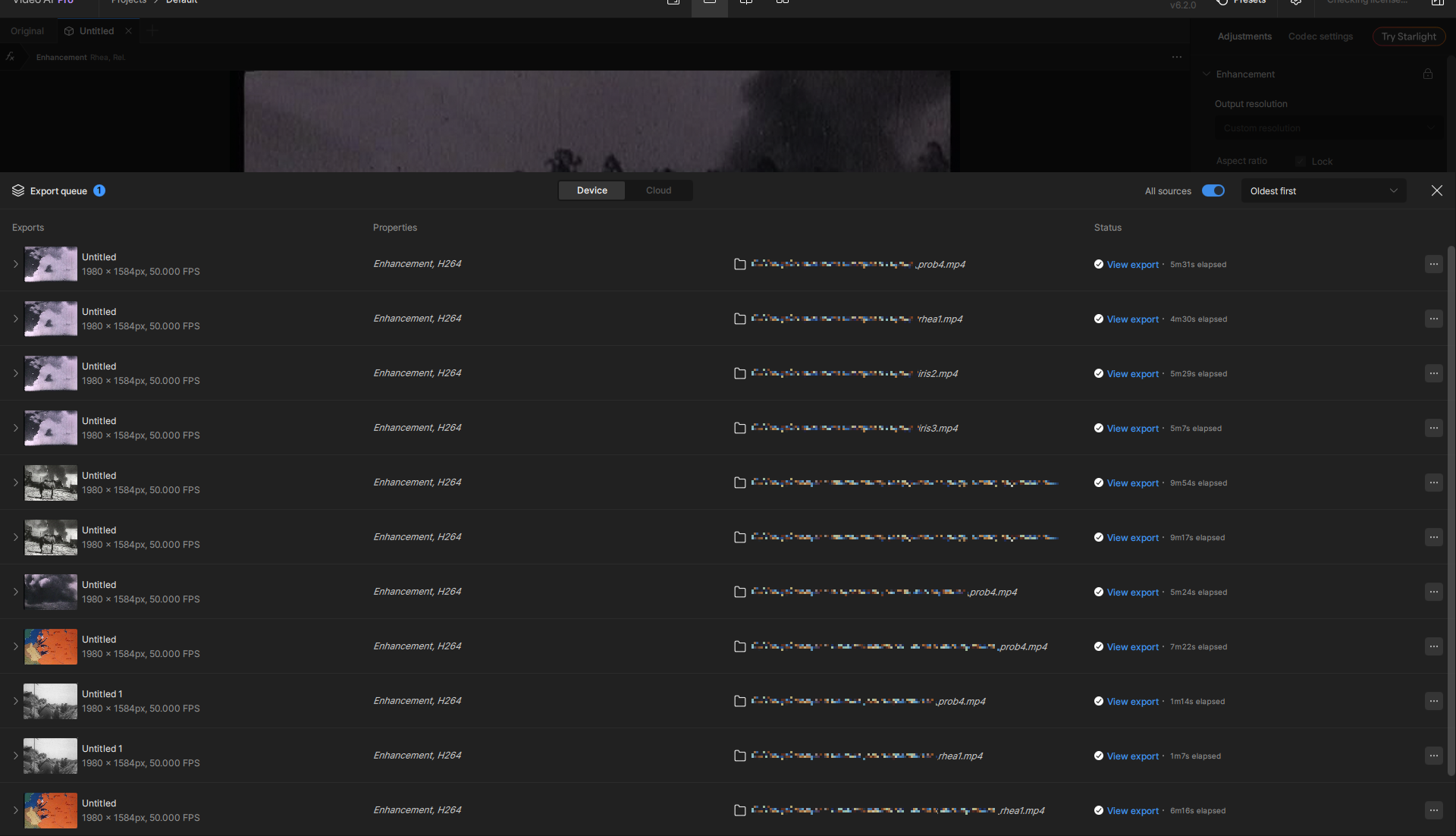
The panel’s size resets only after program restart.
I’m currently testing the trial Beta v7 version with the Starlight Mini model. On my setup (RTX 3090, Ryzen 7950x, and 64GB RAM), when upscaling “prehistoric” footage from the first camera phones (176x144 resolution) by 6x using the Starlight Mini model, I’m only getting 0.1 FPS. Are others experiencing this as well? Will the Starlight model be further optimized in the future?
Also, since I’m planning to upgrade to an RTX 5090 very soon, I’m curious: for those of you who already have an RTX 5090, what FPS are you getting with common low input resolutions, like 320x240 and VGA (640x480)?
Thanks.
Already new TopazVideoAI version 7 - TopazVideoAI 6 was only released in December 2024.
Why another new major version just because of Starlight? But this could also have been done in version 6, otherwise the new version 7 has zero improvement advantages.
It doesn’t make sense why version 7 already exists if it has zero improvement advantages, only makes everything worse and Starlight is bug totally uselessly slow, that must be improved that Starlight is as fast as other AI models, but also make the other AI models more than twice as fast with simultaneous image improvement, but what does Starlight do at all? And why can’t you see an image preview with Starlight, this must be possible in the next update.
And what also doesn’t work at all is that you develop so slowly with Topaz and when updates, versions come, nothing is improved, if everything has become even worse than before.
„Never stick with old versions at all, the new versions come that you use because the current one is always the better one“


3 Likes
