
 …
… 


I notice you can now snap to the zoomed in dividers, excellent! Your devs must like my ideas 
1 Like
So how can I stop the auto zoom when I start a render? It’s sooooooooooooooo aggravating to unzoom every time I’m testing a setting, generate a render and the app zooms in!!!
PLEASE PLEASE PLEASE PLEASE PLEASE how do I turn this off 
after the expected disappointment in TVAI v.5.3.2, I returned again to v.4.2.2 and upgraded the MV of Justin Timberlake - SexyBack, from 480p to 1922x1080, why not 1920x1080, but because TVAI can’t…
ahahahaha - enjoy, all these ERRORS are due to the photo lab managers
PS
when editing video the Zoom effect is not needed, it is needed for photos when upscaling or cropping
May I suggest improvement in the zoom in with mouse roll ? To me :
- First roll in is way to aggresive, it zooms too much
- Other roll in are not enough aggressive, it zooms not enough
Also, I noticed that moving from 5.0.4 that was for me the latest stable multi GPU, I noticed a complete weird behavior with this 5.3.2
- The GPU load balancing is a drama (multiple queued files, single instance, so one file after another)
I absolutely did not get this with 5.0.4, load balance was fine and fps much higher.
Rhea + Gaia → 576p to 2160p GPU+PCIE loads monitored with MSI AB
Surprisingly the app. chose to max fil the weakest PCIE bandwidth port …
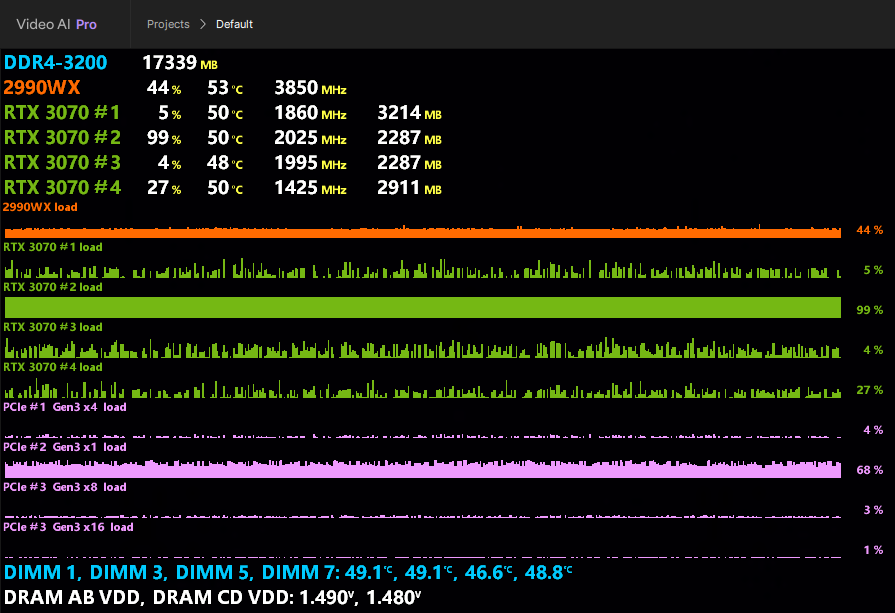
Useless Win11 load screen
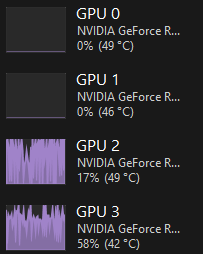
Settings if needed
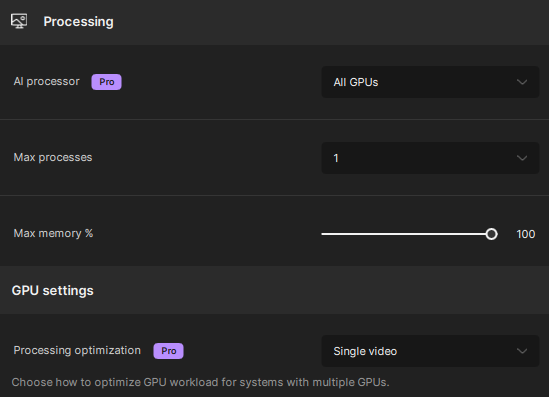
For multiple it’s even worst. The app. throttle about 75% of the time.
Source have been splited on different drives, same for output, tried Nvme aso, impossible to reach something upper that 2% of load with 4 process.
Don’t tell me a 2990WX can’t handle it, it blows everything in AV1 coding.
I benched all single parts : CPU, RAM, video card, each by one, they have good if not very good results
The alpha HDR even crash my RDA or the app, in an insta. kill, I don’t make a disease out of it, but still, it’s unusable as a result.
Nyx is the only model to be ok with load splitting, at given resolution, I confirm your adverted results.
Would be please give a return on this @tony.topazlabs please ?
Hardware is
- air-conditioned environment at 18°c
- TR 2990WX @ 250W PPT
- ROG Zenith Extreme Alpha
- 32=4x8 GB B-die 7.7ns C16-15-15 @ 3200 MHz quad channel
- 3x970 Evo+, OS / Source / Dest
- Output FFV1/H265 on local Nvme / LAN RAID5 benched @640MBps
I will remain forever in v.4.2.2. It doesn’t have an ugly interface, settings or zoom.
1 Like
Please bring back the manual levers. I hate this update!
1 Like
I agree, the sensitivity needs to be dialed down, by a lot
2 Likes
Not all Codec settings stick!
After a restart of Topaz, most settings will stick, but not all.
I discovered at least 2 of them.
Especially since the codec settings are now not on the main screen, this can lead to a new render which is not how you wanted it.
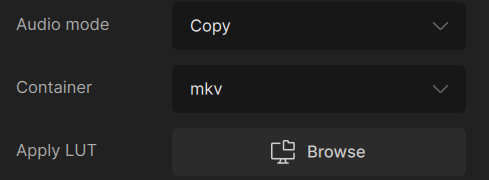
I selected a “LUT” and the “Audio mode” was set to “none”.
That it started to copy the audio was just a waste of resources.
That it forgot to apply the LUT made the render useless.
Luckily I found out soon after I started the render. I stopped it. Went through all the settings and started a new render.
I now know I have to recheck codec settings each time I start it.
Of course I prefer Topaz to remember all the settings I made, not just the majority.
BTW…
I restarted Topaz because it made the file too big to my liking.
I increased the qp-value in
%ProgramData%\Topaz Labs LLC\Topaz Video AI\models\video-encoders.json
To make sure it uses the latest value, I did a restart of Topaz.
I didn’t want to risk it stayed with the old value.
I’d like to know if a restart is really needed.
I believe one can see somewhere which values are passed to ffmpeg.
I haven’t looked into that.
Someone can tell me?
My Topaz is now busy for 2 days, so I was unable to recheck everything I wrote.
They could have at least verified the proper working of multi-GPU before asking extra money for it.
They will also get much less feedback this way as many are not upgrading to “Pro”.
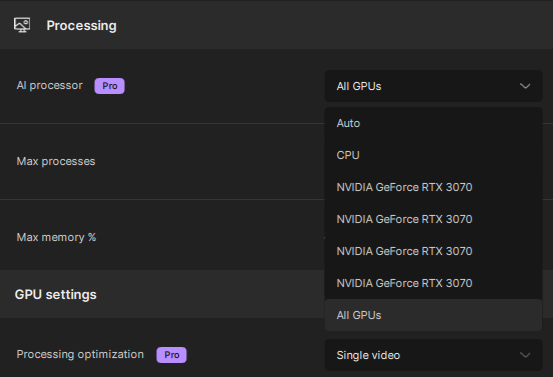
I also think that “All GPU” is not enough.
You should be presented multiple check boxes where you can specify which GPU’s you want to use.
I can imagine someone with multiple Nvidia’s do not want their Intel GPU in the mix.
I don’t have Pro and only have an Nvidia 4070 plus and Intel GPU, so I will not be affected. I feel sorry for the ones having multiple GPU’s and are not able to use them.
Especially because rendering is still too slow for most things.
4 hours is alright, but multiple days is really too long.
2 Likes
I guess you want to filter out me?
So I paid money for a product that I want to see improved and I have to be silent?
I have to take what “Stalin” gives me and be satisfied?
- I need to render a few times before I can properly set my target bitrate?
- I get wrong PAR values if I crop videos before upscaling and get 1:1.000161 instead of 1:1 (the value I asked for when selecting square pixel)
The latter makes the video unplayable by various programs, among them VLC.
An 3840x2160 gets a display resolution of 553049x311040
You don’t care, or you are never affected (I’m not always effected either). But why don’t you just ignore what I wrote?
I will not get any solutions from you anyhow. No-one asks you to provide any.
What is the added value of your writing? Encouraging the team to ignore valid concerns of users who also paid money to them?
Disabling the integrated GPU either on INtel or AMD ( 9950X has an embeded one ) is not the problem.
It is not listed as shown below, so it’s easy to be in the expected situation.
Sharpen and Rhea is special; as higher you set sharpen in Rhea, the more pixel blocks are broken down. If the value is too high, this leads to a loss of contrast. Sharpening can be counteracted with increase of anti-aliasing.
I you wish try this and let me know 
please remove the carousel, clicking through it is annoying me more and more 
3 Likes
Sharpen and Rhea is special; as higher you set sharpen in Rhea, the more pixel blocks are broken down. If the value is too high, this leads to a loss of contrast. Sharpening can be counteracted with increase of anti-aliasing.
What are your replying on ?
The only problem I’ve got with Rhea and 8K files is outputing to FFV1 10b 4:2:0
I can encode manually with ffmpeg but with TVAI it fails claiming a “Resolution problem”.
To me the problem is here :
-level 3 -c:v ffv1 -pix_fmt yuv422p10le -slices 4 -slicecrc 1 -g 1
-g is way too small, it results in buffer underload, and too much keyframes are generated
-slices 4 is not well tuned, and shoul be synced with CPU available threads
No -thread used, unfortunately it is essential for Level 3
The post is even not investigated … Nobody gives a f***k
They could have at least verified the proper working of multi-GPU before asking extra money for it. They will also get much less feedback this way as many are not upgrading to “Pro”.

To my mind also with multi, the CPU must be discharged of video upscaling. GPU can do it 100x faster with at least as much accuracy as CPU FP64, using CUDA. The CPU should only route tiles from memory / GPU / storage. We can even imagine a DirectStorage use to fasten things.
I also think that “All GPU” is not enough. You should be presented multiple check boxes where you can specify which GPU’s you want to use.
I agree with that, we must have a better control on the GPU list, checkbox is an excellent idea.
I am having audio issues. The job completes as normal, but I get no audio on my videos. I did one video, worked fine. I did not change any settings and processed a second video and have no audio.
Thank you in advanced,
David
