This is a bug popping up for other people in here. Audio settings do not carry over from one export to another. For your first, where the audio worked, I’m willing to bet you set the parameter to “copy”, and that worked, but on your next render, the setting resets itself (defaulting to: none), and so no audio.
For what it’s worth, if the video is still good, just have ChatGPT whip you up an FFMPEG command line to transcode the audio from the initial file to your finished Topaz render.
Without doing ANY changes after a crash ( downloading complementary models while encoding ), the app. restored itself with ongoing encoding : good point but …
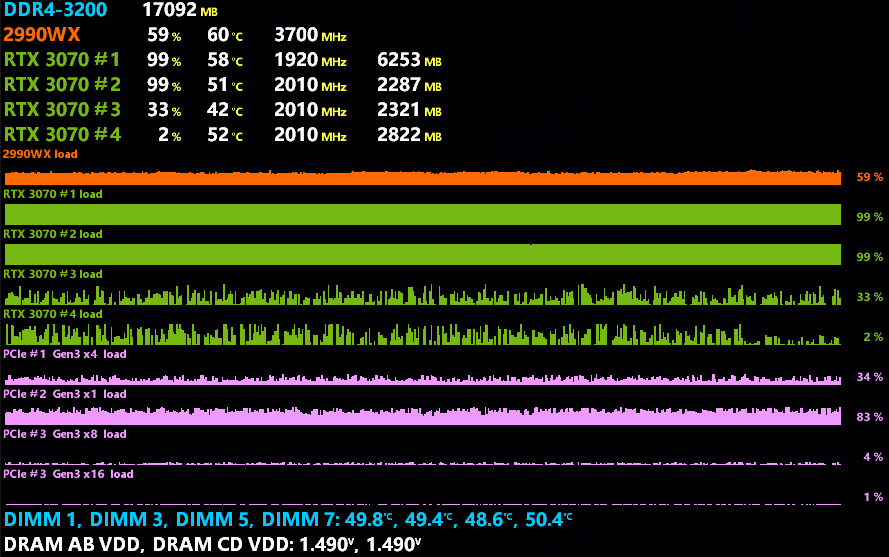
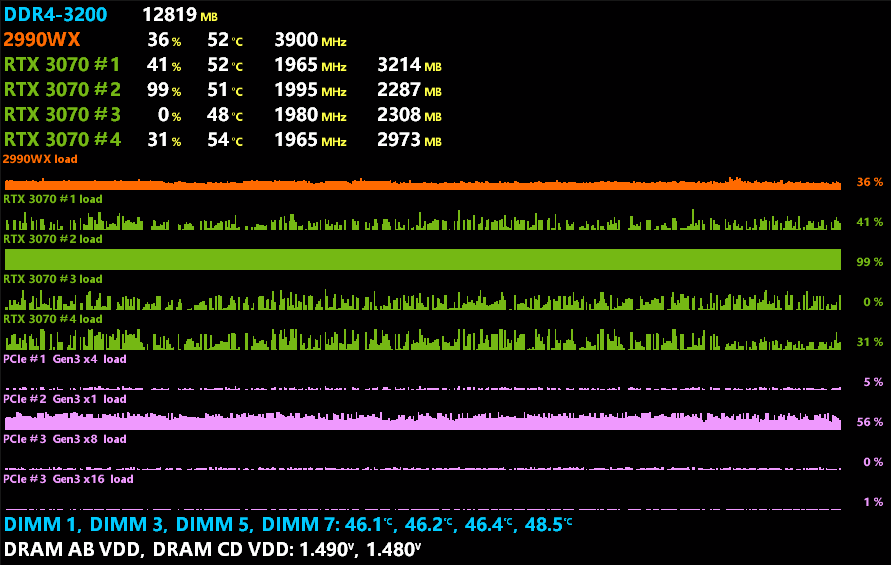
So, there’s really a strange thing with GPU handling.
As an evidence encoding fps raised up, because CPU load is also higher, and much more memory used in GPU #1
Is there any dice roll at app. start ?
EDIT : New file from the queue, everything untouched ! Problem is back
Same models, same type of source (series), everything identical from one file to the other
It is possible that the program behaves differently on identical or similar configurations. Enabling the “recovery original details” option can significantly reduce the number of frames per second (fps), sometimes by up to 50%, depending on the resolution. Although there are aspects of Video AI that require further improvements, I am generally satisfied with the progress of its development.
A similar discussion occurred on the TPAI section – BE SURE TO READ this EULA and decide if you can agree to it before proceeding with a 5.3.2 install.
They issued a slight clarification, but there are many troubling aspects to which I would never agree. A recent post implies that it may be changed some more. I am not a lawyer, and not telling you what to do, only what I did (or didn’t do). More details can be found in the TPAI threads on this.
I hate to say it, but look towards Waifu2x-Extension-gui. The upscale settings are all on a separate page, where the whole page is dedicated to the settings. Then you can decide between presets and some other more basic settings on the main page.
multiple pages are acceptable if they are used efficiently, SCROLLWHEELS ARE ALWAYS BAD. I like the idea of the carousel, but it cannot be at the expense of the other features.
It’s a reply to you’re “8k blown away” posting and not the FFV1 10b 4:2:0 problem you’re talking about. All I would say is what sharpen does in Rhea, if you’re happy with 100% sharpen ok, I never do 100% and I personally think 8x upscaling is mostly nonsense, you can achieve similar results with 4x, but everyone can do whatever they want, I just wanted to share my experience
Indeed do what you want and your absurdities too
In 8K, I keep Rhea’s x4, which completely changes its ability to achieve a correct result.
And if I push the cursor to 100% it is to have the sharpest 8K image possible. I have no problem or artifact with a quality 1080p source, otherwise I would not have pushed the cursor to 100% like an idiot … in order to pass it in 4K with Lanczos or CalmutROM as I would like otherwise the desired softness or finesse
Do I have to put png in 1080p and in 8K? I don’t really have time I’m coding here
Basically it sounds like the EULA is heavily skewed in Topaz Labs’ favor, what a surprise. One more once-a-nice company becoming another Adobe. Just great.
I wonder if there is something getting lost in translation between what Topaz wants and mechanisms the lawyers feel the need to include to “protect” their client (Topaz).
The second version seems to allow for a keep-forever license but also includes language that allows Topaz to change the terms at any time and pull the rug out from under us.
So keep-forever…or…until Topaz changes their mind. (Whichever comes first)
As a practical matter, if this does not change in an upcoming release soon, we will all need to stay at Video AI 5.3.1 and TPAI 3.2.0. So far Gigapixel is still publishing reasonable and decent terms with 7.4.3. If they put the GP agreement on the other products, we can keep buy the updates and recommending them.
Driver Version: 561.09 | WHQL
Release Date: Tue Sep 17, 2024
Operating System: Windows 10 64-bit,
Windows 11
Applications
The September NVIDIA Studio Driver provides optimal support for the latest new creative applications and updates including HEVC support for Twitch, support for a variety of NVIDIA AI features in DaVinci Resolve 19, NVIDIA TensorRT support in the new Adobe After Effects plugin for Topaz Video AI, and the introduction of RTX Video Super Resolution and HDR support in the Opera web browser.
Shame though. It still has the bug they introduced last October that keeps monitors running at more than 60Hz ‘shining black’, instead of being off, when they’re supposed to have turned off with inactivity.
I’ve done that several times over the year. The issue even exists on my other computer too. Reinstalling the old driver or setting my refresh rate to 60Hz fixes it every time.
I have also submitted detailed reports to Nvidia at least three times.
I want to thank all the staff for your efforts, you are doing a good job. I have a request, Could you add the option to add progress detail to the description of the created files?
As in (stable diffusion A1111 Webui) As an exemple when right click created file, then properties, then details, comments, description like: Iris low quality, fix compression:78, improve detail:35,sharpen:20, reduice noise16,dehalo10,anti-aliias:-6, recovery detail:20,…
VIDEOAI : Enhanced using iris-2; mode: manual; revert compression at 30; recover details at 85; sharpen at 85; reduce noise at 7; dehalo at 10; anti-alias/deblur at 20; focus fix Off; add noise at 1; and recover original detail at 30. Enhanced using ahq-12; add noise at 1; and recover original detail at 30. Changed resolution to 3840x2160
 ), the app. restored itself with ongoing encoding : good point but …