What was fixed since the 7.0.0.4 beta? We were still having issues reported with beta 7.0.0.4b. I reported a 1x scaling problem with Starlight-mini and posted a workaround for it in the same post . Was that fixed for this release?
2 Likes
Hello.
Odd. After so many comments later in this thread, I was wondering when someone would ask/request the status of those concerns in ALL the beta threads… .01b, .02b, .03b, 04b… and why in this thread lacks any updates to those concerns… positive or negative, in TVAiv7 keynotes/changelog/Known issues?! 
1 Like
Erm, do you know where you are? This is a Topaz VEAI Forum. You expect answers?!  No, seriously - they have not yet addressed concerns and points raised in the Beta Forums nor on the FB Community Page (but us long servers are used to that). I am sure someone will be along in a minute or two…
4 Likes
Yeah. You’re right. I was just hoping to pull-the-trigger but… the waiting game is back on for me. Perhaps this back-2-school season or this holiday could be the time (yeah, right… I already know).
Ofc basic bugs present:
- split view with Startlight local
- left pane 1080p Original selected
- click on right pane: shows 1080p Original as it should
- click on left pane: shows 2160p
- selecting 1080p original again on left pane
- click on right pane, click on left pane: shows 2160p again
Note: this happens only after selected 2X 2160p output once for left panel and switching back to 1080p original. If I leave the setting at 1080p this doesn’t happen.
So they tried to fix the problem from the last beta where u had to click 2X before 1X was applied correctly but this time 1X is applied correctly at start but when u select 2X it will not apply 1X anymore (despite showing 1X), lol.
Also, when it tried to perform 2160p export (wrongly because i had 1080p selected), PC became completely unresponsive for minutes because TVAI tried to allocate much more than 32GB of RAM. There is no point in rendering when u need more than the physical amount of RAM installed, at least show a warning.
9950X3D + 5090 + 32GB RAM + Win10
4 Likes
A minor network bug:
If I’m behind a corporate proxy, TVAI7 cannot download Starlight models, yet it can download regular models:
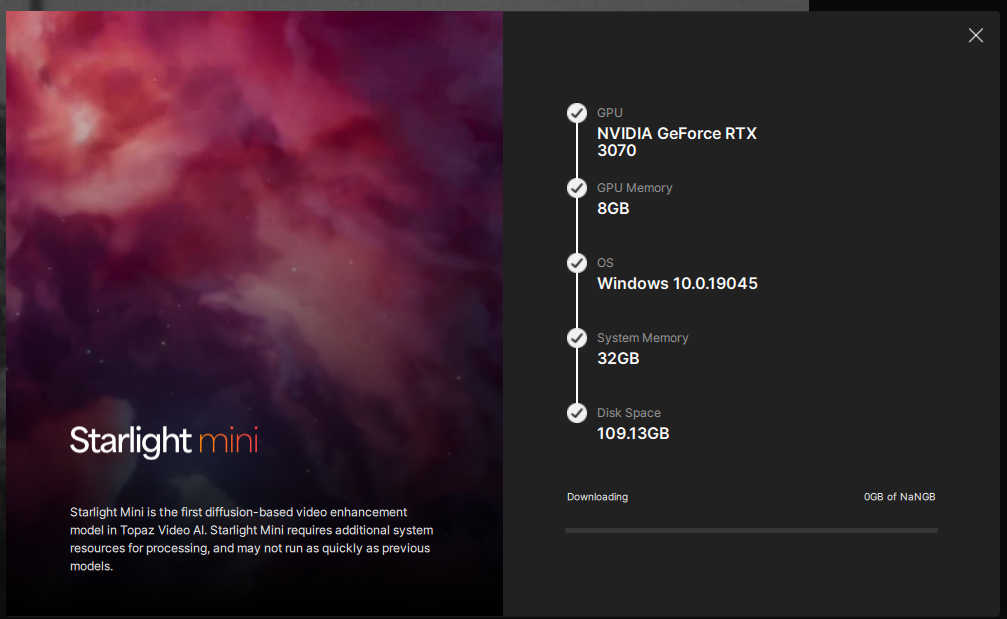
TVAI gives NaNGB size of the Starlight models.
After disabling proxy and setting a direct connection to the Internet it downloads Starlight models:

5 Likes



Output dimension of a rotated video totally distorted. Please note…
2 Likes
And it cannot render locally.
Error setting option preset to value p7.
I’ve restarted TVAI several times, hoping that it would continue download missing part of the Starlight, but to no avail.
Can I safely delete the whole contents of the ‘models’ folder for TVAI to re-download it?
1 Like
I have posted this in Beta1 already, would be easy to fix but too bad it’s not
- Error setting option preset to value p7.
Same issue here! How can I fix it?
It seems like TVAI tries to re-download Starlight models.
The Models folder is 17Gb at startup, Starlight model download dialog pops up, Models folder gets truncated to 13Gb and a slow download process starts again.
At some point download is “complete”, but we know it’s a lie - Topaz products (like TPAI) have a tendency to abort model downloads after some period of time.
The good news is that TPAI continues to download models, while TVAI just starts over again.
1 Like
Do you know a fix for the issue Error setting option preset to value p7? Do I need to re-download anything?
Is there a way to stop live preview in this release?
Starlight mini looks great but doesn’t appear to support selecting a specific GPU to run on (useful when you have more than one). Will this be fixed soon?
1 Like
System check: RTX 5070 → OK
downloaded, I don’t see option to Render 1s
so I started with Iris, clicked Render 1s, it uses almost my whole 12GB VRAM and 100% GPU time, but there is 0.4FPS, and the video is just 320x240, are you sure this is expected behaviour?
tried Artemis, also 0.4FPS, maybe the problem is not slow Startlight Mini but slow application?
Starlight is really very slow to encoding and even loading the model. I have an RTX 3090 24GB it shouldn’t be so slow.
could you try with Iris? I replaced 3090 with 5070 in my desktop and I remember previous version was fast on 3090
Why does the minimum have to be 1282x720 ?
The 7.0.3 beta allows you to keep it at the original which is 720x480.
I do not want to upscale just enhance the SD video.
3 Likes
Holly cow, something is wrong. I have the same gpu and take me like 2 or 3 minuts to start rendering.
The model really take some time but not that to load. I saw that this new version make some “checks” when u load the model.
Prob im wrong, but here is the thing
Topaz check your account 》then check your system again 》check the model (starlight) 》start to load in the ram 》tranfer to the gpu 》split into batches the video (cause if u take a closer look into the gpu processor, you will see that they use 100% and then drop to 0 after 1 minut or less) 》and then they star to show the time and the frame results.
Somewhere there is holding your render time. To trick the first step, to see if is something in your account, turn off the internt and test the speed to load the model.
3 Likes
