Starlight is really needed if your picture is whole squared by low bitrate, low resolution, low motivation (lol).
Look at just RheaXL and RheaXL+Starlight. Difference? Blurred and softed edges. You can achieve that without Starlight.
This is maybe a tough example because the footage already looks quite good. Starlight seems to really shine with low resolution garbage quality video with a lot of compression.
3 Likes
There is a pretty noticeable difference between most of them, mostly after the first.
Are you looking at them on a phone screen? On my computer the difference between the first and the last 2 images is quite big in how clean they look
1 Like
Yes I can see that now, I was testing to see if it would make any difference with animations over other models and other than anything minor I’m not sure it’s doing much if anything.
u welcome buddy <3 glad that i help u in some way
1 Like
In terms of animations - I’m also not sure. But, try some really abandoned animation. Like 360p, ruined by squares, but keep 16:9 aspect ratio (for speed).
Yeah, maybe you will polish it after with Reah (not really nice for lines) or something else, but not sure, that Starlight was trained on Anime much.
I am using shutter encoder 19 to deinterlace using the bwdif and changing color space from 601 to 709. Better results than qtgmc
My first post in a long time, even though I read pretty much everything in the forums.
I updated to v7 just to see Starlight mini in action. On my 4090 I can’t get more than 0.3 or 0.4 fps no matter how I set the memory. The results are definitely impressive especially if you are doing a second enhancement using a different model (I prefer Rhea for best results even though it takes a long time). Somebody else mentioned that Rhea XL produces great results after Starlight as a first pass which is true, better than Rhea.
Now here’s my “beef”… The interpolation is still an issue and I can’t believe that we are at v7 and I reported this issue since v5.4 and it’s still not fixed. I left home almost 4 days ago and I added to the queue enough work for the machine to stay busy for all this time. The input was 4K movies (23.976 FPS) to be interpolated to 60 FPS. Imagine my surprise when I get home today and I see that everything that was interpolated has a variable frame rate.
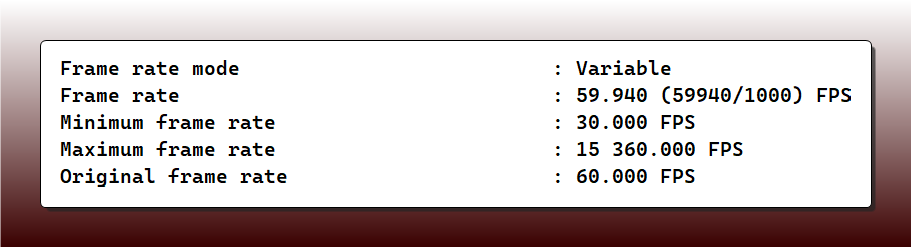
Remuxing the output into .mkv changes the variable frame rate to constant but it still shows a weird rate, not a full 60 fps.

Is this ever gonna be fixed? It’s been more than 6 months. I just wasted 4 days on this, now I have to start over using v5.3.6 which is the last version which doesn’t have these issues. Not to mention the fact that at least on the interpolation part the performance decreased in v7 compared to v5.3.6. On v7 I get 6.7-6.9 fps, on v5.3.6 I get 8.1-8.4 fps.
1 Like
Hi.
You’re posted within the community forum although someone from Support or otherwise will reply and help eventually, if you want help from Topaz Support directly then, here’s the link
Topazlabs Support
support@topazlabs.com
Hope this helps
1 Like
Firstly your question was not clear at all, have you tried any of the recommendations user have posted in here ?
Try using search first before acting like a diva that fellow members are expected to act like your P.A.
1 Like
I tested the same video on my RTX 4090 GPU using 95% and 100% memory usage. The output quality was the same, but the processing speed was noticeably faster at 95% usage (0.2fps → 0.3–0.4fps). Has anyone else experienced this behavior?
Is a 5090 with 32GB of VRAM the best card for Starlight Mini? The cloud option is far too expensive to work on my old home videos.
Hello.
Yup! I’ve mentioned this CLEAR reduction in hardware performance (up to 2.8FPS!) months ago (Rhea is the perfect synthetic benchmark model to take a first-look at comparison released version metrics) and it seems to get worse with no end in sight.
The reduced perf started around the release of the new(?) player and the introduction of TL Cloud services (technically, a few versions before that… see the benchmarks thread versions).
1 Like
In what way is it better? Curious
Pause/Resume ist still a problem here.
I don´t want to run my PC overnight so i am heavily using the pause/resume feature.
I identified a component that is causing after pause/resume not to render video in the exported video from that point on.
The problem accours when using Apollo8.
The resulting video is okay when you don´t use pause/resume.
Using pause/resume with Apollo8 causes no longer writing video..only audio to that file…or some videodata is corrupted from that point on…seeking to later point don´t show video anymore…
Playing that video just before the video is stopping playing let´s play the audio if you let it play but no video !!!
Release Version 7.0.0 & Beta Version 7.0.0.4.b
Version 5.3.6 also this time !!!
It´s time to fix that SHIT !!!
So now i identified which AI-Model is causing the problem and it should be fixed in the next release.
logsForSupport.zip (59.6 MB)
First off, you were crying that you needed help so, I offered you an avenue to follow for you to get help directly.
Instead of you taking that offer and getting help you in your small minded wisdom started sobbing even louder and how far did that get you.
This is a Civilized Place for Discussion so, Please treat this forum with the same respect you would in public and if you can’t abide by that then, leave and don’t come back
Regards
Wish I hadn’t
2 Likes
The interaction between cropping, output size and selecting a model is very buggy after selecting Starlight Mini and selecting another model. Maybe sometimes only the text in Ouput resolution is wrong and the actual output resolution correct.
Ok, cropping is also bugged by itself. Zoom is also bugged with cropping. …
Split view is also bugged with cropping
If Topaz could only keep one version of it’s UI for more than 1 version and fix all the bugs …
Also, Starlight mini seems to be unable to cope with vegetation, it creates the same kind of artificial pattern especially on gras, bushes, tree bark, … .
I load 720x576 source, select Starlight Mini, quick export to 1280x1024: 1.3fps
I load same video, crop height to 336, quick export to 1289x772: 0.7fps ?!?
When I check cropped video output from Starlight, it’s 1696x720. So again, wrong display. And it should probably add black bars on top/bottom instead of stretching to minimum height, cause that will increase processing time a lot.
2 Likes
Anyone else having issues with the cloud render for Starlight Mini? Darn thing is stuck at “waiting for resources”.
Take it down to 70% and see what happens. After I did that, I’m now getting 0.5 fps consistently. I’ve gotten up to 0.8 fps on rare occasion after reducing the GPU memory down to 70%.
try RheaXL 1x on a Starlight upscale 
4 Likes
