I have no idea what happened there  that was odd! But yes, I meant to reply to you. Please share your logs
1 Like
I know you shared others as well so if this is related to the same issue, disregard
1 Like
Can you share the corresponding .main log please?
Where do I upload the logs? Limit is 10MB.
I will only need the logs that correspond to the crash. You will zip the logs and attach them here to your reply.
This is a problem in Proteus when resizing: It doesn’t understand stripes, especially when they’re in motion. Instead, what you get is a checkerboard and frequently a rainbow pattern.
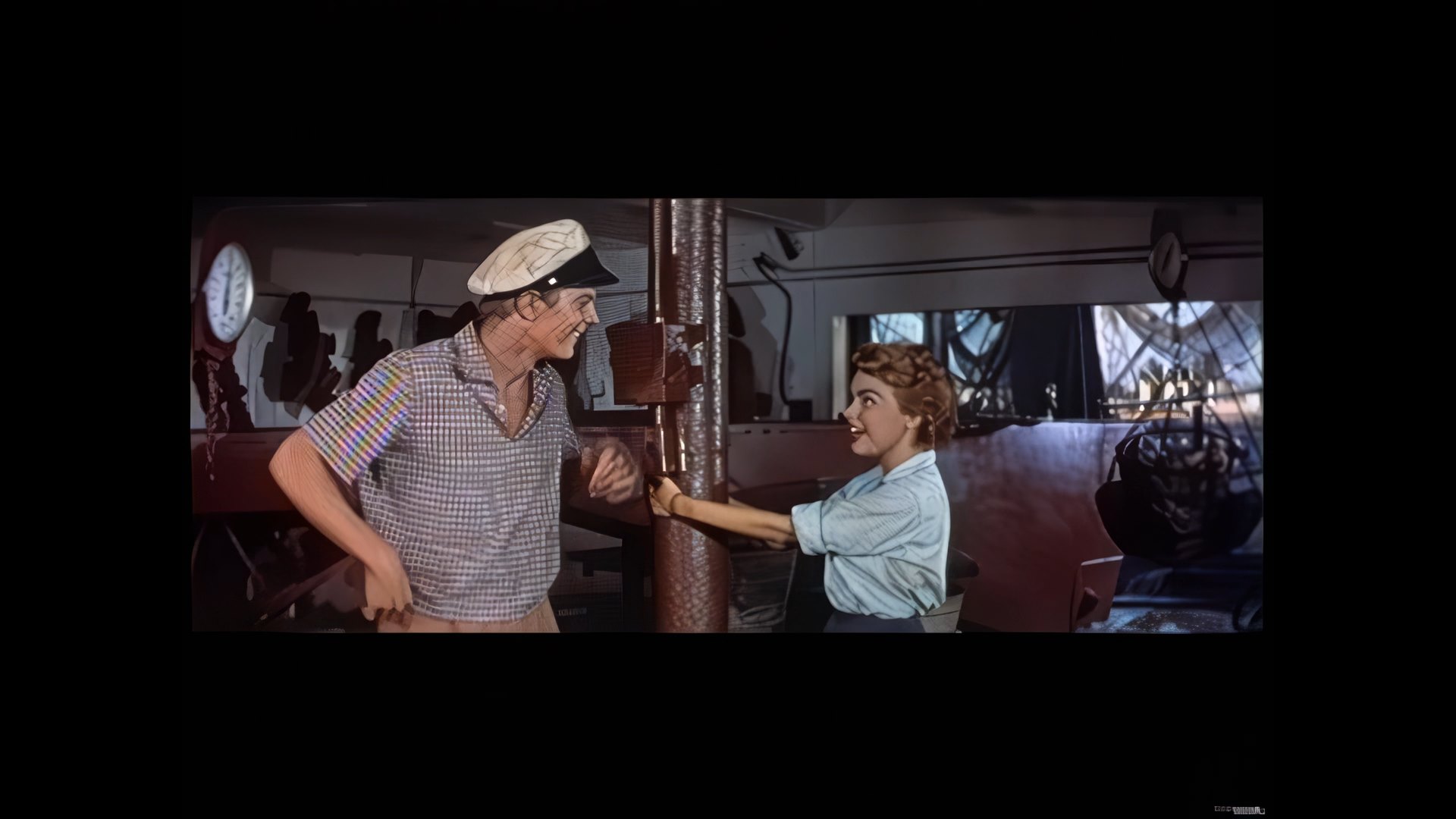
(This is the same shirt:) Sometimes, the same surface becomes a bunch of waves.
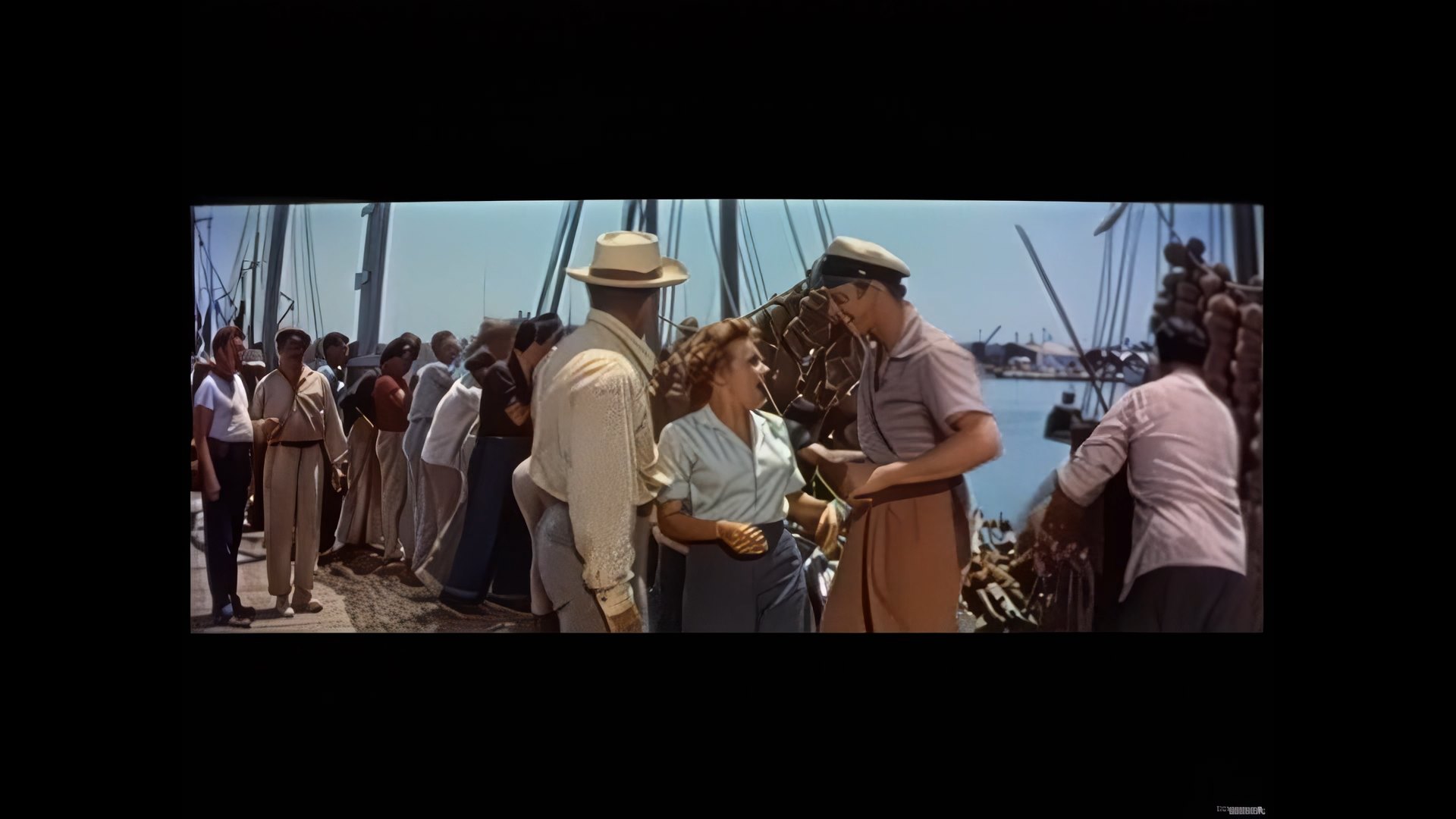
Sometimes, it’s a combination.
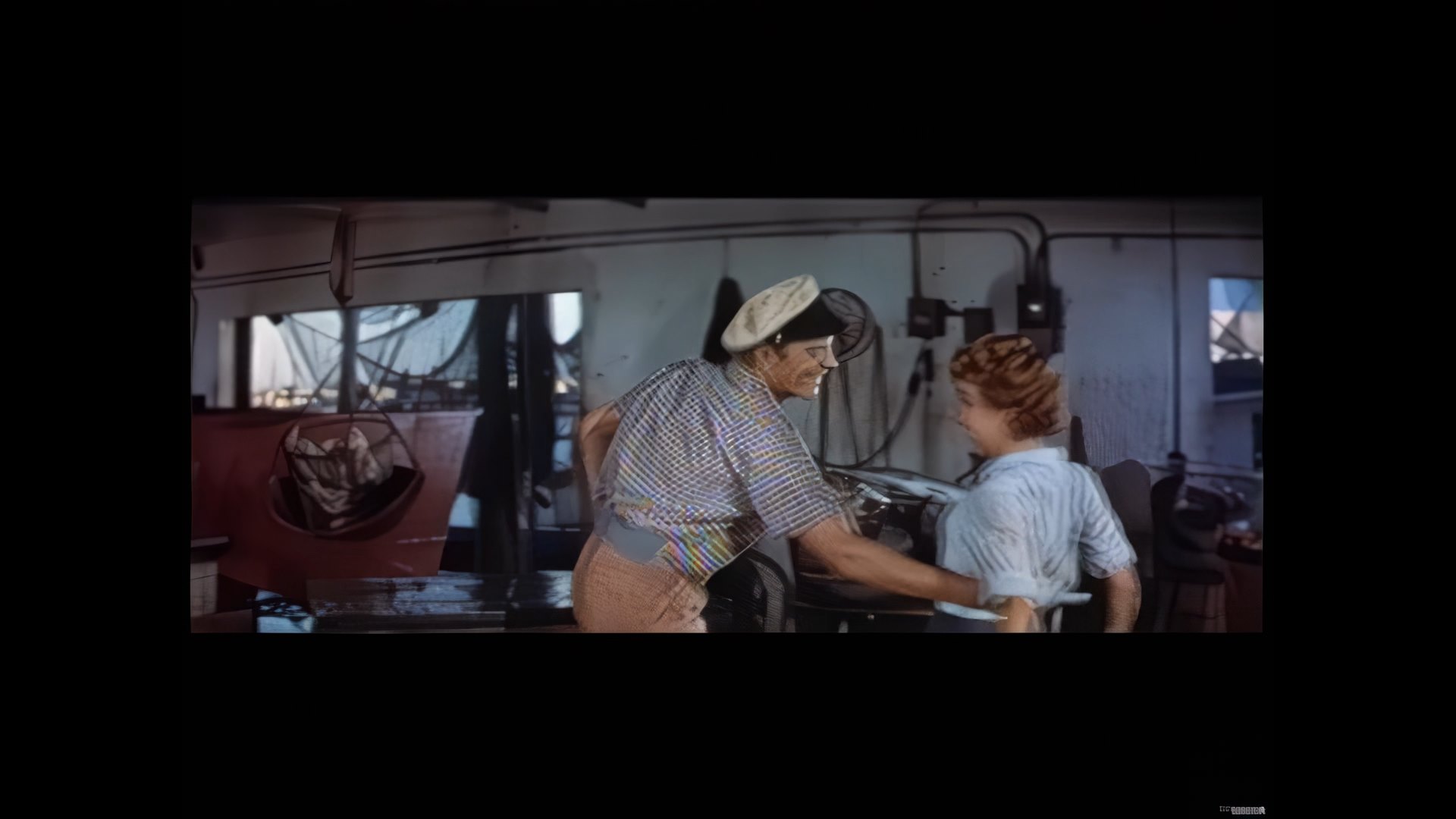
What may provoke this behavior is attempting to adjust Proteus Auto so it will (almost) properly interpret ripples on water.
Please understand that I am not so naïve as to expect that a single Proteus Auto conversion of a long video will give perfect results in a long video filled with many different scenes.
This is what it looked like rescaled to FHD in Proteus Auto -default Settings:
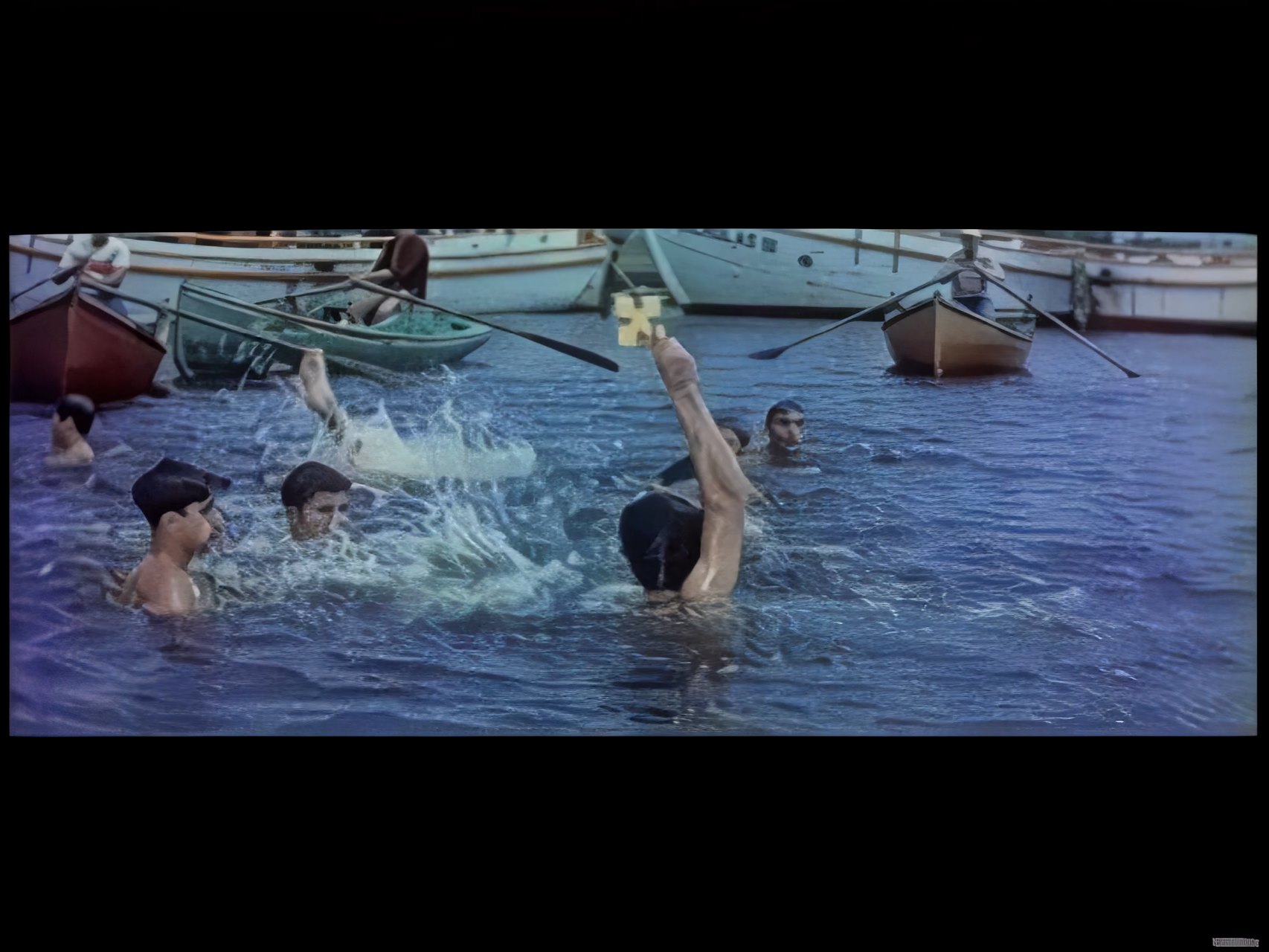
This is what the wave chop looked like in Proteus Auto after correction:
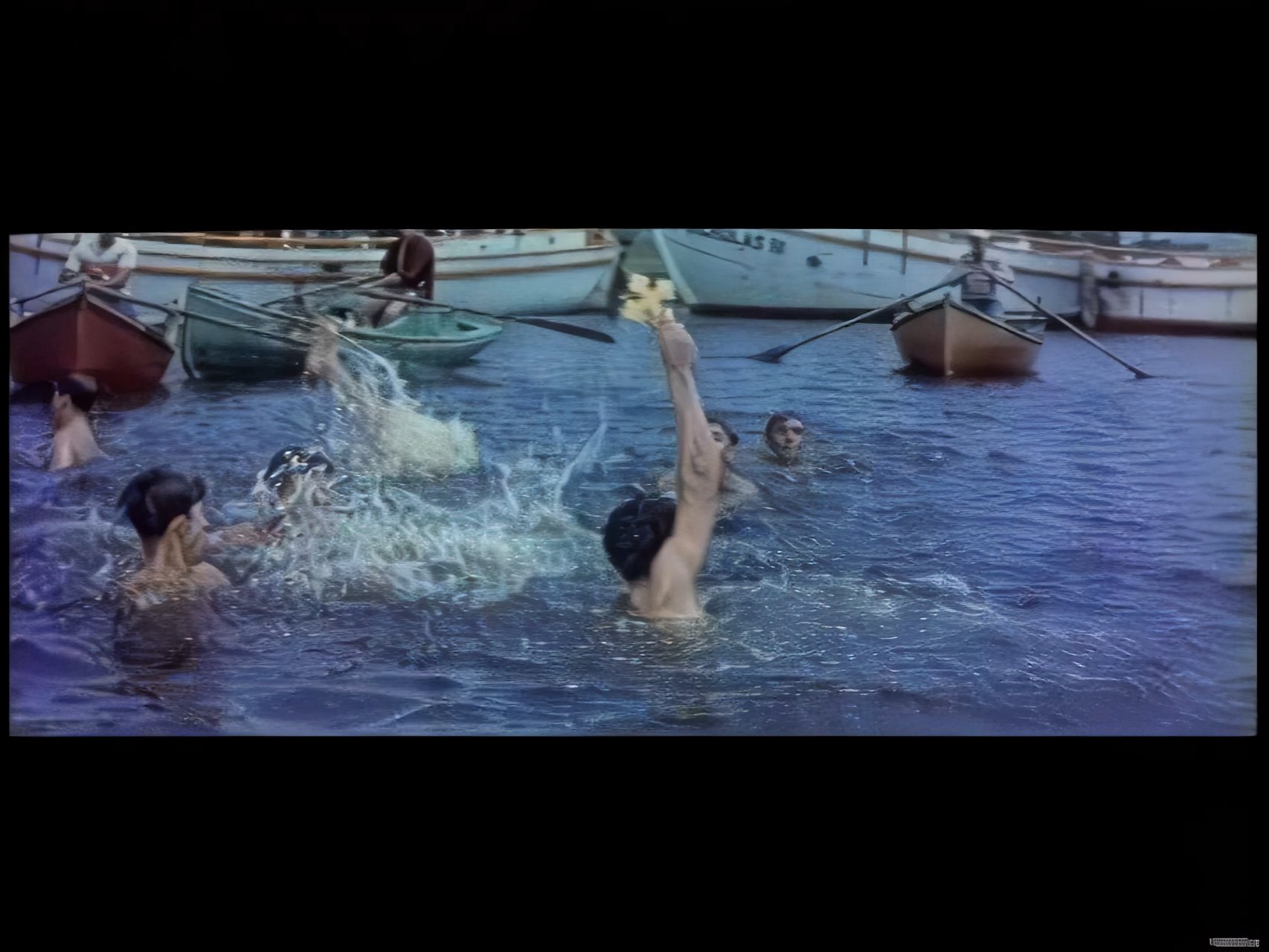
This what it looked like before resizing from SD to FHD:

Note: “Normal” open ocean water ‘chop’ looks more like a matrix of spots than like water. In order to get it to look “realistic” people’s faces look more like they’re from anime than from what was originally an old movie shot on film.
If anyone is interested in experimenting this movie is in the public domain and this is a link to an archive site where a 3.39GB mpeg (SD) download of the full film is available.
Afternote: Now that I’ve uploaded these screenshots, and they’ve been greatly reduced in size they look much better than they really are… 
1 Like
Thank you! I have shared this with our model training team
I’m getting unhelpful file DATES on the previews.
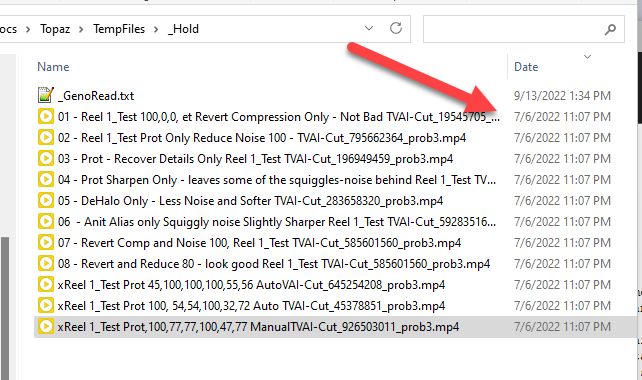
I noticed it on 5b also.
Plus the default file names for previews are not helpful in knowing what the settings were. And when VAI looses the GUI, twice on just these same clips, you can’t get back what settings you had.
2 Likes
So far no, I tested this only with version 3.0.0.5.b, but I sincerely believe that the highlighted one is a problem present on this latest version 3.0.0.6.b as well 
Can you please check the temp folder location that is set in preference?
Hi Ida, this is the folder from Preferences. It writes to a it’s own folder and I’m copying the one that plays and has a poster frame. The two with the real date do not play, the two with the unknowm date play.
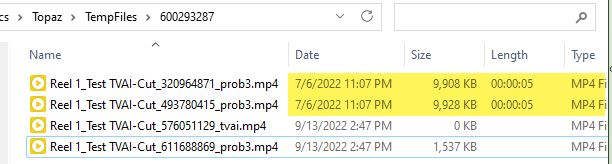
VAI deletes the files on exit now (if the GUI is still running) there was talk about ability to keep the previews. So, I have to copy them to a different folder if I want to save them. Also, when the GUI crashes, it takes the ability to ‘open in explorer’ so I need the file dates so I can find the most recent file.
ProRes 4444 XQ works fine on Windows, just edit the “encoders.json” file in “C:\ProgramData\Topaz Labs LLC\Topaz Video AI BETA\models” and insert this text right after the right curly bracket from the ProRes 422 HQ infos or just edit the ProRes 4444 XQ one with “osx” to match this
  {
    "text": "ProRes 4444XQ",
    "encoder": "-c:v prores_ks -profile:v 5 -pix_fmt yuv444p12le",
    "ext": [
      "mov"
    ],
    "transcode": "aac",
    "os": "windows"
  },
Don’t know why it has been said it wasn’t supported on Windows.
You can also add ProRes 4444 with “-profile:v 4” in this case.
MediaInfo from a test file
General
Complete name : D:\test3.mov
Format : MPEG-4
Format profile : QuickTime
Codec ID : qt 0000.02 (qt )
File size : 311 MiB
Duration : 8 s 67 ms
Overall bit rate mode : Variable
Overall bit rate : 324 Mb/s
videoai : Enhanced using ghq-5
encoder : Lavf59.30.100
Video
ID : 1
Format : ProRes
Format version : Version 0
Format profile : 4444 XQ
Codec ID : ap4x
Duration : 8 s 67 ms
Bit rate mode : Variable
Bit rate : 324 Mb/s
Width : 1 280 pixels
Height : 960 pixels
Display aspect ratio : 4:3
Frame rate mode : Constant
Frame rate : 30.000 FPS
Chroma subsampling : 4:4:4
Scan type : Progressive
Bits/(Pixel*Frame) : 8.779
Stream size : 311 MiB (100%)
Writing library : Lavc
1 Like
do we need to install tensor RT separately as well?
Installation Guide :: NVIDIA Deep Learning TensorRT Documentation like from here?
It’s been doing these weird dates for a long time. It’s the date of the original file in my case. I’ve reported it multiple times with no response.
It’s not something you install. If you look in your models folder, you have Tensor models now.
Dear Ida, please listen to what you are saying. I report a fatal flaw in that I cannot get the software to run AT ALL. I reported it twice. Your “solution” is for me to “reach out” to support (who will only come back to you anyhow… I have no problems at all with VEAI 2.6.4 or any other Topaz software, which I use almost daily.)
Your second solution is to PM you, and send you logs. Not only do I not know how to do that, but I’ve already messaged you people TWICE and your suggestion is I do so a THIRD time. Why don’t YOU PM ME?? And what am I supposed to send logs OF if the software won’t run AT ALL? Not like it crashed while computing a Preview… I can’t see it AT ALL and I can’t interact with it AT ALL.
This is very disspiriting. Nevertheless, while on the freeway this afternoon I had a flash of inspirtation, given the symptoms. Which I tested on getting back to my desk. Turns out it’s not a video driver problem at all, despite so many others pointing the finger at that. It’s much more serious. More in the next post.
@pdwhite thanks for posting a more sensible possible test regime than the usual “it’s your video drivers!” mantra. However, like Imo, I don’t use CLI, haven’t for at least two decades, and don’t intent to start now just to fix someone else’s problem. So that one’s not an option. And, given I can’t see or interact with the software at all because it doesn’t appear on screen ever, I’m not getting as far as ffmpeg (Preview or Export), so there’s nothing for it to report.
1 Like
VEAI 3004/6b: App not visible on screen. This seems to be an INSTANTIATION problem. The following is all VEAI 3006b, having just tested that VEAI 2.6.4 runs perfectly well. This is all on Windows 10 Pro x64, all latest MS updates installed.
Launch app. Not visible on screen, but there’s an app button on the task bar. All the usual methods for attempting to see an app screen don’t work, including Alt-Spacebar Move or Maximise. Nor do any of the window tiling options off the task bar shortcut menu.
I suddenly remembered that there’s an option for Maximize in Task Manager off of an app’s entry shortcut menu. Viola! The app appeared full screen. But still very odd behaviour.
- Off VEAI button on task bar, selecting Close does not kill off the running app. The button just sits there. This too looks like a bad instantiation behaviour.
- Can’t Unmaximize at all. The three sizing buttons at the right of the app title bar are unreliable. The Maximize/Unmaximize button seems to do nothing at all. Minimize does minimize, and sometimes a click of the task bar app button brings the app back on screen, other times I have to go back to Maximize off the Task Manager list. Not found rhyme in this yet.
- Here’s the interesting part. Normally in Task Manager when the app is running you see a “Topaz Video AI” container with a single “Topaz Video AI Beta v3.0.0.6.b” app inside it (the one you can Maximize of its shortcut menu). BUT when I run any Preview or Export calculations, almost always Topaz DISAPPEARS FROM THE TASK MANAGER ENTIRELY. NO CONTAINER, NO APP, NO NOTHING, WHILE IT’S COMPUTING. This is WHILE the app is on screen and the progress bar is advancing. How is that possible!?
In ONE trial, I saw the Topaz container expand to three items: Console, ffmpeg, and VEAI. But on all the other many attempts, Topaz disappeared altogether from Task Manager while processing was underway. Not even in the daemon list, let alone in the app list. - When processing is finished, the Topaz VEAI conatainer reappeared, but the app entry within it did not. App window behaviour became extremely erratic at this stage.
- Have to kill off the container in Task Manager, and launch the app again.
I also tried this on my little MS Surface Pro (v5), also Windows 10 Pro x64 all latest updates. While I didn’t get the behaviour that the app could not be made visible using the USUAL mechanisms, it was quite erratic in terms of appearance. The standard window Un/Maximise button was quite unreliable, and on this computer too, Topaz VEIA disappeared ENTIRELY from Task Manager when Preview or Export processing, but not nearly as often as on my desktop. Naturally, computations were a LOT slower on the notebook, and the results were fairly crappy given the little Intel GPU.
So, unreliable instantiation occurs across both of my computers. New test-driving on the notebook shows growing instantiation problems (the Task Bar icon/Close still works though), while on the desktop after VERY MUCH testing of various 3b versions, the erratic behaviour is significantly worse.
Added to this is that trialling (just) deinterlace (Dione Robust Dehalo), Preview launches FOUR tasks, including TWO copies of ffmpeg. Clicking [Close Preview] closes the Preview pane but leaves all the background processes running flat out, and you can’t use Preview again until they’re stopped. Once they’ve stopped, there’s the Topaz Video AI container in Task Manager, but no apps at all within it, while the app still appears on screen and is responsive.
One reminder: on the DESKTOP a little while back I UNINSTALLED EVERY VERSION OF VEAI (v1.x to v3.xb) in Programs and Features, because it wasn’t clear how clean the system was as the updates never cleaned out earlier app entries. I then installed v2.6.4 fresh, and later v3004b (when I noticed the problems start–I did not note a problem in 3002b but that might just be luck), whereupon the major problems started.
The NOTEBOOK still has a loooong list of VEIA entries from v1.x to v3006b as it has not been “cleaned up”. This pocket lint also needs attention from Topaz.
Hope this helps
3006b installation doesn’t allow you to pick all drives for data file location. My notebook has a drive E, which was NOT offered as an option in the picker for data location.
Drive E is in fact on a high-speed micro-SD. This might be a “reason” not to show it, but (a) that’s where all the models for VEAI 2.6.4 are happily stored, and (b) the picker showed me an even slower network drive (N:) as a potential location.
Drive E is also aliased as Drive F for software configuration compatibility reasons with the desktop. This is achieved via a SUBST statement in a startup batch file on the notebook.
In this case, both E and F should appear in the picker list – and they do for VEAI 2.6.4, but not for 3006b.
---- I’m adding ANOTHER bug here because this anally-retentive beta system doesn’t allow me to make five posts in a row. It’d be nice to keep each bug to its own message, but not possible ----
Please do not prevent the auto-hide Windows Task Bar from popping up when the app is full screen. We WANT the task bar to pop up so we can find out where a video clip is, etc.
