Go into the registry (regedit.exe):
Computer\HKEY_CURRENT_USER\SOFTWARE\Topaz Labs LLC\Topaz Video AI BETA
Find the keys appWin_h and appWin_w
Set them in Decimal to the desired resolution of the application.
Re-run Video AI and it should be fine.
Go into the registry (regedit.exe):
Computer\HKEY_CURRENT_USER\SOFTWARE\Topaz Labs LLC\Topaz Video AI BETA
Find the keys appWin_h and appWin_w
Set them in Decimal to the desired resolution of the application.
Re-run Video AI and it should be fine.
These may be from earlier previews and are most likely from the time shown.
We now save preview files in a folder named with random numbers e.g. 334995007 and delete the files upon closing the app. Although there is a bug that doesn’t delete the last file
Can you please check the temp directory set in the preference and look inside the folders in that temp directory?
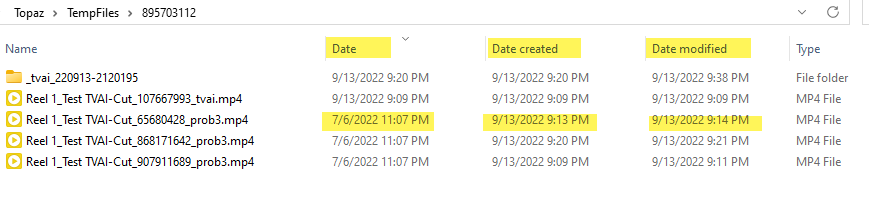
Hi Ida, no, I’m looking at ‘today’s’ folder, and the file dates come out wrong for the one file that works. I know what’s wrong too… there’s more than one file date, and the most common ‘date’ is not being set. I wrote a routine for my own software and I set three of the dates looking something like this:
* Sets the 3 different time values
declare integer SetFileTime IN kernel32 ;
	integer hFile, ;
	string lpCreationTime, ;
	string lpLastAccessTime, ;
	string lpLastWriteTime
So, right-clicking on the header bar of File Explorer, I typically run with just the DATE field showing, however if add LastWrite or CreationTime (both different for the preview file) I can see the correct date. But it’s an issue as most people will just see plain old ‘Date’ which is not being set correctly.
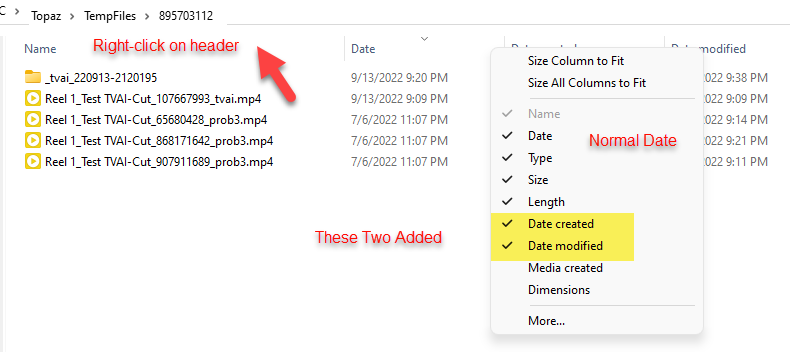
FWIW: The 07/06/2022 is the file date of the input file, so, the main date is set as the input file date. Not really helpful and not correct either. Especially as I look for the most recent file date to see what I’ve been doing. 
@xuan.liu
Using Mac : upgrading the app IF it is not stored in the original folder doesn’t work: it looks like the model fails to be found when running preview/export.
Context: as I own several Topaz apps, I have stored them on the /Applications/Topaz folder.
When an app shows that an upgrade is available, I choose to upgrade with the appropriate button. Download and install works fine, but it places the new version in the default folder (/Applications).
When I move the app to my Topaz folder, it loads fine (I often have to log in again), but when running a preview or export, it pops up an error message saying that the model is not found.
To fix this, I have to download the full installer again from the website. Moving the app to the Topaz folder is OK using the full installer only.
Long story short: can you try to locate the app folder and do the upgrade at the right place?
unless I’m writing code and debugging it or doing some kind of system maintenance, CLI is pretty much passe for me, too.
However, during this beta phase for VEAI 3.xb, I believe that most of the stability problems are mainly from the child applications that the VEAI GUI is invoking and passing instructions to. Ffmpeg may just be the tip of the iceberg; especially since it must be launching child operations. When some of these fail or just hang there are a lot of resources left hanging, too. (Despite the best efforts of the OS providers, when an application terminates or is terminated it can leave a lot of resources hanging. - It can get very messy…
Also, the VEAI GUI also depends on the child processes to return various kinds of status information from its child processes. Some of the seeming frailty of the GUI may actually be due to a child process’s misbehavior.
Having the experience of debugging apps running on an in-house testbed, I can tell you that unless the user’s hardware and environment running it will be identical to the developer’s testbed there will always be unforeseen problems.
In the modern world of PC’s that will seldom be the case. That is why it is so essential that we beta testers in the field should be given all the functionality necessary to report problems and serious failures back to the VEAI in-house development team. - They have instituted a “gather log for support” feature in the current beta. I hope it is extensive enough to report on the behavior of all components in the current beta. And not simply what the top level manages to capture.
They need one of the source videos that produces this since they can’t reproduce it in-house. I told them about it months ago, but prefer not to send a video.
I’ll change that to don’t want to send.
Sure thing!
Where should I upload them?
Today I installed the latest version available, namely “Early Access v3.0.0-4,” and tried the test again, but the result is still the same:
TVAI 3.0.0-4 (Mpeg2 720x480 16:9 DVD video created with MakeMKV to 1080p - Dione TV 2x Auto + Artemis Normal quality) = 0.23 spf (second per frame - CPU utilization 15% - GPU utilization 90% approx.) = estimated completion 1 hour 29 minutes approx.
TVEAI 2.6.4 (Same MKV video - Dione Interlaced TV) = 0.10 spf (CPU utilization 25% - GPU utilization 43% approx.)
It is therefore clear that by activating video upscaling + deinterlacing in TVAI, there is some conflict between the two filters which leads the conversion speed to be really low, considering precisely the speed difference with the old version of the program which does not exploit all the GPU as TVAI finally seems to do with TensorRTs.
I can upload the files and related logs if needed.
I believe this is the link:
https://www.dropbox.com/request/RPNrhmVK1ucqnmvq8rTM
Since you are running Dione + Artemis with 3.0 and only Dione with 2.6.4, the speed will be slower in 3.0
In order to do a straight comparison, please upscale with Dione with enhance turned off.
I uploaded the “gathered” logs into the Dropbox account mentioned in the 1st post, is that okay?
The video I experimented on was straightly downloaded from YT, and, since it was of bad quality, I tried this beta on it.
Thanks for posting the link to the original video. I must say it is low quality video but I do like to see VEAI have a go at very low quality input.
I have downloaded the video and have run some quick tests.
I see that the video is interlaced. I see no mention of deinterlacing in your tests.
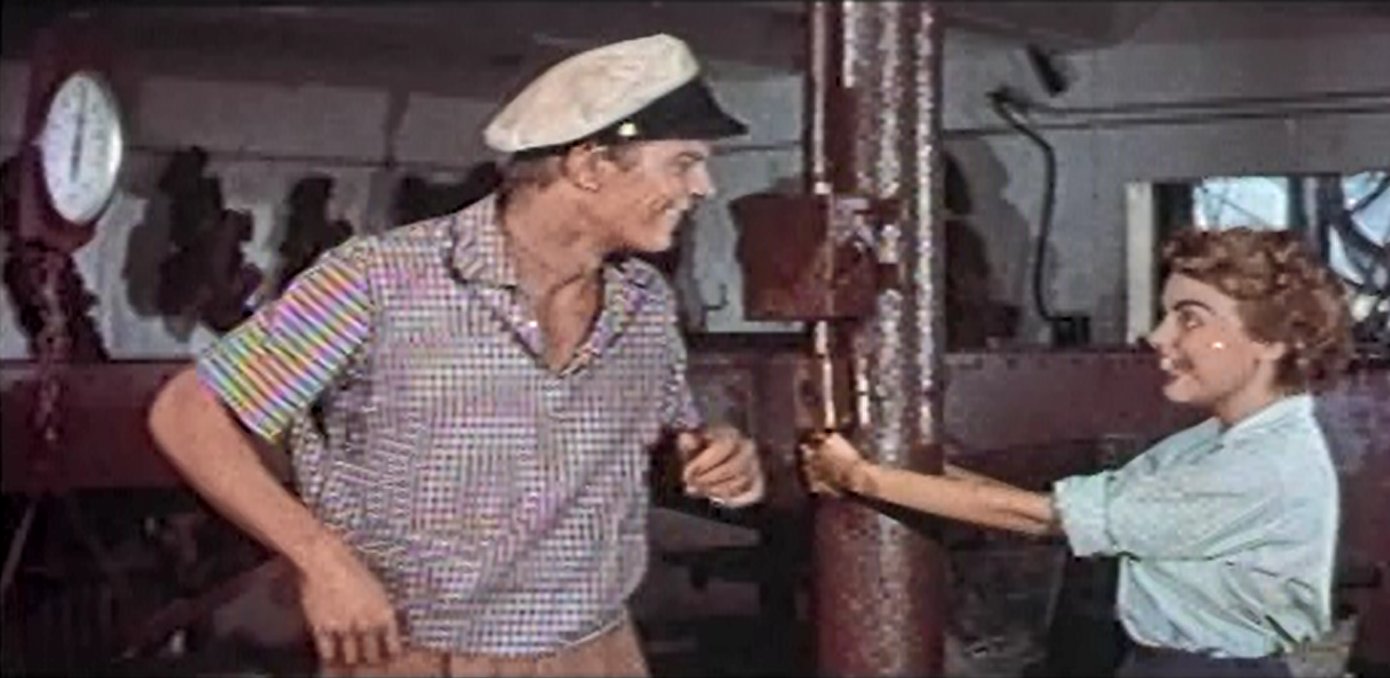
I am wondering about your conclusion of Proteus not understanding stripes and turning them in to a checkerboard - I see the input video having that actor wearing a gingham pattern shirt which is essentially a checked pattern. Also, I see the rainbow effect you refer to in the input video - not at all uncommon in low quality images producing a rainbow moire pattern.
This is a screen capture of the original video, showing the rainbow moire pattern.
A side by side in VEAI showing what I think is a checked gingham pattern in the original, though in very bad quality which inevitably gives moire artifacts.
What would be the real value of an enhancing app that could only handle light weight enhancements?
Fixing what’s wrong with an old grubby piece of video like this may not be easy, but it sure puts VEAI to the test. (Actually, for most things, VEAI is already equal to the task, but it does have a few weak areas. I only wanted to illustrate a few areas that have been tough to handle.
I agree. I only wanted to point out that I don’t think VEAI turned stripes in to checkered - I am pretty sure the original is a gingham shirt, ie checkered. I also wanted to point out that VEAI did not introduce the rainbow moire effect - it just enhanced the effect that was already there.
So, VEAI does need to learn how to identify and fix a moire pattern that should not be there and I doubt that will be an easy thing for the AI to learn.
VEAI is severely lacking in model training.
But what you are saying makes no sense!
In TVEAI 2.6.4., if I choose the “Dione Interlaced TV” model, and I choose to upscale the video to 1080p, not only does the program deinterlace the video, but the model also includes the enhancement in enlarging the image from a lower to a higher resolution.
With the new TVAI to get the same result, I have to necessarily turn on both the deinterlacing and the filter for “Enhance” to do the quaility upscaling, and this thing with the old version of the program happened automatically when you chose the templates for interlaced video:
let’s be clear, with the new program it is much better to be able to choose to activate deinterlacing and enhanced upscaling separately, but this creates a big problem as far as conversion speed is concerned; are you sure that this extreme slowness, also unmotivated by the fact that now the program with TensorRTs takes much better advantage of the GPU, is not due to a bug or something similar?
For me yes, so that is why I am asking you to investigate and fix it for the next versions.
It takes a lot of time and training (input samples) to make AI aware of what its looking at. And, one of the problems is that you never know where the gaps are until the AI encounters them.
It’s like training a child. Sometimes they learn by experience, sometimes you need to teach them what the experience means.
Heh, well, these have been known about for a long time.