Also a bug: even when “Customize Output” is disabled, resolution is checked against the H264-limit (if selected) even if H265 is selected in the main settings.
I have not been receiving notifications of new betas since 3…4b, and only found this update via tab left open on ipad. I have to say that 3…4b was truly awful. I was not able to successfully generate a single output file. And after a while it (the entire app window) wouldn’t even appear on screen from launch. This despite uninstalling, rebooting, reinstalling; and taking my rig down to a single screen. I gave up and left it uninstalled.
1 Like
I recently did a test with TVAI version 3.0.0.5.b and found that “probably” there is some problem or bug in the encoding of interlaced video:
I took a video created with MakeMKV from a DVD in MPEG2 format with a length of 6:26 minutes:
- First I did the encoding with TVEA 2.6.4 + Dione Interlaced TV with upscaling to 1080p, and the encoding took about 36 minutes.
- Then I tried precisely with TVAI 3.0.0.5.b with “Deinterlace” filter (Auto-detect, Dione DV 2x FPS) + “Enhance” filter (Artemis in Normal Quality), again targeting in 1080p; in this case, with the same PC (Ryzen 9 3900x + RTX 2060 Super + 32 GB RAM DDR4 3200Mhz), the conversion process took about 1 hour and 40 minutes: we are talking about more than three times the time taken by TVEA 2. 6.4, and for an almost identical result (maybe TVAI does a better job with deinterlacing, but still the final quality is almost comparable)… and all this considering the “plus” of TensorRT used with TVAI.
Dear developers, I would say that there is a need to investigate this rather serious “problem”!
1 Like
I love the look of the new visual cropping tool. My first preview after using that cropping tool has been a complete cropping failure though. Original video is interlaced top field first 720x434 - I tried both Dione: Robust and Dione: TV followed by Proteus with zero changes on the enhance settings. Upscaled to 1920x1080 and the crop preview looks perfect. However, the preview is zoomed right in to a small part of the top left of the image.
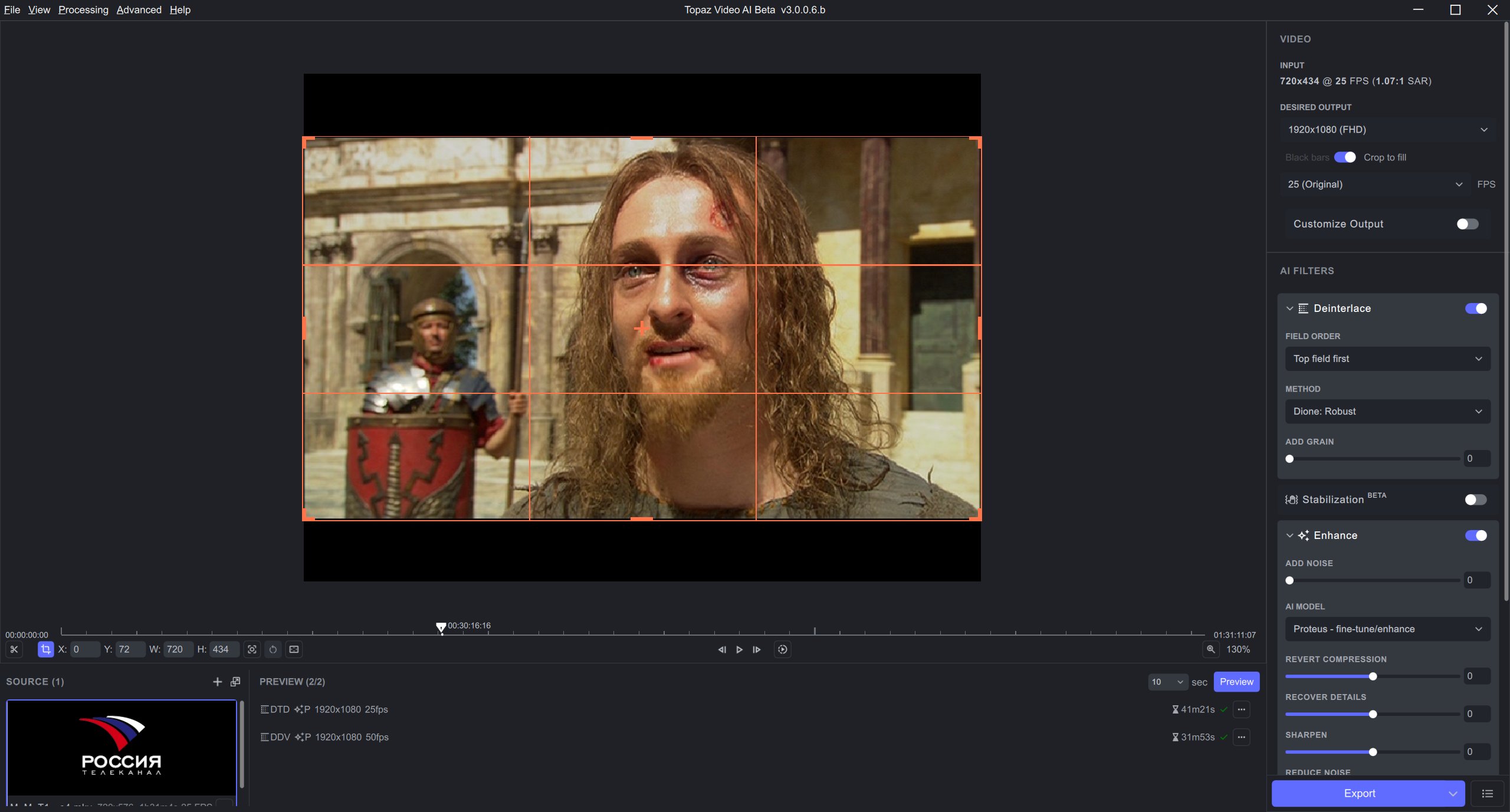
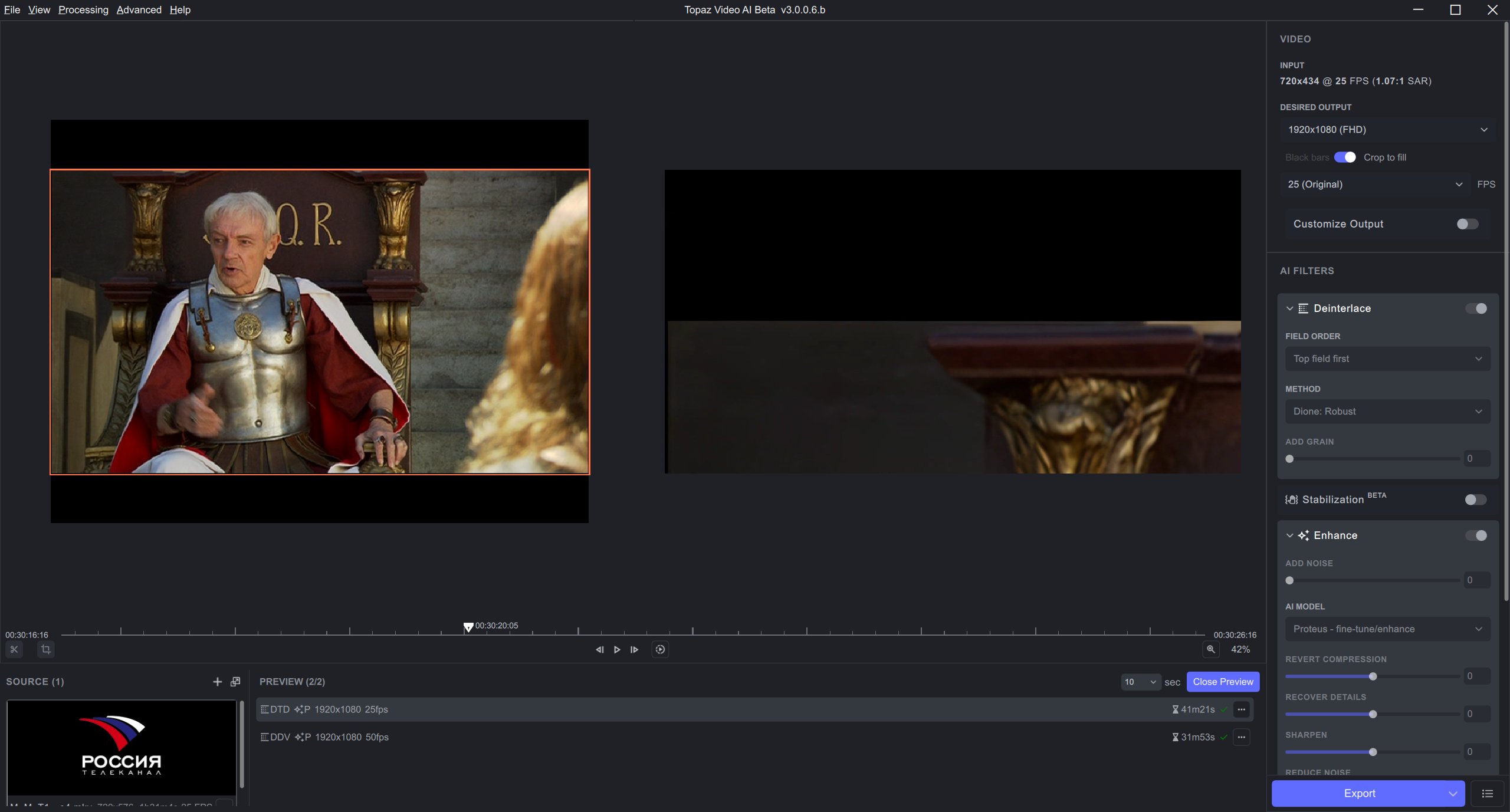
Testing again with the same file after restarting the software - cropping works as expected when I don’t deinterlace. Problem is repeatable when I do deinterlace.
1 Like
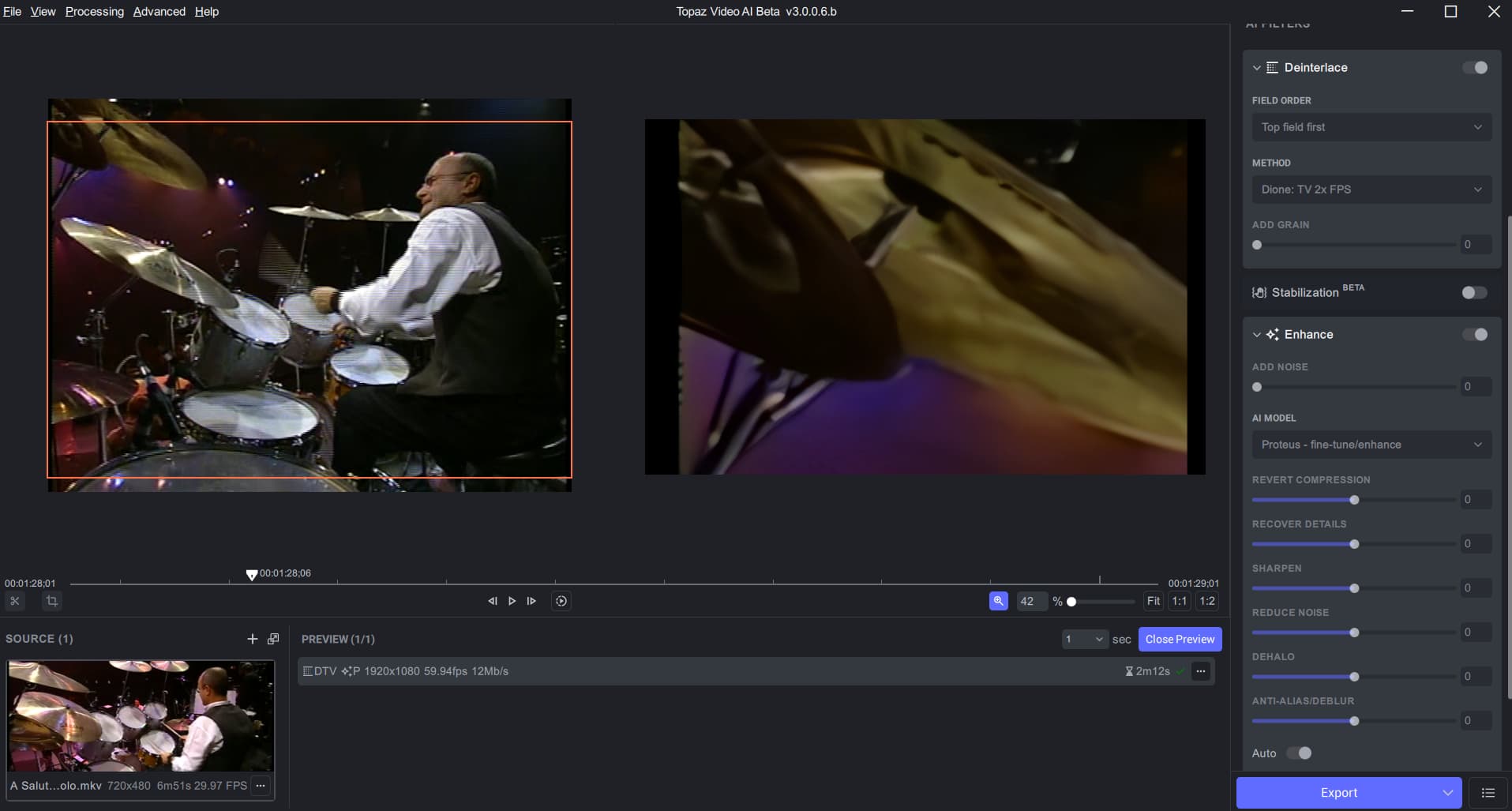
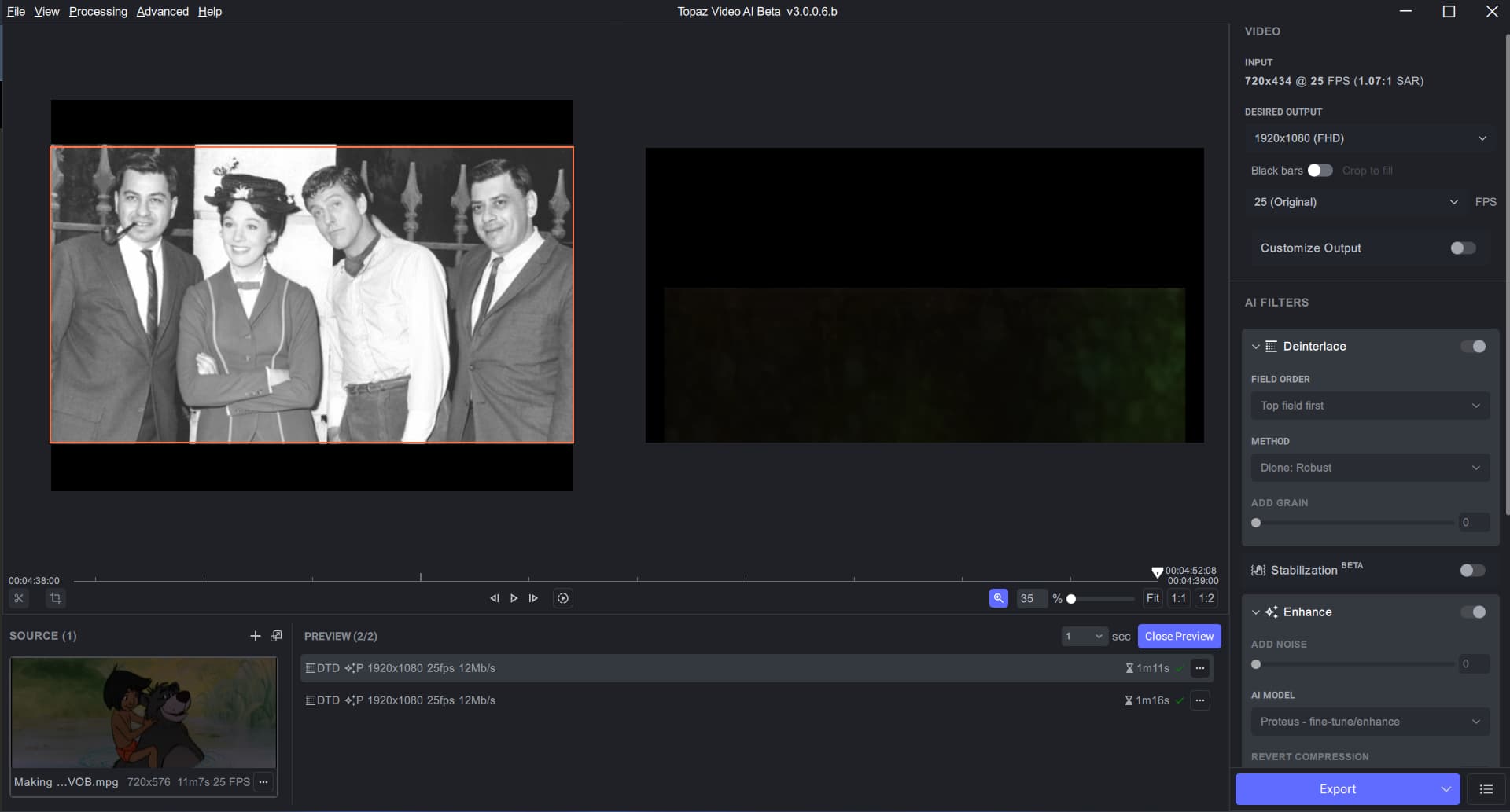
I have just posted an example of this happening also. I have noticed that the weird crop is happening when deinterlace is selected. So, I think what caused your second example to work was not having deinterlace selected - I don’t think it is a Proteus vs Gaia issue.
1 Like
i just testeed with the same setting and confirm the issue. only happening if chaining de interlacing + another enhance filter. used on MakeMkv vob from DVD, and with a mpeg2 file as well (not made with makemkv as sometimes, this software can make weird file). other issue, the part i use for the preview is not the same in the result but from the previous preview. lol.
1 Like
Hi, is the longer processing time limited to interlaced?
My main interest is Gaia HQ and Proteus
Hi Don,
I just had a little bit of experience with this same situation. Presently, attempting to deinterlace and enhance in the same operation tends to bog things down; a lot.
It may be preferable time-wise to deinterlace without enhancement at the original resolution, (although you may want to push your output bit rate up.) - That should happen fairly fast. - After you have an acceptable non-interlaced output video, run that back through VEAI and do your enhancement and resize.
VEAI 3-6.beta is still rather slow, but it is getting better with every new release.
The current beta does have a few issues associated with deinterlace. With one old video, I found it necessary to deinterlace using a 3rd party utility before running it through VEAI to do the enhancement.
1 Like
I have been testing Topaz video upscaler from first release. (I do not process interlaced!)
The best model for my use was Gaia CG.
Now the best choice is Gaia HQ.
Using Refurbished PC, you are always behind the app requirements.
I have recently upgraded to one with Intel® HD Graphics 630.
This PC is good for the Gaia and Proteus models.
Plan was to Test V3.
Buy if the product is up to scratch and running on 630 graphics. (Hence V3 speed)
I am not interested in purchasing more and more powerful pc!
I do not always have internet connection, which is a problem.
1 Like
you’re courageous  I used VEAI with intel graphics 630 from 2020 to end of 2021. then found an used 750ti, and some months later a 1050ti.
if i remember well, artemis with 630 with 2.6.4 , for a 720p->1080p upscale must be between 2,40 and 2,70 spf right ? if you use only gaia, as it didn’t have the same speed improvement as Artemis, it must be slower.
about downloading the models in one go for pure offline use, as it was one of the main request, we hope it will be possible with VEAI 3. for now, it’s not implented, we’ll see if it’s planned for the release or maybe later after the release.
PS : i mean request, not feature 
Thanks, the gaia hq is about 3secs a frame, proteus 2.5 sec using VEAI 2.3.
I only use the program for small low res clips.
You folk have many hundred if not thousands of dollars worth of computer.
I must be crazy LOL
1 Like
you’re not / were not alone. check your private message  !
!
1 Like
I was using the latest beta to upscale 3 videos at once (Theia) for a total of something like 8 videos. VEAI finished all but one of the videos when the main application crashed / disappeared, which is not wildly unusual. What was unusual is that the CPU load and temperatures remained high becuase upscaling work was clearly still going on in the background somewhere. Normally I can see ffmpeg in Task Manager but this time I couldn’t, it was hidden for some reason.
So I waited a while and eventually the upscaling finished and CPU use came back to normal. It was great not to lose the work so I thought I’d just mention this incident in case it’s new or unusual.
For me, the best feature would be 32bit Lagarith output.
Rather than 16bit Tiff.
In VEAI 3 the separation of the GUI, from ffmpeg is much more obvious. The GUI generates jobs and passes them off to ffmpeg. The GUI monitors. them, but isn’t directly involved in the work. If the GUI exits, the work goes on in the background. I’ve noticed ffmpeg vanish, but it’s obvious that some (child) process is still hard at work.
It would probably be more helpful if VEAI-associated child processes kept some sort of ‘I’m alive’ indicator visible on the screen when it is functioning. - Having the VEAI icon minimized but visible, or something like that.
2 Likes
Same bug appear too me. Not detected by logs!! lol!!
1 Like
it is established then that there is a problem using deinterlacing along with video upscaling in this 3.x version! (moreover because with version 2.6.4 this problem does not exist)
Developers, we ask that you take notice of this problem and start working on fixing it for the next versions, maybe for the final version!
@xuan.liu
@ida.topazlabs
So, the developers themselves hardly ever reply to points made on this forum, including major flaws. They just ignore most feedback and leave users to their own devices.
And, this is NOT “beta” testing. Beta testing is after thorough internal alpha testing to ensure design is stable (it changes every release), and that the software is fundamentally sound but might have some unexpected behaviour in boundary conditions and unusual workflows. This is not that. This is unmitigated “let’s chuck out the latest half-baked rubbish that’s both VERY incomplete and full of known bugs, and see how much time people can waste on it”.
I spent a WHOLE DAY trying to get some (any) sense out of B3.0004, with out ANY luck. Finally, it wouldn’t even appear on the screen when launched, even though it was a button on the task bar. So I uninstalled it.
Never received a notice of B3005 or B3006, only found B006 by accident. And I just installed it to check it out. Like B004, it doesn’t appear on the screen AT ALL when launched. Maximising, Minimising, Restoring, uninstall and reinstall, take system down to a single screen… NOTHING makes the beta appear on screen. Uninstalled.
While v2.3.4 is very good, the Beta system is utter rubbish. Don’t waste my time again, thank you.
Oh, and by the way, so far you STILL have removed the most used feature that was important in 2.6.4: being able to compare directly on screen multiple versions of processing for a SINGLE FRAME, using different settings, before you waste time processing a minimum of 25 or 60 frames. That way, you could strike a good balance between high clean-up and low artifacts. In the B3, you have to waste an INORDINATE amount of time doing the same thing, and you can’t put the results side by side. Awful.
2 Likes
as a beta tester like you, i can werdly (try to) reply to some of your questions, but does it worth it ?
- beta are released each friday. Early access each wednesday (sometimes tuesday for some) in case you don’t get a notification.
- usually devs and team come the day of the beta / early access release or just before.
most of our issues are monitored and they are aware of them. topaz is a small company, as a human being, i can understand they can’t spend all their day here on this forum to reply to everybody, they must work on the software and fix the bugs reported. - written in the change’s log :
Known Issues : " * Different view mode is still missing". the chance that at some point the single frame comparaison come back is very high. - the software have issues, but not a completly fail or crashing for most people (except the famous “annoying GUI crash”
if it’s happening to you, question / suggestion are :
did you tried a full clean uninstall of the software ? I mean cleaning registery, appdata and users folder related to it ? cleaning nvidia driver and reinstalling it (if you use such card) is an another suggestion. (i don’t talk about a simple uninstallation, but full cleaning).
sometimes things can get corrupted, system side too.
when there is an issue, there is a kind of organigram to follow to find the source of a problem. there is a example of such a thing in your motherboard manual - here is a quote from a friend of mine, who is a dev, about what’s an alpha and beta for them :
“For us, dev, the notion of alpha, beta, etc, is not something “official”. For example, Google let most of their products in a continuous beta, even when the product work well, and they are available to everybody, so each put what they want behind the word “beta”.
Some company standardised the use of it more than others. Depending of the company possibilities or capacities, the Beta part can start very early (because they don’t have testers or very few in intern) and it can be more or less long, depending of how much the project goes forward.
When we start to speak about “release candidate”, then that’s mean we’re approaching to the official term.”
1 Like
Dear Marty, no it is not worth it. Yes, I uninstalled the software and reinstalled it. Several times. I said that. Am I going to farnarkle around looking for unknown registry keys and secret subfolders in my user profile? NO, ABSOLUTELY NOT. If the uninstall didn’t uninstall the software – ALL OF IT – THEN THAT IS A BUG.
Am I going to wipe and farnarkle around with my video drivers, etc either (which, by the way, I generally keep up to date). NO. It’s not like VEIA beta is the only thing on my computer. There are DOZENS of other apps that could be adversley affected by farnarkling around with the drivers.
As I said, v 2.6.4 still works perfectly. It’s terrific at what it does. So, there is no great problem with my setup. But the betas now won’t run at all.
And if you’re going to ask people to spend significant amounts of their time running formal tests and writing up reports of it free of charge for your commercial benefit, then the LEAST courteous thing to do is to aggregate the major items with their “reporters” and note what has been done about them (if anything) in the next release. Cryptic four-word line items for things that have been half-attended to but silence on a swathe of things reported is not an engagement.
Sure, small company, yada yada. A company of ANY size ought to pace its resources (especially people) in a way that doesn’t seriously cheeze off its testers. If that means fewer features, fine. But this “development” has been blowing around like a leaf in the wind.
I’ve been a huge fan of Topaz for some time. I think their other products are amazing. And I’m an experienced software developer of over four decades. This series of “betas” is not a curated or professional process. And, frankly, I would not quote a social media company as the bees knees in development standards. VEAI is not a platform for people merely “barking” at each other like social media where it doesn’t matter much if there are problems: it’s supposed to be serious software for time-critical major video content restoration and improvement projects. They seriously need to add at least ONE full-time tester to the team, so there’s less rubbish sent out to betas.
Unless the devs proactively send something that actually makes v3+ work on my computer, even if that’s a utility to clean out secret stuff their software left behind (i.e. uninstall in the manner it SHOULD have been done in the first place), and make v3+ work on my computer, I’m completely done.
