Using my RTX 3090, a simple crop (SD scale) is running at 1857.6 fps!
Kudos,
Magna Kudos!
Using my RTX 3090, a simple crop (SD scale) is running at 1857.6 fps!
Kudos,
Magna Kudos!
when doing batch processing using crop and trim, sometimes, the trim selection of a video previously exported, even if removed from the list, apply to the next video a trim selection. so kind of the same issue as with the crop. a previous setting imported in batch is applied to the next video instead of starting from “zero”.
Try going into the crop settings bar on the timeline and click reset. It remembers the settings whether it opened or closed. - (I don’t know about batch behavior as I almost never use it.)
(I haven’t tested that yet, but I hope the crop info auto-resets when a different video source is selected.)
I was having all sorts of bizarre crop-related issues with 3-5.b. Now I know some of them still aren’t fixed.
Knowing it occurs ins some enhancers, but not others, makes me worried about repeat problems due to lack of modularity or common library sync issues.
already told it in previews beta, same issue as with the crop button.
it seems the issue happen when importing several files at the same time. same for crop. as said it’s not a big deal, the rest button work for both. it’s doing normal cropping so much better than most of my video software that i use now VEAI to just do cropping lol 
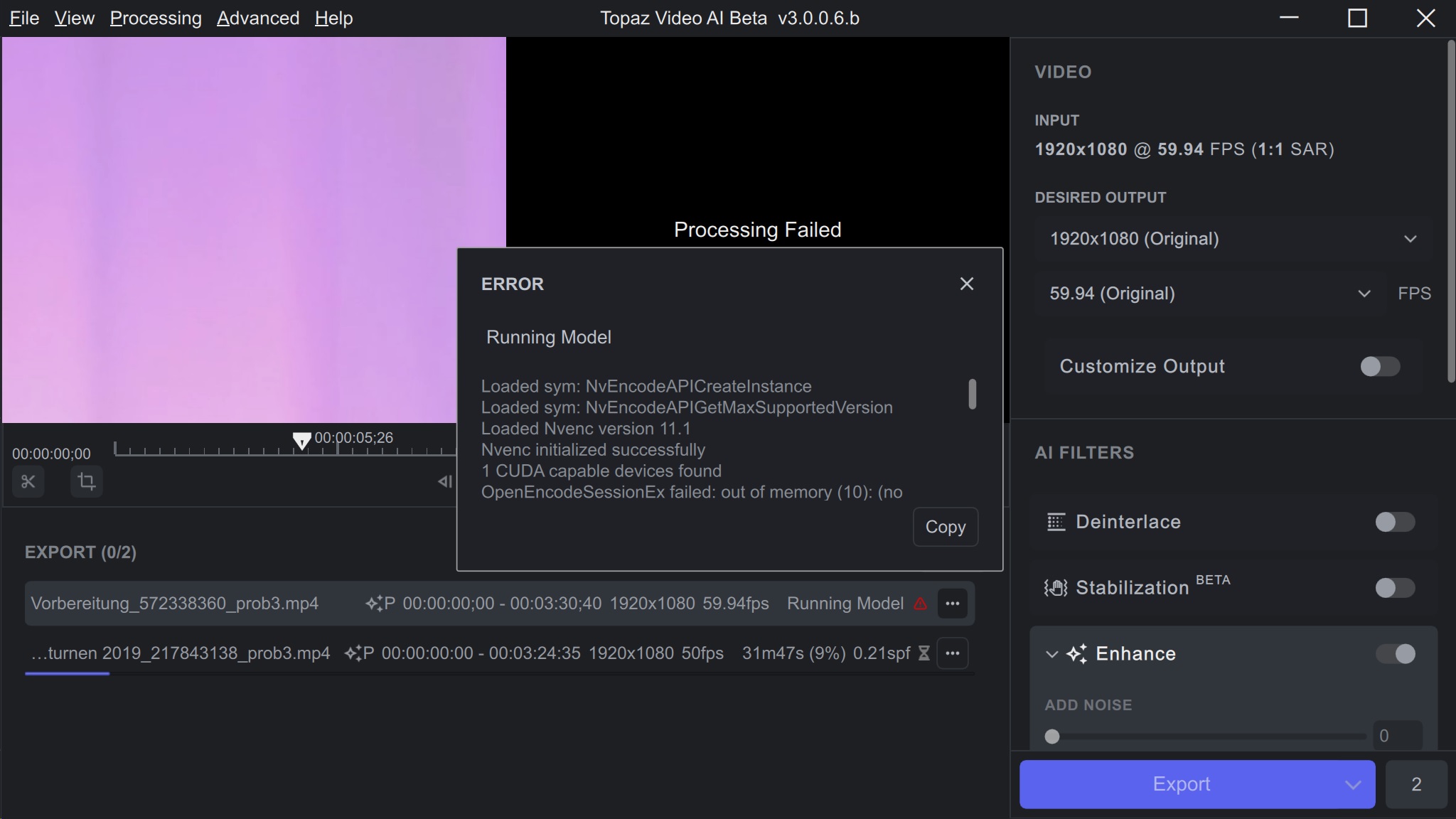
Sometimes when I want to Export more than one video to convert they won’t run and Preview window says Processing Failed?
Try opening them with MediaInfo. If only the header section shows, it means the file was not completed or not closed properly. Video players depend on the missing audio and video characteristics to play the file.
Complaint about Proteus -Updated (This is not new, but the newer versions may actually exacerbate the problem.)
Whenever there is scene that shows rippling or splashing water, it gets horribly pixelated. In 2.x and early 3.x it was possible to minimize this problem by reducing noise, details or increasing revert compression settings. It is becoming MUCH more difficult to do that.
IMO, Proteus Enhance, (and possibly others,) need to recognize the behavior of liquids.
There is a similar problem with small detail, especially if it is green in color. detail cannot fully resolve the original appearance, substituting it with what looks like torn, green micro-sponge material.
The overall result of these two issues is that attempting to compensate for them usually makes the rest of the video, (especially bodies faces and clothing) smooth to the point of losing detail and starting to look more like anime than real-world video.
which video card do you have and how many videoram on it ? (Vram). i got sometimes a failed error while processing 2 videos at the same time on my 1050ti (4Gb Vram), error who went away later, without changing the machine, but as well, no error on a Quadro Nvidia with 16Gb of Vram. (it’s just an idea, it can be something else), but Ida pointed me on that point few days ago.
I’m running an RTX 3090 with 24GB. VEAI really doesn’t use much of its memory or put much of a load in it in most cases. -
One other important factor is whether the system and video card can support resizable BAR. If this property is available, it can speed things up…
I can’t get any scan more than 2 minutes to finish with the GUI still running. The results usually finish and I can see ffmpeg still churning away.
V2 helped pick an enhance method for you, by allowing the comparison, are we expecting that, or do we just guess?
So far I’ve only gotten Artemis low quality denoise/sharpen with Dione DV 2x FPS to work for me. With good results from a 3/4" tape to DV, which looks more like HD now, and upsized well also.
And then 8mm and super 8 transfered to HD. The transfer came out really noisy so, Artemis, low quality (denoise/shapen) works well. I can’t ever see a better result with Proteus.
The results are good, getting there is still difficult.
As for VEAI 3 vanishing leaving ffmpeg churning away. Sometimes ffmpeg actually finishes the job, and sometimes it just goes to loose ends. - These are things that can be expected doing a beta test…
Proteus is much improved, but still has a couple of weak areas. VEAI 3-6b only has a few enhancement choices, we will probably get more of them back. But it is getting to be stronger and more stable. - They’ll add back some of the old bells and whistles near the end. - It would be a good guess that we will get multiple views back and the save settings capability or something similar. Will we get Comparison back? We’ll see.
Time to go and see if my last Export finished…
Update: The export did finish overnight. It would have looked very good, save for the problems I mentioned in My earlier comments about Proteus
I have the Nvidia RTX3070 with 8GB of VRAM
2nd instance crashes: out of memory, but ther is enough available, only 2,1/12 GB in use.
Loaded sym: cuD3D11GetDevice
Loaded sym: cuD3D11GetDevices
Loaded sym: cuGraphicsD3D11RegisterResource
Loaded lib: nvEncodeAPI64.dll
Loaded sym: NvEncodeAPICreateInstance
Loaded sym: NvEncodeAPIGetMaxSupportedVersion
Loaded Nvenc version 11.1
Nvenc initialized successfully
1 CUDA capable devices found
OpenEncodeSessionEx failed: out of memory (10): (no details)
No capable devices found
Nvenc unloaded
Error initializing output stream 1:0 – Error while opening encoder for output stream #1:0 - maybe incorrect parameters such as bit_rate, rate, width or height
Uninit called for ahq-12 0
All streams finished for output file #0
Terminating muxer thread 0
Statistics: 0 bytes written, 0 seeks, 0 writeouts
Statistics: 0 bytes written, 0 seeks, 0 writeouts
Nvenc unloaded
Statistics: 269110 bytes read, 2 seeks
so it’s clearly not a problem of Vram (lol). let’s hope a dev is aware of it, or will read about it here.
found information about the error, it’s related to ffmpeg !!
Looks like my problem is only happening when I convert to H264 (and presumably H265?). It’s fine when using ProRes instead.
Very interesting Link!
Following the NVENC informations my RTX 3060 should support 3 concurrent sessions.
GPU is GA106 (LHR) Revision A1
But what means LHR (Lite Hash Rate)?
Since Mai 2021 NVIDIA deliver all RXT only with LHR, that should downgrade GPU performance for Mining applications. Is that the cause of deficiency also with VEAI in H264 mode?
yes, LHR is Lite Hash Rate, but the performance is only for using the Gpu for mining, not video application like us, so no you’re not concerned by this because i got this error sometimes too (the out of memory) on my 1050ti (4Gb of Vram), but someone else (Imo) reported too that he got it , and he has a 2070s RTX which has no LHR on it.
so it’s not related.
Hi Marty and Imo,
than that is an issue to be handled by the dev!
Here an idea for a quick performance optimization:
When using an upscale of fixed size, leave out the scale filter, as the AI filter already outputs the right size. That prevents the frames being moved once more between VRAM and RAM.