If there is, it’s negligible
I should note that the file was long and expected it to run for 6 + hrs. (One file with stab. on, one without, same exact settings otherwise) I’ve been testing out the new focus fix, I like the results but have to export again to increase resolution. I’m not the sharpest rocket scientist in the drawer so it’s purpose may be beyond me.
Since i build my pc by myself, it does not crash.
But i dont do oc too, bc its not worth.
But the 13900K is able to pull 400 watts, the 4090 is able to pull 450 watts?
Both for a couple of seconds.
When they do suck the capacitors of your PSU empty the pc will go off.
So for this hardware you need at least a 1000 watts psu, at least, bc you still have fans, drives, usb, ram, chipset etc. that do pull power too.
1 Like
Who knows what it is? What does it do? What is it for?
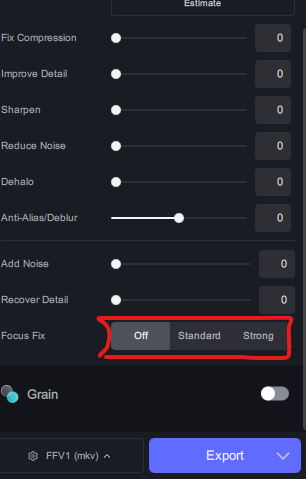
Read the full release notes, it’s like the third feature down.
1 Like
You should make a habit of that, actually.
1 Like

If the thing draws almost 600 watts then you can imagine what the psu has to do.
2 Likes
I didn’t understand a word of it. How does this affect video processing? What is the focus? Focusing on what and what? Please explain, if you understand anything about it yourself. Thanks!
Plus a 4090 which has a maximum power consumption of 483W according to TechPowerUP with spikes even over 500W.
So: Yes, you‘d better look for a really powerful and stable PSU with that combination i9 13700 / RTX 4090
2 Likes
In the intel bios, you can usually set the consumption for short, long and very long boosts.
You should do this, the short-term thermal load should not be underestimated.
Who is the vendor of your board?
I know that MSI has the most powerconsumption, usually.
Some videos that are generally blurry can turn out better if they are decreased in resolution before enhancing with an AI model. This is an option to automate that action. It’s also perfect for videos that have been scaled up without any enhancement. In the past, you would need to scale them down with an external tool. Now TVAI can do it for you.
5 Likes
when overclocking, don’t forget to set the AVX offset. Those instructions produce much more heat and draw more power. An otherwise stable system may crash as soon as it executes AVX instructions. When the offset is set, then the CPU will reduce its clock speed during the execution of those instructions. Read the motherboard manual or search the Internet. I think you will find a more elaborate explanation on the Tom’s Hardware website.
1 Like
*Bio’s was 9/30/22 Updated to 12-8-2023
V-2103 to V-3101 (8 updates)
*Video Driver from 536.23 to 551.23
*Revo Uninstaller (paid) to search for all Topaz files left over files on computer and in th reg and uninstalled whole program
*Windows 10 updated to current.
That did not fix the crashing. But turning off ASUS multi core enhancement let the program go for about an hour before the system crashed. Turning of Intel XTU as well and my files finished but still have to see if it will run over night
I’ve spent quite a few days trying combinations of models with Proteus 4.
With Proteus 3, the more denoising done to the video before, helped it turn out clearer.
For a particular 2006 to 2014 TV show on DVD that I want to enhance to FHD, the settings I found that look best are actually just manual Proteus 4. It’s got pretty heavy noise throughout most of the show with regular low light scenes.
These are the settings I used:
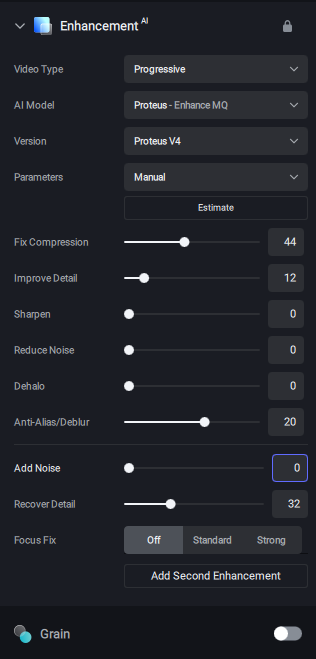
There are still some visual artifacts, but much less than the denoise + Proteus 3 combination I was using. I also found that more fine details were kept.
I imagine for the next show I enhance, I’ll try some variation of those settings.
For reference, the combinations I tried were: Nyx Fast + Proteus 4 relative auto and manual, QTGMC denoise + Proteus 4 relative auto and manual, and Ffmpeg vaguedenoise + Proteus 4 relative auto and manual. I also tried Proteus 4 auto and relative auto alone. For most of these, I tried at least 10 different settings for Fix Compression and 10 for Anti-alias / Deblur to hone in on what values looked best. Anti-alias / Deblur it was safe to keep it ~-25 to ~+25. If it was in the negatives, adding some sharpening was fine. Fix compression does all the denoising. Turning it up too high would lose more fine details. Too high was usually past 60.
2 Likes
why does your have version 4 as if you can select 1-2-3-4 but on my screen i don’t have version
So even after all those updates the program crashed THIS time after about 3 mins. What the fuck is going on for real.
You’ll have that option, when you select ‘Enable Previous Model Versions’ in the preferences.
It’s in the manual:
The manual also says:
We consider the Legacy Models unsupported. We will not improve quality concerns or fix compatibility with these models.
I clicked your first link thank you.
