Hey folks, do you remember Topaz video in version 2, how the preview would start instantly once you clicked it, and it was always in sync frame for frame? Ah, those were the days!!!
10 Likes
Don’t remember that. It usually had to load the model for more time than the newer versions. True, it would keep the model loaded so the next run would be instant.
Just because TVAI 3+ says it’s downloading every time, doesn’t mean it’s actually downloading anything.
1 Like
Please add me to the list of people who do not like this upgrade. I genuinely hate the
UI changes and find nothing about the update intuitive. It feels like you have actually made it more difficult to use. I appreciate that you are frequently updating and seeking to improve your excellent product, but I wish you would focus just on improving things other than the UI and maybe slow down a little with these updates.
7 Likes
I’ve had that oversized thing happening since V3.x.x and found that you can make the whole lot of them shrink back by clicking anywhere on one of them. I assumed it was something in my PC’s (not Mac) screen setup (2K on a 4K screen), but I guess not : (
I think the whole V4 UI needs to mature a bit and get de-bugged, e.g. the zoom timeline control is way too sensitive and could perhaps be tamed by allowing the scroll wheel to adjust it when hovering.
Just experienced my first total system freeze with v4. Never happened with any prior version. 
bummer 
Every time Intel launches a driver i go straight to the release notes looking for a Topaz Fix. 8 months now.
mencoder (of MPlayer) does the best. In my experience, it’s better than VMW, especially as a TVAI source.
I use pipe
mencoder ... | TVAIffmpeg ...
Fast and no intermediate files.
P.S. Ideally, if telecine done correctly, it is 100% reversible. Hopefully, TVAI will find the way.
Don’t blame the devs!
Blame those who decide to publish immature products to get developed by try and error thru their customers.
It makes a big difference to test “innovative” ideas thru a small beta community or to release functione still under development as final product to the public.
9 Likes
Both are working as expected on MacOS. Might be a bug under Windows only.
1 Like
Hello, I am using TVAI 4.0 version. As the version was upgraded, two views were created, but the problem is that the preview for the output is not applied, and the input preview is applied to both views. In View 2, only the applied model and processing details are listed, and Not Processed is indicated on the right. How do I display a preview of the output actually applied to View2?
1 Like
In my opinion colour management was a much higher priority than this terrible GUI update.
In fact users could probably think of at least half a dozen more important priorities over this horrific update.
6 Likes
I am still unhappy I need to buy renewal licenses every year my anymp4 has survived 3 laptops they simple release the key and I can install it I still need this software because Topaz cannot handle flaky metadata so i repair it when the duration says 00:00:00 time Topaz will hang biut when I convert with anymp4 Topaz accepts the repaired movie
I find that I cannot navigate back to the full length video after I have selected part of the video for enhancing I have tried the reset button but it does noet work, any suggestions as this is anoying because I have to remove the video and then put it back
I was told to use the Mark in and Mark out buttons to segregate the section you are testing, then it loops.
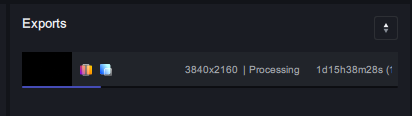
Doing an export and a few things.
First the large one, there is no way to preview anything being exported, kinda a big thing as others have pointed out and we pointed out in beta.
Secondly, the export stats are off center, showing in picture. If you mouse over the black square which would be a preview, then the text corrects itself for the duration of the mouse over. This puts the hamburger button out of reach, luckily a right click works.
1 Like
Unless something changed with the licensing, you should not have to buy a new license every year? (Unless you want to run a version of the software that came out after your license expired?)
The problem is whether you get a version of the product that works in enough ways for you to use it, or whether you have to buy another year in the hope it will.
I bought v3 a bit under a year ago and it still has several issues, my support period gets me v4 but I can’t see I’ll get an acceptably working v4 before it runs out, so in realty I don’t get v4 unless I buy another year and cross my fingers… (but is fairly soon a good time to start a year rather than waiting for a bunch of stuff to get fixed?)
1 Like
I agree with what you say, I didn’t mean devs per se.
1 Like
Agreed, but unless and until they abandon this weekly update scheme (bug fixes apart) it will never change. Every new or changed feature will introduce more bugs, it will never end.
There are good reasons why most popular commercial software developers update and enhance no more than a handful of times a year and often, just twice a year. Just because a particular software development model that allows weekly updates exists doesn’t mean that developers need to use it. TVAI is perpetually in public Beta - for that very reason. It doesn’t sit well with me, this shouldn’t be done like a kind of glorified github development IMHO.
4 Likes
Do I understand you correctly that there are no issues with going from say, 30fps to 60fps because 60 is exactly double of 30? And same goes for increasing the frame rate by exactly 3X ?
You also say the ‘remove duplicate frames’ feature doesn’t work like one might expect? Does it work at all? Is the default sensitivity setting of 10 useful for say, a recording of a livestream that periodically has a very small number of dropped frames?
I often use the apollo frame interpolation on 30fps video with a target frame rate of 30 while enabling the ‘remove duplicate frames’ feature using a sensitivity of 10. I wonder if it’s doing anything at all to source video that has a handful of dropped frames every 10 seconds or so.
1 Like
