Well, I don’t have that.
3.5.2 issue, progress is stuck at 6% even though video is processing just fine.
I was not using any models, simply processing a video to convert from x264 to x265.
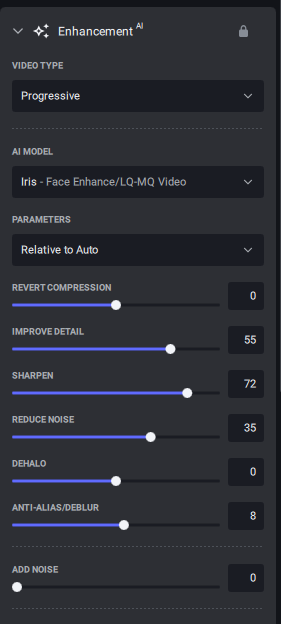
Here is what I am seeing with Iris, this is a 4k source.
Low quality:

And here is Medium quality same settings:

1 Like
Hello,
Could you send us an email at help@topazlabs.com with the full log files from the app?
To gather logs, please select Help > Logging and make sure that there is a check mark next to File Logging. Next, recreate the issue and then return to the Help menu and select > Get Logs for Support and attach the “logsForSupport” file to your reply.
1 Like
I have exactly the same problem.
Does anyone have an explanation for this?
thanks
My MSI katana 3050 was unacceptibe but hell My Gigabyte Aorus 17h bxf i7 nvidea geforce rtx 4080 is a monster best of all i bought it in the middle of the night at amazone because someone had sent it back so i paid 2300 euros in stead of the cheap 2700 gigabyte is the only that delivers quality and performance and overclocking below 3000 euros actually 2800 euros
i had a month asus once it was a rolls royce but Gigabyte does a better job
1 Like
update fixed for me the problem with Chronos fast (where result consisted entirely of a frozen frame and showed a lot longer duration).
- but the export button has disappeared after update (“export as” and “close input” are available only under the file and process menu no button/right link)
** ffwd to today, the export as button and the right-click close input have returned overnight - I don’t know what happened, yesterday I tried changing window size and full-screen to no effect, and now both the export button and close-input right-click menu item seem to have returned after opening another video file the next morning.
Started an export, and I can say that if I move the preview slider, it takes about 45 seconds for a picture to appear. I also had to slide the preview slider, I can no longer just click on the timeline and it goes there.
I think previews in the v3 series have been given up on and we will see the 4.0 Alpha style previews in the upcoming v4 release on the 17th…
3 Likes
Teoretycznie masz rację, producent laptopa powinien go tak zaprojektować, żeby wytrzymał nawet największe obciążenia. Ale co jeśli jednak został wadliwie zaprojektowany i przy tak ekstremalnych warunkach pracy, jakie zadaje TVAI, zasilacz jest ociupinkę za słaby?
Weź pod uwagę, że nikt inny teraz nie zgłasza takich problemów przy podobnej konfiguracji desktopa (i tak solidnej konfiguracji), za to w przeszłości przy podobnych błędach podejrzanym był za słaby zasilacz.
1 Like
Yeah, I knew that was coming soon, and I really hope they do finally give some attention to the preview.
1 Like
Zgodnie z sugestią producenta, po odinstalowaniu wersji 3.3.9 usunąłem pewne klucze dotyczące Topaz’a z rejestru Windows’a, także usunąłem foldery Topaz’a z katalogów Program Files i Program Data i dopiero zainstalowałem najnowszą wersję 3.5.2. Miałem nadzieję, że to pomoże, ale niestety nie…
According to the manufacturer’s suggestion, after uninstalling version 3.3.9, I deleted some Topaz-related keys from the Windows registry, also deleted the Topaz folders from the Program Files and Program Data directories and only installed the latest version 3.5.2. I hoped this would help, but unfortunately it didn’t…
Apollo is also broken for me, thinks it’s making a preview at 10.000fps, within a second to 100% and then program is stuck.
Hello,
Could you send us an email at help@topazlabs.com with the full log files from the app?
To gather logs, please select Help > Logging and make sure that there is a check mark next to File Logging. Next, recreate the issue and then return to the Help menu and select > Get Logs for Support and attach the “logsForSupport” file to your reply.
Hi admins. Does we will get All in Video AI 4? Or we need to buy it (who have license of video AI v3)?
Saw Ai V4 in my email
It should be as usual depending on your upgrade subscription plan If it’s still active before the release you will get the update.
Why v4 didn’t released yet? I see email but can’t find v4 version on the website
I got an email as well, but no information about what is new, which is a bit strange. Checking for new updates in the program also says there aren’t any new updates.
This version doesn’t work with 'All GPUs" selected. Previous versions were fine.
It’s too bad because All GPUs speeds up my processing by a lot.
Topaz Video AI  v3.5.2
System Information
OS: Mac v13.0502
CPU: Intel(R) Core(TM) i7-7700K CPU @ 4.20GHz  48 GB
GPU: AMD Radeon RX 6800 XT  15.984 GB
GPU: AMD Radeon Pro 575  4 GB
Processing Settings
device: 0 vram: 0.1 instances: 1
Input Resolution: 1920x1080
Benchmark Results
Artemis		1X: 	ERR fps 	2X: 	ERR fps 	4X: 	ERR fps
Iris		1X: 	ERR fps 	2X: 	ERR fps 	4X: 	ERR fps
Proteus		1X: 	ERR fps 	2X: 	ERR fps 	4X: 	ERR fps
Gaia		1X: 	ERR fps 	2X: 	ERR fps 	4X: 	ERR fps
Nyx		1X: 	ERR fps
4X Slowmo		Apollo: 	ERR fps 	APFast: 	ERR fps 	Chronos: 	ERR fps 	CHFast: 	ERR fps

3 Likes
