Your slow RAM is a fact, how is that trolling?
Didn’t hurt to try.
Don’t forget that Proteus Auto is slower than Relative to or Manual.
And probably the app and models need more tuning to work full speed with the new GPU’s like yours
1 Like
I usually use Auto, but now setting it to Manual doesn’t change much the speed…
This, and certainly lowering VRAM consumption is not ideal, which is the last thing developers have been doing. But hey, at least it works better than when version 3.0 came out, which was a disaster, but there is still a lot of room for improvement in terms of performance on the latest generation of hardware.
1 Like
It was a good suggestion. With the slow 2400 DDR5, the speed is about where I would expect it to be.
With 2800 or 3000+ DDR5 there would be additional speed.
Can you share what you are referring to? A screenshot would be helpful 
Preview behavior will be slower than the v2.x series because v3.x is creating temporary files so that you can queue up multiple previews and quickly toggle back and forth between previews.
Based on your specs, I would imagine that v2.6.4 may be a bit quicker on your machine, however, I would like to assist you with getting the most out of v3.2.8. Please open a support ticket and I will help you
You can return to v2.6.4 at any time. Here is a link to our Release Forum where the changes and installers for each version can be viewed for any of our focus products.
Hi there, this is a known issue that Apple is working to resolve. As it currently stands, all Intel Mac users besides iMac users should be good to go after updating their OS to 13.4. We are compiling console crash reports and logs for iMac users to share with Apple.
So far, the recommendation is to use an app that manually allows the system’s fans to be controlled, since it seems to be a thermal shutdown that is caused by the sustained use of the system’s graphics card in apps like Video AI.
If possible, please test Video AI with the fans set to the maximum speed, or at least 75%.
This is not currently on our road map and the easiest way to handle this would be to crop this portion of the file.
You can add this idea to the idea section of the forum
1 Like
I’m sorry but that is simply not true, I’ve ven running a clean install of Ventura 13.4 for a week and the hards crashes still continues, doesn’t matter if it’s the beta or latest release.
Also not true about the temperature, video enhance 2.6.4 runs at the same temperature, wattage, sometimes even higher and can be running all night. Also not true about manually changing the speed fan, I tried it first when this problems appeared, is not that. I don’t think is macOS also.
It seems to me that Topaz hasn’t yet picked up on what I I’ve read many times by many different posters in here, over the last few months at least. They (we) don’t want or need to be able to “queue up multiple previews and quickly toggle back and forth between previews”.
We want to be able to do very short previews of 2 or 3 different models and/or settings, initiated simultaneously by pressing a single button, completed within a minute or two, then compare them at the same time with the original and each other, frame by exactly the same frame, as video or still frames.
Just like in version 2.6.4. But using 3.x. That’s what we (I think) want.
3 Likes
I prefer the new way of v3 preview over v2. But ofc, it’s personal preference and depends on workflow.
It’s also quite common that people rather post a comment when they have a complaint than if they are happy.
1 Like
3.2.8 is unable to upscale 4:3 videos to 4:3 output.
I tried Proteus and Artemis models - both fail.
If I set output to 1920x1080 - crop or letterbox - upscaling works.
If I set 1920x1440 - gives me error.
My video card is Nvidia Geforce GTX 1050Ti 4gb ram, 535.98 drivers.
The previous versions, 3.2.7 and earlier, work without problems.
The whining about the preview distracts from the real quality problems of the application. Manufacturers are happy to try, communicate with you, so as not to solve real problems. The preview here is good. No need to change anything!
Are you on an iMac? If you are on an iMac we have confirmed that the recent OS update does not fix this. As mentioned, this is an Apple-specific issue that they are working on.
Since you are still running into these issues, please reach out to me directly via Support so that I can collect your SPX and logs or post the information on your original post for the Intel Mac Crash post.
Thank you!
The 4-way comparison tool in v2.6.4 was an excellent feature and we are exploring alternative preview display options. This is an on-going project.
2 Likes
Please open a support ticket and share your logs and full system profile, thanks!
as i said in my original post, im using a Mac Pro 2019 running clean install Ventura 13.4.
i already reported this problem many times, and like i said, doubt its macOS, why VAI 2.6.4 can run all night with the same temps on the GPU without breaking a sweat?
this hard crashes started with the v3, is the only video software that crashes the whole computer, its embarrassing
Thank you for reminding me.
TV V2.6.4 and v3.x are built on different code bases and are not comparable. We work closely with Apple and they confirmed that this issue is on their side. As mentioned in my replies, since we do have a handful of users who are running into crashes after updating, we are collecting console reports and logs (new ones, not old ones) to share with Apple.
There is always a chance that the issue you are running into is hardware specific or unrelated. It is very easy to assume that an issue with similar behavior is the same issue as another user is encountering, however, very often that is not the case.
Please follow the steps to set up fans for your machine, like the TG Pro app, and let me know if the machine still crashes. This should make sure that the GPU doesn’t get too hot. If you are certain that your GPU is not getting hot, please share your console report and logs running the latest OS and v3.2.8.
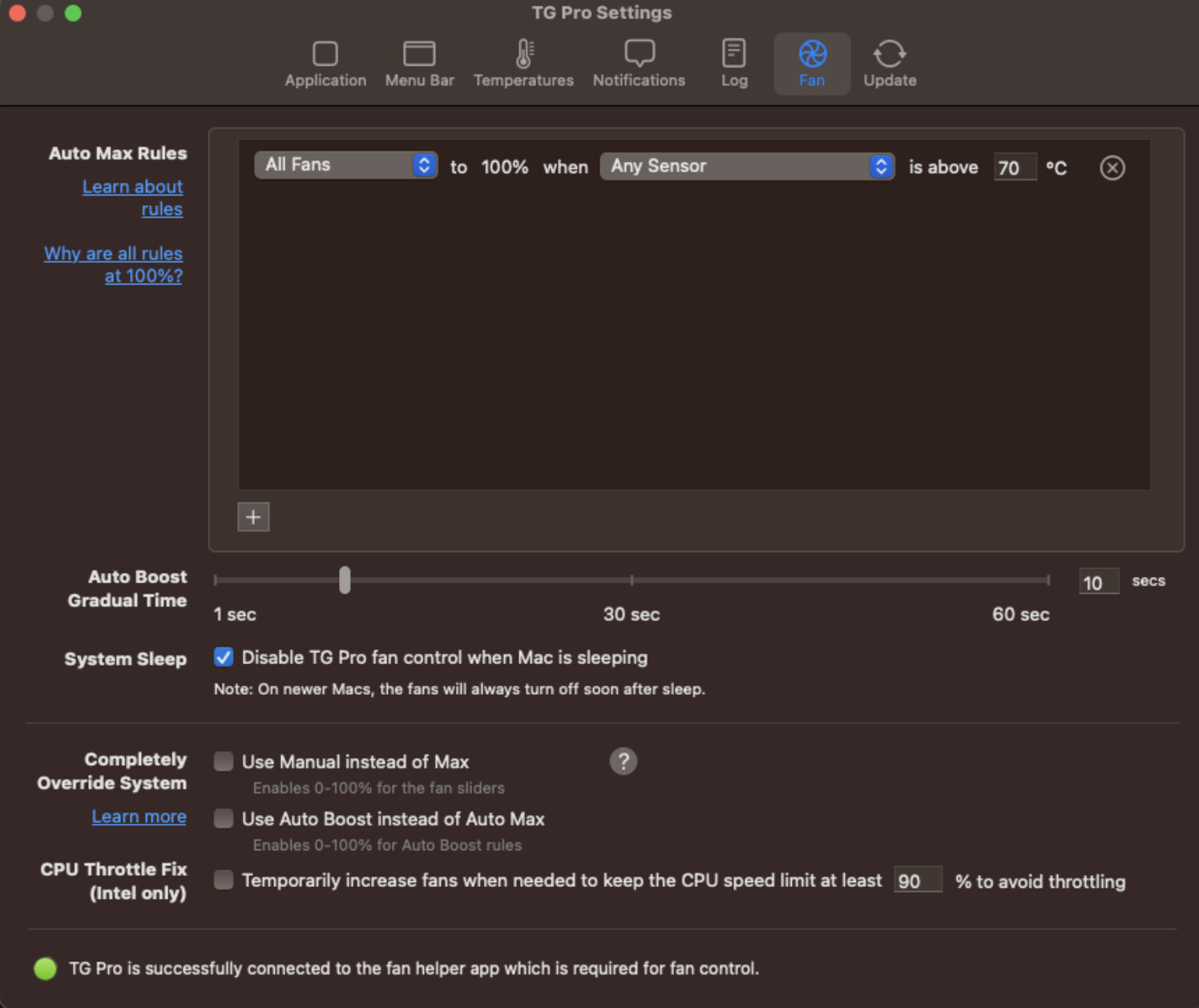
please, read carefully all my previous replies cuz i feel like we are getting in a loop here.
Is not related to temperature like you assume, i know 2.6.4 is a different code but temperatures in degrees are the same here and on mars, im hitting higher temperatures withe 2.6.4 for extended periods of time, sometimes all night without crashing. 3.X with the same or most of the time, even lower temperatures cannot even sustain 5 minutes of processing without crashing the whole computer.
Again, like i said in my previous replies, i already tried the “fan trick” managing to lower the temperatures by about 10 or more degrees, is does not matter, its not temperature, how can one program run hotter for all night and the new one run cooler and crash in 5 minutes?
im going to upload my next crash later today… i already upload a ton in my DM chats with an engineer here, you can check those out also. i provided more info in that DM chat with him, his name is Suraj.
At this point i lost all the confidence i had in this software, i don’t know if my video is going to finish or my computer is going to crash.
Never in my time with this Mac Pro 2019 i had a software that crashes my entire systems so often…
