Small request here. The Previews and Export list still scrolls downward most recent one at the bottom. You changed it as should be, most recent on top, but one person put up a complaint, and you put it back. Can the default be changed to the correct way, most recent on top. I hate to ask for this, but or at least a preference or simply set it to remember how it was on your last session.
2 Likes
I don’t know if anyone else is experiencing this but I’m getting a segmentation fault when running TVAI Proteus upscale through the command line on macOS. I don’t have this issue if I run the upscale though the GUI.
System specs:
CPU/GPU: M1 Pro 8 Core CPU + 14 Core GPU
RAM: 16GB
Command used:
"ffmpeg" -i "input.mp4" -filter_complex "tvai_up=model=prob-3:scale=2:w=3840:h=2160:preblur=0:noise=0:details=0:halo=0:blur=0:compression=0:estimate=20:device=0:vram=0.9:instances=1,scale=w=3840:h=2160:flags=lanczos:threads=0,scale=out_color_matrix=bt709" -strict -2 -c:v hevc_videotoolbox -tag:v hvc1 -pix_fmt yuv420p -b:v 100M -c:a copy "output.mp4"
The segmentation fault appears right after the first batch of No accelerated colerspace conversion found from yuv420p to rgb481e warnings appear.
It would also be good if the imported files had a tooltip hover that showed the full filename - often I will have files that have a similar start/end filename but the middle part differs - in TVAI this gets cut off and I often have to right click “show in explorer” to see what the file is without scrubbing through the preview.
The same would be good on the export list, too. For these I usually right click and show the FFMPEG command to see the filename.
Minor annoyance! 
1 Like
Posting this as a feature request as well as here, please vote if you like the idea:
Yes plesae a pause option during processing.
2 Likes
Both features are coming eventually. However, I’d rather see them remaining focused on improving the application with it’s current feature set before they add more major features. Performance, stability, and improving the preview are more important to me right now. The current development rate is good, let’s not distract them with things that can be added later!
1 Like
Processing speed has improved a lot, therefore “Pause and Resume” seem to be no longer first priority to get fixed. Nevertheless it should not be considered to be an obsolete user demand.
Make sure you have TVAI_MODEL_DIR Environment variable set. Message me if you still have issue
I consider pause/resume to be basic functionality that should have been there from the start, therefore I place it at a higher priority than most other features (the main exception being bug fixes).
1 Like
The sort button on the bar allows you to flip the order. We can just default to the last state.
4 Likes
Thanks for the suggestion, but it didn’t work.
export TVAI_MODEL_DIR="/Applications/Topaz Video AI BETA.app/Contents/Resources/models"
export TVAI_MODEL_DATA_DIR="/Applications/Topaz Video AI BETA.app/Contents/Resources/models"
I also tried different combinations of putting slashes on the end of the models folder. And that didn’t work.
I thought maybe I was doing something wrong with my ffmpeg command (As I generate them using a python script I wrote) so I loaded a video into TVAI GUI, setup a export, tested it in the GUI (it worked), then got the launch command from TVAI GUI and ran it again in the command line. Same issue, segmentation fault. Specifically Segmentation fault: 11, although I’m not sure if that is useful.
Yeah, unfortunately the x30 Pro Beta runs the previews but is stuck with exporting as it doesn’t even load the models, no matter which model is running…
The win all version loads the models for the previews and exports, unfortunately apollo blur is glacially slow, too long to be practical, for both the previews and the export… and the apollo sharpen looks like the effects were dialled up to 100, as it has too many artefacts to run a job on its own!
I’m in the middle of testing the gen release vs the win-all beta, I’ll post when I’m done!
What do you have the dyld_library_path set to? Can you send me the crashlogs from the console app.
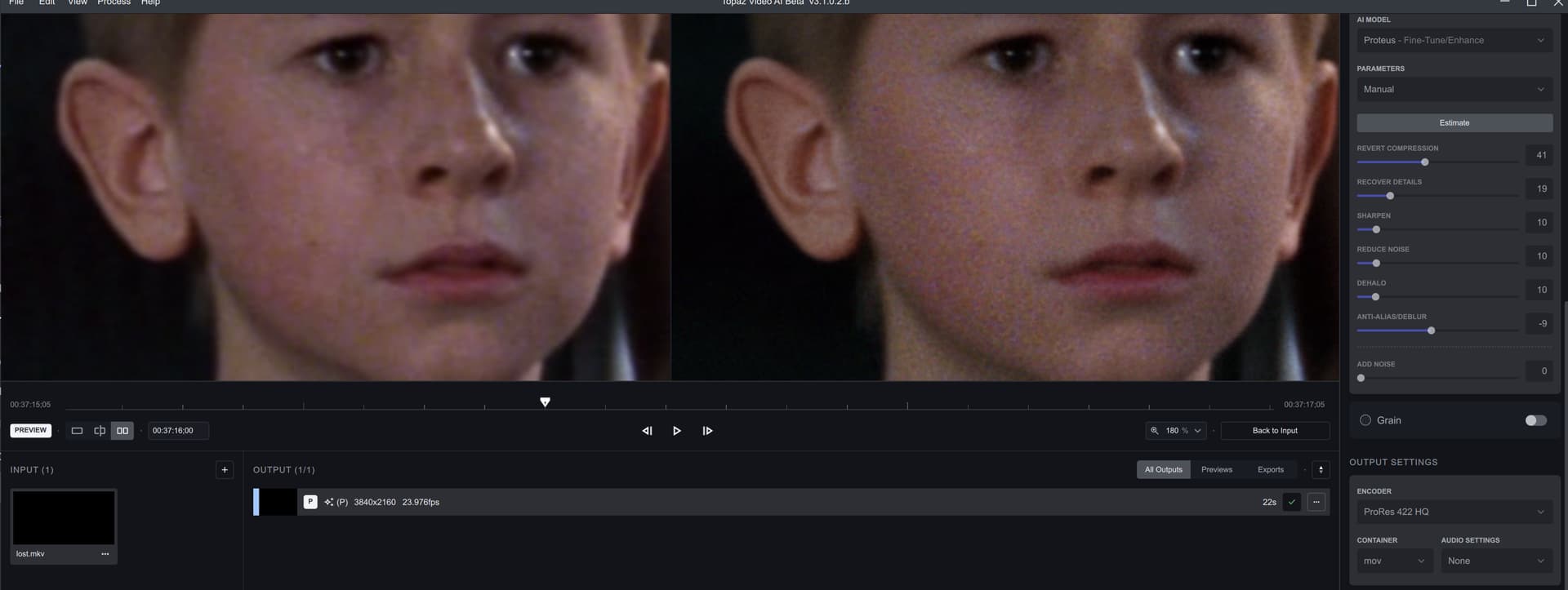
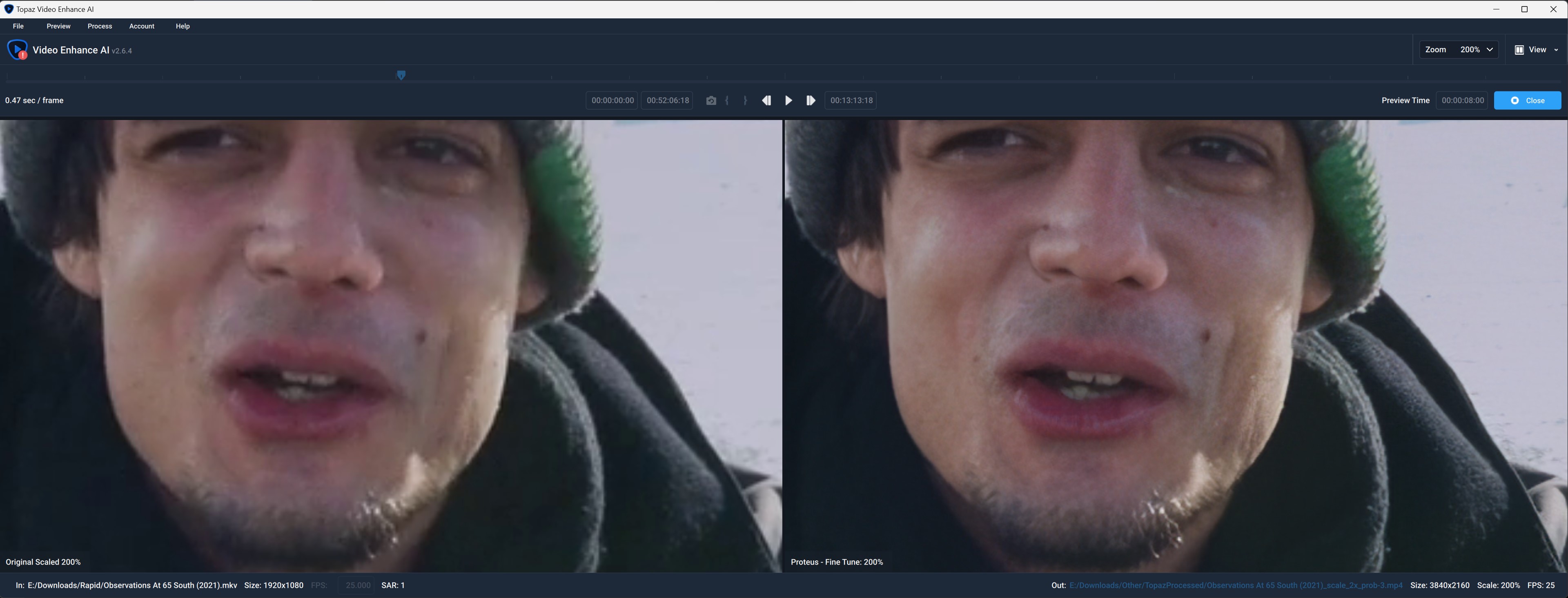
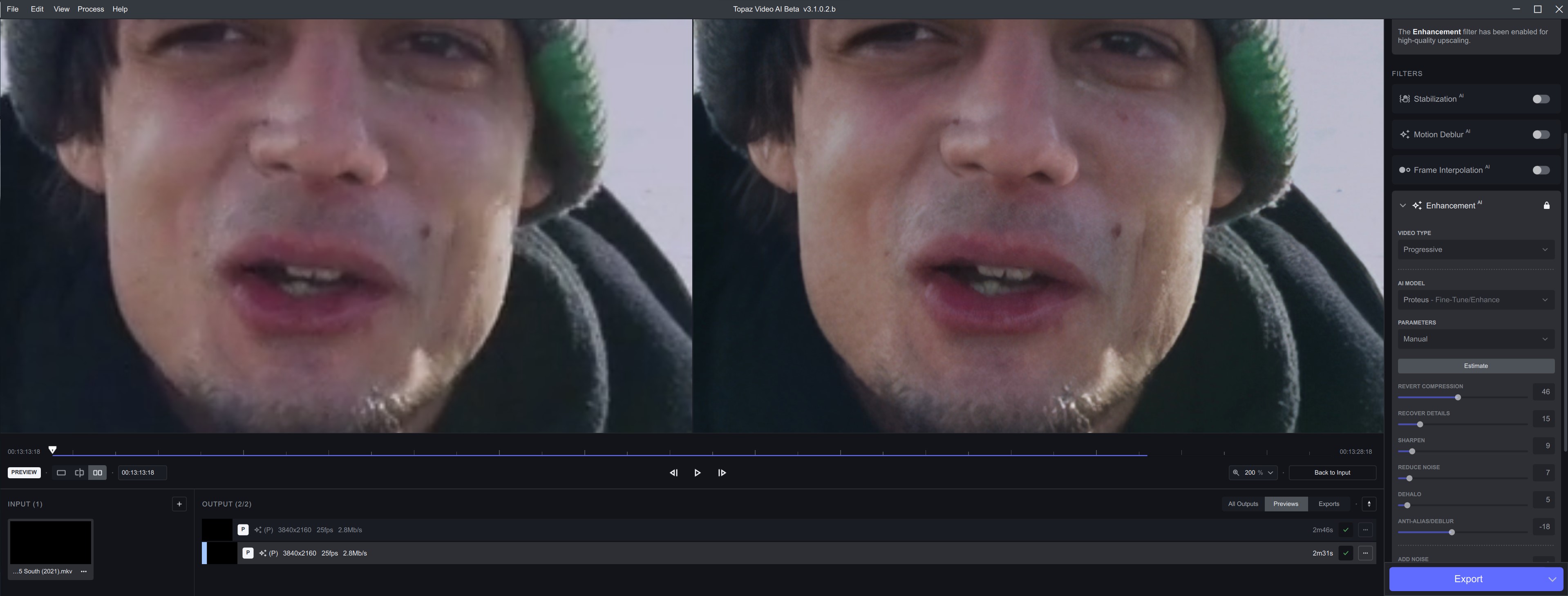
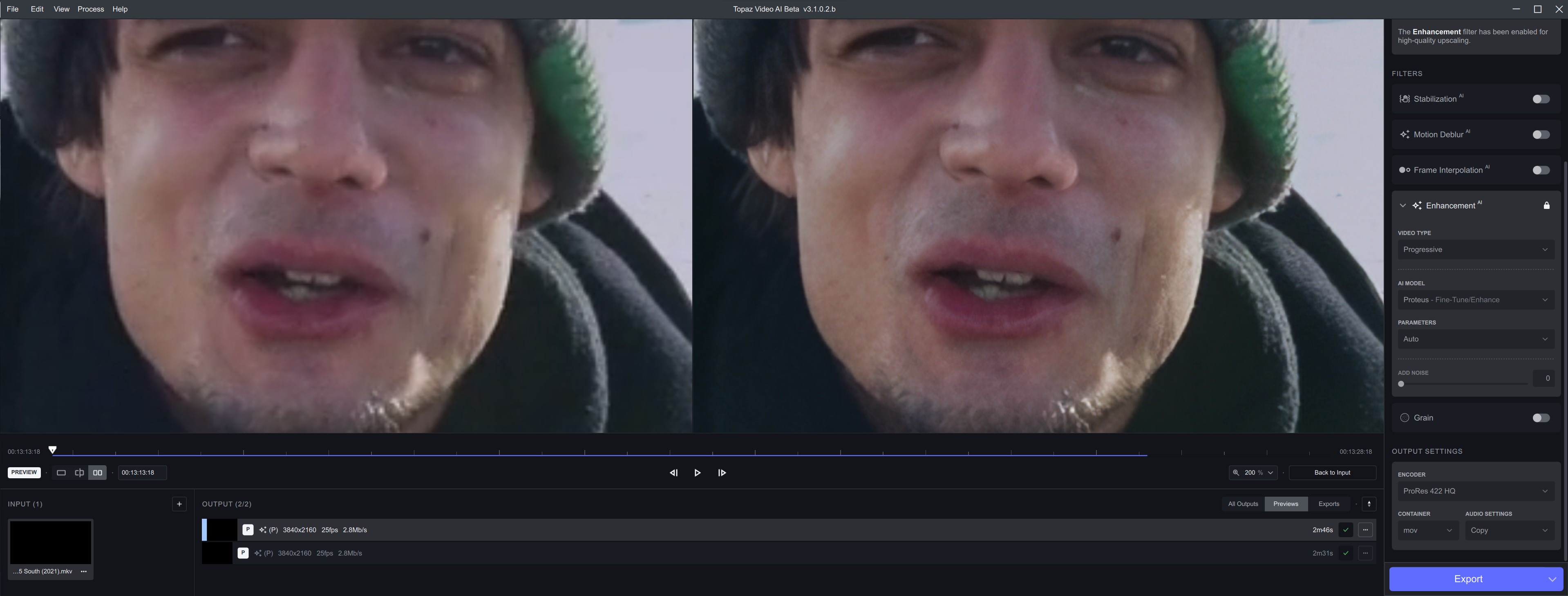
As I noticed in the earlier beta, quality is dismal when it comes to noise. I’m not even sure I’d call it noise any more: it’s downright speckles being introduced into the image (see below); the kind that are as good as impossible to remove on a post pass. Almost looks like the entire Proteus model has been mistrained. At first I thought it was sharpening, maybe; but no, it’s simply TVAI:
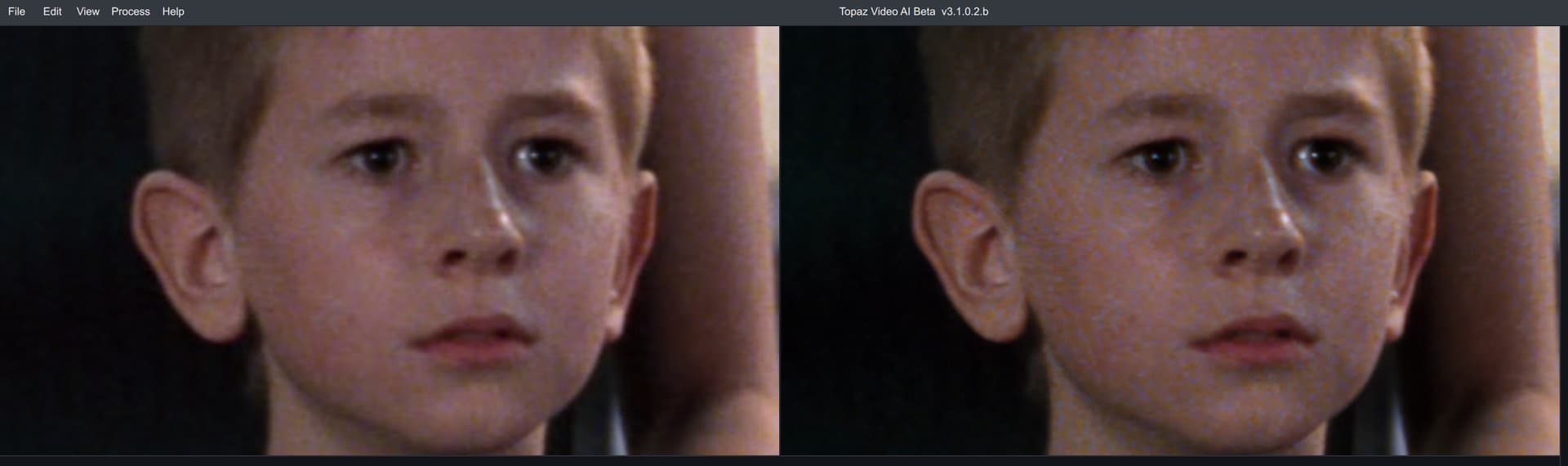
Gaia does it a little better:
And here is good old trusted 2.6.4, actually getting it right:
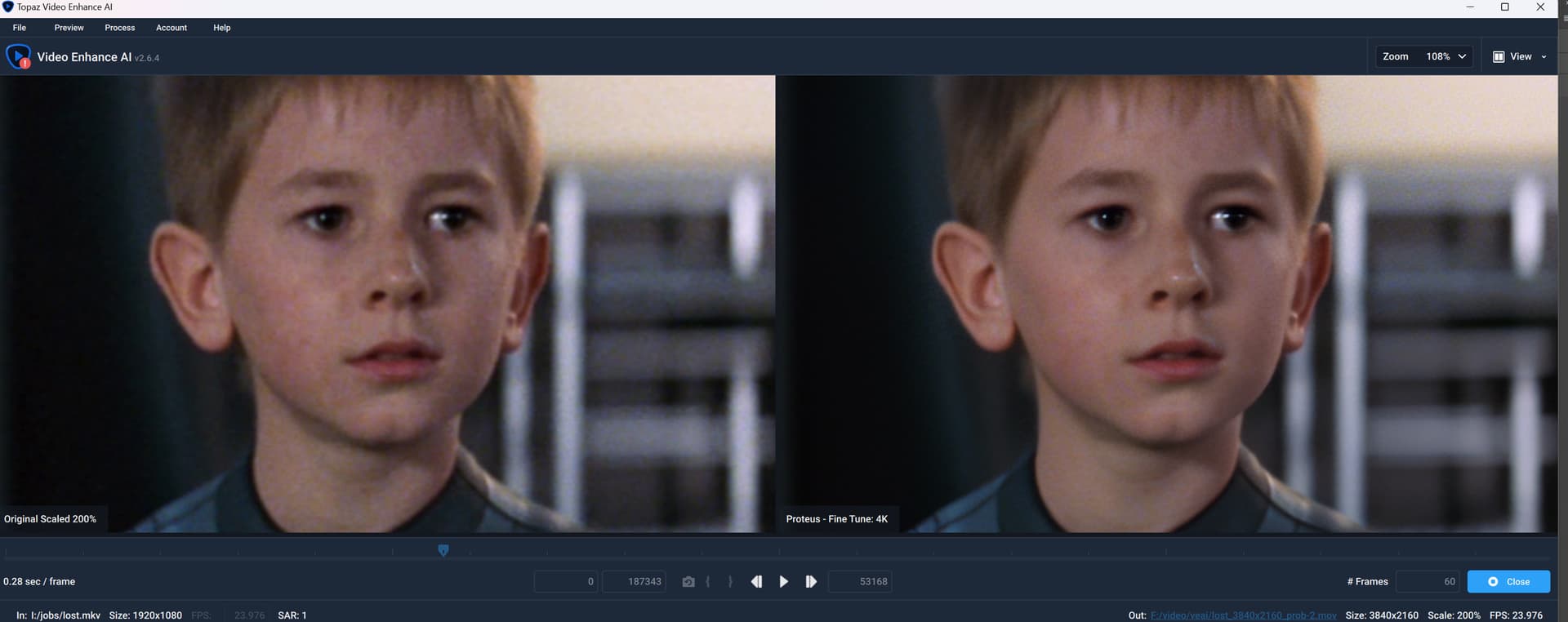
Especially the introductions of heavy speckles (in the first image) makes me wonder whether TVAI will ever recover from this severe quality deterioration.
2 Likes
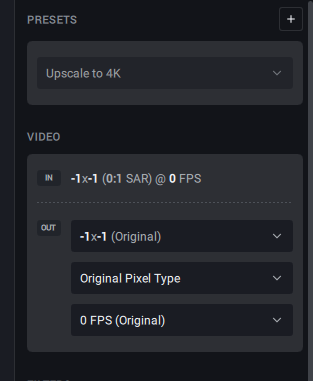
I’ve clean installed and run TopazVideoAIBeta-3.1.0.2.b-RT806 - I have an RTX 3080 GPU on my i9 Windows 11 machine. After I adjust preferences to default 4K preset, when I import a lower res video file, VIA doesn’t detect the resolution or frame rate for the file. (See screen grab)
When I change default back to ‘none’, files load in correctly with resolution and frame rates which I can then select 4K manually and go from there.
I believe this has only happened since I started using RT806 BETA versions.
I don’t think I have dyld_library_path set. I ran echo $DYLD_LIBRARY_PATH and the result was empty. This is from my normal terminal session, a terminal session spawned by TVAI, and a terminal session spawned by TVAI BETA.
If I did this wrong, please let me know and please guide me on the correct way of finding this information.
I also don’t think there’s anything useful I can give you from the “crashlogs” of the console app.
If I open up a terminal and run everything normally, then ffmpeg starts then almost instantly crashes with the error being Segmentation Fault and nothing else.
If I switch my terminal from zsh to bash and export the relevant paths and run ffmpeg again, I get the exact same result, except it says segmentation fault 11 with no other useful information.
Here is an example of the output from zsh:
Note: Removing "-hide_banner" "-nostdin" "-nostats" doesn’t provide any useful information. (-hide_banner is the only one that makes a difference because ffmpeg experiences a segmentation fault before the others can have an effect.)
OUTPUT FROM RUNNING TVAI FFMPEG IN ZSH
/Applications/Topaz\ Video\ AI\ BETA.app/Contents/MacOS/ffmpeg "-hide_banner" "-nostdin" "-y" "-nostats" "-i" "/Users/alaska/Movies/Thing/Videos/To be processed/Normal/2020-07-03 - 5efeb3495e287223b1352.mp4" "-sws_flags" "spline+accurate_rnd+full_chroma_int" "-color_trc" "1" "-colorspace" "1" "-color_primaries" "1" "-filter_complex" "tvai_up=model=prob-3:scale=0:w=3840:h=2160:preblur=0:noise=0:details=0:halo=0:blur=0:compression=0:estimate=20:device=0:vram=1:instances=1,scale=w=3840:h=2160:flags=lanczos:threads=0,scale=out_color_matrix=bt709" "-c:v" "prores_videotoolbox" "-profile:v" "lt" "-pix_fmt" "p210le" "-allow_sw" "1" "-map_metadata" "0" "-movflags" "frag_keyframe+empty_moov+delay_moov+use_metadata_tags+write_colr " "-map_metadata:s:v" "0:s:v" "-map_metadata:s:a" "0:s:a" "-c:a" "copy" "-metadata" "videoai=Enhanced using prob-3 auto with recover details at 0, dehalo at 0, reduce noise at 0, sharpen at 0, revert compression at 0, and anti-alias/deblur at 0. Changed resolution to 3840x2160" "/Users/alaska/Movies/Thing/Videos/To be processed/Normal/2020-07-03 - 5efeb3495e287223b1352_prob3_temp.mov"
Input #0, mov,mp4,m4a,3gp,3g2,mj2, from '/Users/alaska/Movies/Thing/Videos/To be processed/Normal/2020-07-03 - 5efeb3495e287223b1352.mp4':
  Metadata:
    major_brand     : M4V
    minor_version   : 1
    compatible_brands: isomavc1mp42
    creation_time   : 2020-07-03T04:30:35.000000Z
  Duration: 00:11:00.24, start: 0.000000, bitrate: 6173 kb/s
  Stream #0:0[0x1](und): Video: h264 (High) (avc1 / 0x31637661), yuv420p(tv, bt709, progressive), 1920x1080 [SAR 1:1 DAR 16:9], 6007 kb/s, 23.98 fps, 23.98 tbr, 24k tbn (default)
    Metadata:
      creation_time   : 2020-07-03T04:30:35.000000Z
      handler_name    : ETI ISO Video Media Handler
      vendor_id       : [0][0][0][0]
      encoder         : Elemental H.264
  Stream #0:1[0x2](und): Audio: aac (LC) (mp4a / 0x6134706D), 48000 Hz, stereo, fltp, 160 kb/s (default)
    Metadata:
      creation_time   : 2020-07-03T04:30:35.000000Z
      handler_name    : ETI ISO Audio Media Handler
      vendor_id       : [0][0][0][0]
Stream mapping:
  Stream #0:0 (h264) -> tvai_up:default
  scale:default -> Stream #0:0 (prores_videotoolbox)
  Stream #0:1 -> #0:1 (copy)
[swscaler @ 0x138da8000] [swscaler @ 0x138db8000] No accelerated colorspace conversion found from yuv420p to rgb48le.
[swscaler @ 0x138da8000] [swscaler @ 0x138dd8000] No accelerated colorspace conversion found from yuv420p to rgb48le.
[swscaler @ 0x138da8000] [swscaler @ 0x138de8000] No accelerated colorspace conversion found from yuv420p to rgb48le.
[swscaler @ 0x138da8000] [swscaler @ 0x138df8000] No accelerated colorspace conversion found from yuv420p to rgb48le.
[swscaler @ 0x138da8000] [swscaler @ 0x138e08000] No accelerated colorspace conversion found from yuv420p to rgb48le.
[swscaler @ 0x138da8000] [swscaler @ 0x138e18000] No accelerated colorspace conversion found from yuv420p to rgb48le.
[swscaler @ 0x138da8000] [swscaler @ 0x160180000] No accelerated colorspace conversion found from yuv420p to rgb48le.
[swscaler @ 0x138da8000] [swscaler @ 0x160170000] No accelerated colorspace conversion found from yuv420p to rgb48le.
[swscaler @ 0x138da8000] [swscaler @ 0x148008000] No accelerated colorspace conversion found from yuv420p to rgb48le.
zsh: segmentation fault  /Applications/Topaz\ Video\ AI\ BETA.app/Contents/MacOS/ffmpeg "-hide_banner"
If I open the terminal through the TVAI GUI and run everything, then look at the logs provided by TVAI, there doesnt’ appear to be any useful information however I have attached the full logs from TVAI just in case you find something I missed:
LOGS FROM RUNNING TVAI AND OPENING TERMINAL AND ATTEMPTING TO PROCESS THE VIDEO
2023-01-15 21-24-35 Thread: 0x1f74ffa80 Info Setup logging for Topaz Video AI BETA 3.1.0.2.b
2023-01-15 21-24-35 Thread: 0x1f74ffa80 Info QList("/Applications/Topaz Video AI BETA.app/Contents/Resources/qml", "/Applications/Topaz Video AI BETA.app/Contents/MacOS", "qrc:/qt-project.org/imports")
2023-01-15 21-24-35 Thread: 0x1f74ffa80 Warning Populating font family aliases took 56 ms. Replace uses of missing font family "Qrc:/elements/Roboto-Regular.ttf" with one that exists to avoid this cost.
2023-01-15 21-24-35 Thread: 0x1f74ffa80 Info OS VER: 13.01
2023-01-15 21-24-35 Thread: 0x1f74ffa80 Info VNNI:  false  AVX:  false  CPUName:  Apple M1 Pro  Thread Count:  8
2023-01-15 21-24-35 Thread: 0x1f74ffa80 Info Total system memory:  16  GB  0.0732269  GB
2023-01-15 21-24-35 Thread: 0x1f74ffa80 Info Machine id: "12E19366-EB00-5B76-BAF9-50DEF3E4FE73"
2023-01-15 21-24-35 Thread: 0x1f74ffa80 Info Available GPU LIST
2023-01-15 21-24-35 Thread: 0x1f74ffa80 Info 0  Device Id:  0  Name:  Apple M1 Pro  VRAM:  10.6667  GB DataType:  2  Serial:  4294969421x  Visible:  true  Index:  0 Legacy: false
2023-01-15 21-24-35 Thread: 0x1f74ffa80 Info System Information
2023-01-15 21-24-35 Thread: 0x1f74ffa80 Info OS Mac Version 13.01
2023-01-15 21-24-35 Thread: 0x1f74ffa80 Info CPU Apple M1 Pro Threads 8 AVX false AVX2 false VNNI false
2023-01-15 21-24-35 Thread: 0x1f74ffa80 Info Is Apple Processor true
2023-01-15 21-24-35 Thread: 0x1f74ffa80 Info Total RAM 16 Free/Used 0.0732269
2023-01-15 21-24-35 Thread: 0x1f74ffa80 Info Device count: 1
2023-01-15 21-24-35 Thread: 0x1f74ffa80 Info Device Id: 0 Name: Apple M1 Pro Cores: 14 VRAM: 10.6667 GB Used VRAM: 0.000366211 GB Free VRAM: 1.40303e-36 GB DataType: 2  Serial: 4294969421x  ComputeLevel: 0  Visible: true Legacy: false
2023-01-15 21-24-35 Thread: 0x1f74ffa80 Info Reading encoders from file "/Applications/Topaz Video AI BETA.app/Contents/MacOS/../Resources/models/encoders.json"
2023-01-15 21-24-35 Thread: 0x1f74ffa80 Info INFO: encoder list  [{"text":"ProRes 422 LT","encoder":"-c:v prores_videotoolbox -profile:v lt -pix_fmt p210le -allow_sw 1","ext":["mov"],"transcode":"aac -b:a 192k -ac 2","os":"osx","minSize":[2,2],"maxSize":[15360,8640]},{"text":"ProRes 422 HQ","encoder":"-c:v prores_videotoolbox -profile:v hq -pix_fmt p210le -allow_sw 1","ext":["mov"],"transcode":"aac -b:a 192k -ac 2","os":"osx","minSize":[2,2],"maxSize":[15360,8640]},{"text":"ProRes 4444XQ","encoder":"-c:v prores_videotoolbox -profile:v xq -pix_fmt p416le -allow_sw 1","ext":["mov"],"transcode":"aac -b:a 192k -ac 2","os":"osx","osVersion":12,"minSize":[2,2],"maxSize":[15360,8640],"doNotScaleFullColorRange":"always"},{"text":"H264 High","encoder":"-c:v h264_videotoolbox -profile:v high -pix_fmt yuv420p -allow_sw 1","ext":["mov","mkv","mp4"],"autoBitsPerPixel":"1.0","maxBitRate":2000,"transcode":"aac -b:a 192k -ac 2","os":"osx","minSize":[2,2],"maxSize":[7680,4320],"doNotScaleFullColorRange":"always"},{"text":"H265 Main","encoder":"-c:v hevc_videotoolbox -profile:v main -tag:v hvc1 -pix_fmt yuv420p -allow_sw 1","ext":["mov","mkv","mp4"],"autoBitsPerPixel":"0.8","maxBitRate":2000,"transcode":"aac -b:a 192k -ac 2","os":"osx","minSize":[2,2],"maxSize":[15360,8640],"doNotScaleFullColorRange":"always"},{"text":"H265 Main10","encoder":"-c:v hevc_videotoolbox -profile:v main10 -tag:v hvc1 -pix_fmt p010le -allow_sw 1","ext":["mov","mkv","mp4"],"autoBitsPerPixel":"1.0","maxBitRate":2000,"transcode":"aac -b:a 192k -ac 2","os":"osx","minSize":[2,2],"maxSize":[15360,8640]},{"text":"VP9 Good","encoder":"-strict -2 -c:v libvpx-vp9 -pix_fmt yuv420p -row-mt 1 -deadline good","ext":["mp4","webm"],"transcode":"vorbis -ac 2","maxBitRate":2000,"minSize":[1,1],"maxSize":[8192,8192],"maxBitDepth":12},{"text":"VP9 Best","encoder":"-strict -2 -c:v libvpx-vp9 -pix_fmt yuv420p -row-mt 1 -deadline best","ext":["mp4","webm"],"transcode":"vorbis -ac 2","maxBitRate":2000,"minSize":[1,1],"maxSize":[8192,8192],"maxBitDepth":12},{"text":"TIFF Lossless 8bit","encoder":"-c:v tiff -pix_fmt rgb24 -compression_algo deflate","ext":["tiff"],"isImage":true},{"text":"TIFF Lossless 16bit","encoder":"-c:v tiff -pix_fmt rgb48le -compression_algo deflate","ext":["tiff"],"isImage":true},{"text":"PNG 8bit","encoder":"-c:v png -pix_fmt rgb24","ext":["png"],"isImage":true},{"text":"PNG 16bit","encoder":"-c:v png -pix_fmt rgb48be","ext":["png"],"isImage":true},{"text":"JPEG 8bit","encoder":"-pix_fmt rgb24 -q:v 2","ext":["jpg"],"isImage":true},{"text":"EXR","encoder":"-q:v 2","ext":["exr"],"isImage":true}]
2023-01-15 21-24-35 Thread: 0x1f74ffa80 Info TVAI_MODEL_DIR, veaiDataFolder  /Applications/Topaz Video AI BETA.app/Contents/MacOS/../Resources/models
2023-01-15 21-24-35 Thread: 0x1f74ffa80 Info STORAGE: QStorageInfo("/", type=apfs, name="Macintosh HD", device="/dev/disk3s1s1" [read only] [ready], bytesTotal=494384795648, bytesFree=203987308544, bytesAvailable=203987308544) readOnly true blockSize 4096
2023-01-15 21-24-35 Thread: 0x1f74ffa80 Info STORAGE: QStorageInfo("/Volumes/desktop-96md1av", type=smbfs, name="desktop-96md1av", device="//jacrus01@desktop-96md1av/G" [ready], bytesTotal=5000979804160, bytesFree=679065624576, bytesAvailable=679065624576) readOnly false blockSize 4096
2023-01-15 21-24-35 Thread: 0x1f74ffa80 Info Sending tracking event:  "Application Started"
2023-01-15 21-24-35 Thread: 0x1f74ffa80 Info Loaded filters: [correction pre,trim,deinterlace,crop,stabilize,motionblur,slowmo,enhance,grain,output,correction post,export]
2023-01-15 21-24-35 Thread: 0x1f74ffa80 Warning qrc:/videoplayer/TVideoPane.qml:416:9: Unable to assign [undefined] to int
2023-01-15 21-24-35 Thread: 0x1f74ffa80 Warning qrc:/main_osx.qml:10:5 Parameter "visibility" is not declared. Injection of parameters into signal handlers is deprecated. Use JavaScript functions with formal parameters instead.
2023-01-15 21-24-35 Thread: 0x1f74ffa80 Info Login response Success: logged in

2023-01-15 21-24-36 Thread: 0x1f74ffa80 Info Found 0 new app versions
2023-01-15 21-24-36 Thread: 0x1f74ffa80 Info Update check response: true false
[swscaler @ 0x130270000] No accelerated colorspace conversion found from yuv420p to rgba64le.
Input #0, mov,mp4,m4a,3gp,3g2,mj2, from '/Users/alaska/Movies/Thing/Videos/To be processed/Normal/2020-07-03 - 5efeb3495e287223b1352.mp4':
  Metadata:
    major_brand     : M4V
    minor_version   : 1
    compatible_brands: isomavc1mp42
    creation_time   : 2020-07-03T04:30:35.000000Z
  Duration: 00:11:00.24, start: 0.000000, bitrate: 6173 kb/s
  Stream #0:0[0x1](und): Video: h264 (High) (avc1 / 0x31637661), yuv420p(tv, bt709, progressive), 1920x1080 [SAR 1:1 DAR 16:9], 6007 kb/s, 23.98 fps, 23.98 tbr, 24k tbn (default)
    Metadata:
      creation_time   : 2020-07-03T04:30:35.000000Z
      handler_name    : ETI ISO Video Media Handler
      vendor_id       : [0][0][0][0]
      encoder         : Elemental H.264
  Stream #0:1[0x2](und): Audio: aac (LC) (mp4a / 0x6134706D), 48000 Hz, stereo, fltp, 160 kb/s (default)
    Metadata:
      creation_time   : 2020-07-03T04:30:35.000000Z
      handler_name    : ETI ISO Audio Media Handler
      vendor_id       : [0][0][0][0]
2023-01-15 21-24-38 Thread: 0x16e30f000 Info Determining start and end 0 15845830
2023-01-15 21-24-38 Thread: 0x16e30f000 Info Determined start and end 0 15845830
2023-01-15 21-24-38 Thread: 0x1f74ffa80 Warning qrc:/elements/TMenuItem.qml:13:5: QML Shortcut: Shortcut: Only binding to one of multiple key bindings associated with 10. Use 'sequences: [ <key> ]' to bind to all of them.
2023-01-15 21-24-38 Thread: 0x1f74ffa80 Info  input video opened:  "" QMap(("audio", QVariant(uint, 1))("colorPrimaries", QVariant(int, 1))("colorRange", QVariant(int, 1))("colorSpace", QVariant(int, 1))("colorTrc", QVariant(int, 1))("duration", QVariant(qlonglong, 660242))("fps", QVariant(double, 23.976))("framerate", QVariant(double, 23.976))("height", QVariant(int, 1080))("length", QVariant(qlonglong, 15845830))("path", QVariant(QString, "/Users/alaska/Movies/Thing/Videos/To be processed/Normal/2020-07-03 - 5efeb3495e287223b1352.mp4"))("pixelFormat", QVariant(QString, "yuv420p"))("resolution", QVariant(QSize, QSize(1920, 1080)))("sar", QVariant(double, 1))("size", QVariant(QSize, QSize(1920, 1080)))("start", QVariant(qlonglong, 0))("startOffset", QVariant(qlonglong, 0))("step", QVariant(qlonglong, 1001))("subtitle", QVariant(uint, 0))("timebase", QVariant(double, 4.16667e-05))("timestep", QVariant(double, 41.7083))("video", QVariant(uint, 1))("width", QVariant(int, 1920)))
2023-01-15 21-24-38 Thread: 0x1f74ffa80 Info "/Applications/Topaz Video AI BETA.app/Contents/MacOS/ffmpeg" QList("-hide_banner", "-t", "1", "-i", "/Users/alaska/Movies/Thing/Videos/To be processed/Normal/2020-07-03 - 5efeb3495e287223b1352.mp4", "-c:v", "prores_videotoolbox", "-profile:v", "lt", "-pix_fmt", "p210le", "-allow_sw", "1", "-c:a", "copy", "/private/var/folders/jk/2vcj17191x9_h9h249plg5q00000gn/T/295375368/previews/2020-07-03 - 5efeb3495e287223b1352_tvai.mov") false
2023-01-15 21-24-38 Thread: 0x1f74ffa80 Info ffmpeg started for audio CMD: /Applications/Topaz Video AI BETA.app/Contents/MacOS/ffmpeg -hide_banner -t 1 -i /Users/alaska/Movies/Thing/Videos/To be processed/Normal/2020-07-03 - 5efeb3495e287223b1352.mp4 -c:v prores_videotoolbox -profile:v lt -pix_fmt p210le -allow_sw 1 -c:a copy /private/var/folders/jk/2vcj17191x9_h9h249plg5q00000gn/T/295375368/previews/2020-07-03 - 5efeb3495e287223b1352_tvai.mov
2023-01-15 21-24-38 Thread: 0x1f74ffa80 Info EXITED: 0 0 /Users/alaska/Movies/Thing/Videos/To be processed/Normal/2020-07-03 - 5efeb3495e287223b1352.mp4|-c:v prores_videotoolbox -profile:v lt -pix_fmt p210le -allow_sw 1|mov
2023-01-15 21-24-38 Thread: 0x1f74ffa80 Info Removing video "/private/var/folders/jk/2vcj17191x9_h9h249plg5q00000gn/T/295375368/previews/2020-07-03 - 5efeb3495e287223b1352_tvai.mov" 1
2023-01-15 21-24-38 Thread: 0x1f74ffa80 Info Close and delete path "/private/var/folders/jk/2vcj17191x9_h9h249plg5q00000gn/T/295375368/previews/2020-07-03 - 5efeb3495e287223b1352_tvai.mov"
2023-01-15 21-24-38 Thread: 0x1f74ffa80 Info Audio auto options updated {"/Users/alaska/Movies/Thing/Videos/To be processed/Normal/2020-07-03 - 5efeb3495e287223b1352.mp4|-c:v prores_videotoolbox -profile:v lt -pix_fmt p210le -allow_sw 1|mov":"c"}
2023-01-15 21-24-38 Thread: 0x1f74ffa80 Info ~TProcess(): destroyed
2023-01-15 21-24-48 Thread: 0x1f74ffa80 Info Export size check false QSizeF(15360, 8640) QSizeF(2, 2) QSizeF(3840, 2160) false
2023-01-15 21-24-52 Thread: 0x1f74ffa80 Info Trying to run open -n -a terminal --env TVAI_MODEL_DATA_DIR='/Applications/Topaz Video AI BETA.app/Contents/MacOS/../Resources/models' --env TVAI_MODEL_DIR='/Applications/Topaz Video AI BETA.app/Contents/MacOS/../Resources/models' --args  '/Applications/Topaz Video AI BETA.app/Contents/MacOS'
2023-01-15 21-24-53 Thread: 0x16d6a3000 Info Running cmd: open -n -a terminal --env TVAI_MODEL_DATA_DIR='/Applications/Topaz Video AI BETA.app/Contents/MacOS/../Resources/models' --env TVAI_MODEL_DIR='/Applications/Topaz Video AI BETA.app/Contents/MacOS/../Resources/models' --args  '/Applications/Topaz Video AI BETA.app/Contents/MacOS' 0
2023-01-15 21-26-03 Thread: 0x1f74ffa80 Info Opening log folder: /Users/alaska/Library/Application Support/Topaz Labs LLC/Topaz Video AI BETA/logs/
2023-01-15 21-26-05 Thread: 0x1f74ffa80 Info Removing video "/Users/alaska/Movies/Thing/Videos/To be processed/Normal/2020-07-03 - 5efeb3495e287223b1352.mp4" 0
2023-01-15 21-26-05 Thread: 0x1f74ffa80 Info Cleanup directories /private/var/folders/jk/2vcj17191x9_h9h249plg5q00000gn/T/295375368/temp /private/var/folders/jk/2vcj17191x9_h9h249plg5q00000gn/T/295375368
2023-01-15 21-26-05 Thread: 0x1f74ffa80 Info Cleanup directories /private/var/folders/jk/2vcj17191x9_h9h249plg5q00000gn/T/295375368/temp /private/var/folders/jk/2vcj17191x9_h9h249plg5q00000gn/T/295375368
2023-01-15 21-26-05 Thread: 0x1f74ffa80 Info ~TProcess(): destroyed
2023-01-15 21-26-05 Thread: 0x1f74ffa80 Info ~TProcess(): destroyed
2023-01-15 21-26-05 Thread: 0x1f74ffa80 Info ~TProcess(): destroyed
2023-01-15 21-26-05 Thread: 0x1f74ffa80 Info ~TProcess(): destroyed
For reference, these are my actions in TVAI:
- Open TVAI GUI.
- Import my video.
- In the UI select
Upscale 2xand set it to Proteus. - Select from the top bar in MacOS
Process -> Show Export Commandand copy it - Select from the top bar in MacOS
Process -> Open Command Prompt - Paste the command I copied before and run it.
- Close the terminal, open the logs folder, and close TVAI.
And just so things are clear, this is what I am observing:
- Using TVAI GUI to apply the AI filter works just fine.
- Running TVAI ffmpeg through the terminal without a AI filter works fine.
- Running TVAI ffmpeg through the terminal AND using a AI filter (like Proteus) results in a segmentation fault.
Based on this observation I thought maybe the command TVAI GUI was giving me to copy and paste into the terminal was wrong. So I ran TVAI GUI, processed a video, then opened up the logs and copied the command it used there into a terminal. I was still facing the same issue.
I should also note I can only reproduce this issue with command line/terminal processing resulting in errors on MacOS with the Beta. Windows with the same Beta and MacOS with the latest stable release don’t have these issues.
If you’re concerned I might be using the wrong ffmpeg (E.G. Having ffmpeg installed on my system and using that rather than TVAI) I can assure you I am not. I always use the path to TVAI ffmpeg instead of just ffmpeg.
/Applications/Topaz Video AI BETA.app/Contents/MacOS/ffmpeg
I have more information on this. The issue appears to be related to using Apollo Soft to increase the frame rate of a video above 2x.
For example, 30fps->60fps works fine. But 23.97fps->60fps does not work as it’s greater than a 2x frame rate increase.
Relevant information:
Steps to reproduce:
- Open TVAI.
- Import a video.
- Change the frame rate to something greater than 2x the input framerate. And set the frame interpolation AI to Apollo Soft.
- Try to process the video. More often than not, it won’t process and will just get stuck on the
Model Loadedstep.
System information:
GPU: RTX 4090 with driver 528.02 (Tested both the Studio and Game Ready Driver)
OS: Windows 11 (21H2 - OS Build 22000.1455)
CPU: Ryzen 9 5950X
RAM: 64GB
Ok, does that mean you need Pause/Resume to stop processing until electricity costs will drop down again? 

1 Like
Pause/Resume is already possible in v3.x. Just use the command prompt window (copy ffmpeg command line text from UI and paste it into command prompt window).
The command line prompt can be paused with a simple mouse click and resumed by pressing return. Ofc, having a pause/resume button in the UI would be preferable but for me it’s a pretty convenient interims solution.
The one problem I see with the development of TVAI is that there is a big emphasis towards new features instead of perfecting the usability of the current feature set, which leads to constant frustration for many users because the software is harder and more frustrating to use than it should be. This could be the reason why there is so much general complaining going on in these forums.
5 Likes
