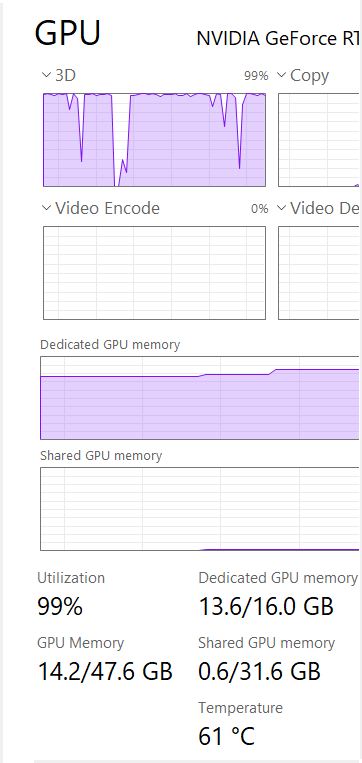
There is significant untapped optimization potential in your RTX 5090 when using Topaz Starlight Mini, assuming the model or runtime doesn’t yet fully leverage Blackwell-only features. Below is a feature-by-feature breakdown of the acceleration paths you mentioned — FP4/INT4, structured sparsity, Transformer Engine v2 — and how (or whether) each could yield real-world performance gains on the 5090 without sacrificing quality:
FP4 and INT4 math can dramatically speed up inference—up to 4×—because the RTX 5090’s Tensor Cores process low-bit operations much faster than FP16 or FP32. When models are properly quantized to 4-bit using advanced techniques like post-training quantization (PTQ) or quantization-aware training (QAT), they can retain nearly identical visual quality while reducing memory usage and compute load.
Structured sparsity works by pruning half the weights in specific layers (in a 2:4 pattern), which the Blackwell architecture can skip during computation. If a model is trained or fine-tuned with this pattern in mind, it can achieve nearly the same accuracy while cutting computation nearly in half, offering a potential 2× speedup without degrading output quality.
Transformer Engine v2 on Blackwell intelligently chooses the best precision (like FP8 or FP4) for each layer during runtime, balancing performance and quality. This dynamic tuning allows the model to run faster—typically 30–60%—by using lower-precision math where it’s safe, without compromising the final output’s fidelity.
If Topaz Starlight Mini fully leveraged FP4/INT4 math, structured sparsity, and Transformer Engine v2, the combined speed improvement on a 5090 could realistically be 4× to 8× over current performance — potentially even higher depending on model structure and I/O bottlenecks.
Here’s why:
FP4/INT4 alone can deliver 4× to 5× throughput on supported hardware, since 4-bit ops run far faster and use less memory bandwidth.
Structured sparsity could add a 1.5× to 2× gain, as half the weights are skipped in pruned layers.
Transformer Engine v2 boosts efficiency via smarter precision tuning and op fusion, giving another 30–60% improvement on top.
These optimizations are multiplicative, not just additive, when properly implemented. So going from ~0.5 fps to 3–4 fps or more on a 1080p to 1080p video is plausible without degrading output quality, assuming quantization and pruning are done carefully.
I hope they don’t avoid optimizing for current gen hardware to juice cloud revenue. That would be disastrous. MBAs could easily sink the company on this front. Optimized versions of Bytedance’s diffusion restoration models are likely right around the corner.
Topaz would want their cloud models to perform faster with these optimizations as well, because it would be cheaper to run the models. It wouldn’t make sense to hold them back from local use.
I think the cloud offering is for the “normal” human who just wants things to work. They don’t want to build a PC, they don’t want to mess with rendering times, no matter how slow or fast, they just want an easy interface.
This is different from people like us who are hobbyists who like to tinker. I have 0 interest in cloud anything. I like to run things on my computer or not at all.
I have “hundreds” of VHS, S-VHS, Mini-DV (and HDV) tapes digitized.
Another “hundred” videos I have on older digital footage.
Then I have a huge number of DVD concerts.
And so on.
Beside the fact, that it will take a “whole life” to improve all this footage with TVAI and afterwards do the video editing …
I never would do it over a cloud solution.
The huge amount of cloud traffic for up- and download including the time…
Then in addition the fees (I don’t want to calculate that for all my footage )
I rendered so far in the last 2 weeks a lot of older footage with my additional new RTX 5090 PC.
Yes, it is slow with only 0,9-1,0 fps. But in my mind better, than up- and dowload it.
I’m not worried. The reason we are all here investing time in the product is Topaz is still a product and user experience led company. If they get infested with MBAs pointing at incremental revenue charts that assume a static competitive environment, they’ll drop off fast and get replaced by another product led company. It’s the tech cycle of life.
Default output resolution for Starlight mini is 1280 x 720.
When I just run the default…I am getting pretty amazing results with old VHS and old 16mm and 8 mm converted media.
Some of this stuff was digitized at 1920 x 1080
Some at 640 x 480
Some at 720 x 480
If starlight mini started with media that was 1920 x 1080 then that is the resolution it will default to if I just leave it on the default.
But I see you guys talking about:
1x
2x
3x
4x
I am not a video professional by any means….I am simply an ex Infantry grunt…not the sharpest tool in the shed…just a guy trying to catalog all his family’s video from 1944 to present.
And I am a bit confused on the terminology of all theses X’s…and “upscaling” and what they might mean to me if I chose those options instead of the Starlight mini default. I realize that choosing a higher option would likely increase rendering time which is already horrifically slow.
Sorry my fault I got the responses mixed up. @ForSerious, when you said “My experience is that in a 40 minute video, there will be at least 4 instances where I feel like something just isn’t right,” does that refer specifically to Apollo and or to 3D CG, or is that referring to TL frame interpolation in general, even if you use Aion?
Also, does TL being built for DVD resolution or 720p, not 1080p or 4K, refer to TL overall, even Aion, or just some of the models?
Also heard about “blurry frames” and bad scene change detection, is that for TL overall, or just faster rendering but Aion will do it right even if it takes longer?
Lastly, chatGPT said maybe try DaVinci Resolve Pro Studio (v20), or Blackmagic Fusion Studio, or TrimensionDNM (in DVD/Blu-ray players, not available anymore). Also Winxvideo AI and
Flowframes. Are any of these options going to do the complete job? I.e.
Artifact-free motion estimation for at least 1080p if not 4k, at least not more than one perceptible artifact every 30 mins rather than every 10 mins
Interpolating 1 final frame before scene change based on the motion leading up to that frame, to keep the interpolated fps steady rather than dropping back to lower fps at cuts, but not blending it with the following frame from a new shot/scene. Or handling it whatever way is whatever is an imperceptable and smooth way to handle this.
Keeping audio sync very precisely, i.e. below perceptibility threshold even for eagle-earred people
Dealing with .976 remainder issue imperceptibly when interpolation to even numbers like 48.00, 50.00, 60.00, etc.
Keeping all original frames for 48fps
Option for 47.952fps (if that would work better than 48.00, if not then not necessary)
Topaz sounds like a great suite with many different features, but is there any chance of getting a better result in all/most of these areas with anything more dedicated to just FI?
I guess, we are all waiting eagerly with some hope
UPDATE:
The new Nvidia Drive 576.80 is already available to download and install.
I did it directly
I tested directly 720x576 footage. Unfortunately I don’t see/recognize any “boost” with Starlight Mini.
With my RTX 5090 I have always 0,9 - 1,0 fps
Perhaps I will later on do a new fresh install of the driver. So far I never needed a fresh driver install.
SECOND UPDATE:
I did now a fresh install of the new Nvidia Driver.
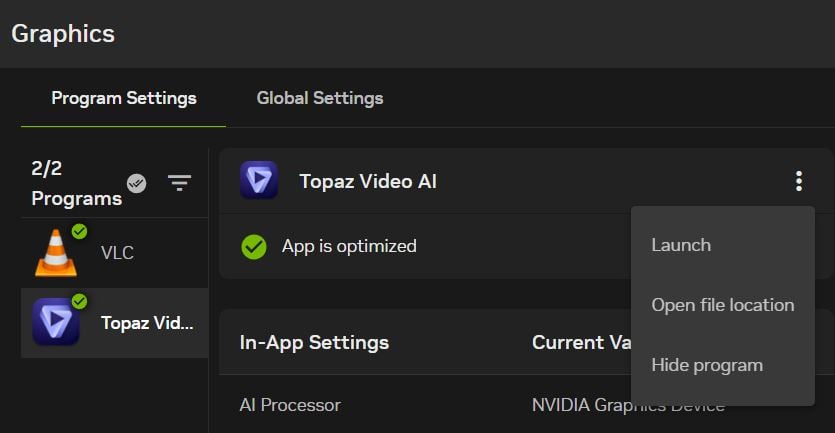
Also I recognized a “new function” in the updated Nvidia App to “OPTIMIZE” Topaz Video AI.
I pressed the buttom “OTPIMIZE” and the Nvidia App says “optimized”.
Hi John, 2x means doubling video size, when you have 480 pixels in high, 2x setting does 960, 3x does 1440 and 4x does 1920, as higer resolution is, as much more slower Starlight gets. But there is also a minimum output size. If you have for example only 320 pixels source and say 2x, it does not 640, I think it does then 720 or 960.
The “project” I am doing for my extended family is to digitize, catalog and store all my family’s video. Then put them on Vimeo and create a website with links so that anyone in the family can get to them for easy viewing.
Some of the material dates back to 1944 and the war….my dad actually had film of himself on Kwajalein Island during and after the fighting given to him by Army Signal Corps folks.
From about 2002 on….most of the videos really don’t need anything as the quality seems pretty good. Before 2002…. The media ranges from OK to terrible. I guess the technology changed for the better with digitized media about that time.
Virtually everyone in the family has iPhones and iPads. And the goal is to have good quality media viewable on these devices.
Vimeo seems to upscale anything at lower resolution to 1920 X 1080 with decent results as long as the original material is OK.
Starlight mini has been a god send….even though it is slow. The “fixing” of these older digitized media is amazing.
Question:
When I render using Starlight mini….if my goal is media no larger than 1920 x 1080 and good viewing on iPads….. should I just use the default or should I go 2x or 3x understanding the additional time for rendering may be necessary?
Stick with the defaults if viewing will be done on iPhones and iPads. The minimum output for SLm is 1080x720. If you start with something larger than that, I believe SLm will allow you to downscale (I haven’t tried that since I’m looking to upscale 640 videos). If you have decent source videos, you don’t need to use SLm. You can use Rhea or Proteus. They upscale and render much faster. In my experience SLm is really valuable if you have bad - terrible source videos. The time and results aren’t worth using it if the source is already good.
Then you open the Nvidia App on the left choice icons “Graphic”
(1 from above = Start, 2 = Driver, 3 = Graphic).
Under “Graphic” you see all the apps, which are recognized by the Nvidia app.
After install the new Nvidia app version and the new Studio driver version, I saw under “Topaz Video AI” the button “optimize”. I had to manually push the buttom to optimize.
All other apps are automatically optimized; I don’t no why (!)
If yes:
Is the new Nvidia driver version with all the improvements behind a “standalone thing” from Nvidia without any advantages for the current TVAI version?
Does it need further adjustments on TVAI to make the Nvidia improvements effective?
I don’t ask especially only for Starlight Mini, cause I tested today also other improvement models of TVAI and don’t recognize any speed improvements during rendering.
(I have a RTX 5090 running with Intel Core i9-14900KF 24x6GHz)
My 4070Ti on working: room temp. 28°C, gpu temp on average at full load is below 65°C, max CPU temp i get today was 68°C Not the fastest gpu, but the coolest and keeps very silent under full load. Entire cover is made of thick aluminum acts as an additional heatsink. Asus no longer does this on the Tuf 5000 Series the cover is made of plastic again.
Hi
I did a Bug-Report with the following problem right now as info
I have a RTX3090 / win10 / TVAI 7.0.1
I’m upscaling 320x160 to 720p with starlight mini
Problem:
sometimes 8 or 16 frames are missing at the end of the output-video
I have tried as input/output a video and image-sequence and its always the same.
One video that has the problem is 97 frames long and the output has after starlight mini 80 frames. Here are the last 16 frames missing and I know that always the first frame is missing.
I think it has something to do with the video-frame-count and the frame-steps (8 or 16) from Starlight mini?
 …
…
 and keeps very silent under full load. Entire cover is made of thick aluminum acts as an additional heatsink. Asus no longer does this
  on the Tuf 5000 Series the cover is made of plastic again.