I don’t see any of those screens for options. I have an Rtx 5070ti. Is this the reason? Maybe it’s just for the higher end cards.?
Studio Driver vs the normal Game Ready perhaps??
And can someone tell me why I want the Studio Driver?
Advantages?
I currently use the Game Ready on my main rig 4080.
It seems to work just fine with starlight mini.
Any rendering speed advantages?
I don’t think it matters. The studio drivers are supposed to be more reliable, but I am not sure about any speed differences. I always use the studio drivers because those generally have less bugs. Sometimes you’ll see a new game driver every few weeks, but the studio drivers are less frequent.
2 Likes
SLM is advertised for low-quality recovery. I haven’t been able to put it into practice yet. It only eats up electricity and my time. The Iris model does close-ups well, the SLM does small details incorrectly - people don’t look like themselves at all. Considering the processing speed, I choose the third option (Proteus+Iris). In this case, the picture remains as close as possible to the original. The only thing SLM does well is texts and numbers.
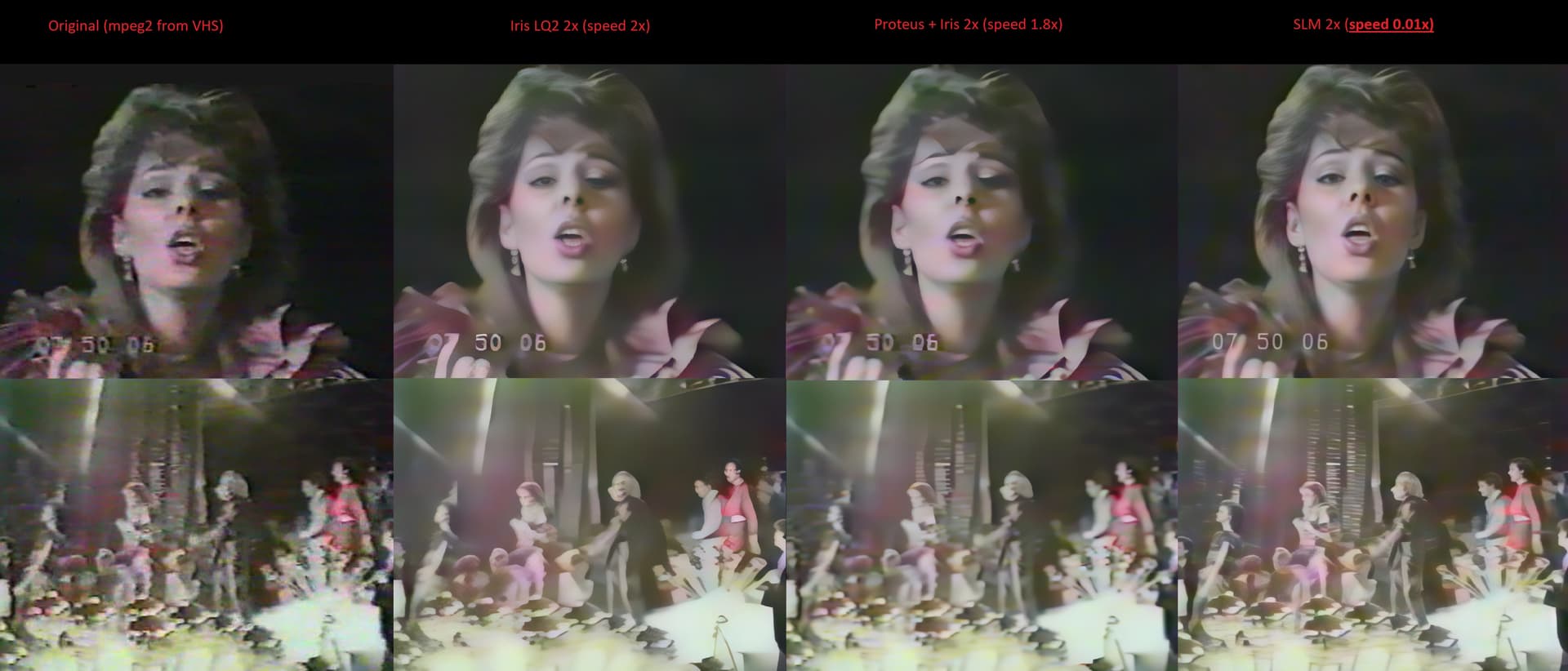
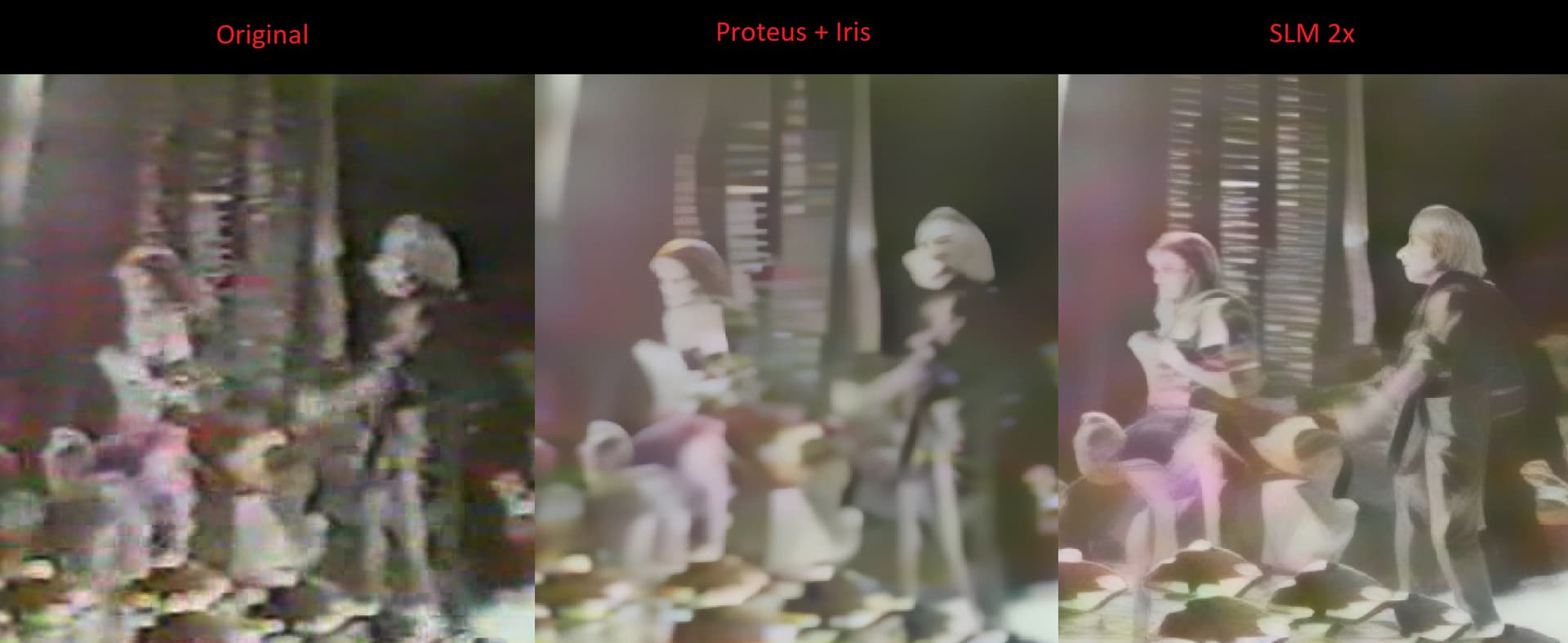
No, that’s not the case. I’m still guessing those upgraded optimize options are for the higher end card like you have (32g vram). Still not sure.
1 Like
I checked this now on my main PC, which has a RTX 4070.
You’re right: There I also see no “optimize” settings in the Nvidia app.
1 Like
Problem solved… Thanks. 
1 Like
Sorry my friend, I just disagree.
But it may be simply the material I am working with. Or for some reason SLM likes my hardware which has a 4080 16GB card.
I have tried out different models and settings in TVAI till the cows came home…..endless experimentation.
Wasted hours and hours trying to improve my old VHS stuff and old digitized 16mm and 8 mm.
Proteus, Iris…all of them. Rhea was the best but file sizes were enormous and the results from it pale to the simple fire and forget from SLM using the default render settings.
Now I am not a video professional nor do I have the trained eye of you folks. I am simply a retired guy trying to organize and catalog a ton of old family videos.
But the results are remarkable….at least to me.
Now render times are a total PITA …..but the results are just ….better….much better.
Again….at least to me.
And it’s not just me….when I showed before and after clips to my wife. Her reaction was “wow!”
I also use a GitHub tool called video-compare….
The comparisons blows you away.
2 Likes
This is real “hardcore” footage…very very bad 
I guess, there never would be a way to improve that kind of footage.
My experience over the last weeks with Starlight Mini is completely different.
I rendered all kind of low resolution footage like VHS, S-VHS, Mini-DV and Super 8 (8mm).
Yes, also these inputs are mostly “bad”, but not as “bad” as your expample 
Up to 90% of the scene clips are very impressive rendered with Starlight Mini. The other improvement models from TVAI can’t generate such results. And I tried a lot in combination with other models, with different settings over the last years.
Face get destroyed only on around 10% of all my clips using Starlight Mini.
Also faces in the background/far background are mostly not right reproduced. But, I don’t render the old footage in order to zoom into all the faces in the background
I’m very glad, that I can use up to 90% and it looks good…much more better than the original even the quality is always far away from HD/Full HD.
2 Likes
I wonder if us Mac users will ever get a chance to try Starlight Mini…
2 Likes
I have not enough knowledge about the grahic capabilities in Mac’s.
Probably it is the same thing like Intel graphics.
I guess, that Starlight Mini actual depends indeed on RTX cards to make it reasonable work.
You can improve results when you adjust contrast/gamma first but when footage is so bad, when nosie eyes and ears are made of a handfull pixels, there is nothing to reconstruct/improve, the only way then is invent something that does not exists, we don’t wont.
1 Like
Hello.
When a company is well-known to misled its customers, over & over again, for years with its magical marketing schemes, well, everything that is said from that company should be taken with, not a pinch, a spoon of salt; that could lead that company in very serious trouble; even from share- stakeholders.
I wrote the company directly and asked about progress for a Mac Version.
I got a nice response saying it was still being developed and was still in the company’s plans.
No promise or hint of a timeframe though.
They did say it is being developed on Apple Silicon and that it will NOT work on Intel Macs.
Given my rendering speeds on my Mac with something like Rhea. I would guess that Starlight mini will be even slower (if that is possible…LOL)….
But it will work.
I cannot imagine that this will not happen given the amount of actual professional video studios in the world that are heavily Mac….a majority of them from my understanding. For Topaz to not tap this market somehow seems unfathomable.
In the meantime….I spent $1800 of my hard earned dollars and built a “rendering only” PC based on a i7 14700 and a 5070ti.
Works nicely and frees my main machine for shorter renders and other things….and I still have my M2 Mac Mini for standard Topaz rendering and Final Cut Pro.
My wife says I have waaaay too many computers
Now if I was just smart enough to be able to use them to maximum advantage….sigh….
Until some weeks ago I’m also never thought to a “big” second PC only for rendering TVAI “things” in the background beside my main PC, which is only 1 year old and has a RTX 4070
At home I had also some investment discussions in a second PC
But I say to myself, that this was the right decision.
The negative thing: it get’s sometimes very hot in my home office
A workflow, there I put the second render PC in another room/a different location doesn’t work for me, cause in the home office I can easy switch between the two PC with a small display port switch, which switch also e.g. my wireless mouse and keyboard from on PC to the other.
you can use windows remote desktop on the second pc, no need for monitor mouse and keyboard with kvm switch, sure you must have network cable, or wireless also works  my horrible loud GTX 3090-24GB card is now working in the companys server room, the advantages of a system administrator
2 Likes
I also use this strategy.
I put the hot computers with the loud fan noise in the basement where I can’t hear them and it is easier to cool them, and I use remote desktop to manage them.
3 Likes
