Honestly, it’s scary to update, considering that each of your new updates inevitably breaks something. You need to hold your horses and test your software better before releasing it to the world. Your approach is somewhat unprofessional. Has the “Add Noise” function been fixed at least? I mean pre-noise, not grain. With you, it turns out that in order to get new opportunities, you need to transfer “all the risks of the update” and then roll back if something happens, which I don’t want to do at all. I just want to work in a familiar tool where everything works and gradually improves.
4 Likes
I’m sorry I purchased another year of updates. Everytime improvements are announced the UI goes to hell and it is like having to learn a new language.
Isn’t there anyone at Topaz who pays attention to the user Feedback?
Don’t keep changing the UI with each improvement in the program.
-
It took many updates to get the get back the use of [ and ] to mark edit sections, and now it is gone again. Yes, I know it is now up in the pull down menu with the I and O shortcuts. That’s ok, but keep the damn [ and the ]
-
Prior version took away the sound by default, and it was hidden under Codec settings - I wasted hours processing a video to find out I had no sound at all. This is incredibly negligent.
-
Now I set the Export name and it looks like nothing is happening. Finally after searching i find that it is being processed without any indication that it is working, because I have to scroll downn the page to get another Window to see that it is being processed.
I am very pissed off. You guys do not listen, and I’m not the only one saying this, so I’m giving Topaz a Grade of D. And that is being generous.
I used to be recommending Topaz to everyone in the past, but I’m not going to do that anymore. Sure the technology is Excellent, but the implementation is keeps getting screwed up.
23 Likes
I’m furious about that the UI got screwed up. What the hell is Topaz thinking? That we have the time to relearn how to do the things we have already learned and gotten used to.
What’s more it took months and months of feedback to get the UI to work comfortably and now it is F$#@ up all over again.
6 Likes
Hiding Export / Processing queue is DUMB!
9 Likes
Topaz just does not understand that easy to use software means you don’t keep changing the UI constantly.
11 Likes
There is nothing else on the market with this range of functions. That’s why the company can slip out, but a red line is crossed now. These mayour bugs are killing the product. I recommend install 5.3.6 and wait…
They must urgent jump now over their shadow and throw all newer development in the trash, even if it is painful.
We can live without a mplayer, when this can’t be fixed. Going back to 5.3.6 instead 2.6.4 is maybe more realistic, fix the few bugs there + update existing models. Stop new feature integration until all is stable. That’s it, really not that difficullt! Topaz has the staff to do that and we, the community, would be happy to help you with that.
5 Likes
I vehemently dislike the new layout. More intuitive my foot. It’s mass contusion.
8 Likes
I’ve not renewed since last year and I was a user since V2.X when I first tried it. I still have some V3.3 or V3.5 installed on my desktop because it mostly works, and has the usable preview system etc, but seeing three more UI revisions and countless bugs remain, plus missing features has ruined my perspective on this software. I’m not extremely active here, but do check my post history to see what I’ve reported and what versions I’ve given feedback for. I was happy when odd bugs or new features were enabled in bugfix patches on the 3.5X and 4.1X series, but knowing a lot of those improvements could or have been undone is frustrating.
As a ‘current’ customer with an expired license, there’s no point in even getting offered better models if we can’t even use them reliably. I tried the V6 in beta, and I gave some feedback but I doubt anyone noticed it or took into account the confusing issues and non-obvious quirks with a general lack of feedback when things should be clickable or not too 
The last update that was of any note performance wise was again on the 3.x branch, was a pretty good 20-30% improvement on my RTX 3000 (3070/3080) and 4060 laptop GPUs. It’s hard to judge if the new models are even better for cleaning up 720P medium to low bitrate videos to a better 1080P/1440P output, has anyone done a decent in-depth comparison vs the past 3 / 4 major releases and their ‘stable’ variations?
I’m just going to have to try out new AI based video upscaling software as the development direction has continued to ignore “stop changing the GUI, and breaking things” requests for 2 years now. The 2.6 UI was dated and inflexible, sure, 3.X series showed promise with decent functionality and interaction, plus some hint of care being put towards optimizations in the video player, ease of previews, frame counter based clipping too.
But each ‘major’ release keeps stripping the good things out, and wasting my, and other folks time with re-learning, re-reporting old bugs brought back or new bugs, hoping we don’t have a new way for our SSDs to be worn down by excessive storage usage etc (Can’t we just… have an option for a RAM drive for us with >32GB of memory especially for previews?), not to mention this “Pro” nonsense removing the multi-gpu encoding feature I, as an early adopter, paid for and had available on my older software. I don’t understand the logic behind it, why would anyone, seeing the software in this state (again) consider it “Pro” material given the decent prior releases that worked alright enough, until the updates happened and then didn’t (and did, and repeat)?
I don’t know how long it’ll be before all the nice small details and options in the UI are restored, if ever, and/or we see clear evidence we’ve got better models that aren’t just marketing another funding round for unaware folks, who’ll be taken on another UI swap and very very quick alpha testing spree, it’s not fun either way. Can’t recommend this, or if I do, I’ll tell people to buy a subscription once if there’s a massive sale, then do musical chairs until they find a version that works best for them. As a semi-competent user and computer enthusiast I’m annoyed doing it myself, so for a less savvy and understanding person trying to enhance random videos, I feel that they won’t get a great impression.
11 Likes
Every time they make an announcement that they’ve changed the interface again, it sends the message out that they can’t design interfaces.
Every time they do it they claim it’s a main selling point. But if that were the case previously then why do they keep changing it? With each subsequent change their marketing always insisted that their new interface overhaul was more intuitive than before, but when it’s being changed yet again the message is that evidently it wasn’t.
Surely functionality should be priority one, if they’re not happy with their own interface then have the correct talent take their time on working on it and when they’ve got a great interface stick with it.
You don’t get top tier software perpetually changing their interface. On the contrary apart from a minor tweak here and there some of the most well used and popular programs haven’t changed their interface for years.
7 Likes
I hate to dogpile on here, but I am a fairly casual user of the Topaz products, and as such I haven’t contributed much to the community. But I bought the Topaz suite last year when I finally got a PC capable of running it well, and even got some upgrades specifically to help with Topaz. And it does a lot of things really well, some decently well, and sometimes the results are scary. But it’s good software that I’ve enjoyed using.
But I’m posting mostly because my sub expired in November, right as the VFR bugs started to appear. I decided to wait through the Black Friday sales to see if anything positive came of that. Then I heard of the December sales, so I figured they’d definitely have word of a fix or something. But instead there’s version 6, which seems to be mostly a UI overhaul and based on these comments, is not going over well. I have worked in IT for 25+ years. I understand this stuff is hard and takes time, but it seems absolutely tone deaf to release a massive new version with the same critical bugs people have been reporting for over a month. The responses from Topaz aren’t feeling particularly encouraging, since they mostly take the “We can’t replicate this” tone and don’t seem to have a lot of urgency.
I basically want to support this software, and want to renew my sub, but reading these posts and seeing updates coming that do absolutely nothing to fix CRITICAL bugs is really disheartening. This software can do wonderful things, and the developers certainly have made it do some magic, but it certainly seems like it’s hit a critical point where the future direction seems a bit wandering.
I feel like the best option for me is to stay at 5.3.6, save my money, and come back next Black Friday and see if there’s consensus about a new “best of what we got this year” version to upgrade to, and that’s sad. I wish the same effort was put into polishing the edges of this software as coming up with Pro and Cloud pricing, or UI changes that break people’s workflows, and sincerely hope the rush to maximize profits doesn’t end up killing the product’s reputation.
I know this is of a “this isn’t an airport, you don’t need to announce your departure” tone, but I think the higher ups need concrete evidence that this new direction is hurting them and losing customers, no matter how small/casual they may be.
11 Likes
I really dislike the new layout… it is not as intuitive as 5.5. I could not find the loop toggle, so I assume it has been removed? If so, bad move. I was so unhappy with it I reinstalled 5.5, I hope you reverse some layout changes, and hopefully learn to get user input before you set it in stone.
10 Likes
This is how I feel. They always seem to manage to break something. But rather than promptly sort out that issue in the next update it’s almost as if they’ve completely forgotten what they did when they got it right before it broke. That sounds crazy but it’s how it feels.
I see things similar to you in that I imagine that it will probably take about 6 months or so from now until we arrive at an acceptable version in terms of a step up.
It’s difficult to even ascribe the status of beta release to each update. Because that would imply that previous issues have been addressed and the only concern would be issues with new changes.
1 Like
It has never worked that way. You have to render a preview to see how it looks.
1 Like
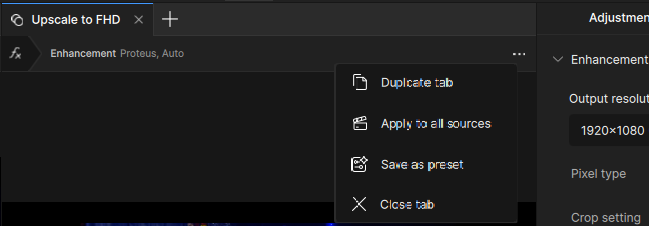
Among several UI issues (choppy play, original and rendered video not synchronized, …) I also have blurry UI text (on non-Retina display on macOS) in a […] submenu:
This would be awesome, Blending/Overlay is something that i do sometimes with AviSynth.
The Problem (dont know for how long, but i know that Video AI 2.6.4 doesnt do that) is that Video AI does not directly Create a Output Clip, or copy the allready processed Frames to the Memory Buffer from the GPU. (that’s what AI 2.6.4 did. Advantages: It was super fast, and we were able to the the processing in Real Time. Disadvantage: Preview Len was limited by the Ram of the GPU).
Newer Versions create a Ton of PNG Files first (Temp dir on C: or manualy selected Topaz Work Directory) and then join those PNG Files with FFMpeg to one Clip.
If Crash Recovery is activated, then 2 Sets of PNG Files are created (if i guess right. I have to guess, because 1-3 Words from each line in the Description are cut off facepalm Because Gui Coder doesnt allow the Preference Window to me moved, and the PopUp Info Window doesnt check the Desktop Size, so that people with a Horizontal Res of 1280 can see anything too) for one preview.
With Overlay/Blend 5 would be created.
SSD’s are much more expensive compared to 2023, and any write process reduces the Life Time from a SSD.
1 Like
This is a very good feature request! And it could already be implemented with an adaptation of the secondary pass. Alas, the latter is broken too, so I guess neither is going to happen.
4 Likes
Thanks for the info. I’m sticking with V5.3.6 for now. It’s the last version with constant FPS with Prores (my favorite codec).
8 Likes
v2.6.4 was a lot (all postive), but not fast. It would tax my CPU/GPU (3080Ti, at the time) only minimally. They definitely need to bring back v2.6.4 Preview, though.
1 Like
I don’t know to what this refers to, but if you mean, that there is not one other AI Video Tool, with that functionality then you are right.
But if you mean Video Processing in general, then i must correct you. Even old Virtual Dub can do way more diverse things, and when AviSynth comes into the game, then any Video Processing Software out there can go home. The possibilitys of AviSynth are basicaly endless.
Just for denoising alone Avisynth has at the moment 53 different Filters, and at least 700 other in Total.
When it comes to pure upscaling the AI Upscaler from AviSynth is much better (and way faster) when it comes to pure (so no other Processing, just dirty Upscaling, without any Noise Removal and stuff like that) Upscaling.
Video AI will always clean up Noise, even with “Artemis Aliasing and Moire” and behave different on different parts from the picture (effect on hair is way more visible as on other parts), especialy when distance come into play.
The upscaler from AviSynth just do what it names suggests.
It upscales, and keeps as much Data as possible. Output on @ 2x has the same sharpness and detail as when the Clip was watched at the native 1:1 100% Resolution.
No Blur Out or Aliasing as with other resizers like Bilinear, Cubic, Spline, Lanzos etc
There’s a bit of more dogpiling going on today, for sure.  From yours truly too. The other reason being that 6.0 is no longer getting criticized by a handful of beta testers, but is now the main release version, for everyone; and, because it’s a release version, replaces your existing v3.5.6 version (aka, your ‘last known good’).
I’ve gotten similar responses on the VFR issue.
Same. I am constantly looking for ways to rationalize why I should extend my license (come January). The VFR bug makes me waver, though. I mean, I’ve been a coder for over 40 years (from Assembly to C++). Not saying I would be able to solve it immediately, but even if you had never seen the source code before, there are only so many places you’re doing something with frame rates; so even a simple text search would get you close to where you’d need to look. Then there’s the simple method of setting debug points. Does it occur after loading the clip? No, check. Does it occur after model X has been processed? No, good. Does it happen when having output the file? If yes, which models? Etc. Point being, this isn’t higher math. Tedious, for sure; but it should take a coder – especially those who wrote the program – a few hours, tops, to at least pin down where it occurs (which usually means you have de facto already solved it). Which, tl;dr, to me signifies they’re not truly looking to fix it; subsidiarily, they have other priorities. And that is bad.
6 Likes
