I see it the same way, the UI was ok before - it’s better to make more and better models, that’s really important!
6 Likes
The UI was the best in v2.6.4. It had a simple, elegant (and working) Preview, where you could click anywhere on the processed timeline. Easy, pristine and effective. They began to butcher the UI ever since, and utterly ignore any feedback – despite promises to the contrary in the topic even. And now there isn’t even a way to Preview externally any more.
Take the v2.6.4 ‘shell,’ put in the newests models, and you’d have a very good, and working v7. But that would be too logical.
14 Likes
I won’t be trying this, The last two updates you released are bugged to death and I don’t have time to keep beta testing your software. 5.3.6 was the last version that actually did what it said on the tin. I will be watching with interest the feedback before my licence expires next April but as it stands now 5.3.6 does what I need. What I want is real time preview with stabilisation, and most of all an increase in speed, I don’t care about tabs, these are trivial and unimportant, the Ui is fine as it is, after I finally figured out how to ensure batch processing applied my preset to all selected videos and not just the first one I’m happy with it, I use it daily at work and will not risk it going wrong.
11 Likes
Im a new topaz user but ive noticed several red flags with this company already. Thanks for these comments. Ill be skipping this version, and am looking forward to another company releasing a better product. For now, this is the only pro upscaling software i can find.
9 Likes
Topaz, you broke the UI that didn’t need fixed. Where do I find viewing previews in an external player? Where’s the time elapsed counter, time remaining counter? For all that is holy, give us a Classic UI option in the preferences!!!
Downgrading right now. 6.0 SUCKS!
17 Likes
Let’s see if I understand correctly here.
You have a known broken and dysfunctional program, you keep pushing and selling a know broken/dysfunctional program and somehow, yet another GUI change took priority???
Since version 5 this thing can’t produce a working h265 mkv file, it’s been repeatedly confirmed by support staff, I have 6 months of support emails telling me you guys are aware and are working on a fix but don’t know why it keeps happening… And rather than fixing a super critical known issue, you update the GUI, instead, again? Did I understand you correctly?
15 Likes
Check out “neofootage AI”. It’s a whole other level.
3 Likes
If you ever worked in a big company (no matter if it’s in the service sector or production sector) then you know, that there are always positions (mostly 1-2 guys)
that have one Job. Try to make things more efficient with other words.
More Output in the same Time = More Money.
Now if something is highly optimized, they still change things around, to justify there
Job in the Company. So they introduce new stuff (like stupid outlines, where the trashcan has to stand ! Like if the workers are stupid Kindergarden Kids, and dont know it, without the stupid Outlines) that should make “things better” but in reality, they just change something, so that something was done, no matter if it makes sense or not.
Example:
a) Until Windows 10 = Taskbar Grouping was possible, but not the Rule.
b) Windows 11 = Now it’s the Rule. Option Gone ! but hey, the guy can say that something was changed, and can explain his existence in the company, by a change.
c) Next Update of Windows 11: Option is back. Now the guy can say again that something was changed, and can explain his existence in the company, because of a change, that would be unnecessary if he doesnt changed “b)”
5 Likes
It is Xmas time right? Not April Fools? This has to be a joke. Tried v6 and in my 20+ years experience in TV and film production I have never encountered a program so full of bugs and unnecessary UI elements. The UI is so damn convoluted it completely and utterly wastes my time. It’s so confusing the program itself doesn’t even know what it’s doing anymore. It crashes all the damn time! How the hell did you think this was good enough to release? Why did you think paying customers wanted this extra bloated crap? Everything should be simple, clean and quick. For crying out loud listen to your customers! Me personally, I just want to simply upscale and enhance footage with just a few clicks with the ability to quickly preview minus all the bells and whistles and unnecessary use of system resources. I also expect models to be improved and updated because that’s really what everyone is expecting and paid good money for. Congratulations Topaz, you managed to not only have dug your own grave but also buried yourself and stuck a tombstone on top to finish it off. Back to 5.3.6 for me.
23 Likes
Wow! Color grading tools?! Audio drift correction???
6 Likes
Yup, I’m inches away from canceling my TVAI license, come Jan 2025. As they say, fool me once, shame on you; fool me continuously, shame on me!
4 Likes
Thanks for the tip, will check it out.
1 Like
We haven’t had a working version since 5.0.4
5.3.4 is not bug free, it has real codec issues
This app should be free as it has been turning into a mountain of bugs for months
Luckily it can be
This is insane and unacceptable, to be clear
At least 6 months of wasted license fees, either by being a beta tester with crappy coded files, or by waiting for unrequested and totally useless features.
What’s the next feature, a color theme between blue, red, yellow, green, stripes, plasma? …
Really … stop being “excited” with such release, feel rather “ashamed” and check your final jobs
The beta thread closed, and sudden 6.0 release with hype on main web web, this is the best meme of ending 2024

11 Likes
There exist 3 Types of Coders.
Type 1 ) Realy skilled ones when it comes to raw Code ! (but often they are not very skilled or exicted about writing a Gui. They prefer the Functionality of Code.)
Those know how to write raw, fast and tight code
(these guys are mostly the ones who create Libs and throw it out in the wild) for something very complex.
People like that, can write a AI Engine, a Codec or something like the FFMpeg Decoders.
Type 2) Gui Guys/the average C++ (or another widely used Coding Language, with a Ton of pre existing Libs in the wild) Coder.
That just know how to use the Function from a pre existing Lib, but is not able to write his own tight, raw and fast Lib.
They know to drag and drop (so they never had to memorize and realy learn, how a
Event System works) a GUI together in a few minutes **
and integrate foreign Libs (with a Ton of Code that they dont understand) just to use there basic Functions (so a ton of needles Code and Functions are built in)
The Problem with foreign Libs.
Blown Up Code → Harder to maintain & harder to understand.
Often way more Code (functions) inside as needed.
More Code = More possibility of bugs.
Result = 700+MB (Compressed) Tools, that do less, as some 11 MB Handcrafted Tool (VirtualDub2)
Type 3) Coders that can write a good GUI, know how to use the API from the OS (so they know how to use VFW. With VFW any installed Codec on the System can be used to compress.) and try to just use there own Code, or Libs that they fully understand, or they can shrink down to the Functions that they need and understand.
If a company got to much from Type 2, and just one specialized Type 1 Coder, then they will have sooner or later a Problem. Because they must rely on a ton of foreign Libs and are dependent from those.
If the Foreign Lib has a Problem, and they dont understand the code, then they have no other choice as to wait until the Type 1 Coder of the Foreign Lib fixes the Problem.
Things like the fact that Video AI creates a Ton of PNG Files (which is bad for the Lifetime of SSD’s) just to create a Lossles Video File, and the fact that most Video Tools (even the most basic ones) out there can use VFW for Export, and Video AI not, let me believe that Topaz has 2 (at best) Type 1 Coders (one for the AI Engine, one for the Installer/Deinstaller), and to much Type 2, and 0 Type 3 Coders. That’s my personal Opinion. Free Speak ^^
** but forget very obvious things like: If Zoom is set to 200% and View is on Fullscreen State, and the user slides the panels back, then the Preview Picture should still be at 200% and not shrinked down, to some weird Size. So that the user, must click on another Zoom Level, and on 200% again facepalm
1 Like
This is all I NEED:
- Ability to process a video;
- Watch it while it is being processed;
- Click on any section in the processed timeline, and watch the result (in sync with original);
- Ability to export to a non-broken, non-VFR output;
- Telling ETA, speed and percentage done;
- Ability to export to a non-broken, non-VFR output;
(Yes, I mentioned the latter twice, but some things bear repeating.)
What I do NOT need:
- Convoluted tabs, disjointed Previews;
- An UI that gets more and more confusing to navigate;
- More and more useful info that gets removed from the status line;
- Models that get no longer (materially) updated;
- Messages about exciting new stuff, that’s even more broken than the previous versions;
- Promises of bug fixes that never happen.
Then come back with “We’ve heard your feedback.”
19 Likes
I’ve been reading what others in here have been complaining about for a long time and took it with a grain of salt.
As of right now I’m seeing myself more on their side.
The only thing I see is what seems the need to attract more customers into purchasing a new WhizBang.
You’re doing what every other major corporation starts to do, take the base completely for granted.
These people including myself are being treated more like beta testers. Ya’ll don’t seem to care about anything other than making it look sleeker and more attractive for the next person you can convince to purchase your product.
You do understand that this’ll only get you so far right?
How could you come up with a new version number that doesn’t add any real functionality? The core use of this product is A.I video enhancement. How could you base a numerical version upgrade based on the GUI? This didn’t change anything for the better. The problems from last version are still there.
At least in CA. there are existing consumer protection laws like the California False Advertising Law that could potentially be applied in situations where a company misleads consumers about significant updates or changes by manipulating version numbers in a deceptive manner.
There’s a plethora of history of companies improving their software and systematically increasing the versioning to reflect it. You increased it while giving the impression of a significant increase in it’s capabilities, enough so that it would justify a versioning change. All you changed were aspects of the gui. Nothing to the A.I that i could find, nothing in fixing long standing bugs…
What new things have improved with the A.I or any other part of the enhancement process that would call for a versioning change?
I’m really starting to feel duped, this is the reason I stopped supporting Stardock Software. They do the same thing… they add a little flash and change the version. No new functionality or improvements… over and over. Trying to find a way to attract more people with the announcements, as if it’s some major improvement… come and get it!!
17 Likes
Version 6.0.0.3 BETA works better than the final version 6.0, in this latest version 6.0 the video preview still doesn’t work, it only shows a black screen. It’s better to use the beta version for now.
https://downloads.topazlabs.com/deploy/TopazVideoAIBeta/6.0.0.3.b/TopazVideoAIBeta-6.0.0.3.b.msi
2 Likes
Just some feedback on the new UI:
- I do like the thumbnail/preview strip
- Interface generally looks nice and clean
I’ve attached a screenshot with some suggestion notes for the UI. I think it may be a deal-breaker for many to not see the current export status unless they click on the export queue. The current in-progress export should always be visible.
I haven’t tested actual functionality yet so I will reserve comments on that for later.
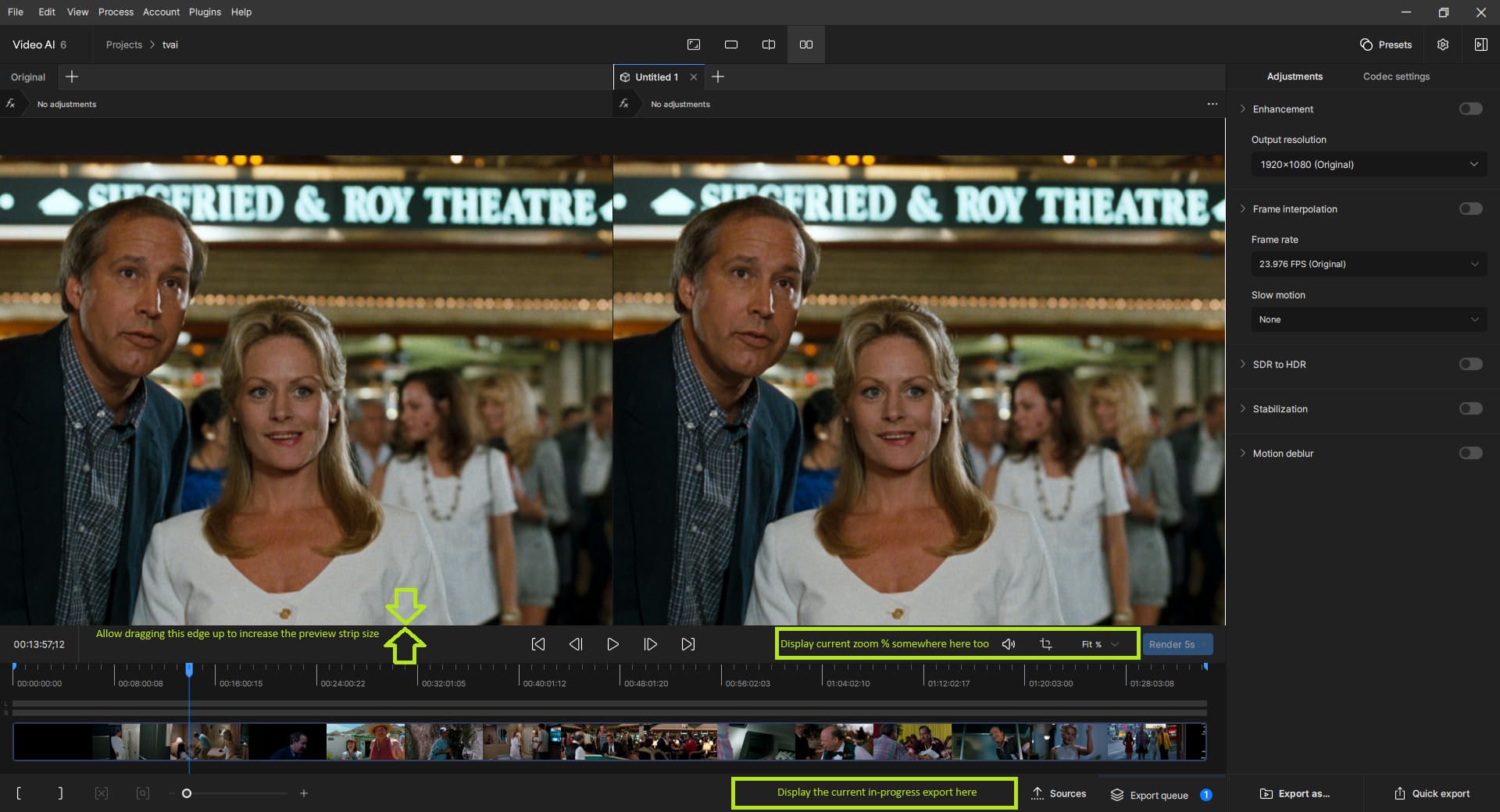
Thanks
4 Likes
Imagine this.
New feature! MODEL BLENDING. Like the way the Proteus model handles background people and elements but want Rhea or Iris for foreground people only. Well, MODEL BLENDING [nicknamed Mixo] uses AI to create a Depth Map so that 2 separate models can be applied and blended. Primary model being foreground and Secondary being background. With the use of a slider you can adjust how far the foreground model is applied to the video according to the depth information being generated. Want Iris to only affect foreground people only, set slider to 100%. Want background people to have a bit of the Iris effect, set slider to 50%. Only want Iris to slightly enhance the foreground faces, set slider to 25%.
Could you do this anyway? Of course, but it would require exporting 2 versions out of TVAI and applying the process in say DaVinci Resolve using its Depth Map feature as an alpha map. But imagine if TVAI did it all in one without having to create multiple encodes!
Now something like that would be a great feature to add and I’m sure a lot of users would actually use it too. I’m really not seeing the appeal of bloating the software with features like tabs which seems to cause more confusion rather than help, especially when dealing with a lot of really short clips that run for seconds. I’m not fond of jumping around into different sections of a program and having to bounce back and forth for simple tasks.
11 Likes
I am now realizing that this feature has literally never worked for me. I didn’t know it was possible. I thought you just had to hit estimate, take your best guess, then hit render.
Are you guys saying I should be visually seeing the difference in the image in the preview window as I am changing individual settings, before hitting render preview?
1 Like
