No, Topaz hasn’t taken issues seriously for a long time. I get the feeling that it’s pure luck at this point if a software version happens to work somewhat properly.
7 Likes
I think the guy who wrote the GUI seems to want to win the World Title for
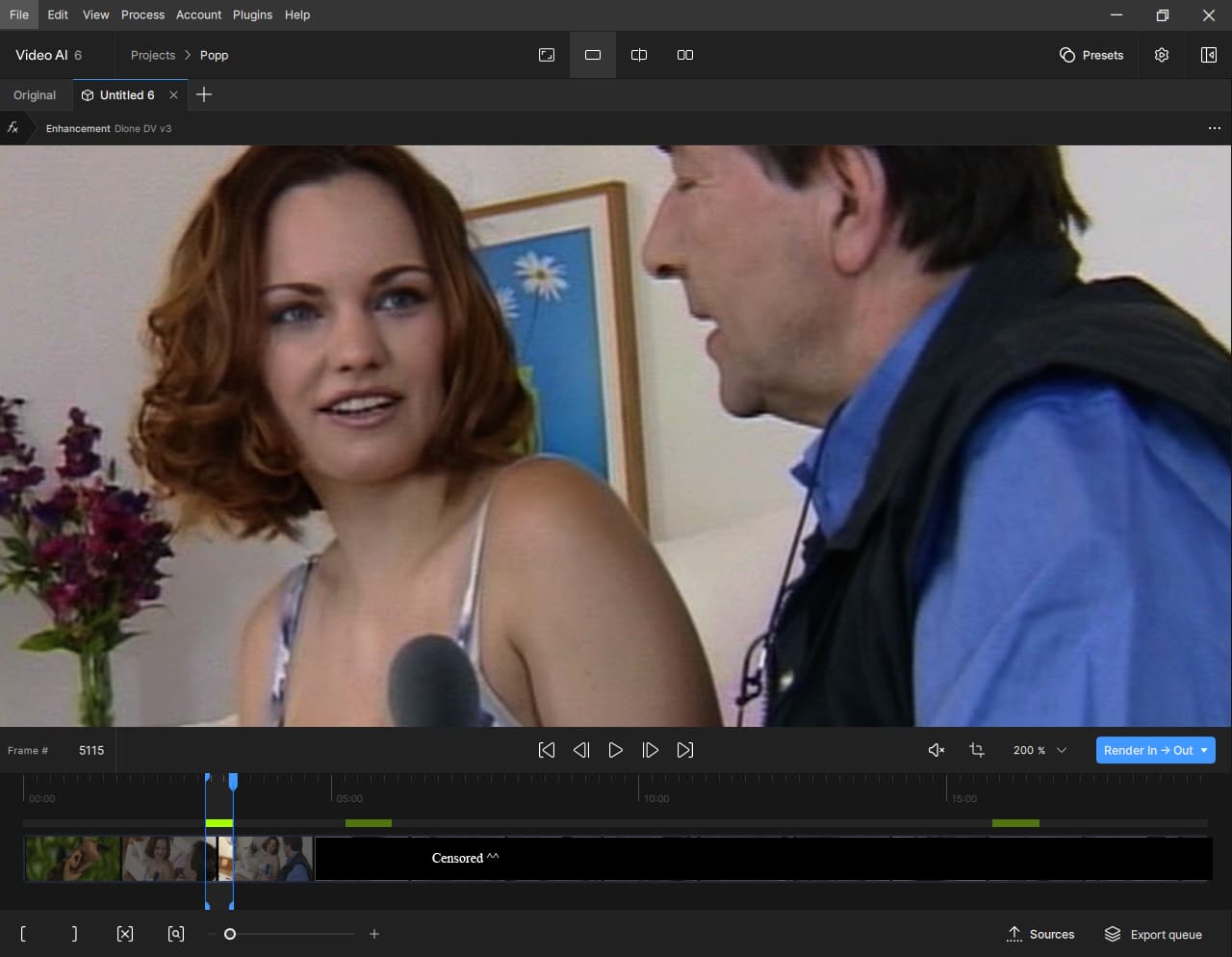
the most wasted space in a GUI !
This is how it looks on my 1280x1024 19"
This is how it would look like, if i wrote the Gui
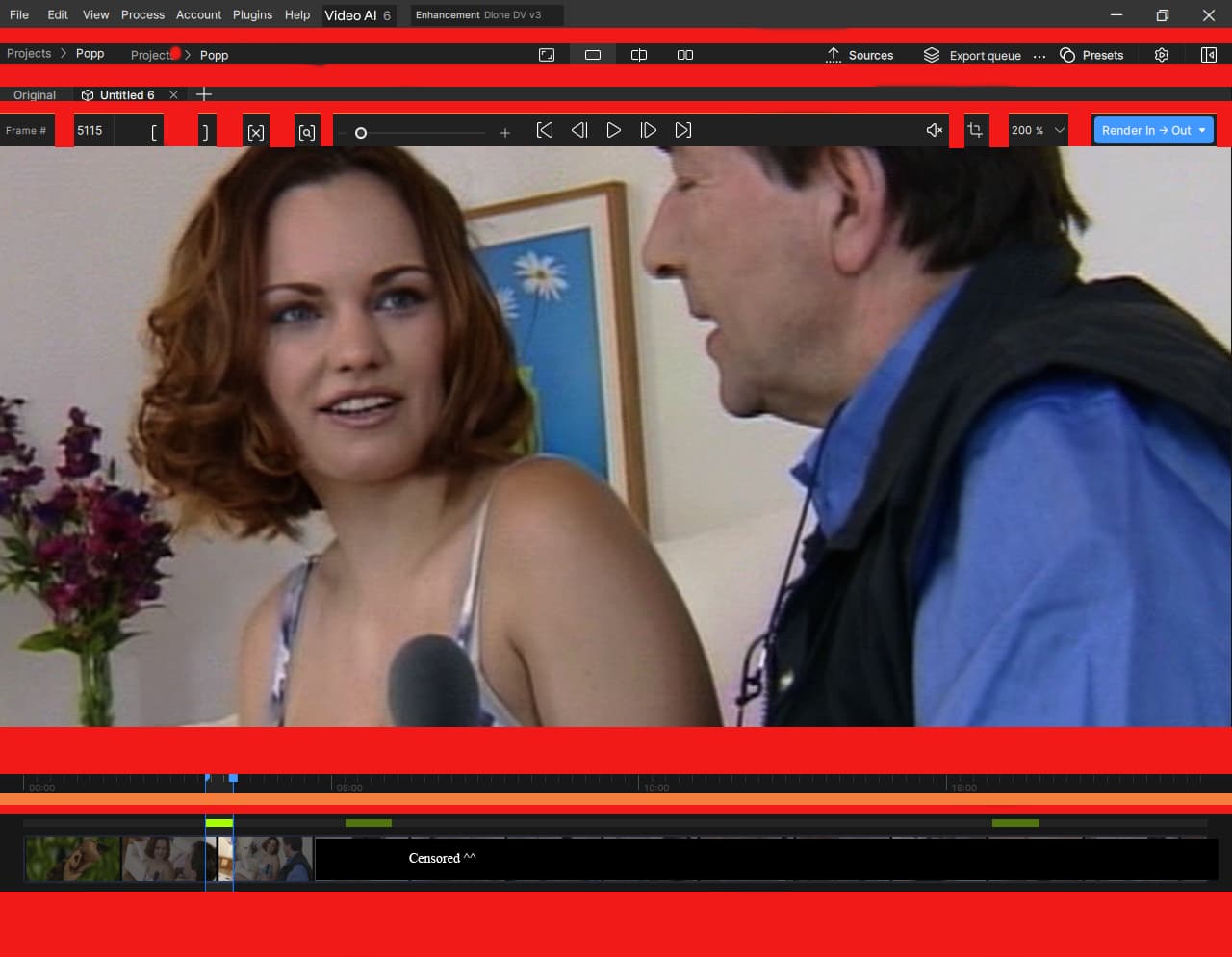
Red = Complette Gone ! So more Space for the big Picture !
Orange = Gone and Numbers over bar, moved 5 Pixel to the top !
Most people use 1920x1080. So they have just 56pixel more Vertical Space, compared to me.
So they have the same Problem: To less Vertical Space, because of a ton of wasted space and cluttered Icons !
Placing as much Icons to the Top is better, as to the Bottom.
Mouse movement to the Top is much faster, precious and less tiring.
@ Gui Guy ^^
Changing the Title Bar/Menu in real time needs one line of code !
All what you have to do, is to get the PID from the Topaz Window once when Topaz is started, then change it when another Tab inside Topaz was clicked, so that the active Model that was used, is visible.
It makes only sense to >not< place the Model Info to the Title Bar, if compare mode is activated.
EDIT:
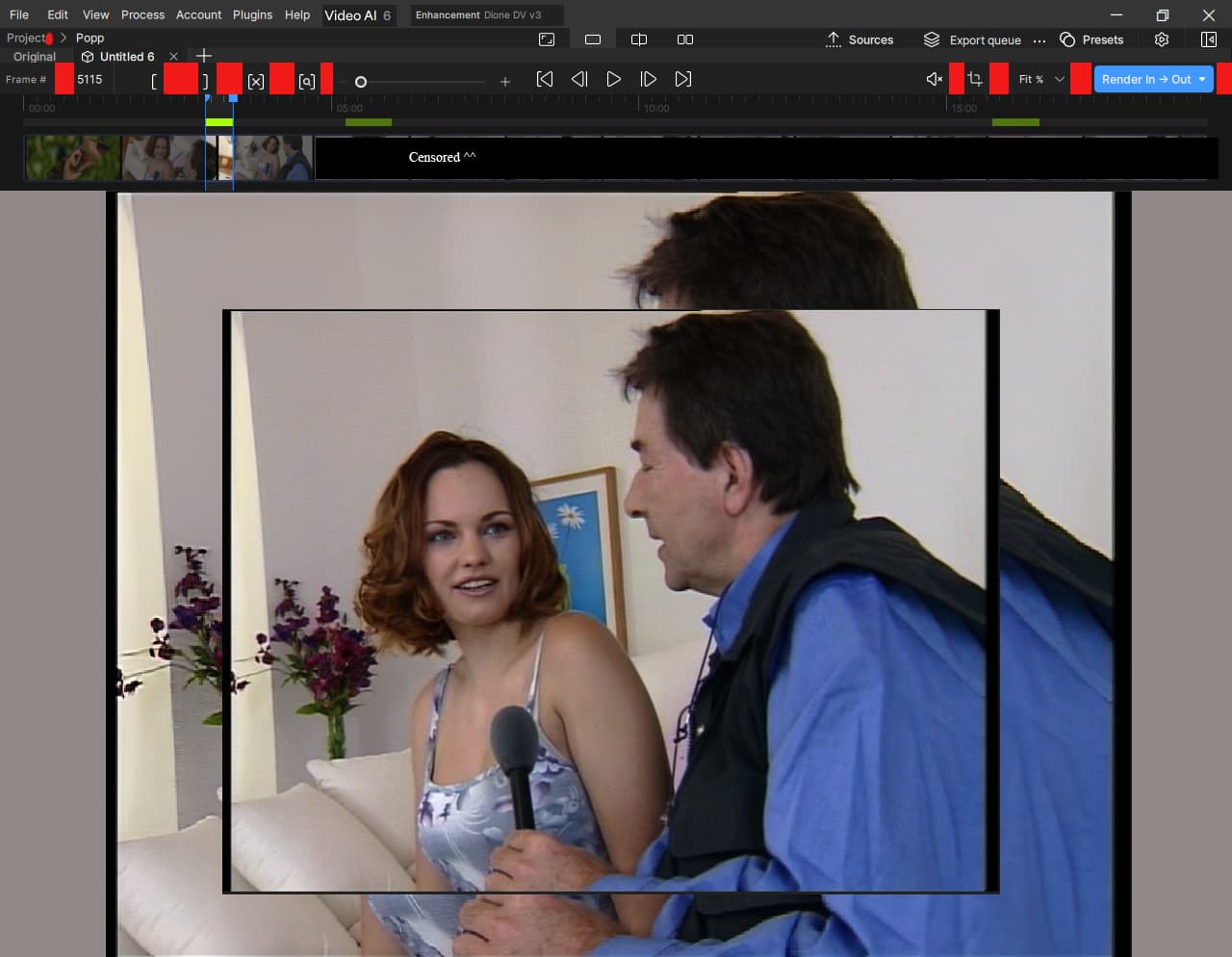
32% More Vertical Space for the Video !
14 Likes
I noticed you can not view the preview progress … how do you even know what previews are being encoded and status of each preview for v6? .
It doesn’t even honor your Render In and Out markers for a preview.
4 Likes
One Step forward, 2 Steps back. It’s always the same with the Gui, and sometimes i think it’s on purpose (i know coding for over 20 Years, and the failures that i see in the Gui and the behavor* are failures that people without many experience do or on purpose) so there will be no definitive proper Version ! Keep Updating ! and Updating ! Pay and Pay !
8 Likes
Yes, who’s watching the watchers? 
4 Likes
There have been ‘definitive’ versions. Usually the last one in a series (aka v.2.6.4, v5.3.6); but everytime they’re nearly done, some upper managment dude decides they need to start from scratch again with the UI, and then everything degrades to 1.0 Alpha again.
All of this has happened before, and all of this will happen again.
12 Likes
Can you try creating a new project file:
File > New project
Let me know if that solves the issue please.
I just want to be able to actually see the preview. I don’t think that’s a minor bug fix when you can’t even see how what you’re about to do is going to make your video look like.
This is so crazy that there’s been 3 releases since it started and it still hasn’t been fixed or even given an ETA to a fix.
8 Likes
You will be banned do not use these kind of words I got banned because I used that some software is good for idiots like me and professionals or I named 365 colourdirector in stead of NLE … I need Topaz Community language documentation only banning me it enough reason not to renew or purchase any topaz license
Yes that is very frustrating as before I could tell the speed that the render will take and if too long I will change the settings. Also no option to open the preview either, just have to go to documents folder.
3 Likes
Seeing VFR not fixed really does suck; it’s not namecalling: it’s just a situation that, well, sucks.  And that is really sugarcoating it. Because, frankly, it’s getting weird. I tried humor, seriousness, and friendly nudging. Nothing seems to make one iota of a difference, though. I mean, how are we supposed to create HQ videos like this? It’s like driving a car that can’t keep a constant speed on the road. So, I’m not even going to install this. Fix it, and they will come.
Okay, back to humor again:
7 Likes
I have to say I am very disappointed that there is no increase in render speed mentioned. As upscaling to 4K is so very slow I would have thought that would be the main priority of overhauling the app, as currently I try to find other ways to upscale to 4K mainly using Davinci Resolve, for which there are currently no Topaz plugins that work either! 
2 Likes
2.6.4 is still my Fav, still using it most times (because it use space much better ! and doesnt wear out my SSD by creating a ton of PNG Files first, just to make a Video after AI is ““Finished””)
Dont know the problems from Versions after 5.3.6 because i realy use AI >2.6.4 just for Deinterlacing (when it’s the better choice as QTGMC, which is rare)
I remember that in AI 3.X there was some nice list view, where people could fill the list, with different “From Frame X to Y” Entrys, which makes much more sense, as it is now.
My Experience is, that there is not one sweet spot setting when it comes to Deinterlacing, or progressive material with Blocking & Noise, that doesnt create weird AI artefacts (Even if it’s just for 3 Frames, i can spot the artefacts on the skin)
you just have to Process a long enough part, and you will find something, that just doesnt look right.
So what makes more sense is to process different parts from the Video with different Settings, which doesnt work good, if there is no Listview (with a Row Height size that makes sense…dont need a Listview that i can see from the Moon)
This is how i would do it.
Just one List ! No Hashmap ! (when people are done, and found good settings, for any Frame, they select what they want, and add it to a Huge joblist !)
Frame 0 - 2000 | Tag: Stable | Model Artemis, Settings …
Frame 2001 - 2005 | Tag: Extreme Blocking | Model Proteus4, Settings …
Frame 2001 - 2005 | Tag: Extreme Blocking | Model Proteus4, Different Settings …
Frame 2006 - 2100 | Tag: Stable | Model Artemis, Settings
…
…
The Problem with AI 4 and 5 was, that they used a List * not for Frame X to Y, but
for the Settings itself.
Which was confusing.
- Artemis V13 - Middle
Frame 0-200
Frame 506-600 - Proteus V4
Frame 501 - 505 (Extreme Blocking Section) - Artemis Strong Dehalo
Frame 201 - 500
_* What they used in reality was a Hashmap (they are very fast to access) were any entry in the Hashmap got it’s own Sub List.
The Sublist Contains just from Frame X to Y, the Map Entry itself, contains the Settings that were used.
2 Likes
I’m bummed about this one. I asked in the Beta topic if we could have this back, and they basically said they wouldn’t.
4 Likes
“Copy settings” and “paste setting” are missing? I usually work with multiple short clips.
So far I configured settings on first one and then copy and paste settings on the rest and export all.
This cannot be done now apparently.
Also not possible to keep visible source or exports permanently is bad.
1 Like
Because what you got there, is considered by me as luxury 
This is the average Source ““Quality”” & Low Res that i got to fight with xD (and those are the parts from the Scene with high detail)


Look at the Blocking on her legs and her dress, that’s what i call blocking xD no chance with Video AI alone.
You can trust me, when i say, that there is not one model on earth, that
will fit for the whole 25 Minute Scene.
It took 187 Cuts (any Cut was proprocessed before with AviSynth & QTGMC, then twice Processed in AI 2.6.4, and afterwards again in AviSynth. 187 x 4 = 748 Files in Total) and 2 Month of work, before the complette 25 Min it was converted from a
unwatachble, mushy, blocky, mess to something watchable, that sometimes look like uncompressed native HD.
1 Like
open preview folder is nice to have but it’s much worser, we get existing bugs + new bugs + space waste UI. The VFR thing is one part but this alone kills the version
8 Likes
Yeah this release is a total failure for everyone, I think. I only got it for the CLI stop-if-in-trail-mode feature. That doesn’t work. So I’ll probably go get a refund. I suppose I now have access to Nyx 3—something that I plan to use since I use Nyx Fast a lot. Is just that one model worth it though.
4 Likes
Thanks for doing the legwork on this iteration of the program.
I knew when they opened their 6.0 reveal trailer with “We’ve been listening to your feedback” twice, that we weren’t going to see jack shit that we’ve been asking for.
UPGRADE. THE. LEGACY. MODELS.
STOP. DOING. UI. SHIT. THAT. NO. ONE. ASKS. FOR.
40 Likes
I wonder if Topaz has a problem with turnover. It’s like they have this parade of new developers coming in, none of whom can be bothered with fixing the mess made by the previous batch of developers. They seem to be more interested in padding their resumes than giving users a stable, usable product. The UI really has gotten to the point where it’s damn near incomprehensible. I won’t be downloading 6 any time soon. 
7 Likes
