What happened to the None Preset in Topaz Video AI?
Now there is no way to set preset to nothing, so all video settings get reset to None preset default (no enhancements, No frame interpolation, output settings set back to default, etc)
Also on a side not it would be nice to see your exports bottom tab and video editor at same time so Exports are not hidden all the time.
And it looks like if you try and encode a video with no enhancements (just None settings for everything). That the progress bar and time remaining will still freeze its percentage a quarter way through. Video will finishing encoding but interface does not update progress bar percentage. This is teh same bug carried over form v5.3.6.
yes but the tragic thing is they can invent the best model ever, if it’s output is VFR, it’s useless. I do not want to have any of my outputs in vfr, that would cause me huge problems, you can hardly process this stuff any further.
Seriously asking here, are current license holders going to get a month’s time extension added to our licenses? We haven’t had a correctly working version of the software since the 5.3.6 release. All beta’s and releases since have had an issue with our content being changed from a fixed frame rate to an unusable variable frame rate. It needs to be fixed, priority one.
I also just noticed you can not view Elapsed Time on a finished encode.
So you can view how long it took to encode. You have all that area in eth new export area yet i see a lot of empty space you can add the elapsed time. Any idea why it was removed in v6 of Topaz Video AI.
What are you doing? Where is version 5.5.2 with fixed scrolling of the preset list? After all, it’s a simple bug to fix, and for me it’s existentially necessary to use the app properly, and my annual subscription has just expired.
I was going to list out in here, all the defects that should have stopped this release, that were found in beta.
I’ll try the bugs and defects section.
Yes, we’re beta testers, but we can only do so much without the source code. And, frankly, I am personally also only willing to do so much.
Completely understood. That is why I said beta testerS, or ANY Topaz’s user, that is willing to NEGOTIATE with Topaz
and separate said unit/rig (users with multi-rigs or users that just wants to “help shape-up Topaz’s software”) to bring the majority of these issues (some go back years) finally to a FULL closure IF Topaz believes in its product(s) like many other companies do if all other measures has failed.
i could not find teh Remaining Time Or Elapsed Time dropdown either under Export tab area. They have been removed for some reason? You also cant view elapsed time on a completed encoded video. Hopefully they bring it back since v6 is a downgrade with missing features from previous versions like 5.3.6.
We’re constantly reducing our bug-free expectations, which is why 5.3.6 is the one that still works to some extent Seriously all above 5.3.6 they implemented mplayer and since then the big problems started
Due to the 13th-gen extreme shortage (and in some territories even the 14th-gen) Intel are issuing 14th-gen up to the 200 series (ofc, a new mobo is required for the 200 chipset, though but Intel is working something out for those users).
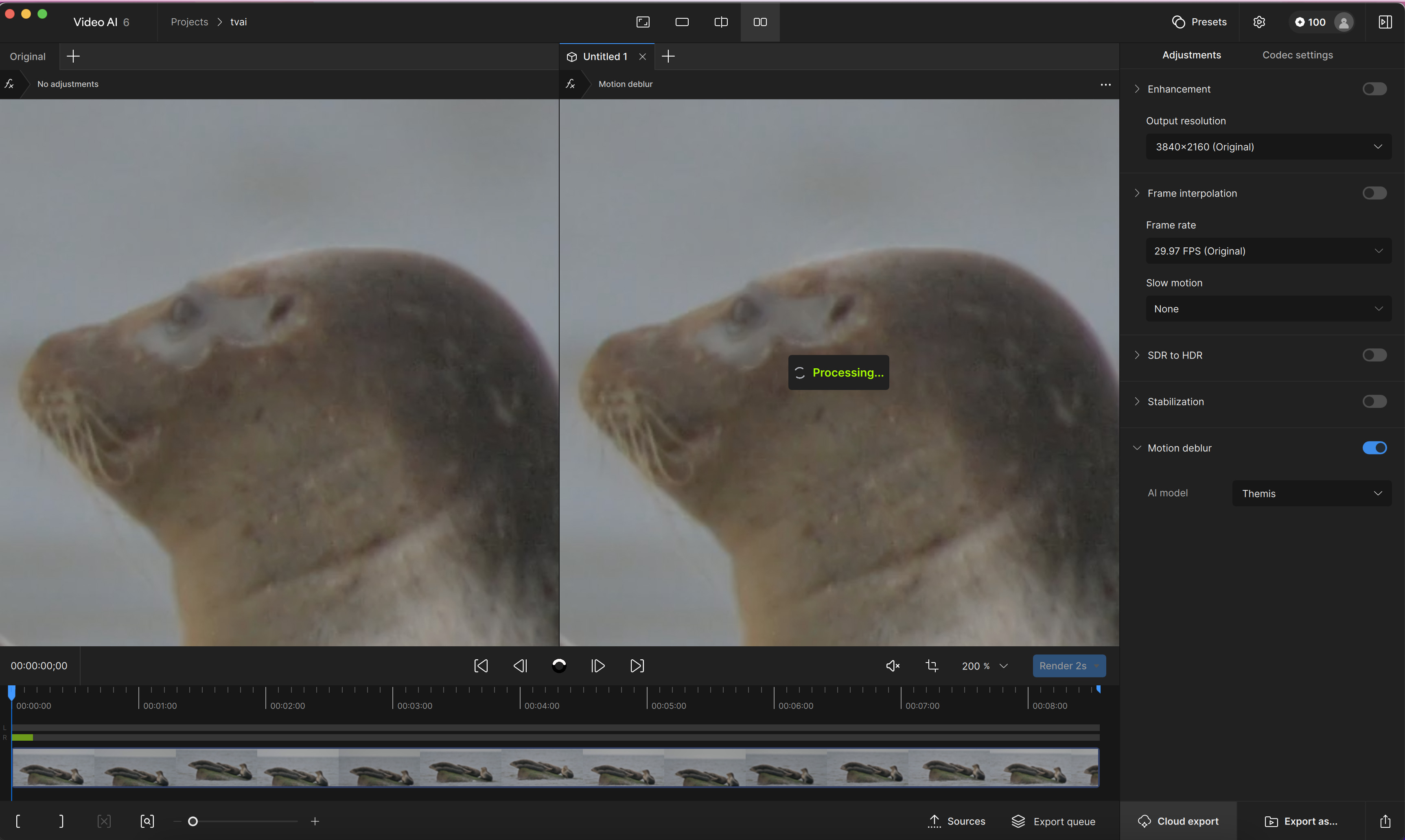
The main issue I had with it (before uninstalling and going back to the previous version), is that I could not find where the preview render queue is.
When I am fine tuning settings, I usually will make a small change and then render a 5 sec preview. With 5.5.1, It would quickly render the first frame and I could then cancel the rest of the preview render, make a small tweak and repeat. V 6 has no preview render queue to allow you to cancel so I end up waiting for the full render before even seeing the first frame. Yes, I know I could make the preview render much shorter, but I like having the option to watch the 5 seconds when needed.
The way the queues are presented in general needs more work. I LOVE the video preview timeline.
Also, ProRes Std exports are STILL coming out with broken timecodes and show 00:00:00 for duration and crash players unless a FFMPEG repair is done on them.
6.0 installed fresh, hard reboot… SURPRISE, still black on video previewing in the topaz player.
How have you STILL not fixed this huge issue? If we can’t see what the model application will look like, how are we going to know what to tweak so we’re not blindly choosing values and models, wasting hours of time processing, and jacking up electricity usage while we’re at it???
Seriously. This issue of not being able to see previews in your player has persisted since after 5.3.x, and now with your big upgraded UI update to 6.0 you STILL haven’t fixed this.
Why? When will you fix it and take this issue seriously?
I already encountered the same issue during the alpha testing of version 6 and reported it multiple times, but I never received any response to my feedback.
It seems like the developers simply don’t care. After all, who has time to release functioning software when they’re busy adding new features and redesigning the layout—features nobody asked for or needs.
At this point, I can only advise everyone against purchasing a license or renewing an existing one. It’s just wasted money.
 Seriously all above 5.3.6 they implemented mplayer and since then the big problems started