Yes indeed. But since I’ve already processed the image. It’s already sharper than when I started  .
.
we mainly see it in the hair, even if there are quite a few details due to the improvement, they remain blurry, like the rest of the faces, but the quality is good for SD
I’m on studio driver version 546.01 and using Video AI 4.2.2, I can’t say if fixes speeds for v5 as I’m holding off updating.
1 Like
Finally added the very useful task pause function and thanks for that, please try to add a professional tool DE FLICKER is very useful and very important tool for this kind of programs.
There is a good such tool at Davinci Resolve… but it doesn’t work properly in many cases.
Also previous versions had the simple ability to open the preview in an external player by double clicking on the preview, this is not possible now.
Thanks
Slow mo doesn’t work correctly, with artifacts (look at hair). Tried all variant - nothing helped
p.s. that’s music video Dua Lipa - Illusion

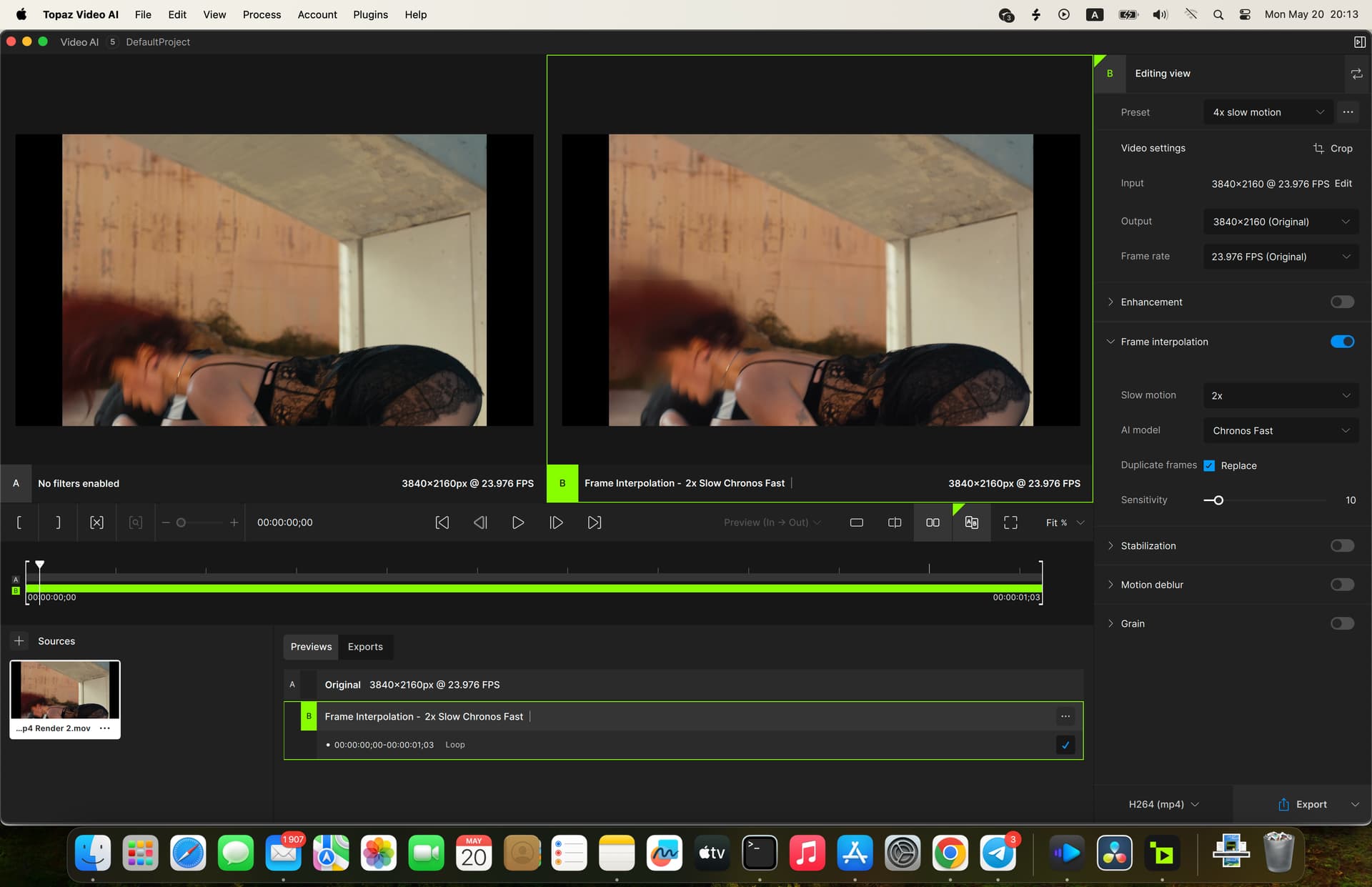
This type of artifacting is often caused by insufficient GPU memory for the input file.
For example, when processing 4K inputs, Video AI will split the input into small tiles that are processed independently by the GPU. In this case, the app is tiling many times to fit the 4K frame into GPU memory for processing.
I’d recommend trying the Aion model, which is optimized for large inputs, or setting a memory limit of 80% in the app’s preferences.
This can be controlled in the app’s preferences under “Export”:
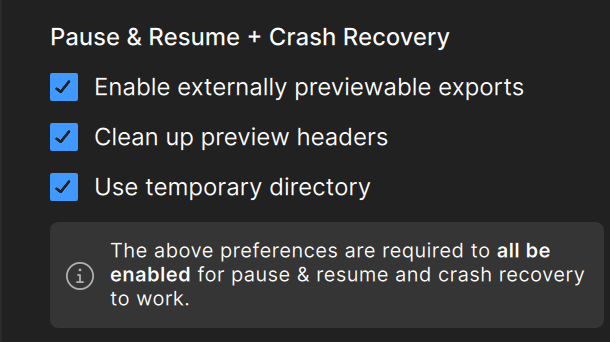
Disabling these three toggles will skip the creation of resumable export chunks and produce a single export file.
Strange, i have apple m3 max 48 gb, ok i will try, thanks
Without the PS explanation, that image could have easily been misconstrued.
So what do I uncheck to disable the second copy? None of them jumps out at me as “this is going to require double the amount of scratch disk that I assume it will.”
Truly, the new UI leaves a LOT to be desired. Previous versions were considerably more user friendly. I feel like this software gets more inane with every update.
1 Like
I sometimes get that with grassy backgrounds, for example, if on a home video recording the background changes focus or the lens hunts as the main foreground subject moves. When the focus of the background changes, TVAI sometimes struggles and can grossly exaggerate the changes, descending into a patch of blurry mess in the background that’s impossible to ignore. When it happens, it ruins the video.
Can happen with all frame sizes in slomo and all models, and has nothing to do with available GPU memory. I wonder if the hair issue and the grass issues are linked?
I see. And thanks 
I encountered a problem, that is, if I press pause and resume in the process of video export, then after this video output, the video screen is very likely to be stuck from the paused position, only the video before the pause is normal, the video after the paused position, no matter where you click, there is only sound, the picture is stuck, I tested it 6 times with a long 20s video, only two of them successfully output continuous pictures, and the other four times are stuck from the paused position, and I did not quit the software, Pause and resume is operated continuously, is this normal, the output video format is, h265main, medium quality, MP4
Still waiting for a model that cleans up all compression artifacts (no Proteus v4 doesn’t do it, neither does Nyx v3) and has better temporal stability between frames AND doesn’t cause ghosting during frames and/or scene changes (both Proteus v4 and Nyx v1-3 leave ghosting).
This could be a Chronos problem. Try a different model
Let me know if this worked please… also what kind of a enhancement was it? If this fixes things, then this is something the devs really want to know about.
yesterday I found a revolutionary setting with hybrid for my SD videos, and in fact, it’s a setting that removes all the artifacts while maintaining the possibility of keeping all the details, even on movements. no temporal smoothing is required. you have to do a pass with hybrid in sd (720x576). one pass in 1280x720 with proteus and another pass with iris in 1280x720. after that, it gives impeccable results, without artifacts, and above all it retains the details of the movements in the dark parts. This is especially good because it has less plastic effect. I will post my method this evening after work.
I’m sharing two videos, for an overview but it’s the same passage, I filmed my screen but this evening again I will produce extracts of comparisons.m directly.
2 Likes
I’d like to see what you’ve done, but that posting host doesn’t work.
Returns:
Error code: SSL_ERROR_RX_RECORD_TOO_LONG
Try this one:
Please don’t.
There’s no need to incorporate bells and whistles from another programs.
We don’t need another bloated video editor like Premiere Pro or Resolve.
The simpler the code, the better.
6 Likes
The models of TVAI do not learn anything. There is no training being done on any user’s computer. Think of it more like they use AI training to make a new really complicated deep nest of ‘if, then’ statements. Your computer just runs those statements on your videos.
