Depends on what you’re doing with it. My GTX 1060 3GB was able to do DVD to FHD. It took about 12 hours for a 45 minute show, but it could do it.
Maybe they’ve changed something. That was with TVAI 3.
On the Topaz website it says you need a minimum of 6GB VRAM for TVAI 5.
I was quoting that.
Go to Topaz Labs | Video AI 5™ | Cinematic superpowers. Ultra smooth. Sharp. Steady. and select ‘Windows’.
is there any way to make TVAI to use GPU when scrolling through the timeline? anything at or above 2k its soooooooo slow its impossible to trim precisely. when i click anywhere in the timeline, GPU utilization will go from 0 to 1% then back to 0%, and it will load after 8-10 seconds, not even at where i clicked either.
i have a Ryzen 7700 and 6800XT.
1 Like
I, too, am having this issue.
The performance of the Iris Medium Model is getting worse. The first time I used Iris Medium it was 1.5fps, then gradually decreased to 1.2fps and now only 0.7 fps.
Summary, TopazAI’s performance is getting lower and lower while the Graphics Card remains unchanged, it seems like they are encouraging spending money to buy new Graphics Cards.
I also am seeing the same thing when I use proteus model. For most my videos, cleaning up noise and grain, resizing, maybe upping to 50 fps, I use the newer models, Nyx, Aion, so I ASSUMED those are slower because they are new and the models are different, but even those themselves are slowing down too. Nyx used to roll 1.2-1.7fps for me on my 3080, and now it is .5-.7 fps. We are not talking minor either here, this is the difference between 1-2 days and 5-6 days per video, and that is numbers worth complaining about.
Hey guys, can we get a performance release every few releases that does nothing but concentrate on optimizing and maximizing speeds for the app itself and models? I know everyone is asking for everything all the time all at once, but I am willing to bet we can all agree that if the app itself is too slow to feasibly use anymore, then it does not matter how good it is. I used to do 1080p to 4k with gaia movies with Apollo to 50 fps, proteus or one of the other models, all at the same time on these videos for 4-8fps if not more, and when I touched 4k video it was about half that speed, give take. Now, even 1080p to 4k doing 1 of these at a time, it pulls .5-1.2fps TOPS, videos that took 1-2 days are up to as high as 8 days now.
This is a massivly changing product every release, but lets not lose site of what it important here, video output #1, and #2 is speed.
1 Like
I think this must have something to do with the way the models for Nvidia GPUs work. My old (5 yr old and 3 yr old) Radeons are all producing the same speeds within ±10% on 3.x, 4.x and 5.x. Way slower than what people with newer GPUs are posting, but consistent over the long term.
This is the worst point of AI Model, the more it learns, the slower the fps becomes. This causes the application to no longer work stably and we cannot continue to upgrade the Graphics Card forever because it is very expensive.
Hi, there. I’m still on 5.0.2 which works fine. I’m wondering if it’s worth upgrading to 5.0.4 or if I should wait for another patch?
Looking at the comments so far, it doesn’t seem like a very good sign again.
5.0.3 was the worst update ever. But what about this one?
AI Model, not a new version of the application. AI Model is automatically downloaded when it is updated even if you are using an old version of the application. You just started using it so you won’t see any change in FPS compared to before.
Even if your AI Model is better, Exporting takes too much time, consumes too much electricity and damages the computer, no one wants to use it.
ye they should DEFIENTLY get this back I forgot it even was a thing back then
TVAI is still using a lot of CPU after 10minutes set all tasks to pause a lot of CPU Power up to over 70% !!!
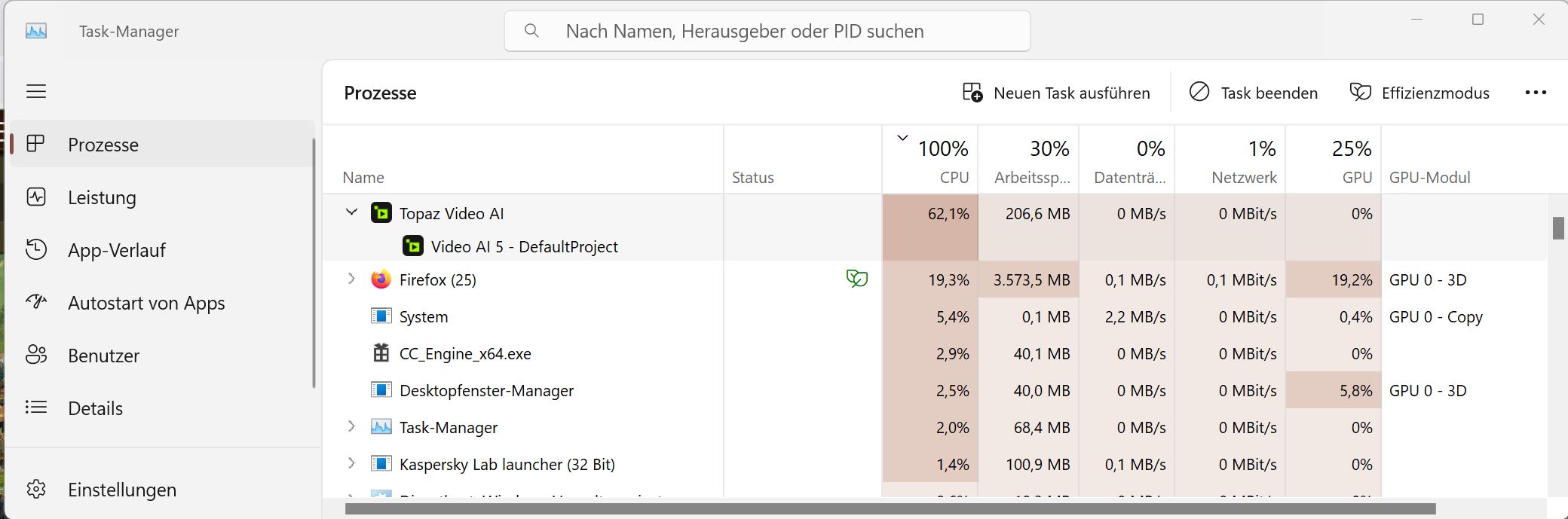
logsForSupport.zip (46.9 MB)
It´s changing from 3% to over 85% !!! for about a minute and then the usage is going down…after some time passes the same is happening again.
What is that high CPU-Usage used for when TVAI Tasks are all paused ?!
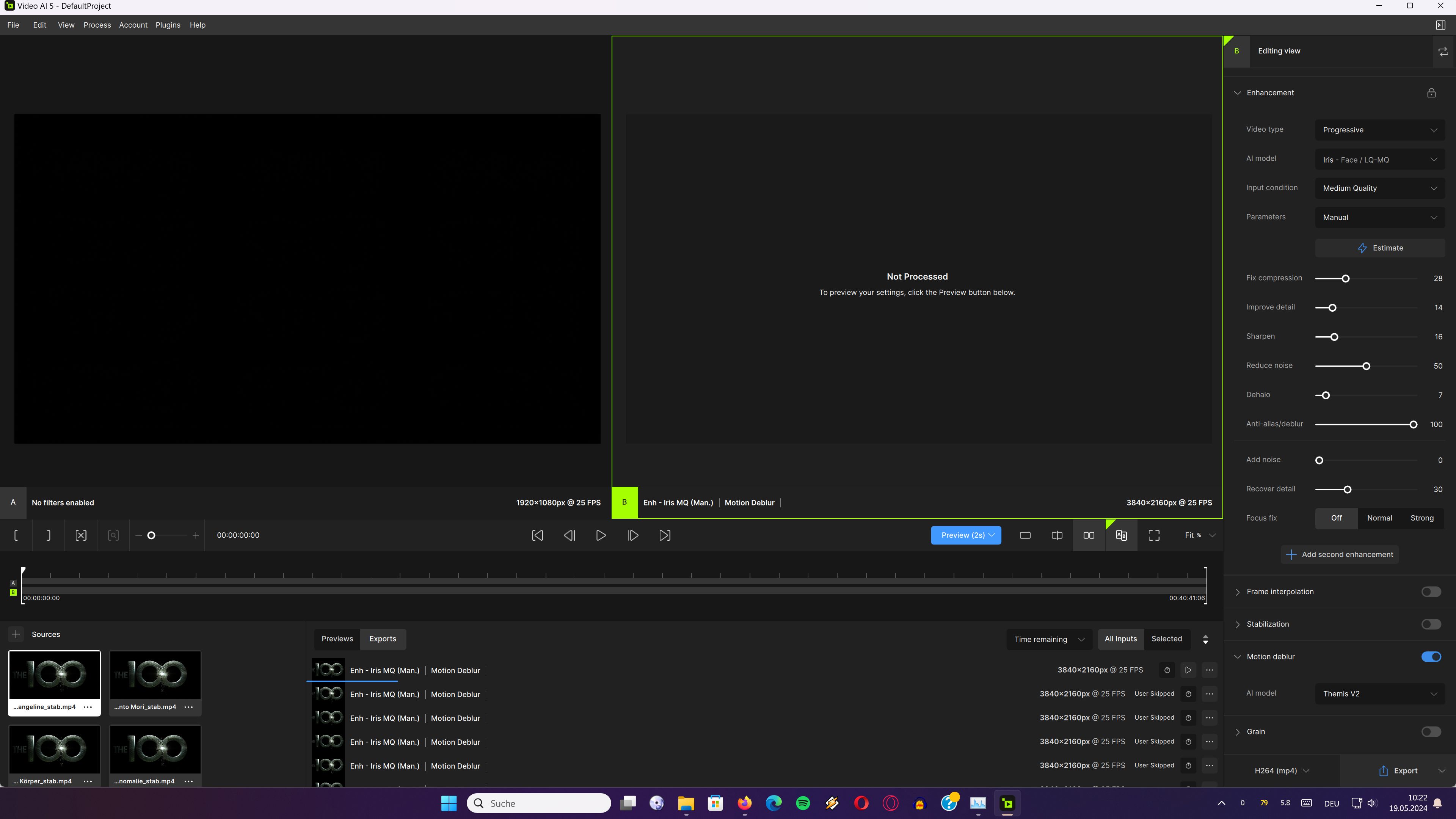
Also why is there a constant CPU usage of about 7% when TVAI is doing nothing ?
1 Like
You might want to look into downgrading your graphic card drivers, I used to update to the latest Studio Drivers but noticed speed was slower each time, now I’m using a driver from November 2023 and the speed jumped about 30% and is more stable.
Why does the export occur and then make another additional final copy of itself? In previous versions it would do this when you included audio in the export, but I learned that lesson very quickly. I also figure it’s possible that it would happen if I add an additional enhancement, but I’m not.
I take an 81GB 4k video file, run a noise reduction step that exports as 410GB ProRes file, and upon completion it wants to recopy that file to an additional copy. It’s taking a full TB of space to recode a single 2 hour movie.
TBH, V5 is a step backwards from previous versions in terms of UI and usability. Thank God I kept the old versions.
1 Like
A little riddle. Is this image HD or SD? 

I’ll let you guess  hihihihi.
But I’ve already improved it a little.
SD 
1 Like
What version # is the driver please?
Sadly SD, because Paramount won’t put any money into remastering VOY or DS9… but we got 5 seasons of Disco instead.
Indeed.
