Really looking better, now if if I could only find 4090 Ti at a reasonable price.

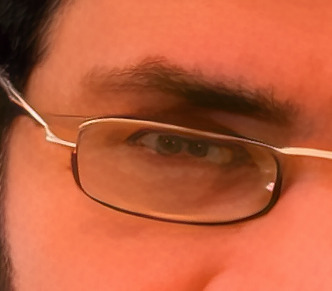
its a polycoria 
I was referring to Fusion Studio, which is the paid stand alone version of Fusion, not the Fusion page of Resolve. I was truly surprised to see that the Enhance OFX plugin is detected and listed. However, I was not really surprised that it doesn’t seem to work properly, because, after some tests, I have the impression that the plugin has a lot of issues, not only in Fusion Studio. I will continue using TVAI as separate application until the plugin is robustly settled, in two years or so.
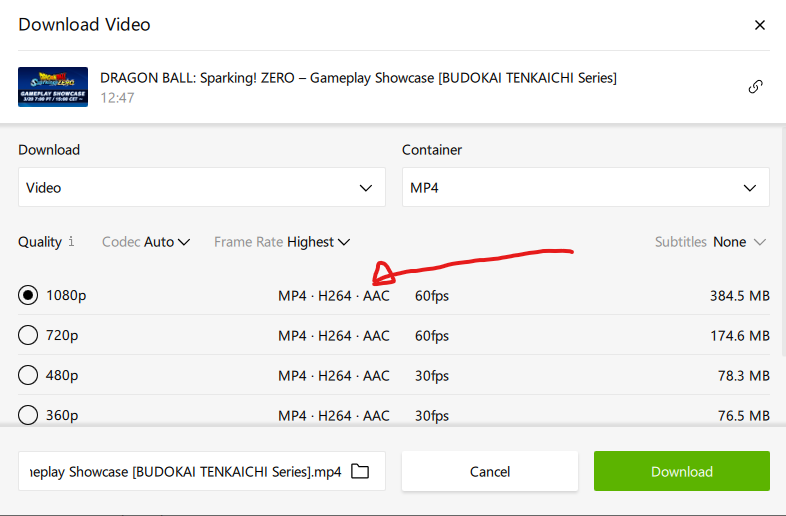
Just select the H264 AAC MP4 1080p 60fps… no MKV/VP9 or AV1 versions!
Try it with your PC and let me know if you can encode a part of video (3-4 minutes) with the AION model with 4x-6x slowmotion!
1 Like
Edit And Color Still Crashing Resolve.
Fusion is Like AfterEffects.
I’m up to this speed by improving the quality of my scaling with Artemis HQ + Gaia HQ with the standard focus fix.
But I have a RTX 3070 Ventus By MSI
Yesterday, when I did the short sequence at 60 FPS, combined with the Themis model to eliminate motion blur, I was at 0.20 or 0.22 seconds per frame. The rendering was done in 15-16 minutes for a video duration of 1 minute 39. So imagine doing the whole episode in 60 fps. I’ll need 4-5 hours if I don’t render a bit more. It’s just not possible right now with my 3070. I’d need a 5070 or future versions of RTX. Better software optimization to further reduce rendering time.
An RTX 4090 is super-expensive and consumes way too much power. Even though rendering times are almost halved compared with an RTX 3090.
There’s a significat difference between 3070 and even 4070.
I have 3070 + Core i7-10700 at work and 4070+ Ryzen 5800x at home, and 4070 performance in TVAI is sometimes doubled comparing to 3070.
Tensor cores usage gives significant boost to speed at 4xxx series.
1 Like
I know that the 4000 series performs almost twice as well as the 3000 series. But I’ve only had this RTX 3070 for 1 year and a few months, and it’s usually when it gives up the ghost that we change. This one is already my 2nd. The first (a very poorly ventilated RTX 2080) gave up the ghost after 2 years because it got too hot. It often climbed to temperatures of 70° to almost 80° using TVEAI v2.x.x at the time. Here, with this one for the same use, I rarely exceed 50°. I’m usually between 47 and 49°.
I did a stress test on my Ryzen 7 7800X3D CPU using the famous CINEBENCH 2024.1 with the stability test where for 30 minutes the bench is run in a loop, in the multithreaded mode pushing the CPU to 100%: checked the values with the HWINFO program, the CPU never goes into thermal throttling and the maximum temperature reaches 78 degrees!
Same for the GPU that I often use in gaming, and my ASUS TUF 4070 Ti SUPER NEVER EVER exceeds the maximum temperature of 64 degrees, even after long gaming sessions!
So I can confirm that it is not a system stability problem, also because the AION model error occurs just seconds after I start the conversion: so it is definitely a “compatiblity” problem or something gerere, due to the program and not to my PC!
1 Like
What is you Nvidia drivers verson?
Mine is working at 537.58 flawlessly.
I’m using the latest STUDIO Drivers… 551.86!
Ps. i don’t see your posted image…
i found topaz to be better than any of those software for testing stability ironically. my gpu and cpu could pass occt and whatever softwares low load and high load tests, but will get “ERR” during topaz benchmark test, and then as soon as i up the voltage a bit it will work again. i found that if the gpu or cpu is unstable i will get “ERR” within 3 benchmark.
for example, my 6800xt will pass occt and aida 3D test at -0.135v, but will get ERR and artifacts in topaz until i up it to -0.1v.
if i have also tweaked a bunch of other settings, the first thing i’d do is to reset the voltage offset to 0 and test again to quickly eliminate it being a voltage issue.
i also like to use aion/apollo + gaia cg + iris to render a short clip to test, one that takes 60 seconds to complete and render it 5 times in a row. if the system is unstable i will get red error within 5 attempts, actually so much faster than those softwares at uncovering instability. i used this method exclusively to min max my per core curve optimizer very quickly.
The problem is that this error that crashes the conversion happens only with AION, while in all other scenarios, never had problems, neither in this PC with the 4070 Ti SUPER nor in the one I use for work with the 3070! (For the 8GB VRAM 3070 I solved set the limit for memory usage, since this AI model needs at least 12 GB of VRAM for the GPU… and ok, but the crash with a 4070 Ti SUPER is inexplicable)!
just from personal experience, i was re-doing the curve optimizer for 7700 last week and as i was going through core by core i would occasionally get “ERR” in aion, which tells me that instability in cpu, cpu voltage, will affect aion too, not just gpu.
I think different models can stress hardware in different ways. Aion may simply be the one model that exposes instability in your system where other models don’t.
The error could be caused by something else, sure. But the fact that your PC works on everything but Aion doesn’t exclude stability as a suspect.
Guys, thanks for the “clarification” but maybe you didn’t understand:
As already mentioned, I have already done a nice INTENSIVE test to stress the CPU with the CINEBECH 2024 loop in multithreading for 30 MINUTES, and I had no system instability, with always quite low temperatures (I mount a decent 280mm AIO), and by the way in fact the Ryzen 7 7800X3D doesn’t need who knows what heatsink to cool it at its best.
Same for the GPU: I use it often with 4K GAMES and the GPU stays for HOURS pushed to 100%, without ever a problem!
I would say that the problem is with AION/TVAI… not with my PC! 
I haven’t updated yet to use AION as I’m waiting for it to be patched up more but I noticed it said in the notes it’s made for high res inputs, what happens if you use it on lower res, such as 720p or below? Does it look worse than the other two models?
I have a request for the Topaz team, which I’d like to explain.
I’ve been experimenting with the 2nd pass upscale feature using various input resolutions and formats. My concern is that when 2nd pass is enabled, the program uses a 1x model for the first pass, while the 2nd pass upscale model can be chosen automatically or manually (e.g., 2x, 4x).
I’ve observed that the 2x model performs better than the 1x model. Additionally, the 1.2x upscale, which actually utilizes the 2x model, produces results closest to the original, with minimal deviations even for clips with resolutions lower than 640x480.
In simpler terms, the 1.2x (essentially 2x upscale) seems to have the lowest FID. FID, for those unfamiliar, is a metric used to assess how well a Generative Adversarial Network (GAN) model performs in generating realistic and diverse images. A lower score indicates images closer to real-life quality.
Interestingly, I’ve noticed that even for minimal input resolutions like 176x144, upscaling to 119% (using the 1x Protheus v4 model) produces significantly worse results compared to upscaling to 120% (using the 2x Protheus v4 model). This is despite the difference being only 1% in dimensions, but it’s noticeable in the video player.
Therefore, it would be ideal if the 2nd pass upscale could skip the 1x upscale step altogether. I believe this would improve the overall workflow and avoid unnecessary processing.
For example, when upscaling with 2x 2nd pass, I’d prefer Video AI to utilize only the 2x model, bypassing the 1x model entirely.
