Well said. I completely agree. Precise 2.6 looks great and it’s fun to see how 5-10 seconds of a video could look when upscaled, but it’s not realistic to upscale a full 20-30 minute video when it takes a day to do it, meaning no computer use and a ton of heat generation. I really hope they can find a way to improve the speed without degrading quality.
4 Likes
Im not looking forward to thier unsavoury histroy on scewing customers on subscriptions, fees and aggressive retention tactics.
1 Like
The computer I used has 7900x 64gb DDR5 (4?) 5080
I only did the 2 days testing as there were problems (end of this post). To start, snippets were tested from from my test video and then I ran the full 00:22:05 video. For viewing my test vid, search for “youtube” “Topper Meets the Ghosts” posted by “Tim Pendergast”. I got that video from archive.org for testing Topaz Video; the mp4 resolution is 494x360.
After snippet tests, when I started the full video test using Starlight Mini the estimate was between 35 and 36 hours so I was expecting just the one run. In fact, it only took a bit over 10 hours. That left time to maybe try Precise 2.6 (also huge time estimate): that completed in just under 11 hours. I was able to watch both the Mini and Precise completed full videos to see results to decide whether or not to cancel. That processing time is far less than the 2 1/2 to 4 days you indicate.
For my purposes and given my situation I deemed less than 12 hours acceptable: my personal “AI datacenter” computer can be dedicated to the task as I have another machine I can use for regular stuff. You have to decide for yourself if that time is acceptable. If so, try your full video and ignore the early time estimates. Moebius pointed out the heat issue. That is valid as I had to put a fan in the room blowing air at the computer to ensure adequate flow of cool air.
I am no longer an owner of Topaz Video: I did the 2 day trial then canceled. I am following the community hoping I will see something that corrects the problem I found - if so I will subscribe to do what I wanted. There might be ways to deal with the hallucinations that ruined the restoration but 2 days was too short to get an answer. Although following in hopes of seeing a solution, if I can help somebody I will do that. Seems only fair to contribute if I can when I am expecting to see soemthing that helps me.
EDIT: I was very pleased with the results of both Mini and Precise 2.6 outside of the unacceptable hallucinations.
1 Like
Yeah…there’s that, but hopefully by the time that would become an issue, ai will have fully taken over and the greedy corporations will be disolved.
But AI will train itself to be selfish and greedy too.
1 Like
FCP Plugin still broken. FCP 12.3.
I was so happy when I opened the app and saw the update stating the speed issue for Starlight 2.6 was fixed. But after performing the update, even uninstalling and reinstalling the update, I find the speed issue has not improved at all.
In this snapshot you see the completion time of a set of clips, all the same resolution (712 x 480), duration (1 minute), and FPS (30) at x2 upscale (1424 x 960). The first 3 completed under an hour, but after that its been a rollercoaster of completion times, the highest of which so far has been nearly 12 hours. Nothing I do on my end helps. I always give my PC a fresh restart and close down every app running as to not take up any resources, yet still I have not gotten an under 1 hour completion since the initial reinstall of the app a week ago.
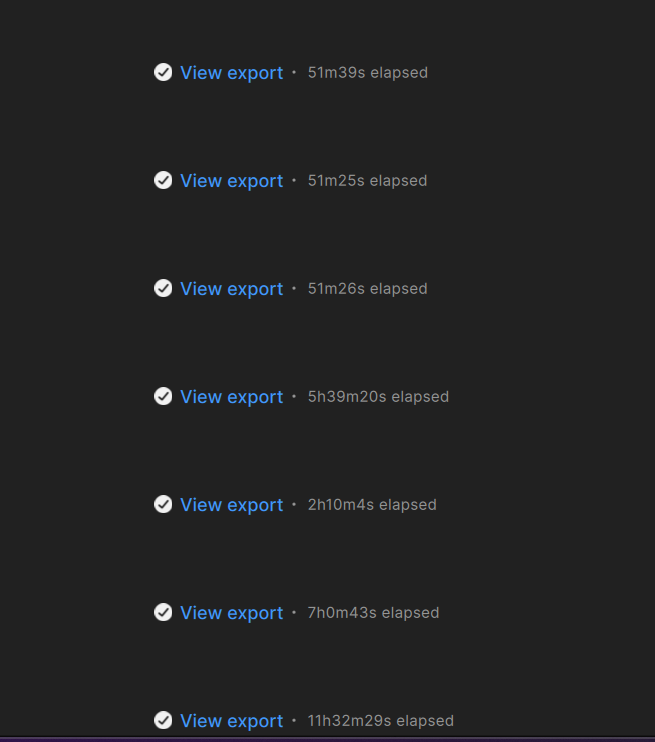
I don’t mean to frighten you, but this looks familiar. Back in early August, I had just completed a series of SLP renders of 360 x 480 30fps clips that were 5 minutes long. The total length of the program was just over 2hrs, and the completion times for the segments were very similar. The last segment was only 35 seconds long and it took about 28 minutes.
With my project completed, I checked and found that there was a new beta available. (The new beta was what would become 1.7.1) I installed it, and without a second thought kicked of another pass at that 35 second clip to compare render times. To my surprise, it took a couple of hours. I scheduled another run and this one took even longer. In all, I tried 3 more renders of this same clip, and saw wildly fluctuating times, most of them longer than the previous one.
It occurred to me that I hadn’t restarted the PC after updating the beta, so I thought maybe that could be the problem, and attempted a reboot. It did not restart. That was August 6th. A week ago, I finally got it running again after replacing the CPU. It appears that the IMC failed, and that may have been what was causing the sudden loss of performance as it was failing.
While this machine was down, I used another that’s a virtual twin, but is equipped with an AMD Radeon 7900-XT with 20GB VRAM. Its render times were literally an order of magnitude longer than the RTX 5070 Ti in the dead machine. On top of that, there were intermittent white areas in output files. I’m not a gamer, but I gambled that AMD would eventually catch up in creator applications. I lost and paid $749 twice: once for a 7900-XT and once for a 5070 Ti. Expensive lesson.
Give the developers credit for trying, but I don’t see AMD ever closing the gap until they change their architecture to perform AI operations with something equivalent to Nvidia’s tensor cores. I’m so happy to have my 5070 machine back in action. SLP isn’t a racehorse, but IMO, the stunning results I’m getting from it are worth the wait.
I have a question that is not really about TV but somehow related. What is the most stable NVIDIA driver version for RTX 4090? I did a full reinstall of Windows 11 and have a bunch of BSOD which apparently are somehow triggered by Topaz Video and related to drivers. I have the latest Studio drivers install through NVIDIA app right now.
I can’t install Topaz Video via the PKG file on Mac. I always used to download the DMG version, but now that it’s no longer available, I tried to install the PKG one, but at the end of the installation process, this error appears: “The installation failed. The Installer encountered an error that caused the installation to fail. Contact the software manufacturer for assistance.”
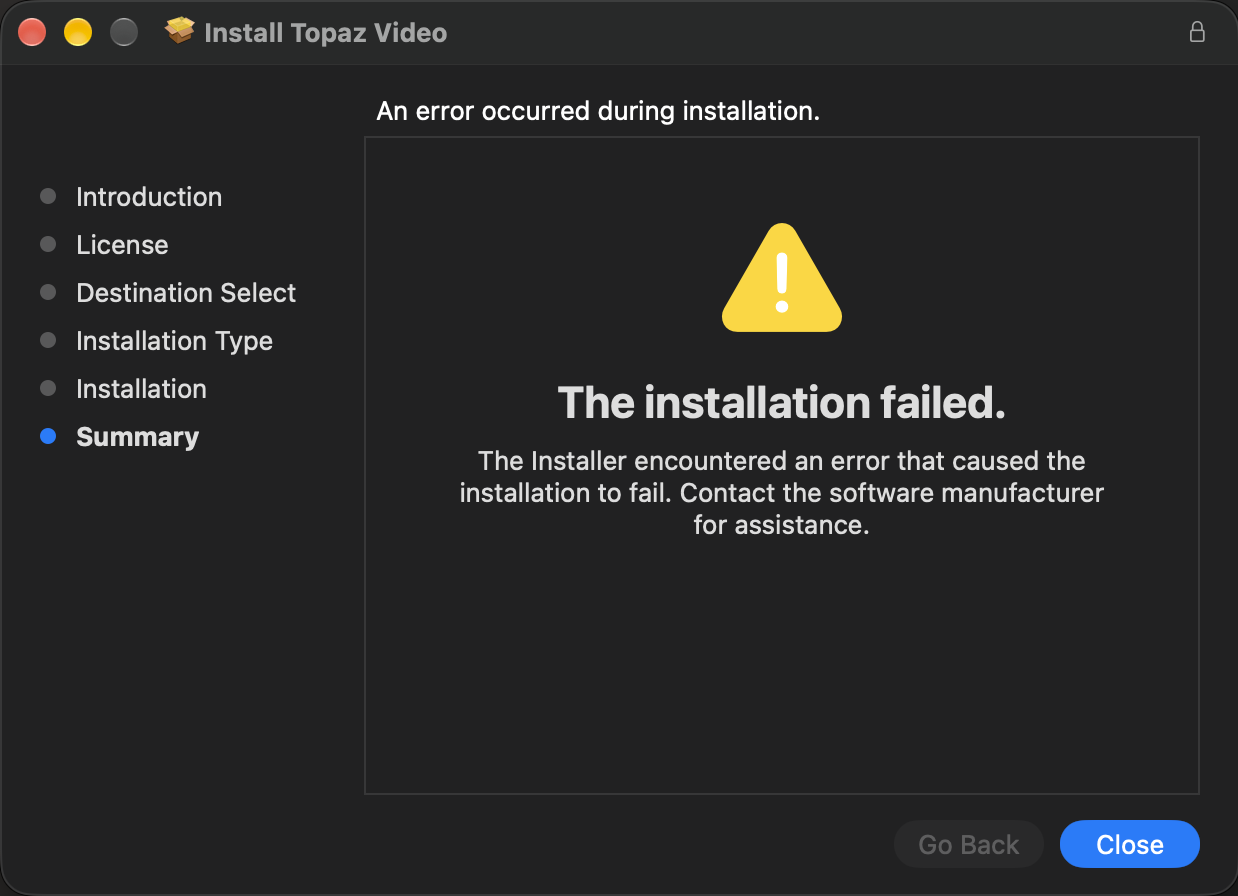
I’ve tried everything I can to fix it. I even reinstalled MacOS Golden Gate (could it be a Golden Gate issue?). So for now I’m stuck without access to the app with no way to install it.
Hi
There are issues with Golden Gate and Topaz Video, but not sure that’s the cause in this case. However, despite what Erasmo at Topaz says, the DMG IS available. Just replace the pkg with dmg in the link and it will download. I tried it and works fine on my Macs.
My guess is that the installer that Topaz uses automatically creates the DMG as well as PKG versions. The NeuroServer app resides inside the Topaz Video app bundle so it makes no sense to me why they (Erasmo) should use that as a reason for saying the DMG is no longer available for NeuroServer versions.
Regards
Andy
Hi there,
Yes, I actually also already discovered the DMG download trick earlier. However, I also realized that even though the installer for the PKG version says it has failed, the app still appears in the Applications folder, and it seems to be working. I don’t know why the installer says it failed.
I’m still having an issue where Topaz completely freezes and force restarts my computer when trying to export videos with certain settings though (that was the whole reason I was trying to update in the first place). I have a feeling it’s an issue related to Golden Gate. Hopefully that’s fixed in the next patch and it arrives soon, because my normal workflow/settings are pretty much unusable in this state.
guys, today i try the Hyperion 2.5 rendering for 1st time. On my 5090, the GPU load is high for 3s, follow by light load for 20s and then idle for 20s before restart the cycle again, is significantly slower than Starlight Mini. Is it normal?
Have you considered (re-)installing macOS 26 alongside 27? That’s what I’ve done on my main Topaz machine (M3 Ultra). Using the shared volumes method, the other OS takes up minimal space as you don’t need to allocate a fixed partition size.
That way, you’ll always have an older Topaz compatible macOS available until they finally catch up.
Regards
Andy
I assume I wouldn’t be able to access all my files and apps without duplicating/moving everything over to the MacOS 26 partition though, right?
Both “partitions” appear as drives in finder, so equally accessible. So in general, duplication / moving files isn’t necessary. You would only need (re-)install the applications you need on the other OS, i.e. Topaz Video and anything else you might use with it.
Although not ideal, I have found this setup to be the best compromise. But wouldn’t it be nice for Mac users not to always have to wait for Topaz to catch up.
1 Like
Oh, I see. I assume you have to reboot the computer to switch which OS version you’re using though, right? Like let’s say I’m done upscaling a video on the MacOS 26 partition/drive, I would then drag it over to the location I’d want in the MacOS 27 version via Finder, then reboot the computer and switch to that one to continue using the computer as normal with the upscaled video file?
And yeah, it is a bit frustrating. Hopefully they fix it soon!
I had the PKG installation failure once. What happened is I had downloaded it on a Mac, then moved it to another mac. I had to re-download the PKG on the 2nd Mac then it worked.
My guess is there are some extended attributes attached to the file and macOS has increased security so it refuses to install a moved PKG file… I haven’t confirmed that, would need to do a little more research.
Maybe try to download the PKG file again from the Mac you want to install it on?
Hope this helps!
Yes, a reboot is needed between OS’s, but no need to copy files between them. The OS currently not in use simply appears like an external drive in Finder, and you can treat it as such.
Hey, Dom. I re-downloaded the PKG file multiple times, and always from the Mac I’m actually using it on. It always showed the same error. During my research, I’ve seen people say to move the file from downloads to desktop, as if you’ve denied permissions there once before, it may not re-prompt you, but I’ve always downloaded straight to my desktop anyway, and I also tried moving the file to other locations (like downloads and documents) before installing, but nothing worked.
However, like I mentioned in an earlier message, the app was actually installed and seems to be working (other than exporting some videos with Aion frame interpolation, which crashes my MacBook, but that happened even on an older version installed via DMG) even though the installer says there was an error. So it may just be an incorrect error message, which is strange.
1 Like
