So close yet so far. Was able to upscale/enhace to 4K with SDR-to-HDR conversion. But upscaling anything with any model to 8K refused to work and just gave error logs. Back to ver 1.0.4…
Still installing a .nuke folder in the root of D: drive instead of a suitable location on C:
Thank you for looking into it. I believe the SLP performance gap might just be really that large based on other RDNA3 card users:
Thank you for confirming. I agree — there’s likely something fundamentally wrong with how SLP is processed on RDNA3 cards like ours.
Thank you for sharing another 4090 reference point. That level of source quality just doesn’t seem achievable on RDNA3 for SLP. Even attempting half of that quality already drops RDNA3 cards into the 0.00x FPS range. There really does seem to be something fundamentally wrong with RDNA3 performance on SLP — the gap isn’t just doubled or tripled, but it’s exponential. The differences are literally in factors of ten.
2 Likes
I did more extensive testing on Dehalo. Increasing dehalo actually reduces the monster faces for small distant / blurred faces. Negative Dehalo value increases monster faces.
Surprisingly it was reduce noise that made distant blurred faces render so no more reduce noise. So now the best 2nd pass after SLP is Rhea with Dynamic settings of Improve Detail -100, Dehalo 25.
2 Likes
Please kindly take note the file name issue isn’t limited to SLM/SLP output as image sequence, but all other models that output as image sequence. Thanks.
1 Like
Why? Are you not happy with 4K77? 
2 Likes
Was gonna say that. Originaltrilogy is a great resource A+
1 Like
Not a neuroserver.exe bug that I thought but something else that has to do with how windows/apps detect pixel resolution, creating a x4 larger file than normal = why it took x4 time for me.
There are some data structures and matrix multiply operations that are this much faster on GeForce cards.
It’s just weird that performance on Radeons get worse and worse. Right now I have around 60-70% of GPU Utilization, ~250 instead of 450 watts of power consumption and processing often fails after 10-15 mins.
1 Like
Starlight Precise 2.6 spills into shared system memory and drops to 0 FPS on RTX 5080 16GB
I have that version too (4K77, …).
But it doesn’t give you the same feeling as upscaling the 2006 Special Edition.
It’s like using the Force (with plenty of patience, just as Yoda recommends): harnessing the combined power of the RTX 9060 and StarLight, and watching the quality improve frame by frame.
Or imagine a super-vacuum cleaner:
You could just walk into a clean room (how boring).
Or you could go and buy a large pile of sawdust, scatter it all over the room, and then bring out your super-vacuum to get everything sparkling clean…
You feel like a Jedi Knight wielding a lightsaber!
(Apparently, the original version is coming back to theaters next year!)
1 Like
Does anyone know what is causing this to happen, I’ve been noticing these random square areas (see it on the right side towards the bottom half that fade in and out and last about a second worth while using Starlight 2.6. Never seen this on my rtx 4090 before but not sure if it is related to this version of the software or my system settings. I am doing all the obvisous, 100% Vram (only using 18gb while encoding) alsong with all the suggested settings I’ve always used.
CORRECTION: I did see this before on the 4090, during the beta testing, and I submitted a sample section. It looks a little more defined on this latest build when it happens. Someone said there is a good stable build for SLP 2.5 with the RTX 5090, which build was it? I am a founders member.
Windows 11 Pro x64
Asus Rog Astral RTX 5090
asus rog strix z890-e
64 mb ram
ultra i9 285k
encoding to a seperate m.2 ssd on a slot outside the lane usage.
TL;DR: I spent 3 whole days on SLP tuning: 1.06fps → 2.4 fps on 1920×1080 output (2.26X or 126% speed increase; +78.9% of that is from the tuning alone, the rest from cropping out black side bars). I released my Free SLP tuning launcher on GitHub — Windows x64, fully reversible:
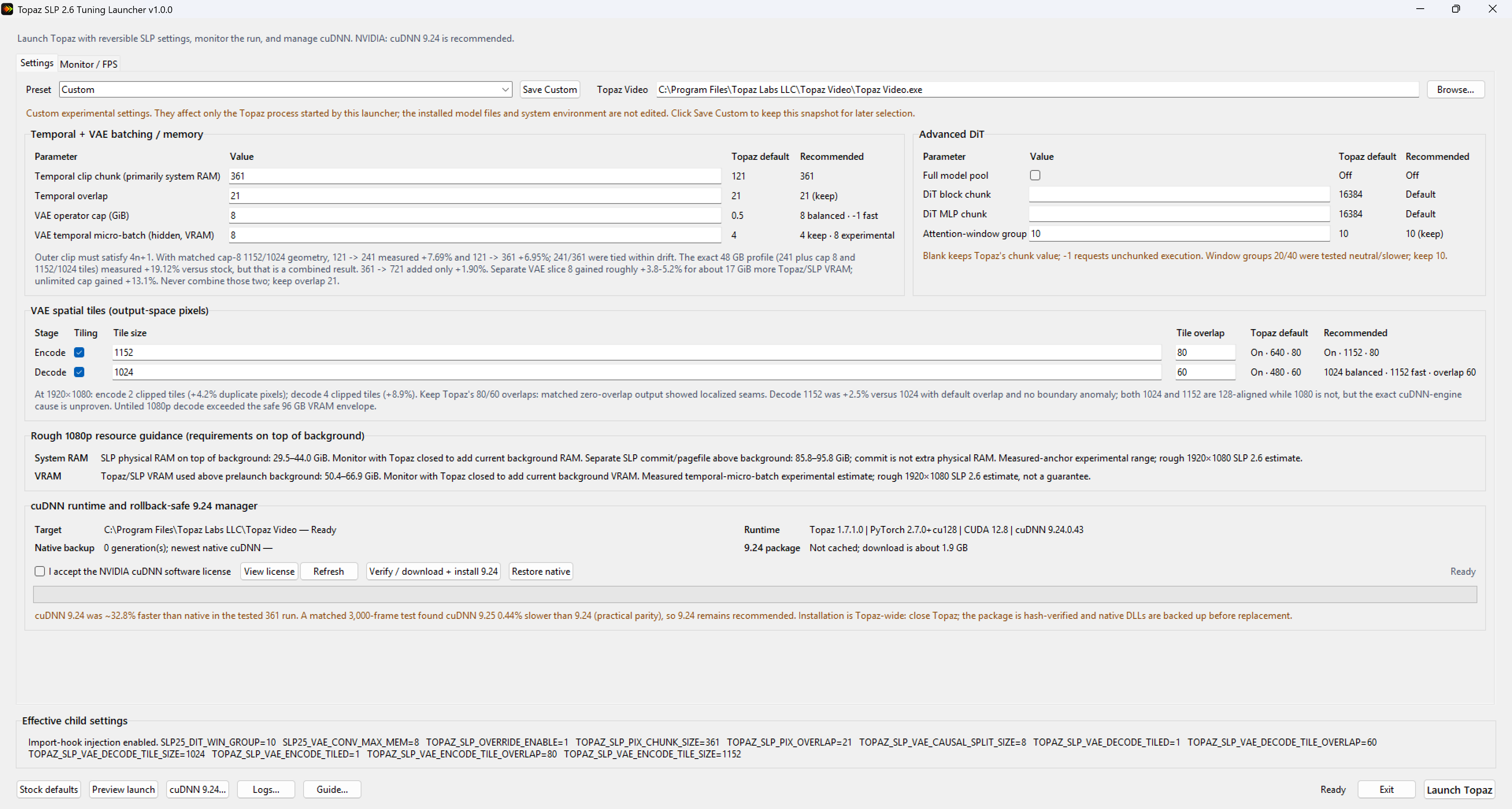
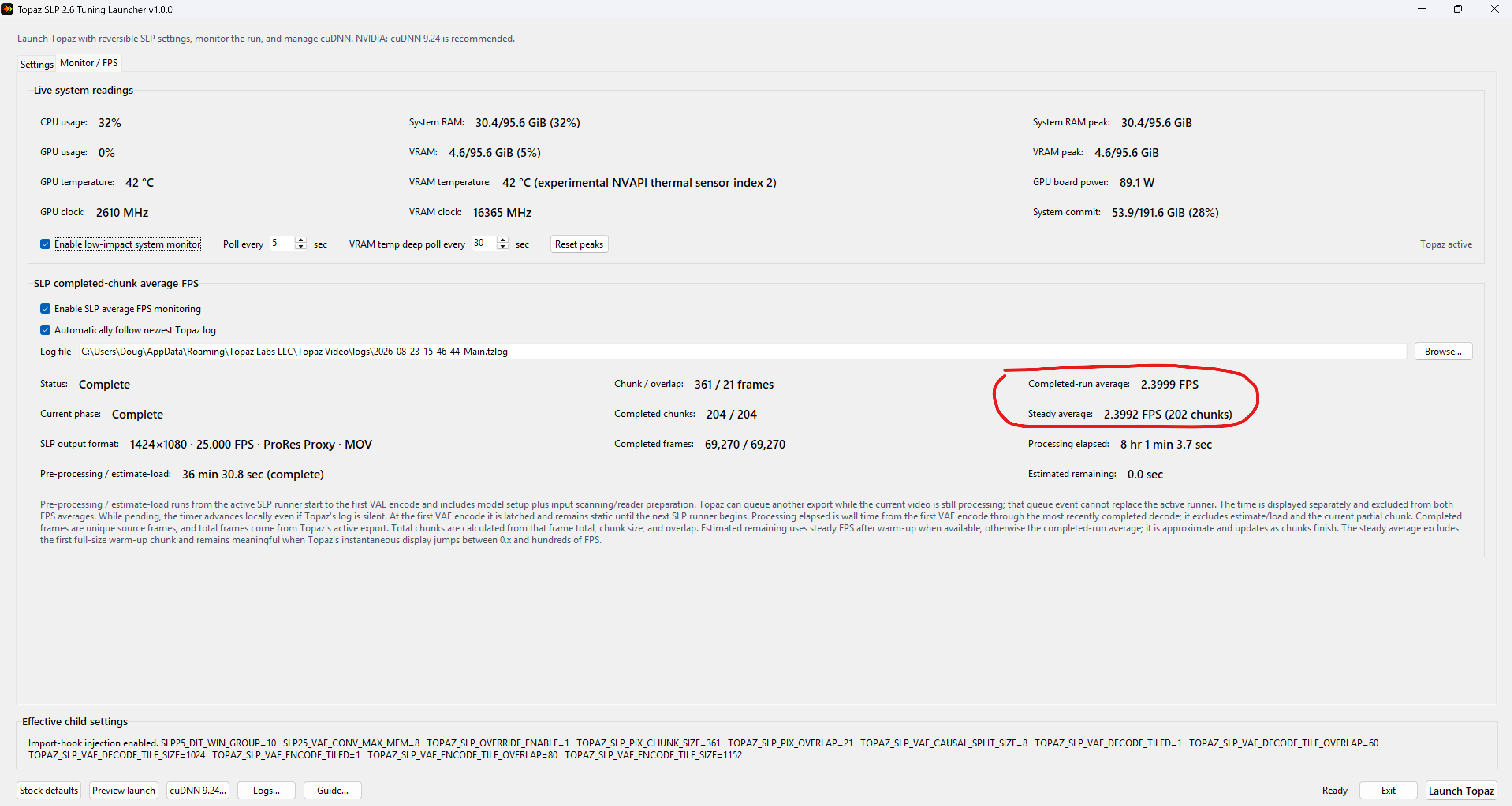
RESULTS:
Earlier in this thread I reported 1.06 fps processing 1920×1080p at 1x enhance. After countless parameter tests, I’m now getting 2.4 fps on the same videos. One clarification so I don’t oversell the tuning: I also cropped the black bars off my old 1920x1080 videos. The content is 4:3, not 16:9, so cropping removes about 25% of the pixels (1920 → 14## wide). With VAE tiling and tile overlap at the seams, the true processing reduction may differ from that. The tuning alone improved the speed by only +78.9%.
One consistent finding: for a given output resolution, the enhance factor (1x/2x/3x) barely affects speed — it’s the output resolution that drives speed.
VAE TILING FINDINGS (all at 1080p output on a 96 GB RTX PRO 6000 Blackwell / 96 GB system RAM)

- Disabling VAE tiles entirely → OOM. That’s weird at 1080p on 96 GB; in SEEDVR2 I got a big speedup from disabling tiling and never came close to running out. Has anyone else hit this?
- Tile size 1920 (whole frame in one tile) → no OOM, no speed increase, VRAM spiked.
- Tested tile sizes: 1024 (4 tiles/frame), 1080 (2), 1152 (2). Results: 1024 was faster than 1080 in some cases, and 1152 was fastest overall: [add fps for each].
This is counterintuitive - fewer, larger tiles should mean less overlap waste - so my working explanations are: (1) cuDNN picks kernels from exact tensor dimensions, strides, dtype, workspace limits, and hardware, not tile count; (2) 1024 and 1152 are both multiples of 128 (8×128, 9×128) while 1080 is not; (3) encode and decode are different operator stages with different tensor shapes, so tile size affects them differently and is nearly impossible to predict without exhaustive testing.
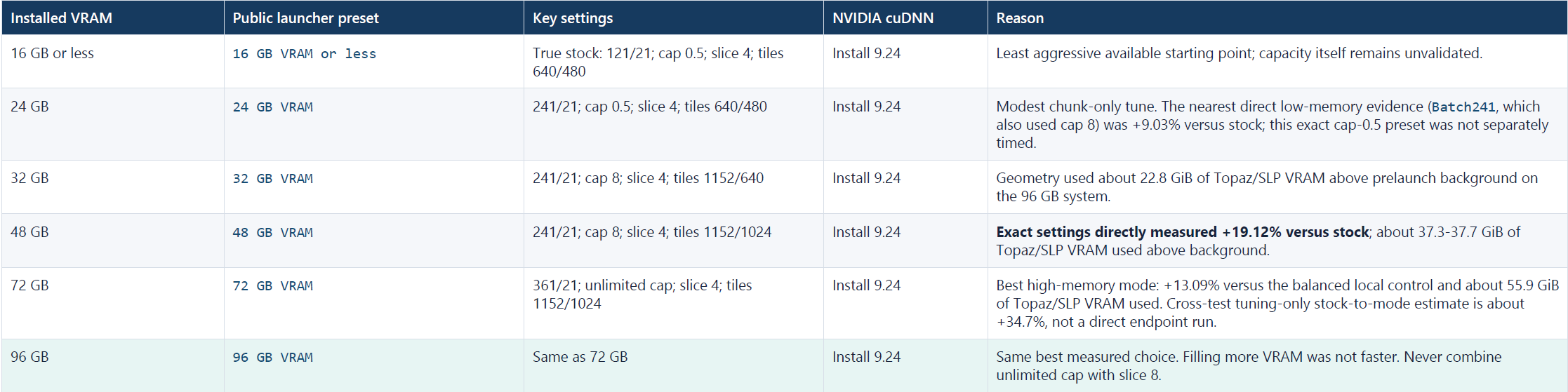
CAPACITY TIERS (a stab in the dark)
These are experimental starting points, not validated hardware recommendations. All of my development and testing was performed on one workstation with:
- NVIDIA RTX PRO 6000 Blackwell with 96 GB VRAM
- 96 GB system RAM
I did not directly test the presets on GPUs with 16, 24, 32, 48, or 72 GB of VRAM. Those tiers are conservative extrapolations from the memory behavior observed on my 96 GB system.
Use the launcher’s live memory estimate together with the VRAM and system RAM already consumed by Windows and background applications as a rough peak usage gauge. Aim for at least 4 GB free, 8 GB if you want to keep using the PC. For NVIDIA: cuDNN 9.24 at every tier, inspired by a suggestion from @naxci1 in the SeedVR2 community [9.25.0 is now out @naxci1; but performed 0.44% slower]. Results vary by GPU, driver, Topaz version, and workload. the launcher can restore Topaz’s native cuDNN files.
FUN FINDING: SeedVR2 fingerprints inside the SLP binaries
The Python extension .pyd files in Topaz’s SLP package contain explicit SeedVR2 and ComfyUI-SeedVR2 names, attributions, class names, and source-extraction comments. A case-insensitive string search for “SEEDVR2” and “ComfyUI” turns up numerous hits, e.g.:
- tcsrmwja1bgh.pyd: “SeedVR2 Video Upscaler - Latent Domain Temporal Chunking”
- _init_.pyd: “ComfyUI-SeedVR2_VideoUpscaler; Official SeedVR2 integration for ComfyUI”
- ub2q3f495bmv.pyd: “SeedVR2VideoUpscaler; SeedVR2 Video Upscaler Node; Execute SeedVR2 video upscaling”
There are MANY, MANY more instances. At minimum, this establishes that SeedVR2/ComfyUI-SeedVR2 identifiers remain in the installed runtime. In my opinion, the quantity and specificity of these strings strongly suggest the SLP runtime descends from, embeds, ports, or integrates SeedVR2/ComfyUI-SeedVR2 code, which would explain why SLP behaves and performs so much like SEEDVR2 and so differently from SLM and the other Starlight models.
And that’s a good thing. SEEDVR2 was the best diffusion based, generative video upscaler ever but installing and optimizing it through ComfyUI could be extremely difficult. Memory limits, VAE tiling, chunk sizes, overlap, offloading, and source-dependent behavior produced very different experiences among users. Even with my previous 32 GB RTX 5090, it took weeks of trial and error experimentation before I could run SeedVR2/ComfyUI reliably and obtain the results I wanted. Users with less VRAM or less experience could easily encounter OOM errors, poor settings, slow performance, or disappointing results. That complexity was the reason for the highly polarized sentiments towards SeedVR2 that we even saw in this forum. Some called it the Holy Grail, some called it crap because they either couldn’t get it running or it didn’t produce the polished results they expected.
Now that SEEDVR2 have been abandoned by its original developers, Topaz is effectively its spiritual successor - SLP is the “SEEDVR3” the community kept praying for, just encrypted and closed source. That’s fine for most people: SEEDVR2’s ComfyUI setup was too complicated for most users anyways, not to mention extremely resource intensive. Topaz made it work on as little as 12 GB VRAM and the quality is now clearly above SEEDVR2 in about every way, which is no small feat.
WHERE TOPAZ COULD DO BETTER
Topaz has optimized for the low end and for the uber expensive Topaz Cloud niche, leaving customers with high-end consumer/prosumer cards practically bottlenecked at speeds not much better than those with 16 GB cards. Stock SLP configuration on my 96 GB GPU maxed out at only 15.1 GB of VRAM usage. This launcher fills that gap: faster processing, less wasted energy (energy is expensive these days), and a smaller environmental footprint. That said, without the unencrypted source there’s only so much we can tune from the outside. Topaz’s engineers can optimize things end users like myself can’t even see: the VAE wrapper, tiler, and memory manager; generation phases; pipeline patching/diffing; dtypes and quantization; architecture dimensions; training/fine-tuning/distillation provenance; tile generation/blending; VAE memory limits; clip blending; supported attention backends; frame/spatial batching in the DiT; golden deterministic I/O. Tuning SLP from the outside is, at best, guesswork that requires immense trial-and-error and with restrictions that Topaz engineers would not have.
WHAT’S NEXT
Given how closely SLP tracks SEEDVR2, I already have an idea to speed up DiT and VAE that should be good for another 30–40% speed boost on top of the current gains, but probably only 24+ GB or maybe even 32+ GB VRAM GPUs can take advantage of. I have to get back to real work, so it will probably be awhile before I can find time to work on this next phase.
EDIT: Just incase I was unclear. I’m not saying you need more than a 16gb GPU to benefit from this launcher. Even folks with 12gb and 16gb vram GPUs, as long as it is NVIDIA, can use this app to enable cuDNN 9.24 and should theoretically see 20 to 30+% speed gains. But I would appreciate if you guys report your speed gains and the settings applied so we can get a sense of what settings work well for what hardware.
EDIT2:
Please share your results in this link. A user reported 62% speed gains on a 5070ti 16gb Vram!!!
18 Likes
Do you find that it removes artifacting when in motion? I’ve tested a few videos and it seems like it isn’t removing the artifacts as well as in your videos. Your shots look super clean.
This behaviour is by design.
The image is splitted into several tiles and the individual tiles are processed one by one.
1 Like
As you can see, the examples show exactly what I get - unless there’s HEAVY blocking artifacts, the kind which causes a lot of ‘garble’ to appear. The blocks are removed though, almost every time, unless the model takes them as a part of the ‘deal’, as seem in the Linus shirt close-up - the NCI letters and his neck are ‘blocky’, and not everything went well there. 
I deliberately don’t show the screens from the video player (be it Potplayer or MPC BE), because I use RTX Video upscaling there. That’s also, probably, why 720p result looks so sharp on a 4k display, too.
1 Like
I think SLP2.6 is using the 7B model right? In SeedVR2.5 I like the details in small faces better with the 3B model. But I have another Question.
It looks like SLP2.6 has less problems with ghosting/afterimages than SeedVR2.5 … SLP has still ghosting but less.. Do you have any idea why this is the case?
I don’t know if the original SeedVR2 has less ghosting as well and SeedVR2.5 has messed up something here?
So I was doing 2nd my second pass with another SLP at 2x, and that was what was causing my tiling issue as it was oversharpening. It looks realy good in some cases, but also overdoes it a bit too much, but the tiling is a non-starter, so I gave your technique with Rhea a shot and wow…it really surprised me. It is better than Pnat. I also tried it in reverse and applying SLP as the finisher, but wasn’t as good. Also, I apply your Rhea tech at 2x to bring me to 1960p and it looks amazing. Have not tested on small disant faces but got your message here on the new settings.
I think they used the 3D model. Because the 7D model is good for pictures, but not for videos. For the ghosting issue, Temperal 21 is used in SLP, it’s written in the settings. Actually, if you use Temperal 21 in SeedVR2.5, you get the same quality output there as well. Normally, many people don’t know about it and don’t use it, I set it to 4 or 8 there, anything more affects the speed. Here they fixed it at 21, I set it to 4 here too, because if there’s no problem with the video, it’s just a waste of time anyway.
Also, for those capturing analog video such as vhs, etc, there was a post way back when in another forum where somebody was saying if you use the elganto video capture usb device and use it with the OBS software and bypass the elganto software, you get really good quality. And while it’s true , you can control the bitrate and get better results over their native software, one thing I have learned is you are still bottlenecked by the hardware itself in that thing. I also have a Canopus AVDC-110, and doing a DV capture via VirtualDub, deinterlacing in hybrid while converting to Prores, the results when compared side by side with the OBS/elganto setup were night and day difference, SOOOOO much better with Canopus. For those on a mac be warned that after Tahoe they stopped supporting firewire so you’d have to go back to use it, but windows still supports the legacy drivers for it. Pretty nice little capture device, I am glad I held onto it all this time. No surprise they go for $300 on ebay these days.
1 Like
