A similar question was asked previously regarding 5070Ti and 3090, with the responses in this thread: Midrange GPU choice
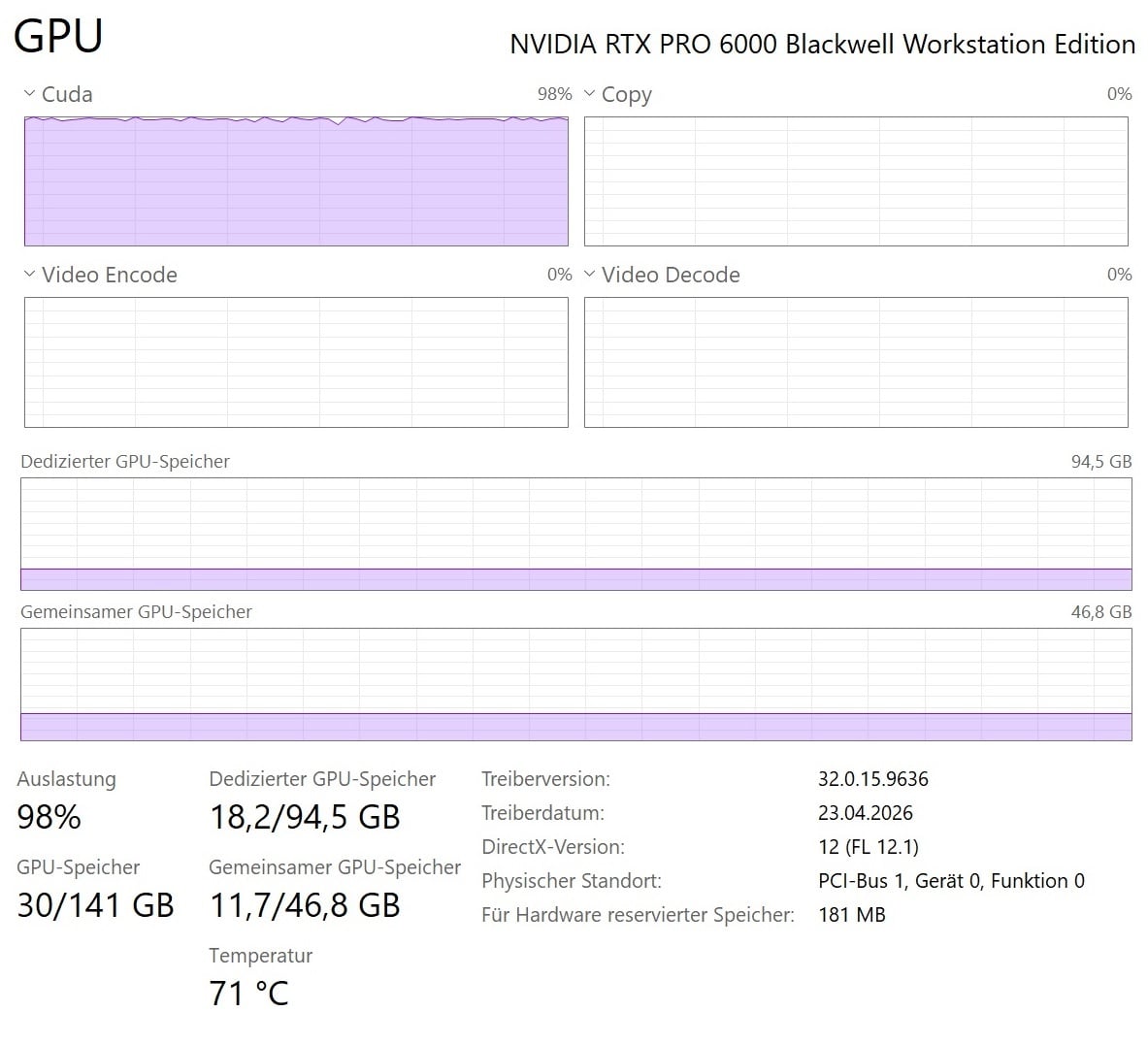
This is SLP under Topaz 1.6.0, shared memory is always utilized, it makes absolutely no difference what settings you configure in the driver.
1 Like
There is no answer to my questions.
When I try to render a longer clip using Topaz Precise 2.5 on a Ryzen 7950X with an RTX 4090, the process crashes. It works fine at a 720p output resolution. If I split the longer 4K clip into sections of a few minutes, the rendering also works. Before the render aborts, the RAM runs out. I have also noticed that Precise starts the actual rendering process much faster for short clips than when I render the same clip as a section of the long clip. Precise always seems to analyse the entire source clip, even before just a small sequence from it is to be rendered.
Translated with DeepL.com (free version)
With very noisy clips, the noise in Precise 2.5 causes minor artefacts in the image. These can be reduced very effectively by rendering the clip first using the Denoise function. It would be great if Precise had a dedicated Denoise slider built in. The results from Precise are really excellent, even with poor-quality clips. Many thanks to the Topaz team for this brilliant development!!! The software behaves quite differently in terms of stability on different PC configurations, particularly at higher resolutions and with longer clips. This issue still needs to be resolved.
Translated with DeepL.com (free version)
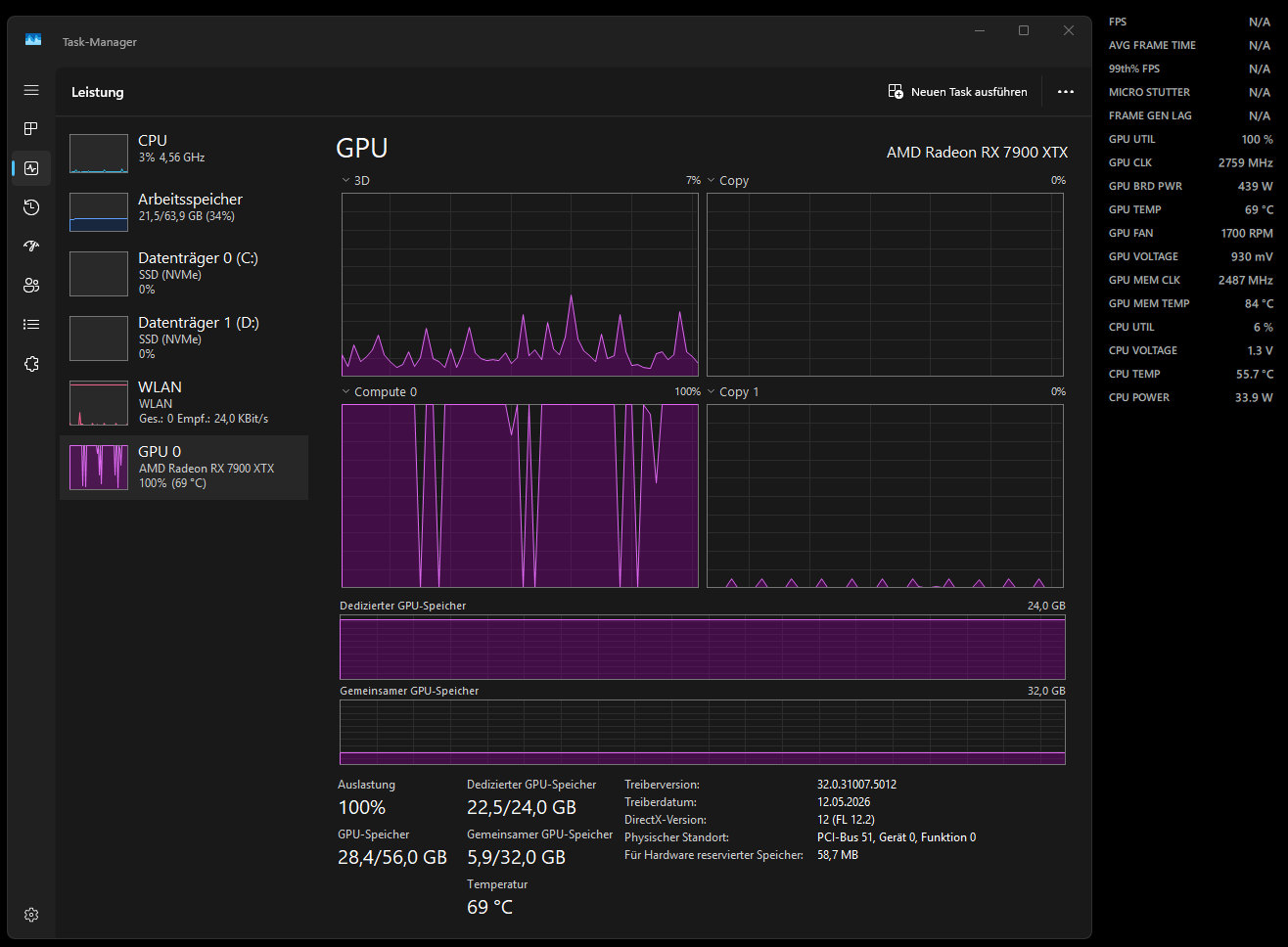
Starlight Mini:
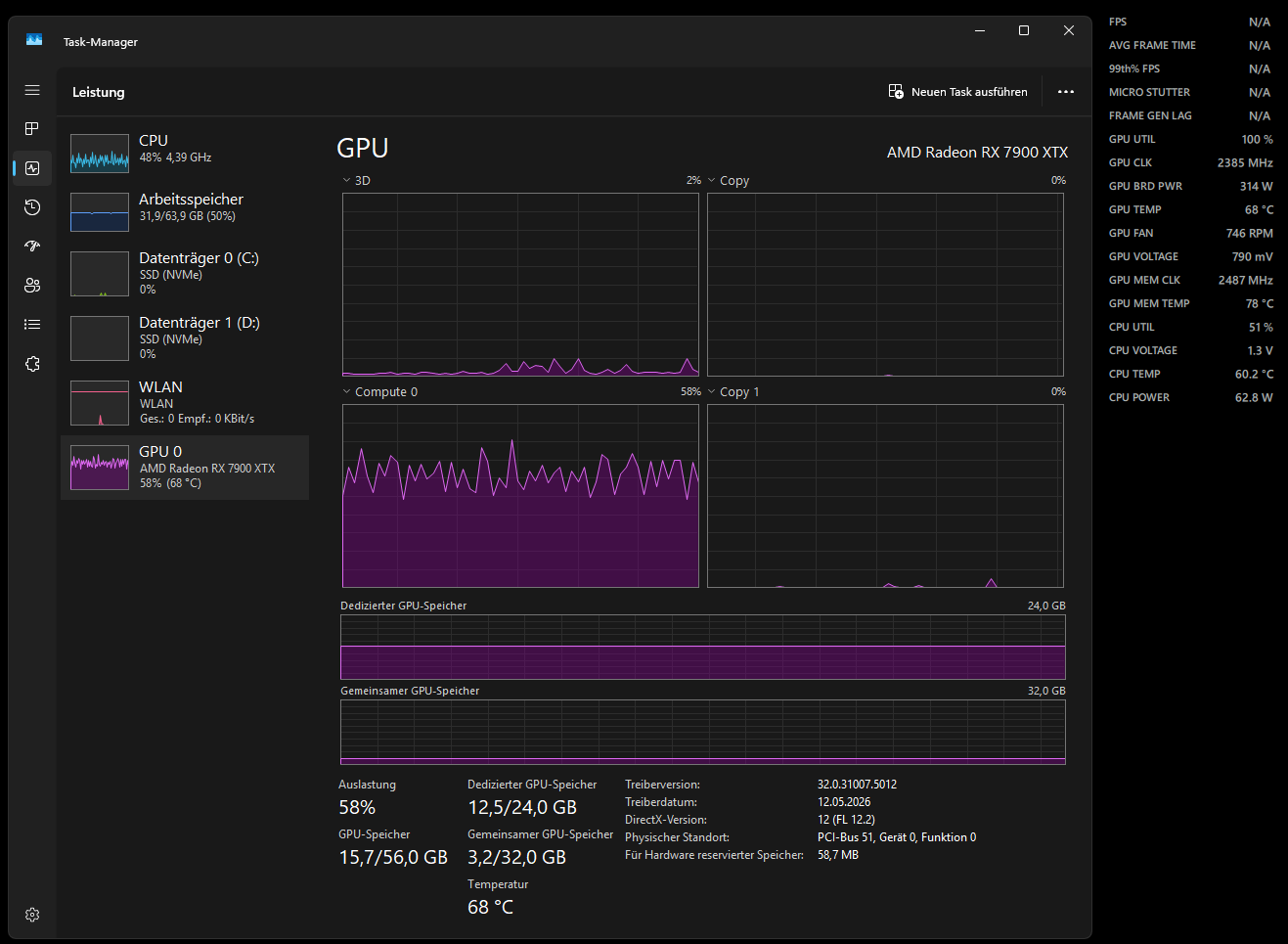
Starlight Precise 2.5:
I don’t think this is simply a VRAM limitation.
Looking at the screenshots, Starlight Precise 2.5 actually uses less VRAM than Starlight Mini in my test:
Starlight Mini / classic FFMPEG path:
- GPU utilization: 100%
- GPU clock: 2800 MHz
- GPU board power: 450 W
- CPU utilization: 5%
- Dedicated VRAM usage: 22.5 / 24 GB
- Total GPU memory usage: 28.4 / 56 GB
Starlight Precise 2.5 / Neuroserver path:
- GPU utilization: 60 %
- GPU clock: 1800-2400 MHz
- GPU board power: ~300 W
- CPU utilization: ~50%
- Dedicated VRAM usage: 12.5 / 24 GB
- Total GPU memory usage: 15.7 / 56 GB
So in this comparison, the Mini model uses significantly more VRAM and still keeps the GPU fully loaded, while Precise uses much less VRAM, much more CPU, lower GPU compute utilization, lower GPU clock, and lower GPU power draw.
That is why I have a hard time accepting “VRAM limitation” as the explanation here. If VRAM pressure were the main issue, I would expect Precise to use more VRAM or at least show signs of memory saturation. Instead, the GPU appears underutilized while the CPU becomes much more involved.
The more obvious difference seems to be the processing path:
- Starlight Mini uses the classic FFMPEG path
- Starlight Precise 2.5 uses Neuroserver
I could understand the behavior if someone explained that certain parts of the Neuroserver pipeline are not well supported on AMD GPUs, or that some operations fall back to the CPU because of AMD architecture, driver, backend, or implementation limitations.
But based on these numbers, it does not look like the GPU is running out of VRAM. It looks more like the Neuroserver path is not efficiently utilizing the AMD GPU and is shifting a significant part of the workload to the CPU.
2 Likes
Any updates, when we can run Precise 2.5 on 8gb videocards? I have 4070 rtx 8GB and 64gb RAM
1 Like
My theory is that the Neuroserver was developed to let larger models (like Precise 2.5) run on machines with 16GB of VRAM or less. The earlier releases (1.3 and earlier) used a component simply called “Runner” to feed the data to the AI model and return it, ultimately, to FFmpeg for commitment to disk. Neuroserver, while using the same basic workflow, seems to be working with a more pre-compiled set of model files and passes more work to the CPU. Precise 2.5 in particular has become very batch processing focused. My guess is that those GPU “pauses” are BLOBs being swapped in and out of memory,
2 Likes
Exactly this. The more VRAM allpication has, the wider is batch size. I’d be so glad to run SeedVR2 at 52 GB of VRAM. It would be possible to export FullHD video. The same applies to Topaz’ Neuroserver.
1 Like
5070Ti without any doubt. Last models are made for the new architecture.
1 Like
and the cooling solution in the 300 series is worse. The 3090’s fan ramps up, it gets loud, and it still gets hot. I used to have a 3090 that ran at around 85-87 degrees Celsius during SLM workloads
Precise strangely runs on my old 8Gb RTX 3070, although at 0.2 fps it’s too slow to be of any practical use.
How? I thought Starlight precise required 12 GB VRAM Minimum. I have a 2070 lying around and if I could use it I would but it fails the System check.
Thank you for answering me. If the latest versions are designed for a new architecture, then is the 5070 Ti faster than the 30-90? By how much? Where I live, the 5070 Ti and 3090 cost about the same.
No idea. According to the specs it shouldn’t work, but it does. Just really, really slowly.
And Precise is not the only one. Sharp, Fast and HQ all failed the system check with the 3070, but after switching the processor preference to an RTX Pro 4000 Blackwell that would pass and download the models, I was able to switch back to the 3070 and run Fast and HQ.
So far I haven’t been able to get Sharp to do a complete run on either GPU.
It won’t work with the RTX 2070, you need at least a card from the RTX 3000 series.
Ahh what a shame - not to worry I have a 5060 TI which does great - I just thought the 2070 might work as well. It works with Starlight although very slow, but it doesn’t with precise.
EDIT: Actually I think the latest update removes the limitation. hmmmmm
After some testing, I’ve noticed that version 1.6 SLP utilizes hardware significantly better than in version 1.5. In particular, CPU usage is much more consistent in this version. Instead of fluctuating between roughly 30% and 70%, it now stays fairly steady at around 70% utilization. It also seems to me that this results in faster rendering speeds.
Version 1.6 also uses noticeably more RAM. Previously, usage was typically between 9 GB and 12 GB, whereas now it consistently sits at around 14.5 GB. However, I’ve observed that in some cases only about 2 GB of RAM is being used. Strangely, this does not appear to have any impact on rendering speed or image quality.
To be honest, I’m quite puzzled about the conditions under which this happens. From my perspective, it almost seems like it could be a display issue in the Windows 11 Task Manager. Has anyone else experienced something similar?
GPU usage, on the other hand, remains largely unchanged in this version. While utilization still fluctuates, my RTX 5090 is generally used very efficiently—except for VRAM. Unfortunately, only about 20 GB of VRAM is being utilized.
Looking ahead, I would really like to see Topaz add a control slider for “Precise 3.0” to allow better tuning of the model to individual hardware.
1 Like
A very bold theory…
2 Likes
What are you usually doing when you see 70% CPU usage? I’ve never seen any Topaz app pull more than 30%, and even that is just occasional peaks. Most of the time it’s under 10% even when my GPUs are pinned.
