Topaz Video 1.1.0

Finally, an update again that actually brings real improvements.

Grain has been sensibly reworked and is now finally truly usable. As far as I can tell so far, the result looks much more natural. It is genuinely an improvement over all previous versions.

However, I am missing explanations within the program itself for the different options of the Grain filter. It would be nice if these were added in the near future.

I still cannot fully understand the Engine Refinements after several tests.
With the Starlight Mini model, I honestly cannot detect any change in speed. If there is any difference at all, it is only within a very small percentage range.
The image quality of the model also remains unchanged compared to previous versions.

With the Starlight Sharp model, however, the situation is different—at least in terms of speed. The model has become significantly faster, although I cannot say exactly by how much, as it strongly depends on the resolution of the source material.

As an example:
With my 1-minute test clip at a resolution of 320 × 240 and 15 frames per second, a 4× upscale to 1280 × 960 now takes only about 13 minutes instead of roughly 20 minutes.
Upscaling the same test clip by a factor of 3 to 960 × 720 now takes only around 6 minutes, whereas it previously took a little over 10 minutes.

In terms of image quality, however, very little to nothing has changed. Due to the increased speed at factors x3 and x4, I now increasingly prefer this model over Starlight Mini—also because the result does not have that “wax filter” look.

I could not detect any improvement in speed or image quality for the other models. Proteus, Iris, and Artemis remain unchanged.

Overall, this is an update that is finally worth it again after a long time and does not represent a step backward. Unfortunately, it is rather sad that such an update is now perceived as something positive. For a subscription-based model, one simply had to wait far too long for this.
1 Like

Maybe any of the following? (No idea, I’m just guessing.)

c:\Program Files\Topaz Labs LLC\Topaz Video
c:\Program Files\Topaz Labs LLC\Topaz Video AI\

c:\Program Files\Common Files\OFX\Plugins\Topaz Video AI.ofx.bundle
c:\Program Files\Common Files\OFX\Plugins\Topaz Video.ofx.bundle\

c:\Users\All Users\Topaz Labs LLC\Topaz Video
c:\Users\All Users\Topaz Labs LLC\Topaz Video AI\

c:\Users\AppData\Local\Topaz Labs LLC\Topaz Video
c:\Users\AppData\Local\Topaz Labs LLC\Topaz Video AI\

c:\Users\AppData\Roaming\Topaz Labs LLC\Topaz Video
c:\Users\AppData\Roaming\Topaz Labs LLC\Topaz Video AI\

c:\Users\Documents\Topaz Video Projects
c:\Users\Documents\Topaz VideoAI Projects\

c:\Program Files\Common Files\OFX\Plugins\Topaz Video AI.ofx.bundle
c:\Program Files\Common Files\OFX\Plugins\Topaz Video.ofx.bundle\

And yes, in c:\Users\YOUR-USER-NAME\


AMAZING THANK YOU TOPAZ! THANK YOU FOR NOT FORGETING APP USERS!!! <3

Hi, thanks for posting this detailed comment.

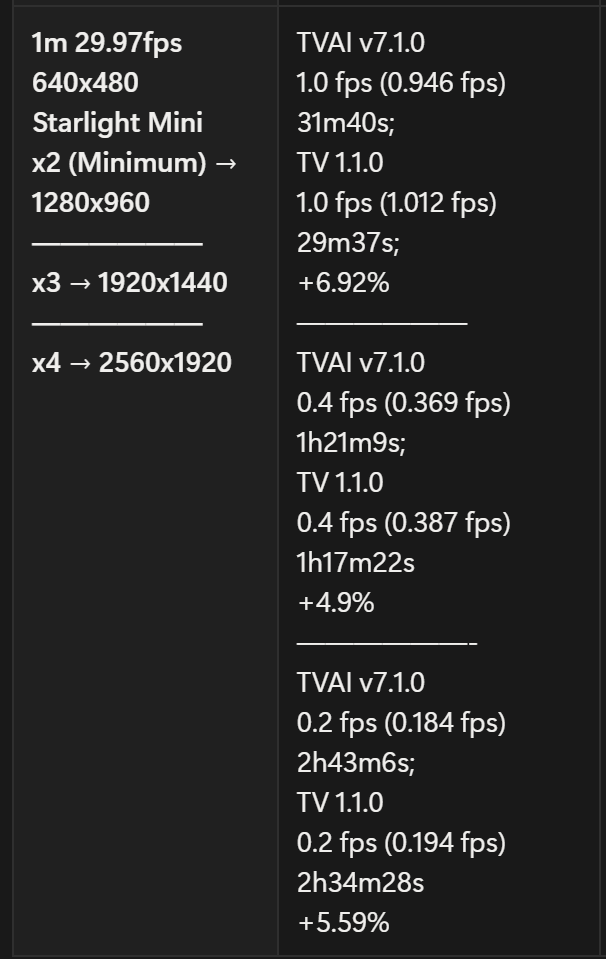
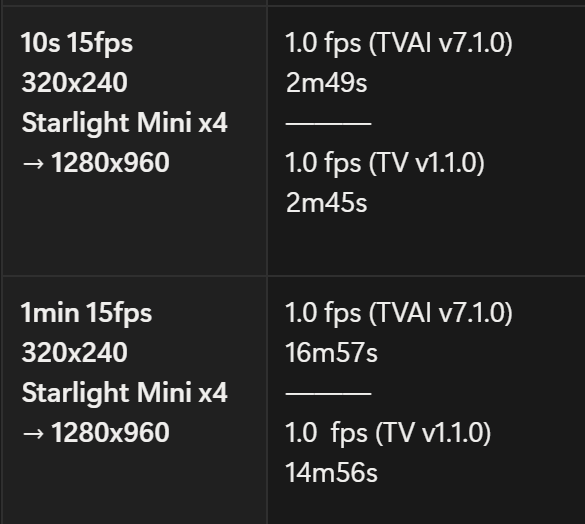
I am curious about your result on that 1 min 320x240 15 fps clip, so I made myself a clip to match your clip specs, but at the end on my build, I cannot recreate the improvement from 20 min to 13 min from your x4 upscale to 1280x960, and also like to know how you manage to make x3 work as 1280x960 (x4) is the minimum option from SL Mini. The 2x and 3x options never worked on TV 1.1.0 on my end, and they will just export to the minimum 1280x960 size, and the 1280x960 minimum is the only available option on TVAI 7.1.0 (I usually just go for x4 for such super low res instead of x2 and x3, so I would not bother too much with x2 and x3 if they were not working).

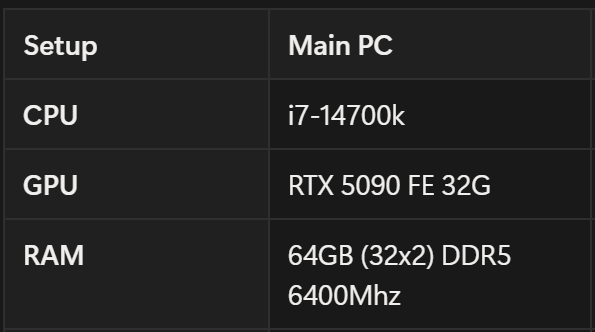
Anyway, please see my build spec and result below using TVAI 7.1.0 and TV 1.1.0, with GPU VRAM usage set to 100%:

On my build, TV 1.1.0 saved about 2 minutes on exporting the same 1-minute clip. I assume the difference will be much bigger for longer videos.

I have thought the Max VRAM Memory setup (100% and 90%) might affect the exporting speed, but it turns out the difference varies from each run; sometimes the 90% setting saves half minute and sometimes they are just 10s different.

But in the end, I stayed with v7.1.0 cuz TV 1.0.0 still quite buggy on many settings. Maybe I will consider slowly switching my workflow to TV 1.1.0 for export time improvement

Try this link when transition to founder was done in your case you get local SLM + SLS for Topaz Video (also SLM into TVAI V7 works anymore) but beware never let it expire, then you loose the founder state.

Customer how didnt’t purchase two products in time had no transfer to founder and for new customers, they must pay for the pro version to get local Starlight for Topaz Studio
so this gets expensive then what I have criticized

I’m not sure, but it seems to be local Starlight is still working into TVAI V7 when people have perpetual purchased this Version. This leads to the consideration that founder (or Pro) is only worthwhile if there is progress with Starlight in Topaz Studio Edition. If it remains as good as in the old TVAI if you have this already, why pay an annual fee when you can do without it?

He said the speed improvements were for starlight SHARP, not for starlight mini.

I am not sure I see any speed improvements, but I don’t have previous versions installed to test them against each other. If someone does have multiple versions installed please check to see if you have speed improvements with starlight sharp. I’ll do some more testing again today, but I don’t remember what the speeds used to be.

oh well, how did I miss that
.lol XD, I don’t use SL Sharp a lot cuz I tend to use the Mini first, then use other models to enhance, this approach is more flexible while using different models as second enhancement than using a single straight output from SL Sharp.

but glad to see small improvement on Starlight Mini on TV 1.1.0 though based on my test last night. I will have both versions (TVAI 7.1.0 & TV 1.1.0) run today with my regular 23-minute videos to see how much time will be saved from them. The result will reveal in the next couple days.

1 Like

How is the Vram usage in 1.1? With V7.0.2.b/7.0.0.4.b I get more consistent results using high ammount of Vram (5090), and I would like to see Topaz give users the option to use the maximum amount of VRAM again + optional going over Vram limit using shared.

1 Like

1.1.0 has significantly slowed down; a video that previously required one hour to complete now takes four hours. this needs to be fixed.

I haven’t noticed any speed difference between 7.1 and 1.1.0.

Starlight Mini exports are identical.

2 Likes

not Starlight, other models i.e. Artemis.

Removing the export command and CLI in this release REALLY REALLY sucks! That is a huge part of my workflow because I do batch renders using those exported commands. Where did they say that this feature (which has been there forever) was going to be removed? That likely is a deal breaker for me, and I would not have renewed by subscription. REALLY annoyed by that.

Why the hell do you keep taking things away? If it is to try to force people to pay for Pro, I highly doubt that is what will happen. Instead, they will likely find other solutions like I am now looking for (stable diffusion inpainting and upscaling here I come).

Plus, AMD users are still screwed
 16GB requirement for starlight local with nvidia but a 20GB requirement for starlight local with amd. WTF?! What would happen if you removed the check to allow 16GB cards like the 9070 run it?

It really feels like most of the “innovation” from Topaz lately is centered around how they can try to squeeze more money out of the people that helped them to succeed. I am absolutely disappointed in the direction this is going.

12 Likes
The 2x deinterlace feature is broken after update 1.0.
In the old version 7.1.4 and earlier, everything works correctly. I can do 2x deinterlace without frame generation. In the new version, selecting 2x deinterlace turns on frame generation, which is completely unnecessary. This feature worked for several years, but you broke it.
2 Likes

Yes, that seems a bit off - excluding the vast majority of cards due to those 4GB.

But it’s the same for Apple Silicon with that crazy / arbitrary (at least seeming so) 36GB, excluding all those 32GB machines.

2 Likes

Downgrading from 1.1.0 back to 1.0.4 is reanabling the Pause/Resume Feature that is AGAIN broken in 1.1.0

Anyone else experiencing that ?!

Ok, after several tests, the 1-minute 640x480 is more accurate:


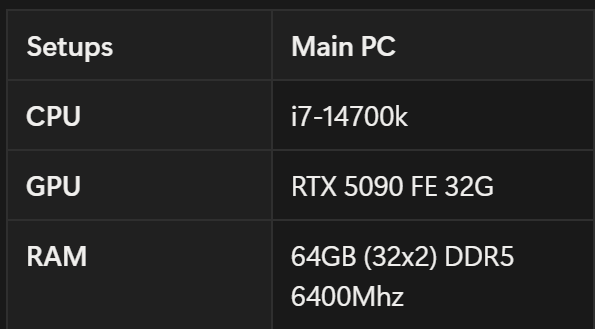
(No OC, only have RAM XMP enabled, running on 2TB PCI Gen4 SSD)

The rendering time performance has about 6.5% increase.

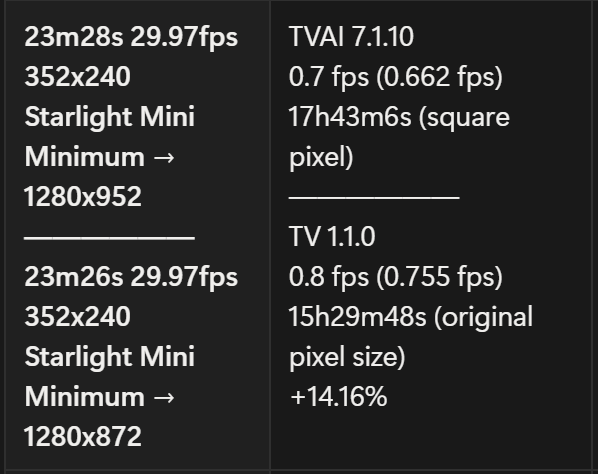
The result from 23-minute videos is not accurate enough cuz the resolution on that one is 352x240, not a standard type to straight for x2 x3 and x4, and has 2 seconds differences.

TVAI 7.1.0 greyed out the pixel type option to force the option on square pixel, output res is 1280x952 (as minimum);
TV 1.1.0 only works on the original pixel type, and the output res is 1280x872 (as minimum). The result below has 14% increase but just for reference.

Overall, I will go for TV 1.1.0 for Starlight rendering only, and keep using other models on TVAI 7.1.0 for better rendering time. (as I seem many users post the performance drop issue on TV from TVAI, and the result from the built-in benchmark test on my end does have lower fps as well.)

1 Like

The video viewer is broken again in 1.1.0 when I load it and try to scroll through 1.0.4 worked fine. Makes it impossible to make segments of files since I can’t see what I’m editing. Is there a work around for this? Really appreciate the increased speed I’m seeing but if I can’t get this back I will have to downgrade again. Thanks for any help.

A post was merged into an existing topic: Topaz Video 1.1.x - user benchmarking results

I need CLI (command line) for personal licence, since I batch-process a lot :upside_down_face:
I would like to see it coming back in the next update

5 Likes

UPDATE: I’m relieved to say my CLI scripts are now working OK in v1.1, at least until Topaz decide otherwise. (I had one of the environment variables wrong before.)

But the removal of Show Export / Preview Command is still a major inconvenience. I’ll just keep using TVAI v7 if and when I need those.

Andy

1 Like