Wow…what! That’s insane…..if true why didn’t they call that out more in the notes? That’s a massive improvement. That’s a 3x upscale. Typically for me I think that would sit around .6fps for a 480p clip.
Not noticing any material speed improvements here. I’m doing a 2x upscale of 1920x1080 content and I’m getting speeds of 8.9 seconds per frame, which is the same as what I got before the update. I even updated to the latest Nvidia drivers because I read another post about optimisations that Topaz should benefit from.
This is with an RTX5090, 9950X3D and 96GB DDR5.
3 Likes
Yep if you’re a founder you can use Starlight locally. Not sure how you check, but I’m on the founder subscription and can use it.
8.9 seconds with starlight? That must be a non starlight model? I have a 5090. I get around .4-1 fps max. How are you getting speeds like that?
I did have to set the environment variables to the new studio location, versus TVAI 7.
Thanks for that confirmation / clarification - I did already take that into account.
With those environment variables set accordingly for TV v1.0:
- A given script works fine when v1.0 is installed. But when I update to v1.1, the script still runs fine, but the export contains the trial mode “watermark”.
- When I re-install v1.0 again, there is no watermark after running the same script.
Thanks again.
Andy
1 Like
8.9 seconds per frame = 0.11fps
1 Like
Ah, thank you! That makes more sense.
Outstanding update, I only use it to dione TV - deinterlace and 2x nyx fast for my TV show DVD’s but I gained 1.0fps in encoding thats a half hour off of a 40 minute video also better picture and it’s not placebo. Also it does’nt take 5 minutes for it to start up now anymore pretty quick now loading model ect. But thats all I use it for so otherwise no clue.
Thanks for the update! Any information on when Starlight Sharp might support native output above 1080p? Also, I’d love to see some speed and/or quality improvements for Starlight Mini on Nvidia GPUs.
update doesn’t work for me, (I9 4060 laptop) doesnt show preview, only in explorer.
[Inappropriate language removed by Moderator], I bought this few days ago for starlight mini. And now I cant use it again. I’m going full refund and sail the high seas again. Atleast then I can use starlight mini again.
I was willing to pay…. but you, like all companies, dont care about users.
I hear it might be useful to see if it’s taking out too much or too little noise. You should be able to quickly view the noise that was taken out and decide.
After finished 1 file i started the next…
Pausing the new file over night.
And also resume didn´t resume the next time i startet 1.1.0
Another time Topaz Video 1.1.0 closed directly after heavy hd activity from resume.
So RESUME is broken in 1.1.0
Forget update & uninstall and do fresh install of 1.1.0
Did that for 3 times. Problem persists
Yes. And claiming it’d affect “only a small subset of systems” won’t help, either (especially considering that on the Mac you do have an extremely uniform hardware-base making such a claim somewhat ridiculous).
See also here:
That said that crazy RGB effect is gone with the 1.1.0 update here (M2Ultra/64GB) - but the other issues are still there.
I just rendered another video to send to Topaz support. Same thing happened. It has a chromatic effect and then goes black after a few seconds. Hopefully this helps them figure out what is going on. I’ll post back if I find out anything.
I’m one who has previously questioned the unexplained name changes that have led to some confusion, and applaud this move, with a couple of reservations:
-
Can I feel confident that a local render with either the Mini or Sharp variant will be using the same model it would use if exported to the cloud, and therefore will be of equivalent quality whether done in the cloud or on my computer? In other words, Mini on my computer=Mini in the cloud?
-
This is a silly appearance thing:
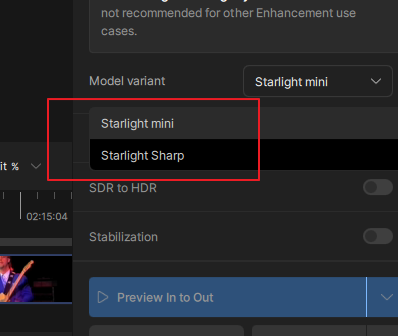
Wouldn’t it be a little cleaner if there was case consistency in the naming of the model variant? Starlight Mini and Starlight Sharp, where all the terms begin with capital letters rather than the mixed case shown in my screenshot.
A minor thing, but a little more professional-looking, in my opinion.
4 Likes
Not sure I see any speed increase but things appear to be working. I did a fresh install. I deleted the topaz folder in programdata but somehow it still loaded some of my settings. Anyone know what other folder I should delete to completely start from scratch? I don’t remember what I did before.
