Hello. Since we have unfortunately always had to uninstall and reinstall to make patches and updates and upgrades function correctly, is this still going to be the rule of thumb for this new version and upcoming versions, of Topaz Video? Thanks!
I bought Topaz today to upscale old 8mm and VHS materials. But to my surprise the mini function is gone and I can only use the cloud version for credits? You guys just took out the option without communication?
An issue I reported in the beta is still present. I can’t close the app normally, after hitting the x to close, it just hangs and I have to force close it with Windows.
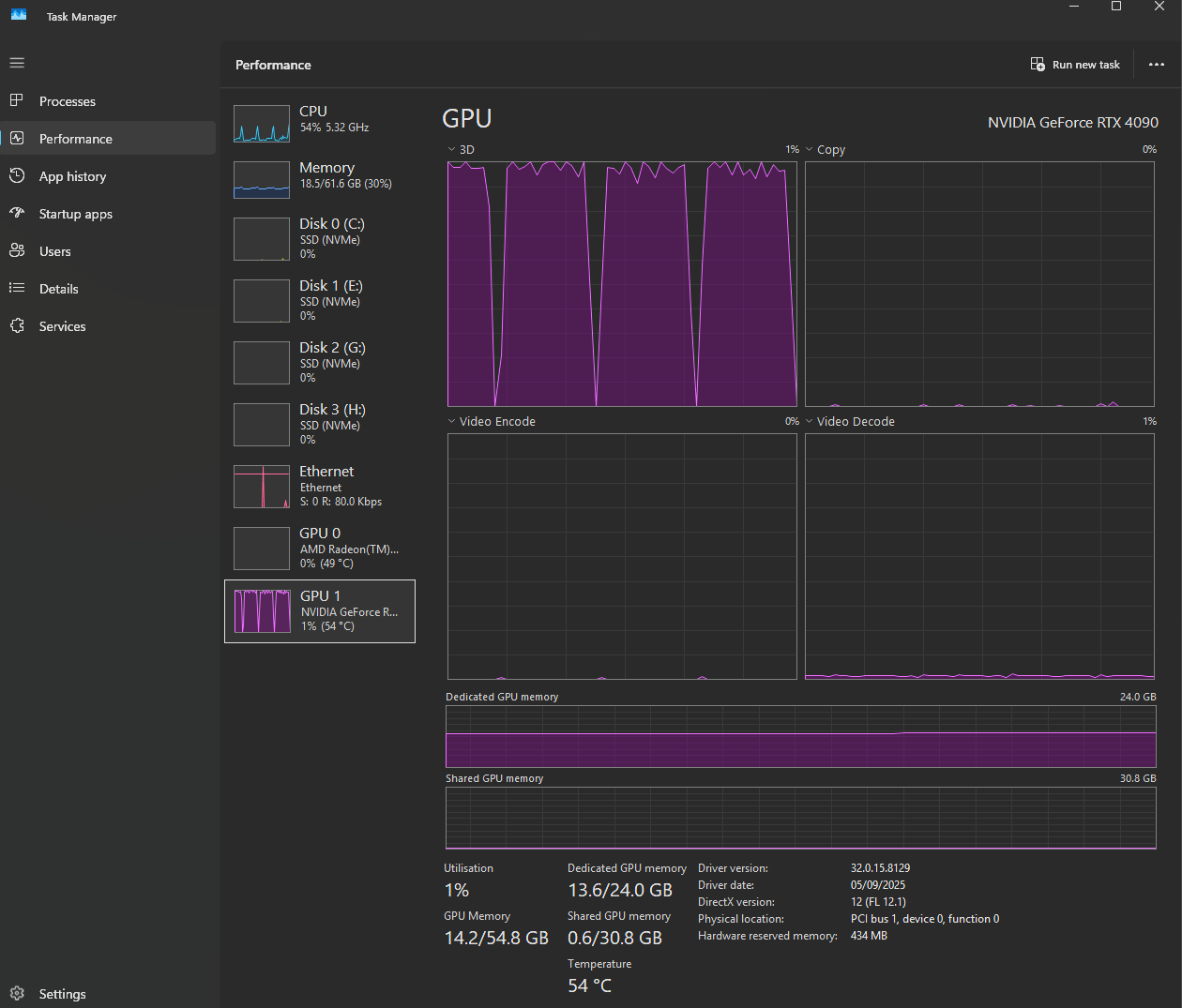
Also, using SLM and SLS on my 4090, the status while giving the time estimate for a job I’m running goes up and down constantly, likewise with the seconds per frame reading. Looking in task manager, the GPU usage is at 100% for so long, then dips down to 50% for a time, and then back up to 100% again, and repeat.
Reported temp of my card never gets higher than 75c, so it’s not dialling back because of a cooling issue. Any idea why usage doesn’t stick to 100% until the job is finished?
I also use an RTX 4090.
With my SLM models everything runs normally without slowdown.
The slowdown only happens with the SLS models.
When it slows down, the GPU temperature drops very low and the processing progress stops moving, but the GPU utilization still stays at 100%
I haven’t been able to have a stable version since 7.1.1. Also, I’ve noticed a white artifacts or speckles in my image in low light or incredibly detailed scenes happen with my workflows when processing enhancements seperately. If I process all the enhancements together, the image isn’t as clear but the white artifacting goes away.
Newer versions of the program have made the image have way more compression and made the models more unstable. This was tested after reinstalling all of the downloads and models from scratch. The models have the white artifacting on both nyx and proteus.
So the workflow is upscaling 1080p content to 4k using either proteus or nyx, adding HDR, and 120fps Aion at 80 to 100mbps. As you can imagine running all these models together causes problems frequently and it can take almost 4 days for me to finish a project or come to find out 2 days in, there was an error. I would prefer to run them all separately but it introduces white speckled artifacting.
Also, I do not like the newer Topaz layout as it’s buggy when retaining prefered settings and the exports are god awful. Now I have to spend three times as long trying to export projects than before where it would retain where a folder was coming from and I could easily selct the folder for the project to export too.
Also I’m having to manually rename every project because when exporting it doesn’t automatically populate the title with the models being used. Since it’s not retaining my prefered settings, I’m now having to manaully add what container I want to export in. How many mbps I want to set the video to, sound settings, Color settings etc. Please get this fixed, the newer versions are highly unstable and terrible to navigate. I don’t think this is what us users had in mind when we switched to a paid subscription model plan.
The other ui was more streamlined and less buggy. I don’t consider the ui updates worth upgrading to, especially when they don’t work properly. I don’t mind staying on an older version occasionally checking on newer version, but I would like to get rid of that white artifacting bug. It’s always when combining nyx or proteus with aion ran separately.
Topaz Labs made Topaz Labs Video Enhance AI. It got updates up to verison 7.1.4 a few weeks ago
About a week ago Topaz Labs deprecatedTopaz Labs Video Enhance AI and released Topaz Video 1.0.
With the release of Topaz Video 1.0, the “Starlight Mini” model was renamed to “Starlight”, and local acess to the Starlight model was shifted to a feature that only “Founders” (People who had a active Topaz Labs Video Enhance AI license during the transition to Topaz Video 1.0) or “Pro” subscription owners can use.
These changes are both documented in release notes of Topaz Video 1.0
I tought AMD-GPU Support and for MAC-OS Starlight is Founders or Pro only, but NVidia-GPU on Windows you get Starlight local without a Founder by normal active Topaz Video Subscription (Perpetual no longer Starlight, this was clear) and it is “Starlight Sharp” that is Founder only.
But I’m unsure now whats true, when I read what Topaz Labs wrote it’s not clear to me. My “Founder” is since days “transfer in progress” and I wonder how long it takes. Anyway I’ work with older V7 TVAI and Starlight, I have no stress to change and pherhapps it’s better to wait a little bit when I read all the bugs new V1 Topaz Video has.
In TopazVideo „Studio“ both, local SLmini as well as SL sharp are locked behind the Pro paywall.
So, you have to be a „founder“ or have a Pro licence to use those models locally.
(Or, if you had TVAI before you can of course keep using the last 7.x version of that)
Despite assurances from Mr Wixom at Topaz that the EULA would be updated regarding use of the CLI, it hasn’t changed. The offending sentence which I have been told is incorrect, is the following:
“Access to or use of the Command Line Interface (“CLI”) is strictly prohibited under a Personal License”.
Apparently, this doesn’t apply to Topaz Video.
While on the subject of the CLI, no-one from Topaz has yet replied to my bug report several days ago that the CLI documentation has disappeared from the website.
It appears that the lack of communication skills at Topaz includes within, as well as to its customers.
ok also “Starlight (mini)” not only the Sharp model is founder…hmm, then I think Topaz Video alone without founder state is dead, when they didn’t upgrade any of existing models proteus/iris/rhea, no one gives money for this every year.
I don’t think that’s a good idea. I would have given SLM to everyone who has an active video subscription, and founder is benefit, but well, they have to know what they’re doing.
Well, it should be - and also is here, at least on the Mac.
I didn’t try the windows version up to now as here the old TVAI 7.0.2 works well enough and is said to be the best for quality anyways.