Photo AI is now called Topaz Photo and therefore got a new version number as well.
3 Likes
Thank you!
1 Like
You can still run your copy of Photo AI 4.0. That’s the perpetual license version that may receive minor updates from Topaz Labs but no feature updates going forward. Your license for that can’t be renewed to get feature updates per a recent change in Topaz Labs policy, but you can run it as long as it runs on your hardware.
You can also run Photo v1.01 (the new Studio version of the app); this one is subscription-only, though (assuming your Photo AI license is Active, not Expired), you get free use of it until your one-year license to Photo AI is marked Expired in My Accounts. If you want to continue with it, you will be able to do so at the legacy renewal price for Photo AI ($99 USD plus tax, if any) as long as you don’t let the subscription lapse. If the subscription lapses at any point, you would have to renew at the higher, current renewal price, so it’s recommended to set your subscription to auto-renew. Like other subscription products, and unlike your perpetual license version, it stops working if the subscription is not active. This Studio version will be updated with new features going forward, without additional fees. With the Studio version, cloud processing is included at no extra charge, so you no longer need to buy cloud credits.
Use either version or both as you prefer.
Oh and if you’re unable to activate the new Studio Photo, and you are eligible because you have an Active license to Photo AI, if it says in My Accounts that your account is in transition, there has often been a delay of a few days or more before the account transition is completed and the new app can be activated.
Downloaded and installed, no problems whatsoever. I have tried to run both programas (PhotoAI and Photo) simultaneously and both works without any interference.
I have noticed that one of the slide bars on one of the adjustments stayed visible even when changing the filters, I need to verify it again and if persisting, I’ll report back.
Everything else seems to be running as usual, it even kept my preferences from the older model… Running on W11H.
@marcelo.cinicola - great to hear! For the lingering sliders, the development team is aware and we can reproduce, and are looking into a fix. Will let you know here once a fix released.
Thank you Ange! Staying tuned for the fix!
I try to use the Wonder feature and using the cloud. I saw it upload and it has been stuck on this screen for 5 minutes and still continue. It did say cloud render is 40 sec. Did it crash or does it take this long or even longer? Thanks.
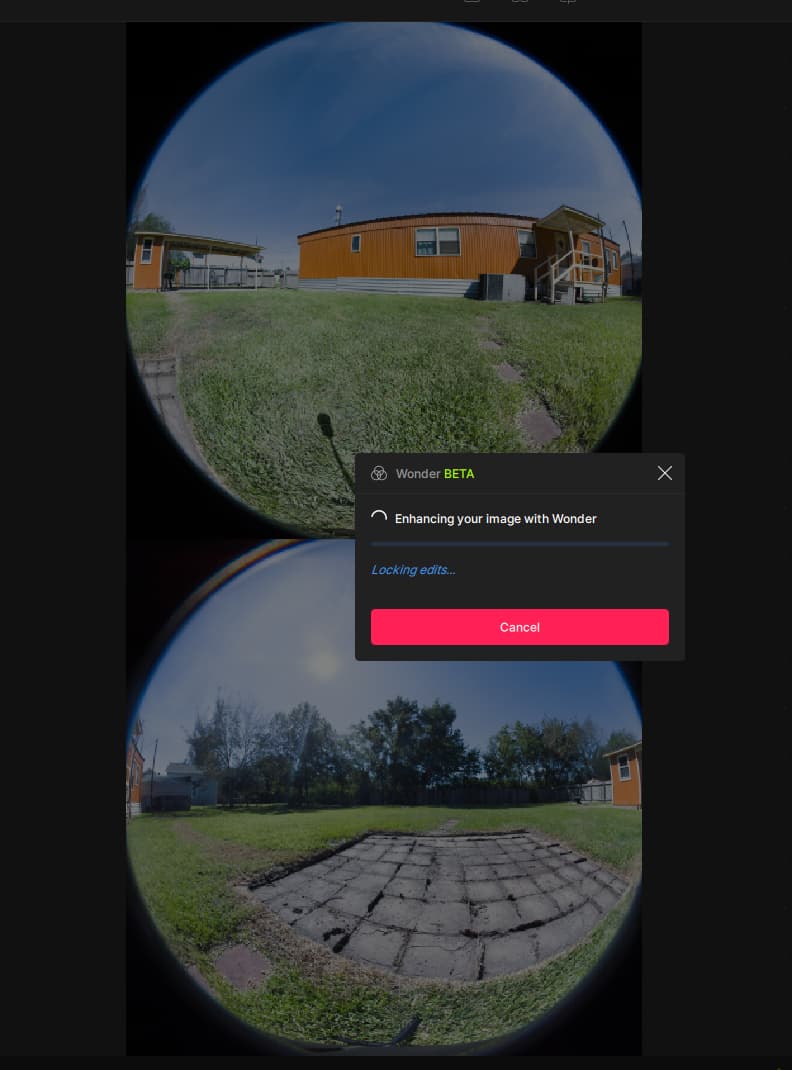
@mrtoyota03 - We have a known issue for Wonder that has an issue on the cloud on some machines. The development team is looking into a fix. We will close this thread here once resolved: WONDER CLOUD PROCESSING | Error loading model when using Cloud - #4 by Ange.topazlabs
2 Likes
I’m disappointed that a significant flaw is still in this software: when I’m in Lightroom and use the File > Plug-In Extras > Process with Topaz Photo (Studio), then edit the DNG photo, save it, and it moves back into Lightroom…every date attribute is the date I processed the photo (today). Upon export of the DNG to a JPEG, every attribute is today’s date (DateCreated, DateModified, etc.) and the image is at the bottom of my Lightroom library as the newest image even though it was taken months ago.
This is a problem because it means that I have to use a third party app to edit every field back to the original time/date stamp or the image will show out of order in Google Photos or any other time-based sorting app. This is a waste of my time and dissuades me from using Topaz Photo.
Topaz Photo should, at minimum, retain the DateCreated timestamp so it can be used to change the images time/date fields back to the original. Even better would be if Topaz kept every time/date field as-is and didn’t alter it.
This flaw has existed in the software since the very first version of Photo AI. When will Topaz fix this?
6 Likes
I don’t have that issue. Lightroom Classic recognizes date/time I shot the photo from the DNG produced by Topaz Photo
Interesting, I wonder what differences would account for the difference in what we’re seeing? I just confirmed again, and it’s worse that I realized: Topaz Photo strips out all date information.
Here’s my original DNG file showing a June 28th date:
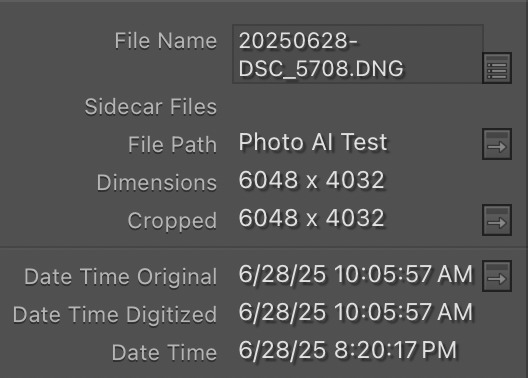
Here’s the Topaz Photo-processed file; no Date Time Original or Date Time Digitized, only Date Time (which is I believe File Create time)
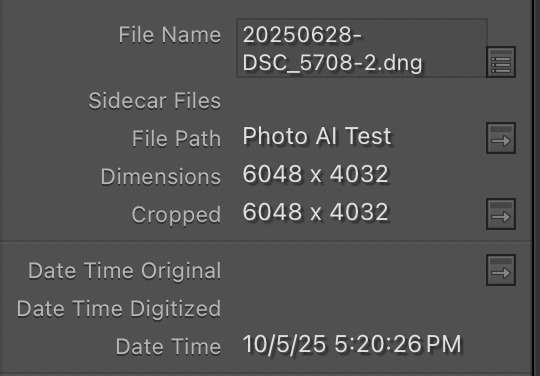
I see a difference. I’m imputing a Nikon RAW file to Topaz Photo, while you’re imputing a DNG file.
This can occur if you rename or change the filename using LRC. What happens if you use the native RAW out of camera file with no renaming-conversion to DNG?
Ah, excellent catch! Thanks for pointing that out. Yes, that’s a key difference and speaks to a possible bug with DNG files.
@Ange.topazlabs I’ve confirmed this bug occurs with DNG files. I imported an NEF file taken at 8:35am this morning:
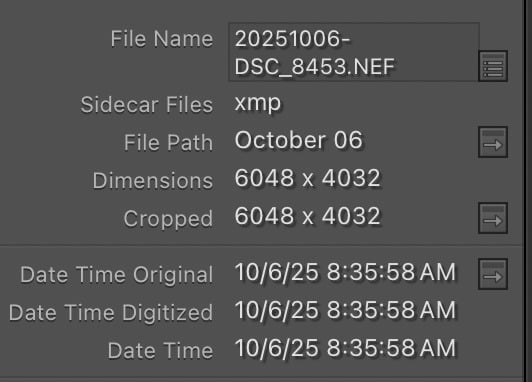
I processed it with Topaz Photo and it maintained all three time/date fields without altering them:
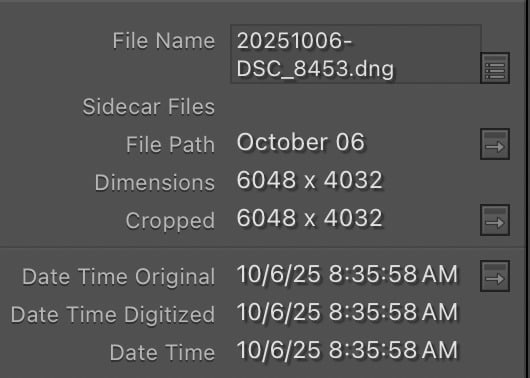
From a different camera, I imported and let Lightroom convert to DNG, and confirmed it did not change the time/date stamp from when the image was taken (you seemed to imply Lightroom itself my have been altering the time/date stamp upon conversion to DNG; I don’t see that). This was my starting point:
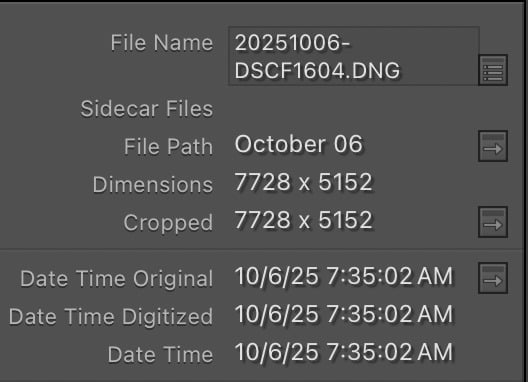
After processing the DNG with Topaz Photo, it removed Date Time Original, Date Time Digitized, and swtiched Date Time to the processing time:
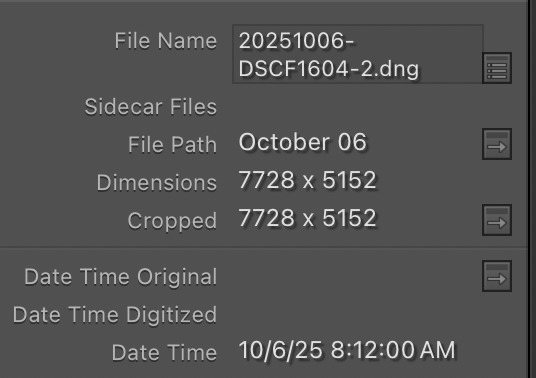
Seems like a bug to me?
3 Likes
We are looking to see if any workarounds possible. The issue is only on files LrC newly created (by renaming them). Best to use the native RAW file which won’t have any issues.
Asking a customer to alter their workflow to work around a software bug isn’t great. 
The NEF to DNG process, which created a new DNG, maintained the time/date stamp info from the NEF. This is how it should work.
The DNG to DNG process, which created a new DNG, removed the time/date stamp info. This seems like a bug to me.
1 Like
Yes, I mentionned the development team is aware and looking into a fix. The steps sent are the current workaround and your contact information is on the development team ticket to be contacted once a fix found and released! Happy editing!
2 Likes
Ok, thank you and I understand. I look forward to a future fix. 
1 Like
Will there be a new beta available for the Studio versions of Photo (and the others)?
