Hello! Today we have a patch release with fixes for the most frequent issues since release.
You can find the installer links and the full changelog below for this version of Topaz Photo. For any issues, make sure to send us an email to support@topazlabs.com
We are working on more fixes and feature updates, stay tuned!
Topaz Photo v1.0.1
Released September 23th, 2025 Windows: Download Mac: Download Snapdragon: Download
Changelog
Fix for seat management blocking login
Fix pricing modal links adding wrong products to cart
Dynamic Topaz Photo feature modal size and updated close button color
Fix showing original image when any processing happens after Wonder is added
Fix upscale resolution (ppi) field not showing up
Fix Photoshop plugin error when Photo AI is also installed
Fix enhancement reverting to default state when adding another enhancement and coming back
Fix Wonder and Recover Faces pasting faces in wrong location
Does the Ps fix noted in the Changelog (bullet #6) mean that both the new Topaz Photo (Studio) and latest Photo AI (Perpetual) Ps plugins should now co-exist and both will work as plugins (launch, process, export to layer) in Ps (File > Automate) with no error msgs?
@Fotomaker - yes it would be the fix to allow both apps to coexist without any errors (which was happening on Windows in Topaz Photo v1.0.0) - Let us know how it goes!
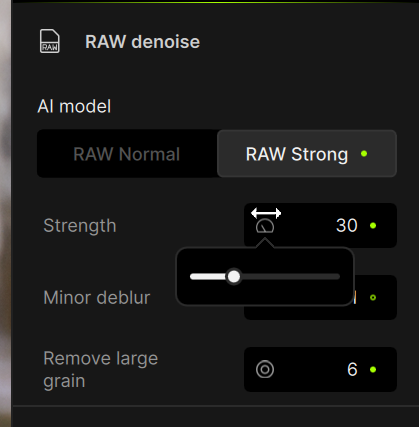
For the adjustments, you now have a box for a number, and a control you can drag to change the number. When you mouse-over the control. a pop-up slider appears below the control
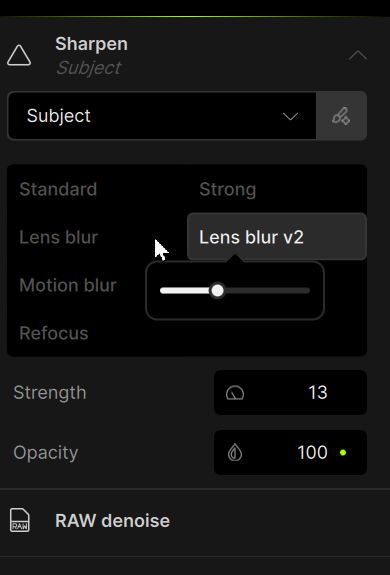
This pop-up usually disappears. Sometimes if you move the mouse sharply away from the panel, the pop-up remains visible, and can then sit on top of another panel
So even though I can now see the Sharpen panel, the visible slider still controls the original denoise setting. The first time it happened, the slider exactly lined up with the value I was trying to adjust, and it took me several minutes to work out what was happening
Personally I don’t like the new design - I far preferred just the sliders. But if you are going to stick with this new design, please fix this behaviour.
And make the fact this is a pop-up more visible. A thin dark grey outline on a black background is not obvious. I actually only noticed the outline when I took these screenshots
@david.barker-2802 - Thanks for this. We are tracking the lingering sliders issue and added your contact information for this on the development team ticket, and can tag you once a fix is found and released! For the other feedback, while the development team reads this thread, you can still post your sliders feedback and ideas on how you would like them in the Ideas forum, and have other users add their votes.
When using Photo in Photoshop, should I use File/Automate/Topaz Photo… or Filters/Topaz Labs Studio > Topaz Photo… A bit confusing that it is available in two places!
Wrong thread but do you know when Gigapixel will be available in Photoshop? And will it also be available under Automate and Filters?
I suggest you use File > Automate for a number of reasons (Lingyu or Ange may suggest others…):
1- If you want to alter sizing with scaling you must use the Automate approach. Adobe doesn’t allow filters (especially 3rd party ones) to change size in the Ps UI.
2- By using Automate, when you Export to Ps, your output will be sent to a new labeled layer. It will not overwrite your ‘launch’ layer (ie, the layer you send to the Topaz plugin).
@hummersallad - Automate always imo as not only it allows for full upscale sizze changes (not possible in filters) it also automatically creates a layer on top of your work, with the enhancements used in the naming of the layer. Filter does not create a layer and if you forget to duplicate your work/onto a fresh layer before using Filter, it will override that layer and could be problepatic. Using Automate always prevents any possibility of loss work and all upscale options, win win. For Gigapixel, best to post on their thread, it would be from Automate as its upscaling models, not possible from filters.
For @Fotomaker’s reply, I would not recommend Smart Filters as we do not support them and can have inconsistent behavior, but if it works in your workflow without issues, nice!

 Will do.
 Well, I suppose she can be considered so when helping!
  But, no I haven’t used my ‘diner waitress’ vocab for a long long time.