Hmmm. Thanks. I do have “founder” Photo AI software and auto renewal is turned ON. So I was able to download the new Topaz Photo, the Studio version. That should mean that unlimited cloud render is available, yet it seems not to be. Suggestions?
Also, while you may have access to the app, the full transition and Unlimited Cloud rendering may not of been completed, this can take a few more days.
1 Like
Ah! That was it. Thank you Ange. “Allow Cloud Processing” was turned off in Settings. Ironically, on this particular smallish image, my computer actually processed it faster. Thank you.
@richsfusa oh great! You are welcome
Any official answer regarding this question:
??
Thanks for the response.
I’ve been running more tests and I realise they are similar and I wasn’t comparing like for like.
In both PhotoAI and Topaz Photo the first time you hover on the ‘subject’ word for sharpen it takes about 3 seconds for the mask to show. After that it shows almost instantly in both.
I was seeing the instant in Photo AI and hadn’t noticed the delay in the past, but I’m seeing it there now.
Overall I’m still feeling Topaz Photo performs better. I feel the initial analysis of a photo is quicker and I’m not getting distracted by other things while I wait for it any more.
I would very much like to give feedback about this new app, but i cannot even log in. My subscriptions are active. I even reset my password. It’s defunct for me at this point.
A post was split to a new topic: Tips on how to Remove pattern on a file
make sure to reach out to support@topazlabs.com and send a screenshot of the error you get trying to log in. Make sure to confirm what email you are attempting to log in with. Keep in mind the transition is still underway and it will take a few more days for everyone to fully have access.
@rosie.coller good to hear! Happy exploring of Topaz Photo 
I just shared a tool here that can remove patterns from images, in case an AI model produces them.
Or TL is interested in removing such patterns with an FFT filter.
Unfortunately, it has been moved.
Tips on how to Remove pattern on a file - Showoff Spot - Topaz Community
It really didn’t belong in this thread, especially with no explanation of why you posted it. It was off topic.
1 Like
Every time I update a Topaz program and export from lightroom to Photo AI, it loses the option to “export to LrC”, I’m trying to sort this out with Topaz Photo, but there does not seem to be a solution - all that is available is “Export”, which does not return the image back to Lightroom Classic. It’s like opening a separate stand alone program instead of an external editor. Any solution for this?
1 Like
Yes, it was moved to the appropriate section as it is not related to Topaz Photo.
If the app produces artifacts, you can contact us here or at help@topazlabs.com and show us examples and we can have a look!
@jonathan.healy can you give details on your image types (RAW or JPEG), what plugin menu you use (picture of it) and since you are on Mac, a confirmation if behavior changes if you give Lightroom Classic full disk access?
- Go to Apple menu > System Settings (or System Preferences) > Privacy & Security > Full Disk Access
- Click the padlock icon
 to unlock, click the
 +button, find Photoshop in the Applications folder, click Open, and then click Quit & Reopen to apply the changes. - You’ll need to enter your administrator password for the changes to take effect.
On the My Products page it says I have Photo AI v9.9.9, but it is 4.0.4.
This will be fixed once the transition complete, will take a few more days.
2 Likes
So now you want me to buy a new computer to use your product?
1 Like
Intel Mac computers were always mentioned in System Requirements for Photo AI as not fit for heavy AI processing and always had slow processing and limitations using all enhancements in Photo AI. You can continue to use your owned Photo AI perpetual versions.
Apple officially discontinued Intel-based Macs a few years ago and has fully transitioned to Apple Silicon (M-series) chips. Because of this shift, newer AI technologies, including the models used in Topaz Photo and Gigapixel Studio, are no longer compatible with Intel Macs. While these apps previously ran on Intel devices, they were never optimized for AI processing and have now reached the limits of what that hardware can handle.
Studio does include unlimited cloud rendering for images (and video credits ), which you can use via Web Tools. This lets you run the latest models with full performance even on an older machine.
2 Likes
Personally, I was excited to try the new Wonder feature. Mind you, I have an AMD 7900 XTX with an AMD Ryzen 5900X, and it’s no slouch, but if an image needs to take 4+ hours, it’s just not worth it. I can’t tell if it’s early days and needs optimisation (a lot of it) or a push to use their cloud solution.
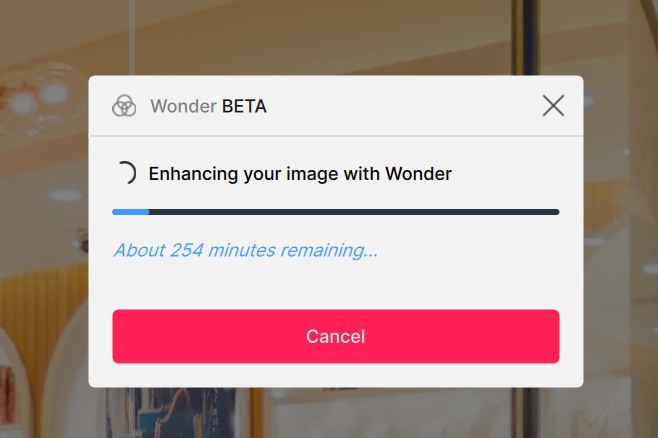
It’s not like it will process it in the background while you work on other images or a preview, either, so you’re prevented from continuing work in Topaz, which seems a bit counterintuitive.
3 Likes
