@PinkCaviar - What is the starting image size and scale factor you are using? The limit for Wonder output is 128MP. Test with a smaller scale factor to reduce the output size. Also Cloud processing will be unlocked and unlimited for images, once you have a 128MP max output size, you can also test the cloud processing once fully rolled out (transition will take few days)
It’s 11904 x 5952… so its not the smallest and I am not trying to upscale it. I also realised I was trying to uset he TIF version so I have converted it to JPG and ETA is now 16 mins. Still a little time is needed but not a while day. Curious to see the end result.
So the “free” cloud processing isn’t ready yet?
@PinkCaviar if no scale factor then it wont go over the limit at that size (71MP). JPEG format will be faster. To get faster processing, you could use the cloud processing or since its already a 11K pixel file, would be best to do Wonder on the original file, then export and upscale to the 11K pixel size using a non-generative model.
1 Like
@golder-50350 - It is for some users, but still in progress for others. The full transition for all users will take a few days.
I had no idea it was free (is it). I just wanted to test my PC out and test its limits.
I tried it, but seemed to get stuck in the “uploading” phase.
Thank you for this. I have hoped to get this for quite awhile.
2 Likes
I keep getting “Error running model” on every model I try. Using a Mac mini Pro M4 with Mac OS 26 Tahoe installed. I did try to reinstall the app, but no luck. Thoughts anyone?
I downloaded Photo AI to my laptop, Intel i7-11800H, 16Gb, Nvidia 3060, with the latest Nvidia Studio drivers. Fully patched W11.
Installation took forever. This morning, I exported a photo from DxO PhotoLab into Photo AI, and the first thing I got from Photo AI was “Downloading models … some need to be re-downloaded”. It’s quite true that when after a long long wait (I went out to play cards for a couple of hours and it was just finishing when I came home), I had updated versions of PhotoLab and Nik to install; but can either of these updates possibly have had an impact on the freshly installed Photo AI files?
I have had time to check my hardware and Windows update info, as well as reading through this thread to check whether anyone else had reported the problem. And still downloading the models. Needs fixing!
1 Like
Were you working with Photo AI (the perpetual license product) or Topaz Photo (the new Studio incarnation)?
Wonder is not made for images this big, use Standard Max or Hifi V2.
You will be disapointed from Wonder with big images.
1 Like
2 posts were merged into an existing topic: Topaz Studio | Transition Questions
When I choose to select a Custom resolution in Wonder BETA there are only commas and I don’t know how to proceed. Could you investigate? Thanks.
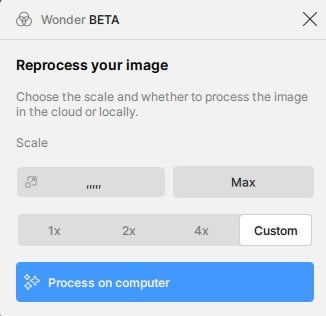
(I intended to post in the bug report category but there I have to “Select at least one tag from Bug Report (Internal)”. I tried inserting an own tag which didn’t work nor did I find a selection of valid tags to choose from.)
1 Like
AFAIK, this was Topaz Photo. I had to browse my C: drive to find the program I launched… FWIW, some couple of hours of (re-)download later, it had finished. I was able to launch WONDER. and I have to say it looks quite slick.
So, a few hours later on (because there are other things in life like shopping and sleep), I tee’ed up another shot in PhotoLab and exported it to Topaz Photo. The same thing…
If it can be helpful, here is the log for the second session (which I aborted).
And, as a footnote, after cancelling the exported edit, I decided to launch Topaz Photo from Windows. Load the same shot (I can’t upload it; too big) and get the same downloading models message. And before you ask, my hard disks are all SSD, with ample space.
What next?
2025-09-18-16-33-45.tzlog (106.7 KB)
3 Likes
@rene.kuipers - we are still looking into Tahoe compatibility. To know what is happening, from the app can you click Get Help and attach logs, it will send a ticket to our Support queue and logs and we can have a look! Also make sure to mention if you are using standalone or from plugin!
@mike16 - You are downloading 32GB of models, it will take time, yes as its a complete new install separate from Photo AI. Missing models means there is a blocker on your side, which we cannot bypass. Test rerunning the same installer while connected to a mobile hotspot (do not uninstall) it will analyze what models are missing and install the missing ones. If still get the message after this, turn off firewall and antivirus, rerun installer again. Once all models installed, turn back on firewall and anti-virus.
Once that is done, if any issues remain send in screenshots, and new fresh logs to support@topazlabs.com and we can have a look!
1 Like
That Log data should be useful to the devs. Thx for the clarifying info. I am not TL staff.
My installs take a very long time too. When I’ve tried to treat them as a background process, the TL installs typically mess up.
@pmb2026 - thanks for letting us know about the tag issue on the Topaz Photo forum, we will have a look.
For the comma issue, are you able to select the commas? What size is the original image? Keep in mind the maximum output size for Wonder is 128MP. Let me know the details and I can relay to the development team!
Thanks for writing back.
Yes, I can select the commas, however, I don’t know in which format to input the wanted final size. The original image is a .tif with a size of 21 MB (1538 x 2460 pixel). I would like to upscale it to a size of 2400 x 3840 pixel for my tablet. “Normal” Resize scaling (no Wonder) works fine.
