Are there Before / After screen shots to help see the image without spots and after the spots appeared? For comparison.
1 Like
Hello Adam.
I’ve looked at your settings on your picture and under Auto Selection of the area to be adjusted even though it says All it’s worth checking. Sometimes it not always all selected and it can lead to this problem.
By the way it’s a really good picture.
Regards Bob. 
1 Like
Hello Fotomaker it’s good to see your here. I’ve had a busy day and I’m fair worn out!
Regards. 
2 Likes
I’ve had problems where TPAI loses color depth, especially at the light/dark extremes; not sure if this is what’s happening here (don’t know what the starting image looks likes and whether it’s 8 bit or higher).
More concerning to me might be the blockiness on the right side but it’s hard to tell if that is in the original image or a consequence of compressing a screen grab.
2 Likes
What is the original format? I suspect this is over processing artifacts. We would need to test and download the original to be able to know more. It would also be best to put the original in Photo AI directly, to get beeter results, not a PS plugin that onyl sends a merged layer of your work to Photo AI! Since you have PS too, I would do the Light/color edits in there, to avoid a over processed look, which seems to be happening here. Let us know if you post here a link of the original and we can test it!
1 Like
for the block artifacts, if they are in the processed file, would be overprocess artifacts and I suspect this file might of been shot originally as RAW and the original may also be pretty dark, we would need to see the original to know more. If that’s the case, there is a misuse of the enhancements, and RAW Denoise should be used here, not Denoise. To get RAW Denoise, to use Photo AI as a standalone as PS cannot send the RAW file to Photo AI.
We can know more and test more if @adam.manka-0545 sends us the original!
1 Like
I knew the Raw doesn’t get sent from Ps, but is it a .tif? Or, something else, Ange?
I process raw files. How do I upload a raw file?
@Fotomaker no matter the starting format, using the PS plugin will merge everything into a non-RAW layer and send that over to Photo AI. Won’t make a difference vs using the plugin if shooting non-RAW files, but for RAW files will be crutial to work with the original in Photo AI as standalone, to use the full quality RAW file into Photo AI and benefit using RAW Denoise.
@adam.manka-0545 - to use the RAW file in Photo AI, open Photo AI from desktop shortcut, then import your RAW files in Photo AI. benefits will be that you can do batch editing and files will have RAW Denoise, which you don’t use right now. It will give much better results. Then export as DNG (still RAW format) and then import the DNG into PS. Will be faster workflow as you can batch edit, and will be better results too and no over-processing artifacts! Let us know how it goes!
1 Like
Thx Ange!
Hi everyone, I just use version 4.0.3 to batch process my photo (around 350 TIFF photo) with auto pilot on Windows 11 24H2, 64GB RAM, Ryzen 7950X, 3060Ti 8GB RAM with latest NVIDIA studio driver installed, and found the program has heavy memory leak. It will used up all my memory and crash around 150 photos each time. I have to separate it to few batch with reboot to complete the job. Hope this issue could fix in next release.
@dicky29 - can you send to support@topazlabs.com your logs and System Profile? We would like to investigate as we don’t have any reports of any memory leak. Once we can identify the issue we can relay tot he development team and open a development team ticket! Steps here to gather your System Profile and Logs
Is there still a way for someone to buy Topaz Denoise AI? I realize that it is discontinued, but I know someone who just wants what it offers rather than the expensive and multi-function Photo AI.
I don’t know if this is helpful or not (the person would still need a license key) … because that is a legacy, no longer supported product. Scroll down the page at this link:
If I understand what is written there correctly the downloads require a previous license key (purchase) for Denoise AI. For someone who did not previously purchase it then the download would just be a trial version. Is that your understanding also?
Yes.
Unless some arrangement could be made directly with Spt… but I wouldn’t know about that.
Hi.
DeNoise is available as part of the Topaz Web Apps, you can try for free with your first ten images and buy credits thereafter either though one of purchases or monthly Subscription.
Here’s some information and a link
Remove noise from your images instantly for free.
Noise reduction software has remained largely unchanged for over a decade—until now. Traditional noise reduction tools often blur details or create unnatural smoothing, but our AI-based approach is different. By learning from millions of images, our denoising model can accurately differentiate between real detail and unwanted noise. This allows you to remove noise while recovering important image details, something that was impossible just a few years ago.

Upload an image to denoise.
Drag and drop or

Upload to start - Free
Sign up and start for free - no watermarks.
Hope this helps
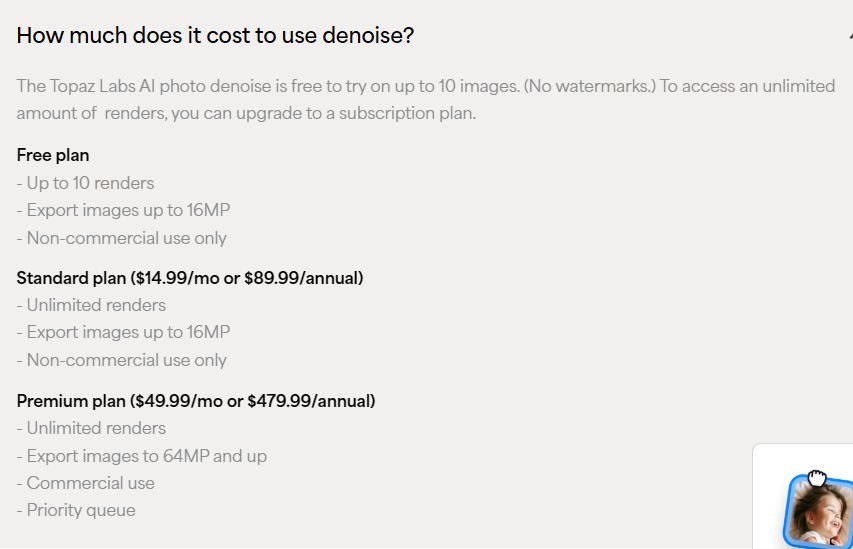
I told him to forget about Topaz and get On1 NoNoise AI instead. Good price too. He is thrilled with it.
@Tostanica-fezanamu - If On1 can meet your friend’s needs, great! FYI for your questions: Denoise AI is not for sale since it’s been discontinued and yes would require a previously purchased license key, otherwise it would remain in Trial Mode. And-E also posted a link to the web apps, which has a standalone Denoise wep app, which could of been an option too if they wanted something that didn’t require specific computer RAM and VRAM since it online based.
1 Like
