I added a ticket for this for the development team to look into!
1 Like
@dakota.wixom11
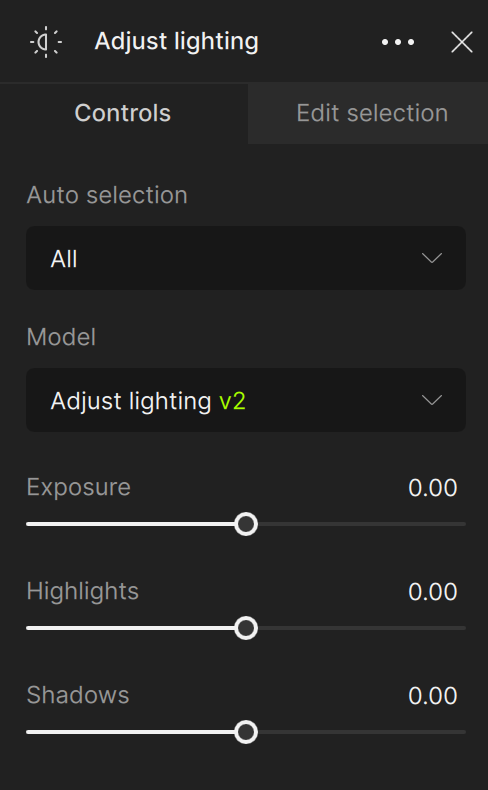
Just tried v.3.5.0 and the same happened to me, so I had to go back to the 3.4.3 (working OK) since the sliders shown on the announcement are missing on my PC (W11):
Tried a simple .jpg picture to test it. No luck.
2 Likes
@jurgen.wietschke - we opened a ticket for this, it seems the text field issue has issues with foreign keyboards. As mentioned in your email to support, we will contact you once resolved! @marcelo.cinicola we will also notify you once fix released for the text field.
1 Like
Thank you @Ange.topazlabs for your reply, kind of confusing then on the announcement? It’d seem like we’ll have available the sliders for highlights + exposure from scratch… or I missed something from the release notes?
1 Like
I can’t comment on how it works because it crashes upon opening. Intro window flashes on the screen and closes within one second.
Thanks! Sorry, this is an old screenshot. There’s only one slider for this release. I’ll fix the image 
1 Like
@joyep - make sure to write to support@topazlabs.com and we can troubleshoot with you!
Thanks!
Also having this exact issue, although not the “can’t reboot Mac” part. I had to down grade all the way back to 3.3.3 to get super focus to work. Version 3.4.3 has the same issue. I did not try 3.4.2. However, since I knew 3.3.3 worked, I reverted to that version.
@dontaylor - you are on OS 15, not 13, and you don’t have the reboot issue, so this is different. Have you tested this step since you are on OS 15?
If any issues persists on the newer versions, let us know at support@topazlabs.com and we can troubleshoot with you!
It was discussed earlier. Unfortunately, that’s how the Topaz works.
Yes, but this is not acceptable, and I’m glad Topaz is working on it
Is it only in super focus mode that cloud rendering can be used? I have tried it by the way and it doesn’t work. Error running model. I did a repair of Photo AI
This is the second time I’m writing this and hope this time I get a reply!
Again its the same issue with Photo Ai 3.5.0.
I used to use Gigapixel and Photo Ai in a VM with no issues but since Photo Ai 3.4.3 and Gigapixel Ai 8.1.2 releases both apps stops recognizing my RTX 40 series GPU. It won’t show the GPU in AI processing option menu so everything going to render on CPU. I’ve tried the new version of Video AI trial, it works smoothly inside the same VM. All other Apps recognize my GPU with no issue, So I’m sure it has something to do with the new versions of Photo Ai and Gigapixel. (When I restore the old versions, both app recognize the GPU again)
Could you please tell me what’s the issue here and why new versions stopped supporting GPU-Passthrough or Virtual GPU in device manager?
Many Thanks,
Soli
@ronny.melbeus - yes the cloud is Super Focus Only. If you get this error, this is a local issue, that can happen as the preview is generated locally. Seeing on our side that you have a Intel Xe card, make sure to be on its latest driver: https://www.intel.com/content/www/us/en/download/785597/intel-arc-iris-xe-graphics-windows.html - then reboot and retest
@persjeg - I see your post on the Gigapixel Bugs and issues forum. Keep in mind this forum is a Community Forum to get other user’s input, and we mention at the top to reach out to support@topazlabs.com for any issues. I have moved this post over to Photo AI now since you are reaching out here.
Can you send screenshots of both the Edit > Preferences > General > AI Processor dropdown options from prior/latest Photo AI versions, with your System Profile to support@topazlabs.com and we can share to the development team this behavior!
I am sorry. I spoke too soon. I am using 3.5.0 today and I see that the color shift problem still exists. It seems that the problem is with the initial view and not the processed view. The initial view of an sRGB JPEG or TIFF often has way too much saturation and contrast. It is not the correct view. Even just using the split screen view on an unprocessed photo shows the left side of the line (the initial view) has way too much saturation and more contrast than the right side. Also, the right side, which is correct, looks the same as the Apple Preview app and Photoshop. Strangely, it doesn’t happen every time though.
I’m a Windows user. So don’t know if that changes things… Did you already mention whether you have the colorspace in the PAI 3.5.0 set to the same colorspace you’re using with other processing of your images.
So, for example, if you’re opening an sRGB image into PAI 3.5.0 do you have the colorspace in PAI set to preview sRGB?
I’m not sure it would make a difference. But, just a thought.
1 Like
I just have the defaults. I have not changed anything. Looking through the Preferences I do not see a place to set the colorspace to preview sRGB. Where is it?
1 Like
Thanks.
But unfortunately upgrading the graphics card didn’t help. Same error.
I’m sending the log file, which I see indicates the error, in case you can see anything more.
Will cloud rendering also work with other features in the future?
I know that my hardware doesn’t fully meet the system requirements.
That’s why I accepted the offer, during black weak last year, to buy Photo AI with cloud credits. What I fear now is that I won’t have any use for my cloud credits.
With kind regards. Ronny
2025-02-15-15-27-56.tzlog (119 KB)
