I am waiting on a confirmation from Lingyu on the reasons on the placement in Privacy for this Generative AI toggle. @gotozeus @z1nonly
1 Like
I have mentioned to the development team! Intel Macs were always mentionned as underpowered for all AI processing in our System Requirements, and Stable Diffusion models just goes over what this combo (Intel MAC AMD) can handle. The only version to use is v3.3.0, as it was the first version with Super Focus as beta, and the multiple issues raised on Intel AMD and further testing had the development team decide to revoke the access to it.
Yes, I have seen your request for me to do even more Photo AI testing on my Mac which results in having to do a hard reset each time. I am not in the Topaz beta tester program. This feels like you want me to be an alpha tester. Over the last few years using Topaz products I have done a lot of uncompensated testing for Topaz using lots of my time and effort, creating screenshots, writing detailed explanations, etc. This cycle is getting old. 
There is still the other problem that I sent in a bug report for an earlier version where using Denoise, etc. causes a color shift and tone change when I use the standalone for an sRGB JPEG or TIFF. Still in 3.5.0. Noticed it with B&W photos too where the tone changes.
1 Like
SuperFocus worked perfectly with my AMD Radeon Pro 5700 XT and it was relatively fast!
So please give us Users the choice whether we want to use it or not! It’s just a Toggle and the User can decide it self!
1 Like
We can troubleshoot with other users that will flag this (none others yet for this Super Focus issue) and get back to you, or you can test the troubleshooting steps I sent. None of the steps I sent require a reboot. For the moment we have not had this specific issue flagged our way. I have also shared the logs to Lingyu.
For the color shift, I have replied with insight from the development team as we cannot reproduce this, nor do we have other reports for this.
the request was passed on!
See my 2 posts above. Both times I had to do a hard reset in order to get out of 3.5.0. The Super Focus Cancel button didn’t work. I could not reboot. I had to do a hard reset both times I did testing for Topaz. Please reread my posts and also my email messages with the bug report. I have no confidence that even if I do more free work for Topaz that the result will be that you fix this problem. You seem to be saying that after all the work I did testing and providing info for the other problem below that Topaz does not intend to fix that one either. Is Topaz just throwing up their hands and giving up?
Just now I changed to CPU and had the same result. I finally had to once again do a hard reset.
So, this will just be another bug that Topaz does not intend to fix? For that bug also I did multiple rounds of testing for Topaz. It doesn’t mean a whole lot that Topaz cannot reproduce it since Topaz, apparently, has not been able to find any of the bugs before release that so many users quickly discover after every release.
I spent decades as a software engineer on systems software. I can’t count the times I had to work on hard to find bugs that for a long time I could not reproduce. Ultimately I was able to find and fix them. It takes effort and diligence and a can-do attitude to find and fix those bugs. Please stick with it.
The logs have been shared to the development team already, and I can get back to you with their insight. I can confirm for each issues, there is no other reports, but a ticket was open with your logs submitted. For the color shift, their insight was to update from OS 13 to the recent one as the logs do not show any issues, and it cannot be reproduced. For the hard boot, the coreML deletion, once done, since issur remains, I have opened a ticket for your case with your logs and we will circle back on your support email thread once the development team provides insight or a fix! If other users report this they will be added on that opened ticket.
I’ve see the same issue in Windows. I’ve been send a picture (.CR3) from Lightroom via “Edit in…” to PhotoAI. There’s doing a little denoising and sharpening, then send it back to LR. If I validate the original file and the exported .tif file from PhotoAI I see a little color cast and a tone change. I’ve used the color profile PhotoRGB
I’ve tried another image in the same way and there I don’t see such issue.
Such color shifts and tone changes I see at least with early 3.x versions. In version 3.4.4 I have no problems.
I’ll doing further testings.
For your case @axel.matthies - any reason you are doing Edit in and not the RAW plugin workflow? Doing Edit in revokes your access to RAW denoise and the color handling of the RAW file. Let us know how your tests go!
For Tostanica, it’s not the same thing, as we have his files and cannot replicate. We sent steps to Tostanica to further troubleshoot his issue.
@gotozeus - @z1nonly
Brought this up in our meeting with Lingyu today and since generative AI pulls data that is not there in the original image, and it’s pulling information from the training data set and not part of the original image, the slider was placed in the privacy section - however it’s more of a authenticity concern rather then privacy. We will move this slider to General Section, thanks for flagging!
6 Likes
I updated to Sequoia 15.3.1. I also deleted the coreMLcache folder. It seems that the Super Focus problem and the color shift/tone change problems are resolved now. Great!
In discussing with support I learned that no one at Topaz has a Mac with any version of MacOS prior to Sequoia 15.* so it is impossible for them to test and verify the software works properly on prior versions.
The Topaz website says that versions from 11 and above are supported:
https://docs.topazlabs.com/photo-ai/system-requirements
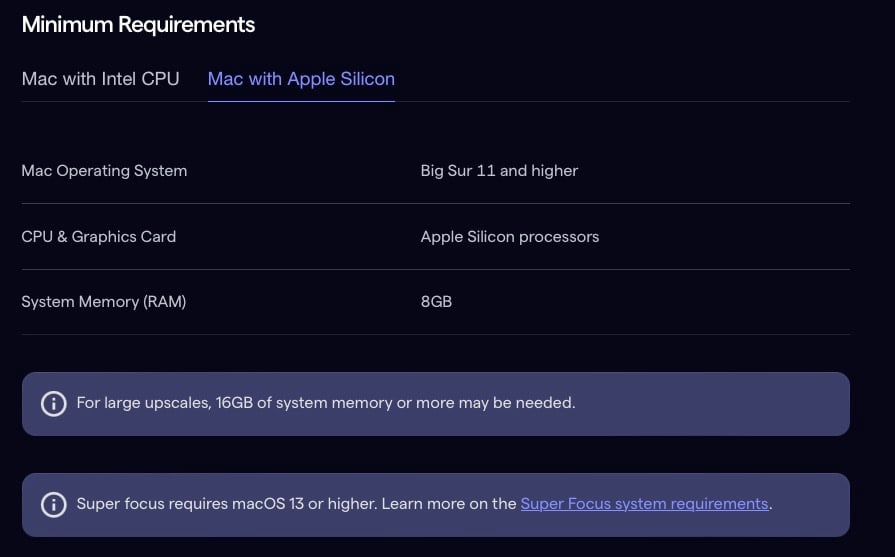
And note that versions from 13 and above are supported for Super Focus.
The website needs to be updated to say that only 15 is supported.
1 Like
Glad it’s all fixed! We stay up to date on our OS updates yes and we also have multiple users that work on OS 13 that have no issues with color shifts or Super Focus! As mentioned you were the only user with this color shift reported or stuck Super Focus, we could not reproduce it with your exact files, and after talking to the development team, the next step was to update the OS, which has resolved the issue  Glad that both your issues are resolved not with this update, and happy editing!
Tried to update to 3.5 and the Windows Installer popup said: Error opening installation log file. Verify that the specified log file location exists and is writable.
help?
“Apple Silicon devices saw the greatest improvement in processing time, up to 40% on M1. On the new M4 devices, the improvement is close to 10%.”
How can an M1 be 40% faster but an M4 only 10% faster???
Surely, it’s the other way around as makes no sense for the new M4 to be slower than a 5 year old M1?
For super focus to be efficient it has to process only the selected (green masked one) parts of the image. Nowadays it process the whole image which is ridiculous, cause often the wished area to be sharpened is smaller than the preview area.
3 Likes
@designs-5645 - Can you test this direct link Dakota posted all the way above? this will bypass the in-app installer.
@Celts88 - the % increase are compared to the prior processing times on these machines. M4 will process faster compared to a M1, yes. But a user on M1 should experience 40% faster Super Focus compared to HIS M1 processing speed prior to this optimization.
@vincent.lugnier - I agree! Forcing a selection is something the development team is looking into! For now, all is processed and it allows for selection being tweaked to remove/add from selection unwanted areas without the need to reprocess.
1 Like
As previously reported in the Beta, if you select PAI from Edit In within LrC, then make changes to your image. If you click on the X in the top right corner, instead of Export to Adobe LrC, then you do not get the Do You Wish To Continue box, your changes are lost and you are transferred back to the unedited image in LrC, even though the file name has changed. This was just in Beta, but has now been transferred to the LIVE version now.
1 Like
