I downloaded the Windows 3.2.1 version linked above and tried to install it on my Win11 PC. I got this error:
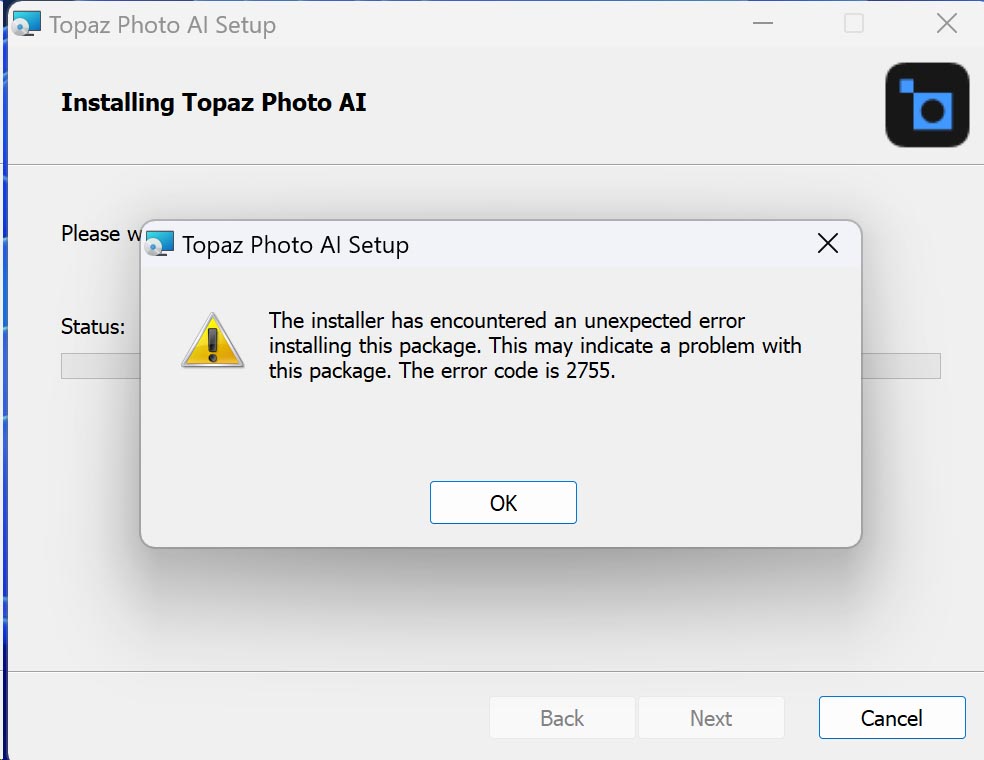
Anyone else getting this error? I have never gotten it before. I had 3.2.0 and it installed a few weeks ago with no problems.
I downloaded the Windows 3.2.1 version linked above and tried to install it on my Win11 PC. I got this error:
Anyone else getting this error? I have never gotten it before. I had 3.2.0 and it installed a few weeks ago with no problems.
We should hope that US courts will follow this wisdom.
Microsoft and others have been trying to blur the line between ownership and subscription, so you are not truly buying anything when you hand them your money. I was afraid that Topaz was becoming that way, but now we have reassurances that it was a mistake or misunderstanding that will be corrected – I have no reason to disbelieve them, as the company has always done business honorably. It is fine if they want to have different terms for large companies; there is no reason Google or Disney should use their products for $100 a year to make images that will sell millions around the world.
…Sam
I need 3.2 … this release refuses to load images and connect with Lightroom …
3.2 worked, and I have a wedding project. WHERE ARE THE PREVIOUS DOWNLOADS STORED … AND NO, THEY DONT DISPLAY IN MY PRODUCTS … IT JUST TAKES ME BACK TO THE COMMUNITY PAGE.
THANK YOU …
Each section of this community forum under Releases has the download in it:
The older apps, are here:
3.2.0 works quite well for most things. If you need the most updated before the whole new UI and major changes, then 2.3.2 is the one.
Please note that the blue text in the boxes above is the link.
…Sam
I’ve been quite unhappy with Photo AI this year. Despite all the new versions and interface enhancements, I’ve encountered a significant problem on my MacBook Pro 16" (2.4 GHz 8-Core Intel Core i9, AMD Radeon Pro 5500M 8 GB, RAM: 32 GB, macOS Ventura 13.6.8):
Enhancement previews take an unreasonably long time to generate, and saving/exporting causes the entire system to grind to a halt—often never completing the process.
As a result, I deleted the latest version available to me (v3.1.3) and downgraded to earlier versions. Testing revealed that in my case v2.2.2 was the last stable one that worked without freezing, providing fast processing and exporting times as expected.
My question is: What changes in the later versions would cause such severe performance issues on my machine? While I understand my MacBook Pro is Intel-based and not a Silicon model, it still meets the recommended specs.
Since I’d need to upgrade my subscription to access v3.2.1 or later, I’m reluctant to do so without knowing whether the performance issues have been resolved. As it stands, I feel stuck on this older version until I upgrade to a new Mac.
Any insight would be great. Thanks!
During the installation process there is a message that the install files are being verified so, I suppose, that means checking for corruption (probably a checksum, hash, or something else).
I almost reran the 3.2.1 install file again to see what would happen, but then I decided to just download it again. I ran it and it reported that the previous install of 3.2.1 was corrupted so it would repair it. It chugged along and completed. Seems to be working now, but I have only run the standalone on one photo.
The combined problems on the various features and developments of TPAI were not enough. The unclear things were not enough, such as that TPAI was supposed to be the integration, with autopilot, of Denoise, Sharpening and Gigapixel, while for some time now Gigapixel has been reborn with new and different features from TPAI. No, all this was not enough, now also doubts and problems with the license: do Topaz think before doing any action or do they think their customers are oxen?
With the risk if not being read now that there seems to be a huge hoopla with regards to EULA I still have to ask…
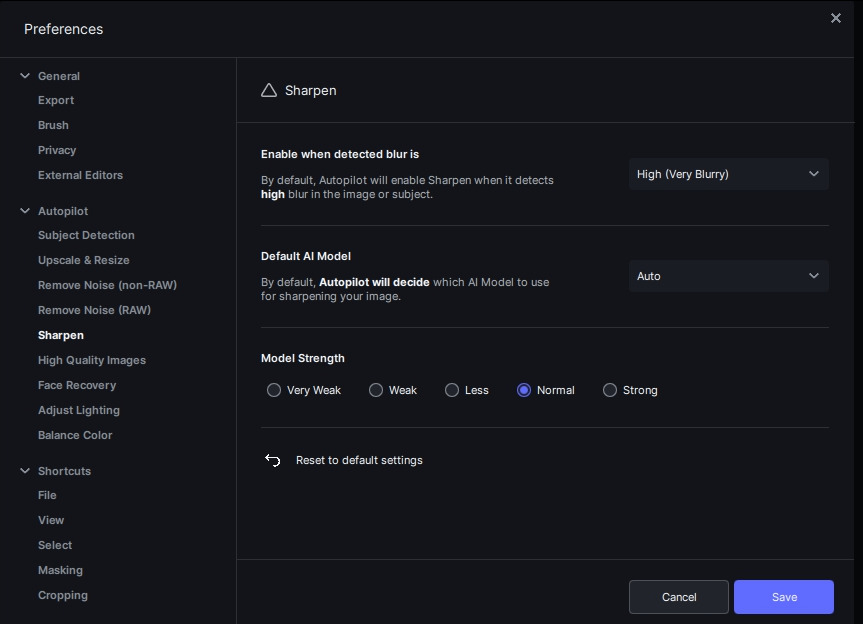
Quite some time ago when some users were commenting on the Sharpen and Denoise usually being applied a bit to much when using the autopilot I learned that you could go into preferences and “dial it back” a bit in under “Model Strenght”, with the options:
“Very Weak”, Weak", “Less”, “Normal” & “Strong”.
This - at least for me was perfect as I always felt that both Denoise and Sharpen got overdone on just about every photo I ran through it (it still does in my opinion), and I set it down one or two notches for much better result.
Now - about a week ago I ran my first “batch” with PAI 3.2.0 and felt from the get go that the output when Sharpening once again felt way to strong with results that came out oversharpened - a lot.
So… I guess my question is: Can someone please help me understand why I can no longer dial back default Model Strenght in preferences? For some reason it is removed for Sharpen, while it is still possible to set Strenght for Denoise.
For reference (Yeah, I’ve actually spent a bit of time going back and installing 4 different versions)
2.3.2:
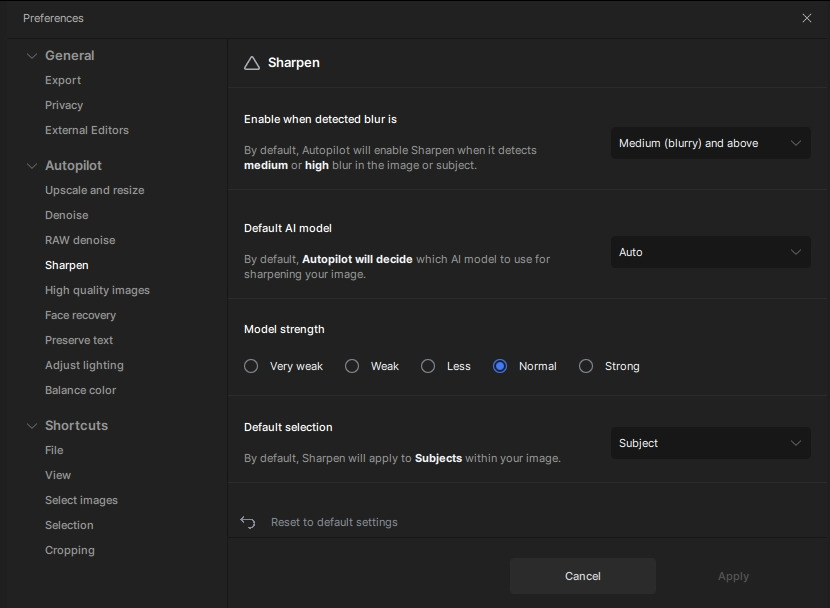
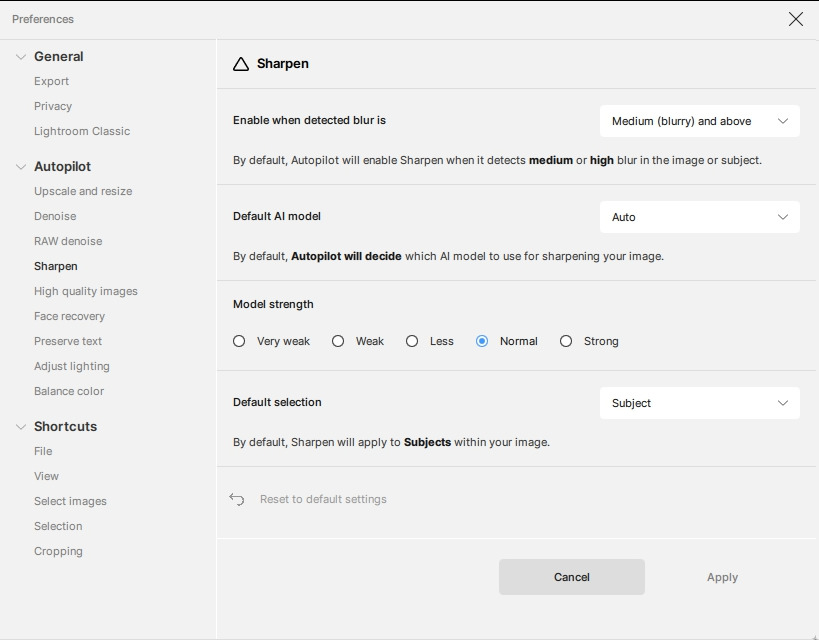
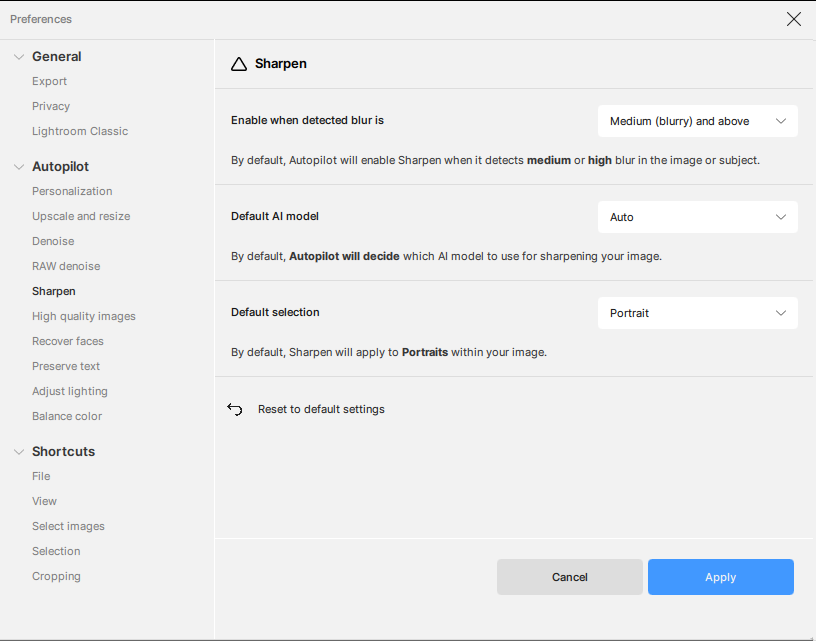
Soo… what’s going on here?
We all have our deal-breakers, and from time to time I read about different users saying (because of different reasons) “I’m downgrading, and I won’t update until this is fixed!”… I just didn’t think it would happen to me. But now? I just don’t have time to sit and flip though 150-200 photos and set things manually when 3.1 provides does its thing and fixes a whole folder of photos while I’m away doing other stuff.
Edit: Apologies… I have yet to update to 3.2.1 - not touching that one until this whole EULA things get a bit more “formal” solution than just a promise here in the thread so I guess I can’t say for sure that I can’t control sharpen model strength used by Autopilot once again.
Is Photo AI opening and crashing, or does it fail to open? If it’s opening and crashing, please upload logs to my Dropbox so I can check for the cause.
Open Topaz Photo AI, go to the menu bar on the top and click the Help > Open Log Folder menu option.
Dropbox File Request
Added this as a feature request.
We are reaching out to Fujifilm to better support their cameras.
What kind of images were you try to improve? If you upload them to my Dropbox above I can try my hand at it.
We introduced the Autopilot personalizations feature in 3.2.0 which will track the changes in strength that you apply to your images and save those changes once you export. Over time, Autopilot learns your editing preference and automatically applies it to all images imported hopefully reducing manual changes.
The strength preferences were useful, but we noticed that very few people knew it existed or used it frequently. We have a plan for the AP personalizations that will make this feature more useful in the short and long term.
Yes, we knew there will be a cost associated with the switch. If you need to run a batch immediately, then I would recommend using v3.1.2 for now as the controls are in that version. We are already planning to update the Autopilot behavior to better align with how everyone is editing.
Somebody else asked me for info yesterday and I sent it to them.
It fails to open
3.2.0 works perfect
Ooookaayy… 
So, what exactly is “over time”? How many sessions do I have to spend clicking through every photo to add (or not) sharpening, dial it down, move to next, apply, dial it down, (wash-rinse-repeat) for a couple of hours each time to get PAI to understand (“learn”) that yeah, I think a product that always overdo the suggested adjustments should go easy on things?
How many photos will that take? How much of my time I don’t have do I have to spend on being a teacher for something I paid for?
I would have thought that one in parallel with the other (leave one setting, let PAI learn from that) would have been the clever way of solving it that instead of making a clean cut:
“Hey, being the clever learner that I am I’m noticing that my master have been running sharpening on Auto with Model Strength set to Weak for the last 6 months… maybe I can learn something from that?”
Moreover - on the removal of model strength:
So you’re basically saying that people found and used the Model Strength settings for Denoise in preferences (that you kept) but they didn’t see the very same setting just below so you removed it?  Feels like “not many people used” would have held better as an argument if they would both be gone…
I know that a lot of people kind of frown upon running batches satisfied with the end result being “good enough”. (I can’t really see a reason why I can’t coexist with someone who has the time and dedication to spending more, but that is a much longer conversation) But really… Asking the end user to spend the time to train an autopilot being less aggressive?
If you need to run a batch immediately, then I would recommend using v3.1.2 for now as the controls are in that version.
For now? Unless there is a drastic change in how PAI works with this regard in a future update for me that downgrade would actually be permanent. Either the Autopilot gets less aggressive “on it’s own” or it won’t…
Sad …
This is not what I hoped for with new terms, as I understands it.
Its really bad i my “world”…
Still have apx 1,5 year of updates under the old terms…
(paided a long time ago)
Hmmm… what will happens to this … Refund or ? - if I not except the new terms…
What kind of improvements would you like to see for Photo AI? What is most important for you to make the application better?
Things that need improvement.
All are rudimentary needed features and should work. All are included in LR, Neo, Affinity, PS and others
Since my original post this weekend, they indicated that some of this is a “misunderstanding” and they will correct or clarify some of the terms. As they have always been an honorable company in the many years I’ve been dealing with them, I expect that they will improve this.
However, as the old saying goes, “trust everyone, but cut the cards” – I will not install 3.2.1, as that would be “signing” the unacceptable terms. If renewal and individual use are clarified and there is an opt-out for being a part of their “publicity”, then new versions will again grace my computer.
Overall, I expect they will fix this.
…Sam
I will do the same… will not install 3.2.1. and wait…
-and hope they are a honorable company that will fix this, because this is not Acceptable terms…
The new terms means I’ll I have to look for a new program. Photo AI is great  , so that would make me sad to change.
  …
…
The answer to your question is in this discussion in the “ideas” category
I remember that it was voted by 140 forum users!
Then there are many other discussions voted by me on similar topics.
Last but not least the market price perhaps correct for a professional user but absolutely unapproachable for amateurs who process a few photos a week: you could however have two versions of TPAI, a full one for professionals, and a light one for amateurs for example without batch and without raw management but only as a plugin for PS, Lightromm, etc. (it’s just an idea thrown out there).
I know many amateur photographers who are attracted by TPAI but who don’t feel like investing such a large sum (consider that in Europe a 20-25% tax must be added and therefore the total cost is around $250).
While I understand what you’re trying to get at…
(And here I think I might have to apologize in advance for getting a bit “lenghty” but in the interest of presenting one type of user scenario/case I’m just gonna “go there”):
I’m what most people would call (and I’m not in disagreement with that) an amateur. I shoot around 400 photos of human castles every two weeks or so for one of the groups here in Catalunya, Spain when we are performing in different smaller cities all over the region, and I’m actually only in it because I got bored watching my two kids perform up there on the top, and since I like to shoot photos I kind of offered to take part.
The subjects captured can be divided into three groups:
The above groups of photos I usually cull down in XnView to about 100-150 which I load into PAI where I just let Autopilot do it’s thing (up until a couple of weeks ago with the model strength dialed back, but that is another conversation) after which I run the result through Radiant Photo for that extra “pop”.
I then quickly flip through the output and just trash the odd photo that didn’t come out right or whenever I discover that I might have ended up with a couple of more shots of the same person than needed. I finally upload the whole thing to our shared cloud solution where the people responsible for the different parts later distributes to social media accounts, and our VP sends her pick to our local newspaper.
All of what I described above might probably be frowned upon by the hard core photographers that go out and shoot a couple of photos that they then spend hours processing, passing photos back and forth between (for example) lightroom-PAI-lightroom-other solution and…?
Don’t get me wrong - I’d love to have the time for those kind of adventures, but for me a successful shoot is one where I can just automate as much as possible, and my “public” is still ecstatic (spelling?) every time a performance gets published on our internal Facebook page. Or when some parents come back and can’t thank me enough for some of the photos I take of their kids (I have actually gotten off a couple of “hits” among all the “good enough’s” that comes out).
So… what did I want to say about all this rambling?
Back to the amateur thing… I’m one of those. I batch all the time, but I dropped Lightroom after having subscribed for about a year in the beginning when they turned Subscription based and I realized that the day I stop paying is also the day I lose acces to it all. I want things to come out with a range between ok and great with as little effort as possible. I do still get lucky and produce frame-worthy stuff once in a while, but I spend more time struggling with light and bright backgrounds than being lucky. Neither do I use PAI as a plugin. I do really like the simplicity of PAI though, but I do get a bit “hmmmmm…” when I read about the new EULA and cross my fingers hoping it really was a big misunderstanding.
Anyway. I guess I’m done now. Why did I reply to @GinTonic ? Oh, yes… Just wanted to say that it’s probably not as black and white as being able to say that a “light” version for amateurs could be a version without batch raw, managment and only as a plugin. I think the range of different types of users are wider than that. In that case I’m more in line with what they are doing with Gigapixel at the moment and the “split” between regular and pro they presented.
But I do understand what you’re getting at…
I think I understand what you mean and I think you’re right: maybe it’s good to distinguish between a light version and a full one regardless of whether the user is an amateur or a professional. In fact I think that a professional who, for example, restores splendor to old photos from a century ago, therefore obtained from a scanner and not in raw format, manipulates the photos with some editor and then perfects them with TPAI using mainly the face recovery and sharpen functions, and perhaps resize, and therefore a “light” version could be sufficient for him since he certainly doesn’t process more than a few photos a day. In your case I would say that even though you are an amateur (from an economic point of view?) your flow is more similar to that of a professional, for example, someone who takes wedding photos and therefore has to process perhaps hundreds of photos every day and therefore needs a tool that does everything automatically and repetitively as much as possible. The distinction I made between light and full was, and I specified, only and solely purely for illustrative purposes.