I did a major cleanout of my computer and when I re installed Topaz AI it was updated and hasn’t worked right since. Seems to be the only program affected.
I have relayed it to our development team for a look at how to fix this.
In the meantime, you can do this workaround to resize the window:
- In the Photo AI app, press the Windows and Up arrow keys together.
If this does not work for you please follow the directions below:
- Clear the registry for Topaz Photo AI, as this contains the app window location: How to Clear Your Topaz Labs Registry Entries (Windows)
i followed the above instructions and uninstalled Photo AI [v3.1.0], deleted all its registry entries, and re-installed. It did not fix the problem. I tried it again, this time clicking to delete the configuration and data files, and making sure I rebooted before I reinstalled Photo AI. It still did not fix the problem. [Note that by uninstalling the data files the 2nd time the re-install took a very long time to get all the data back that Photo AI uses. ]
My System:
Lenovo K450e
Processor Intel(R) Core™ i7-4790 CPU @ 3.60GHz 3.60 GHz
Installed RAM 16.0 GB
Edition Windows 10 Pro
Version 22H2
OS build 19045.4651
Intel(R) HD Graphics 4600
Please send me your full system profile information so I can check if your computer hardware is up to date.
You can securely submit your files(s) to my Dropbox using the link below.
Please be sure to send me a note here to let me know you sent something.
I uploaded the requested profile file to Dropbox as requested. Thank you for looking into this.
Lewis Newton
Unfortunately, I can confirm with you that your computer does not meet the Minimum System Requirements for Photo AI. We have some more information on our Topaz Labs Documentation page that I will link below for you to review:
Topaz Photo AI | System Requirements
Just to note, your machine’s graphics card is an Intel(R) HD Graphics 4600 , and our minimum requirements mention needing an Intel UHD 600 or higher card.
We can still try the following workaround to see if we can get the application to operate more stable:
- Open the Topaz Photo AI, go to Preferences > General > AI Processor, and select CPU.
- Using CPU is not ideal since the CPU RAM memory is not dedicated to graphics, but it can give you better performance.
You can also try reverting back to a previous version if you want. You may find v2.4.2 will give you faster processing speeds:
- Topaz Photo AI | v2.4.2 | Windows Installer
- If you revert, make sure follow the steps above to change the AI processor to CPU.
- The specification for this version was still a Intel UHD 600 or higher card, but this is the previous interface and may give you faster speeds.
Hello @ross.moore and everyone!
Hello Richard,
Circling back to let you know that last night we released v3.1.1 that resolves the window position issue you were having.
Something important to mention before you install it:
- This v3.1.1 does fix a number of issues, however, one known issue with this update is that there is a bug when used as a plugin from Affinity, Corel, or Photoshop Elements.
- This means that if you are using Photo AI as a plugin from those apps (Affinity, Corel or Photoshop Elements) , please do not update to v3.1.1 just yet. Our development team is actively working on a fix for those plugins and will release v3.1.2 very soon. If you are using those programs (Affinity, Corel or Photoshop Elements). If you are using those programs, until then, stay on your current version.
- If you are not using Photo AI as a plugin from those programs (Affinity, Corel or Photoshop Elements), please go ahead and download v3.1.1 and let me know if your window positioning issue is resolved. Here is the link: Photo AI v3.1.1 -Windows: Download and Mac: Download
Thanks for your patience while our development team was fixing this window issue!
1 Like
I installed v3.1.2 and the cursor offset problem still exists. I still have to click above the item I want to activate. Since after installing the new update the problem still existed, to make sure the configuration was reset, I then uninstalled Topaz, cleared the keys in the registry, rebooted, and reinstalled Topaz as described above, and that still did not fix the problem.
I can use Topaz, but it is very annoying to have to remember to click above any command I want to activate.
In the next reply I’ll attach a marked-up screenshot showing the problem.
Regarding my system, performance is not the issue. I have been using Topaz just fine since purchasing it in May 2023. When purchasing Topaz, I contacted support to determine if it would work, and also looked closely at system specs and benchmarks for my hardware, and determined that I met the minimum requirements.
My CPU is a 3.60 GHz Intel Core i7-4790, launched May 2014, and supports AVX. This was a fairly high-end CPU for the time. My graphics is Intel(R) HD Graphics 4600. I looked at numerous graphics performance benchmarks for this, versus the UHD 600, and the Intel(R) HD Graphics 4600 consistently came in higher performing, consistently showing 2X or greater performance over the UHD 600 in most benchmarks. And as I said, Topaz performance for me has been just fine.
Thanks!
Here is the marked-up screenshot showing the cursor offset problem as it still exists in v3.1.2.
Click the image to enlarge the view and to read the note explaining the behavior.
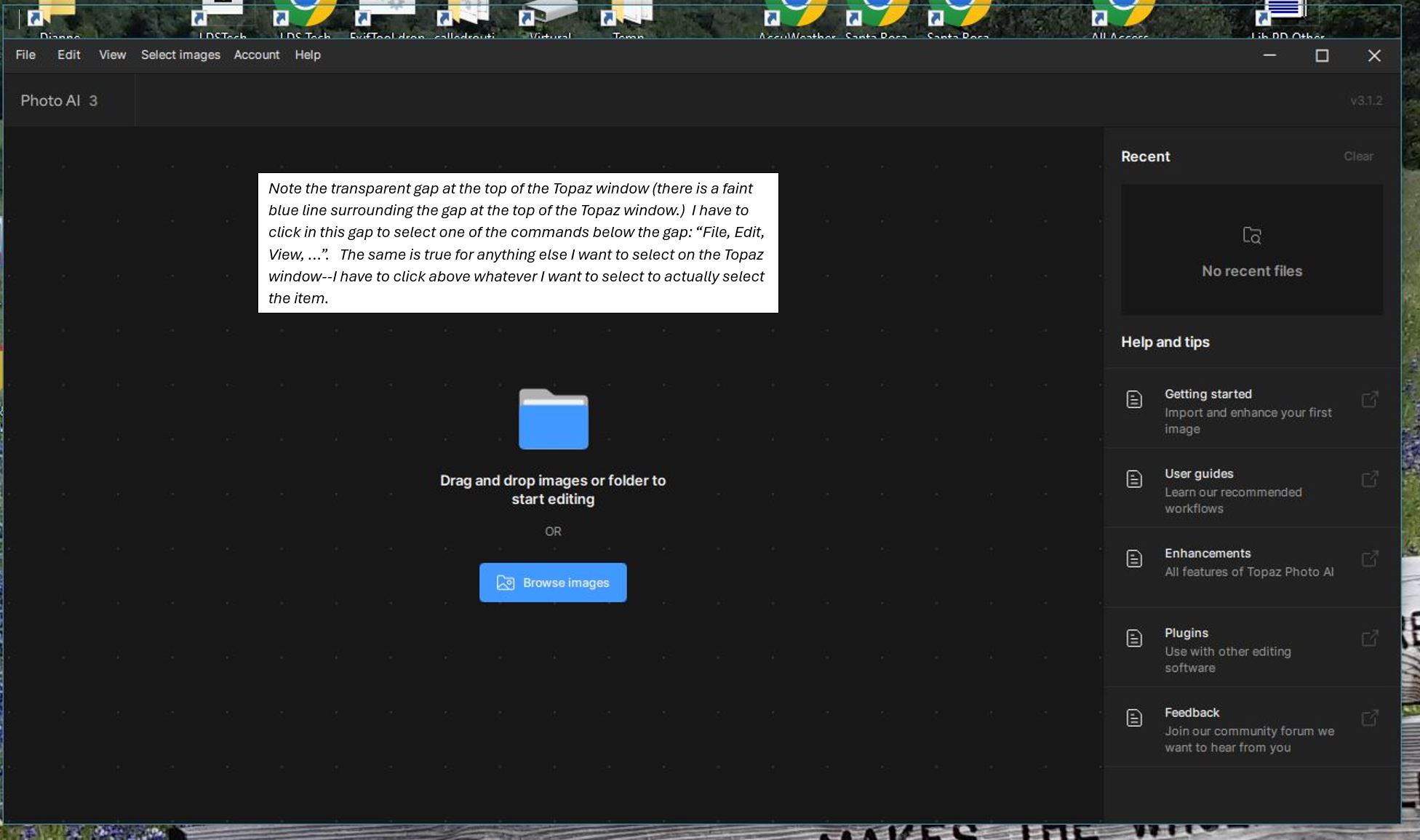
Here’s the explanatory note in the text box in the screenshot:
Note the transparent gap at the top of the Topaz window (there is a faint blue line surrounding the gap at the top of the Topaz window.) I have to click in this gap to select one of the commands below the gap: “File, Edit, View, …”. The same is true for anything else I want to select on the Topaz window–I have to click above whatever I want to select to actually select the item.
1 Like
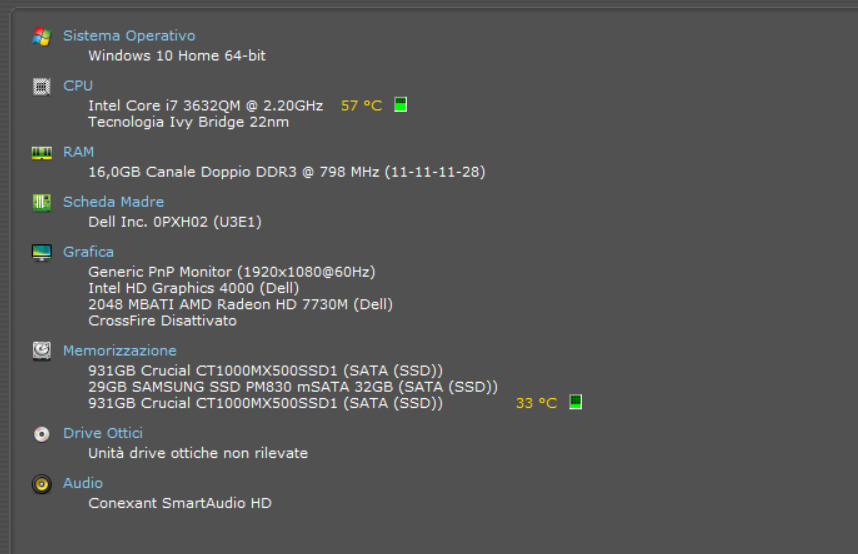
Pur avendo scaricato la nuova versione di Photo AI 3.1.2 non si è ancora sistemato il problema/bug della completa apertura della finestra del software. Come risolvere?

1 Like
This is still not fixed in the just released Photo AI v3.1.3.
Others have noted this as well in topic:
“Topaz opens small and mouse is misaligned with all buttons”
1 Like
Non capisco perché succede. Eppure credo che le prestazioni del mio PC siano sufficienti per farlo girare correttamente. Però mi sembra di capire che nessuno sappia come risolvere il problema. Compreso lo staff di TOPAZLABS. Tu hai avuto qualche chiarimento?
Topaz Photo AI V3.2.0 still has the problem on my system with the vertical miss-alignment of the screen with the mouse.
The following discussion topic seems to be more the center of recent discussion and has additional comments by others who are still having the problem as well:
Topaz opens small and mouse is misaligned with all buttons
[Note that this post used to be in another Topic and was merged into this Topic, hence the link above just comes back to the present topic.  ]
]
We’re you able to try the following steps:
Thanks for this, however, this solution was already suggested and it’s inconvenient. I’ve other applications that are interfered with by a static task bar, and shouldn’t have to make adjustments just for Topaz when no other program is having this problem. Others have pointed this out too. Only Topaz, and only after the latest update, is behaving this way. Nothing else, from all the MS Office products, Quickbooks, Maximizer, iTunes, File Explorer, Bing, Google, etc. etc. are having this issue, only Topaz. I can continue to use it as-is but correcting what’s clearly a Topaz-specific flaw is the solution that I think all of us would prefer to see.
1 Like
Thanks! However, I looked at this when it was suggested before, and i just looked at it again at your suggestion. On my system I don’t have my taskbar autohide at all. To experiment again, I tired various settings (auto-hide on or off, setting various positions, etc) on the MS Windows Taskbar menu to see if it made any difference and it does not change the behavior where within the Topaz window the screen is shifted down about a quarter inch or so, yet the cursor has to be clicked where the buttons should be; that is, I have to click above any Topaz command I want to select to actually select it. Thanks again.
Is there any update on this issue? I see this thread will close in 20 hours, but have not had any update on the problem. I see other issues opened with the same or similar problem of screen alignment. The most common solution is that the computer does not meet specs. That is not a very good solution as I have been using Topaz for a long time and don’t plan to upgrade my computer just for this application.
This topic was automatically closed after 60 days. New replies are no longer allowed.
Hello everyone,
Following on this issue, here are the steps to fix this:
-
Update your graphics card to the latest drivers. If you need help to do that, you can contact us at support@topazlabs.com with your system profile.
-
Ensure you are not using the Windows settings where your taskbar is automatically hidden. To access taskbar settings on Windows 10, you can:
- Right-click or press and hold on to an empty space on the taskbar.
- Select Taskbar settings.
- Make sure it’s always visible.
- Changing the graphics settings for Photo AI in Windows.
- Search for “graphics settings” in the desktop search box, or go to System > Display > Graphics settings. If you have multiple options, choose your graphics card instead of letting Windows decide.
- Delete the Photo AI registry. This is where the display settings are stored.
If none of these solutions worked, please contact us.
Please note that we discussed with Intel, and they told us that they don’t support graphics cards that are older than 2016 anymore. That would also mean that your computer does not meet the minimum requirements to run Photo AI.
1 Like
