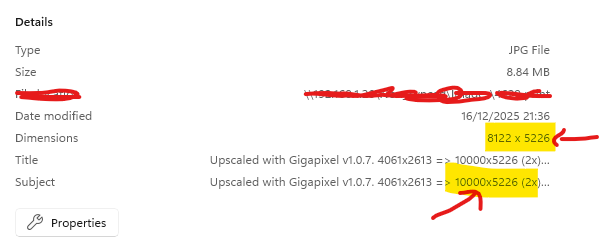
@alexandre.topazlabs the sizing issue, is still persistent in this release, look at my file details of an image. 4061x2613 original size upscaled to 10000x5226, but then it outputs 8122x5226px, I think it’s still remembering the last size output by default. Something still isn’t right with this. Ask your dev team to test with 2x different image dims, and output to replicate the issues
1 Like
Cloud rendering is not working after updating to v1.0.7…. Dont know if its just me or others as well??
1 Like
Same here
You are right, this issue is still open on our side and we will reach out when it’s fixed 
- It should technically be in the next version if all goes right.
Are you using Redefine + grain? We are tracking an issue with that at the moment, and we have already released a first fix. Can you try again today? It worked for me.
I thought Gigapixel was a professional tool for professionals. When I need to work, it’s unfortunately 50/50 whether the cloud will work or not. Right now I’ve been waiting for a few hours for the render and the wheels are still spinning. Yesterday it was only possible to send individual files to the cloud, two or more did not activate the Cloud rendering button. I have version 1.0.5 and I don’t have the courage to update when I read about other problems here. Do you release semi-finished products into the update and then iron out the mess on the fly? I thought as a paying client that I could rely on your services!
The issues from the past few days are now resolved. If you are still experiencing issues with cloud rendering, please contact us at help@topazlabs.com so we can investigate.
2 posts were split to a new topic: Feedback | Cloud rendering process
When will the model “Sharpen Wildlife / Portrait”, rolled out in Topaz Photo, be available in Gigapixel… will it be there at all?
Hi.
Sorry strictly for Topaz Photo only because, their part of Photo’s Sharpening capabilities which Gigapixel doesn’t have
Hope this helps
1 Like
A model that yields better results with animal pictures than the existing ones was announced weeks ago in the GP Beta thread, no new Beta since. My subscription runs for another 11 months, and if there is no substantial improvement in rendering animal fur (Redefine is a joke in that respect, and Wonder brings no improvement in comparison to the non-AI models), this first subscription period will be my last one. None of the newer GP models performs better than those in GPAI 8 when it comes to fur texture. And those who already use stand-alone AI generation such as Flux or Stable Diffusion should have a look at SeedVR2, an upscaler for ComfyUI which is powerful, fast and free. If the devs go on treating GP as a project that comes last behind VideoAI and PhotoAI, it is probably going down the drain due to a decreasing base of subscribers.
Interesting, I’m not a Beta Tester hence, I wouldn’t be privy to the information within the Beta Thread so, could only go on the information I have and from what I knew therefore, both the new Portrait and Animal Sharpen Models were placed in the Sharpening Section within Topaz Photo which Gigapixel doesn’t have so, from my point of view I was correct.
Also, you mentioned something about Topaz failing to Upgrade Gigapixel in a long time admittedly, there hasn’t been any Upgrades since the transition from Gigapixel AI to Gigapixel Studio when Standard MAX and Wonder were added not forgetting Unlimited Cloud Image Rendering plus, half a dozen patches since then.
Just remind me when was that again the transition was in September and it’s now December a mere few months ago so, a life time ago then.
Please bear in mind, also, that both Topaz Photo and Video have had major Releases recently to versions 1.1.0 so, one can assume a 1.1.0 Release for Gigapixel is pretty much imminent and who knows they may add Portrait and Animal Sharpening to it.
You also, mentioned Gigapixel as being the poor relation of both Topaz Photo and Video as though it had been abandoned by Topaz not your words exactly but that’s what you were referring.
Topaz Photo had two patch releases
Topaz Video had four patch releases
Topaz Gigapixel had several patch releases so, Topaz Gigapixel has been worked on the most then and therefore, far from being abandoned.
Lastly, you referred that lots of Topaz customers have left since the transition, how do you know this because, you’re read it within the Transition Topic many people were dissatisfied and were going to leave Topaz.
I beg to differ, it would be interesting if Topaz released the information on how exactly how many customers actually left, how many stayed and how many just saw a dam good deal and just got on with it.
But, I know Topaz, won’t release that Data because, one why should they and two what would be the point they have nothing to prove to you, me, or anyone else for that matter.
At the end of the day if you want to leave because you’re not happy that your decision to make
19 posts were split to a new topic: Recover | Results Tips & Tricks
A post was split to a new topic: Feature request | abreviations for models in output file name instead of the full name
A post was merged into an existing topic: Model Downloads | 403 Error Appears
4 posts were split to a new topic: Education | Intel-based Mac
I just read something about context size and outsourcing to SSDs. No wonder memory prices are rising when SSDs are used to outsource the context (KV-Cache) that an AI model can process to SSDs (Via Chips like nvidia Blufield4). I would be delighted if TL would also use this technology to program better models. For my work, models such as Standard Max and Wonder are state of the art. However, I haven’t quite reached my goal of creating really large images with lots of detail down to the last pixel.
Gemini said, to render a 24mp image to 100mp with fine detail in fp32 precision, am v-ram size of 500gb would be needed.
I hope you’re doing well. I recall you mentioning in the Gigapixel beta thread that a new beta would hopefully be in the works after Black Friday/Cyber Monday.
Since it has been about 50 days and we have seen some minor patches released in the meantime (but no betas), I wanted to kindly check in. Is there a new beta version on the horizon soon? We are eager to test out what’s coming next!
Thanks!
2 Likes
500 GO? 
 . That’s huge. Apart from a cloud server (and even then I don’t know if any exist with such a VRAM capacity) no one in the general public could have that.
Hi!
Thanks for patiently waiting! We are definitely working up a few things so hold on a little bit longer. Glad to hear that you’re excited to try out some new things!
1 Like
