Topaz Video AI: latest version, Neuroserver runtime installed
Issue:
All Starlight models (Mini, Sharp, Fast 2, HQ, Precise 2.5) are blocked from local export. Hovering the disabled Export button shows: “This hardware does not meet the minimum requirements for local export with this model.” Only Cloud export is available.
This is unexpected. The RTX 5090 has 32 GB VRAM (well above the 10 GB minimum and 16 GB recommended) and is a Blackwell GPU with CUDA compute capability 12.0 (sm_120) — far above the stated 8.9 minimum for Starlight-tier models.
Possible misdetection:
The Topaz PC Compatibility Check reports my CUDA Support as “compute capability ~8.9”. That value corresponds to Ada (RTX 40-series), not Blackwell. My 5090 is sm_120 / compute 12.0. It looks like Topaz is misidentifying the GPU’s compute capability, which may be why the local-export gate is triggering even though the hardware exceeds requirements.
Steps already taken:
Clean reinstall of Topaz Video AI (full removal + fresh install)
Installed Neuroserver runtime (~2.8 GB)
Confirmed all Starlight models show green in the PC Compatibility Check
NVIDIA Studio driver is current
Logged in with a valid purchased license
Other (non-Starlight) models run fine on local/Device export. Only Starlight is gated to Cloud.
Could you confirm whether:
This is a known GPU-detection issue for Blackwell / sm_120 cards, and
Whether a fix or workaround exists to enable local Starlight export on the RTX 5090?
Thanks — that’s a helpful data point. It does sound like a software-side detection issue rather than a true hardware limitation, since the message is hitting people whose setups were working fine until recently and whose hardware clearly exceeds the stated minimums.
In my case the GPU is well above spec (RTX 5090, 32 GB VRAM, Blackwell / sm_120, compute 12.0), but Topaz’s PC Compatibility Check reports my CUDA support as “compute ~8.9” — which is actually the Ada (40-series) value, not Blackwell. So it looks like the app is misreading the compute capability and then triggering the local-export gate even though everything passes green in the compatibility check.
Whether the common thread is Windows 11 or the GPU-detection logic (or both), it seems to point back to the app rather than any individual PC. Would be great to get an official confirmation on whether this is a known detection bug and if a fix is in progress. Happy to attach my full DxDiag / system report if that helps narrow it down.
Mine isn’t working either. Same situation — Starlight local export is blocked and only Cloud export is available, even though my hardware is well above the stated minimums.
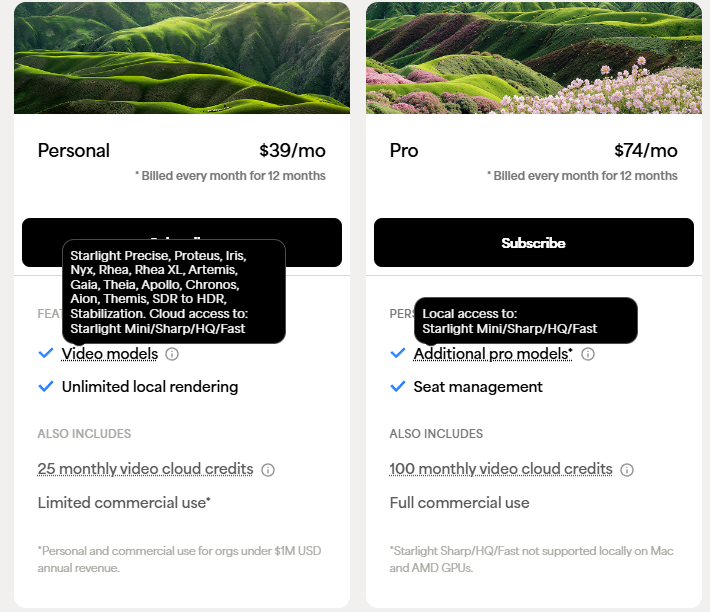
If you do not have a Founder tag on your account or a Pro subscription the Starlight models (Mini, Fast 2, HQ and Sharp) will only be available via cloud processing. You should still be able to run Precise 2.5, though, with that hardware.
The team is looking into reports of incorrect messaging pop-ups for users, though with hardware and accounts that should be able to run the models locally. At this time some have seen the issue in 1.6.1 after updating, others after relaunching the app, with some reporting to the support team that logging out and back in reset the connection and allowed processing, and some saying that creating a new tab and clicking other models then going back reset things.
This is causing some difficulty to sort out the exact cause and issue but the team is looking into this for a resolution soon.
I ran Topaz Video for the first time this morning. I selected a video clip and used the Starlight 2.5 model to do a 2x upscale. I exported about 1 min of the clip using Cloud Export.
Then when I tried to use the same clip again to export a longer version using the same Startlight 2.5 model, the Cloud Export option is no longer available. Local export is also not available. The export button is greyed out, saying “This hardware does not meet the minimum requirement for local export with this model.”
And when I quit the app, it hangs.
I’m running this on a Mac Studio M3 Ultra, with 512GB RAM (384GB assigned to GPU).
Please send the logs from your apps to the support team for review. The devs are looking into reports of this issue to see what is going on. help@topazlabs.com
To gather logs, please select Help > Logging > Get Logs for Support and attach the zip file to your reply.
Here is a video to help with the steps of how to collect the logs.
Since today and out of nowhere Topaz is not recognizing my stem specs anymore and therefore I can’t use Starlight anymore as it is saying that my hardware is not meeting the minimum requirements… Although I have what it takes with an RTX5070TI and matching CPU and RAM? What can I do to fix this? Reboot does not work and I don’t want to reinstall everything…
Can you send the logs to the support team at help@topazlabs.com? We are having the devs look into this issue and some users have found that clicking on different models and then back to Starlight has helped in their situation.
Tried it, no luck on my side… I deinstalled and reinstalled Topaz Video and initially it worked again, but after doing some minor preference change forcing a program restart it is again not working again
If you have a Pro subscription or the Founder tag on your account and are still seeing the other Starlight models not work, please grab the logs and send in to the support team for review. Those do require the Founder tag or a Pro subscription to run locally even if your hardware is above their requirements.
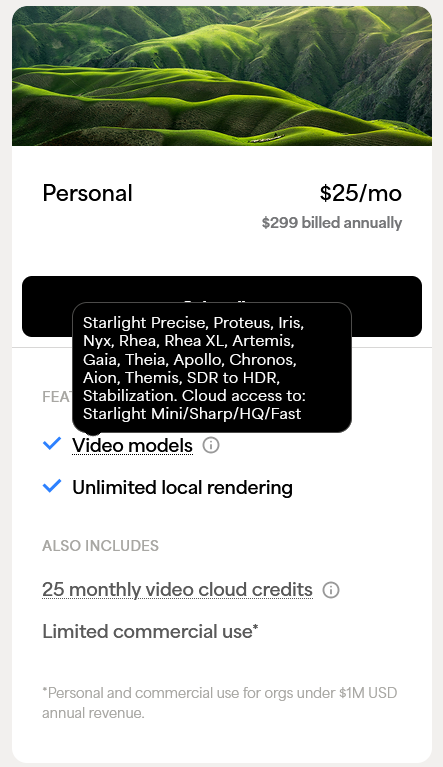
The personal subscription plans allow for Starlight Precise 2.5 to be run locally; the other Starlight models are available for local processing under a Pro subscription, as they are part of the Pro workflow, same as multi-GPU processing, and EXR/DPX image sequence support. The personal plan offers access to those models via the cloud workflow, though.
There’s also a cheaper annual option that’s worth mentioning. Good is SLP is included but it’s just a shame that the Starlight Mini isn’t - I think it definitely belongs on the list.