Gigapixel v8.3.2

Thank you, Dakota!

That sounds as if I don’t need this 8.3.2 release, right? Because each of the installer options at top of this thread seems to have what I’d call a qualifier of some sort (RTX, Qualcomm, ARM, etc.). I don’t see one that just says Win 11 or regular Win 11. Unless the Win option with the ‘RTX’ qualifier is applicable to my AMD system as well as RTX.

My system is: Win 11, AMD RX6800 XT (GPU), Intel i9 12th gen (CPU). Working with TL products as Ps 2025 as plugin.

If you’re having issues with image loading worth a shot, but otherwise no. This is a hotfix.

We are unfortunately still fixing some image loading/crashing issues. There’s another fix coming ASAP. It’s a very weird issue and it is tied to monitor colorspaces from what I can tell - so it has been absolute hell to debug because nobody on our QA team could reproduce the issue since they had different monitors. Thinking we figured it out - we’ll see!

But if those problems don’t affect you, you’re in the clear for skipping this release and the next one coming up in the next day or two.

3 Likes

:+1:t3: :+1:t3: :+1:t3: :clap:t2:

Hey Michael. We are thinking it may be an issue related to certain monitor colorspaces which is honestly super wild. We are pushing another fix ASAP - please stay tuned in the next 24-48 hours for a potential fix. Keep me posted in that thread if it fixes your issue.

Same goes for anyone else in this thread still experiencing crashes. If this build doesn’t fix it already - please try the next patch release of Gigapixel when it is available and let me know.

2 Likes

We think we have traced the core problem - it may be related to your monitor colorspace of all things. Please try the next patch release, coming in hot ASAP. We’re trying to get the fix out ASAP, but we are also validating that it indeed fixes most of these crashes.

Just paid for the latest update for Gigapixel, installed 8.3.2, and it crashes every time I try to open an image. I’ve reinstalled it and get the same result with every image I try to open. Restarted computer, get the same result with every image. Computer is a Ryzen ASUS ROG Strix G17 (2023) Gaming Laptop, 17.3” QHD 240Hz, GeForce RTX 4070, AMD Ryzen 9 7945HX, 32GB DDR5 ram. Gigapixel is set up to use the RTX-4070 graphics adapter.

Any suggestions?

Thanks

@dakota.wixom:

Over the years I have found that Topaz support usually replies within a day and the reply is on point. I am having difficulty getting an answer from support this time though. :frowning: See this sequence of messages with support and how after multiple attempts still no answer. The way things are going the sale will end before I can even install the trial to check it out. :frowning:

I contacted Topaz support with this query:

I have Gigapixel AI 6.0.0, but I want to download the trial of the current version to see if I want to upgrade. Will it overwrite 6.0.0? If I decide to not upgrade will 6.0.0 still be there and usable? Is there anything special I need to do to retain 6.0.0?

I have both an Apple Silicon Mac on Sequoia 15.3.2 and Win11 PC. I want to use the trial on both to check the speed.

By the way, when is the last day of the current upgrade sale price of $64?

I got this response:

At the moment, I don’t have the exact details on how long the Topaz AI promotion will run. However, promotions can At the moment, I don’t have the exact details on how long the Topaz AI promotion will last.

Promotions are often limited-time offers and can depend on various factors, such as the number of upgrades or potential new offers. I’d recommend watching it so you don’t miss out!

I then replied:

Thank you for your reply. What about my primary question below about installing the trial?

Then I got this response with links:

You can access our Gigapixel trials from our Topaz Labs Downloads Page. When you first install, you can click on Free demo or log in to start the demo mode. This won’t automatically charge you if the product doesn’t suit your needs - no need to provide any payment information to preview the enhancements.

Here’s our Quick Start guide for Gigapixel. The filters and functions sections will explain all of its uses in more detail.

I then replied:

But that does not answer my question about my existing version. Please reread my question down below. Thank you.

Can a Topaz employee please answer my question with regards to installing the trial while my existing 6.0.0 is also installed? Thank you.

Those replies almost looks AI generated and reminds me about a WhatsApp conversation I had with the support of one of my mobile phone providers that - about halfway in - asked me if I wanted to be transferred to a real person…

I said yes, had to wait half a day for someone to get back to me and when that finally happened I was once again coupled with AI at first. :see_no_evil:

1 Like

install 8.2.2 and wait for 8.3.3 ( maybe )

According to the sequence of the pseudo-answers shown, these are probably generated by something that is missing the “I” in the abbreviation “AI”. That’s not how a person would answer, I think. Unfortunately, the use of such automatic “advisors” is spreading like a plague. I have the impression that Microsoft once had something like Cortana (I don’t remember exactly) and (fortunately) it went bankrupt. Are there too many questions? Then it would be worth doing things so that (potential) users don’t have to ask so many questions.

1 Like

I have tried to reinstall and install earlier version nothing works. Keeps crashing

Do you have the original rel. 6.0.0 installers on your Mac and Win computers?

Or, if you go to your acct page on the main Topaz Labs website and look under ‘My Products’ can you access your installers from there (and download them ASAP) to your computers to have for reinstall?

If so, in theory, you own them and should be able to reinstall them. But, I don’t know if other tech issues would preclude that.

The typical result is that you can only have 1 version of a Topaz product running at a time. And, one version overwrites the other. Whichever is installed last. Ppl who are more techie than I may know a way to run 2 simultaneously to compare the outputs and/or speed of one release vs another.

You should get a more definitive answer to all your questions (I’m just a user) from Topaz staff. @ida.topazlabs. I hope it works out.

Thank you . i will try

1 Like

Please check.
System > Display > Color Profile
Automatically manage color of applications > ON

Thank you.
I switched automatically manage color of applications to “ON
But Gigapixel 8.3.2 still crashes as soon as I open any image file - even the one (JPG/rgb) I was able to edit successfully with version 8.2.2 just yesterday.

Hi, everything works besides the Redefine.

It crashes every single time, no error messages or anything. I click on preview the entire image or area previews, it shows the “rendering” box and it crashes instantly or at most 2-3 seconds later.

Tried basically everything with settings, uninstalling, changing folder path, installing program files and program data on the same path and etc, but nothing changed, still the same crash every time i try to run redefine.

Microsoft Windows 11 Professional (x64) Build 27818.1000
Ryzen 7 5700X3D
RTX 4070
24 GB RAM
Nvidia Studio drivers and up to date

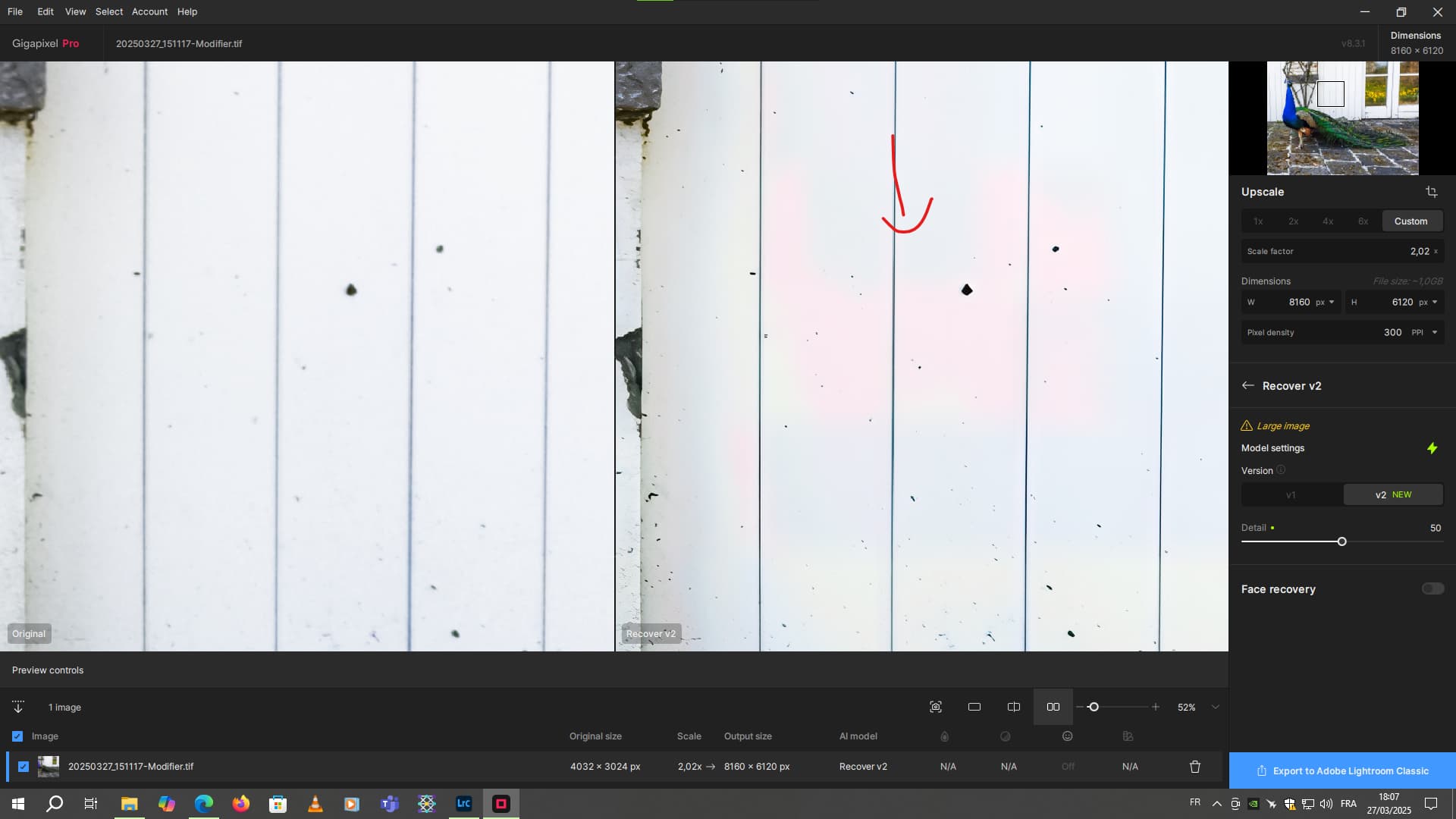
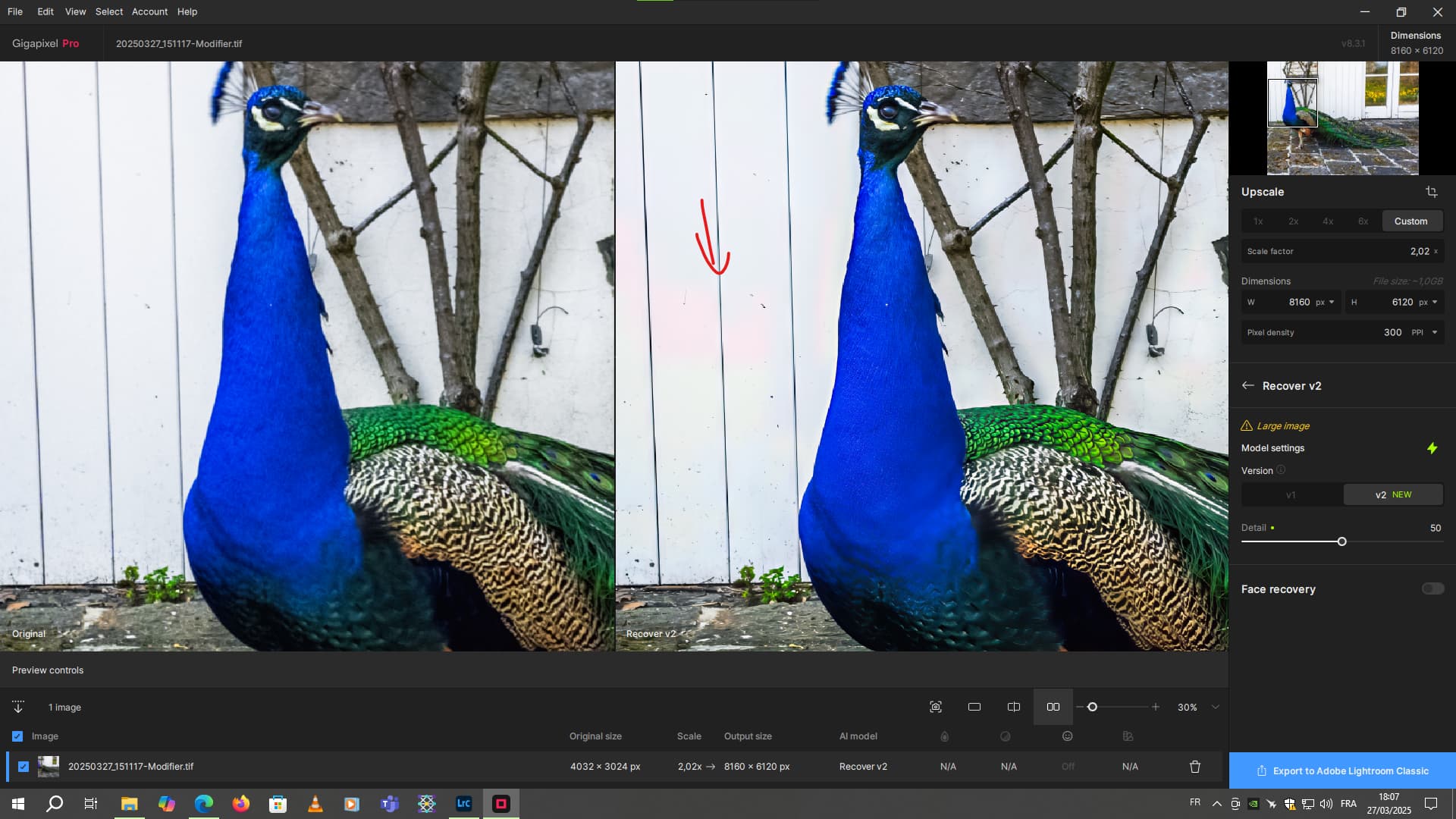
The small problem I see with Recover v2 is the pink spots in the white areas of the photos.


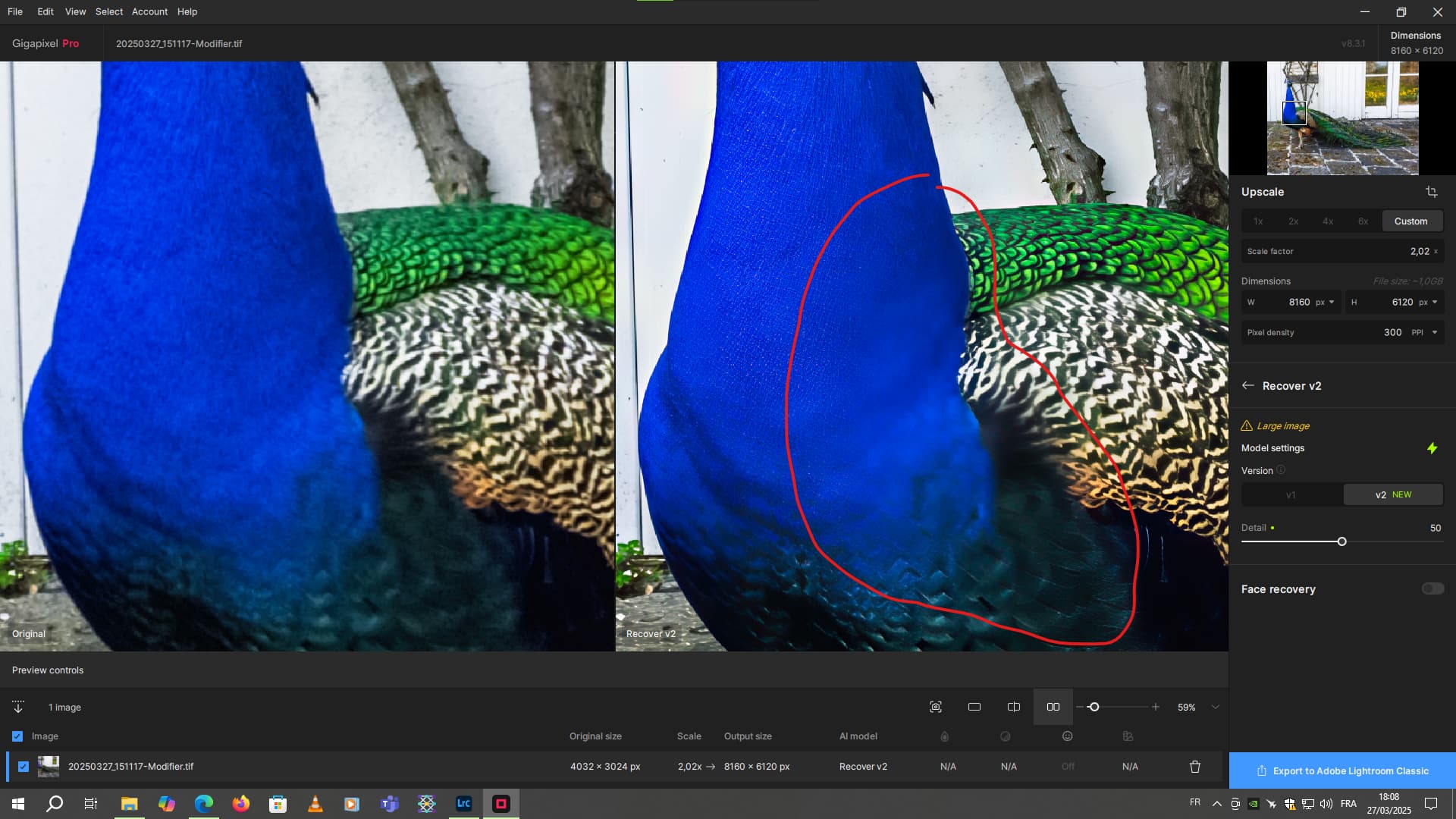
It also tends to blur areas of my image.

Me too. The sky wasn’t completely white, more like white-gray. And it’s not from the rising or setting Sun.

I was actually replying to someone else’s question/comment. But hope that helps you too…

Ouch!!
Heavy tiling there: