I don’t think there’s even a local model for Apple silicon available at all - same as SeedVR2, unfortunately.
So it’s Cloud or nothing as it seems for us.
I don’t think there’s even a local model for Apple silicon available at all - same as SeedVR2, unfortunately.
So it’s Cloud or nothing as it seems for us.
Apple has put a stop to itself with the design of the M chips.
The chips are good for classic work, but as soon as things get specific, they’re out.
Thx! Not to be prejudiced, but I never know what’s going on with tech systems and China…and reverse access to users’ assets and computer content.
That’s just crap, sorry.
The Intel Macs weren’t really Macs and Apple had nowhere to go with those.
The jump from Intel to ARM was really insane from both a performance as well as efficiency point. I’m using Apple systems since those old 68k days and over PPC also those often poor Intel ones.
Also the GPU performance of those chips is really good for an integrated chip- compare that to Intels and/or AMDs integrated offerings!
Again: a decent AppleSilicon rig is in about the same league as a RTX 4060-4070.
Not everyone wants a 650W heating plant (besides the Intel one beneath it) in his room.
It’s basically NOT the performance but that NVidia has got everyone to use CUDA.
Maybe Apple and AMD should develop a CUDA → Metal or whatever wrapper?
ComfyUI is fully open-source and maintained by Comfy Org, a US-based company. It doesn’t install or run any software from Qwen/Alibaba. Instead, it just loads the open-weight AI model files. Everything processes locally on your computer—no internet connection needed after downloading the models, and no data sent back to anyone.
Got it! Good to know.
It may still be too techy for my level of processing photography to handle re: installs, etc. vs if I was an S.E. But it sounds intriguing.
@lhkjacky You can also use this workflow with this model for scaling. The level of detail it adds is truly amazing.

I’ve watched that YouTube video before too, but the creator has paywalled the full workflow and obscured all the key details in the demonstration. Because of that, I wasn’t able to replicate or test the exact workflow myself. However, I can try creating one myself to see whether it gives better results than SeedVR2. 
However, I was able to download the workflow without paying. There’s a free link.
The workflow is here.

Z - image Turbo Workflow + All Image Examples include the workflow Jockerai.zip - Google Drive
Ah yes no, I’m confusing it with the other one which is text to image.
Hello Fotomaker
I’m a bit late posting. I didn’t have the time when the posting was made but had a go a few days ago and thought I may as well post it.
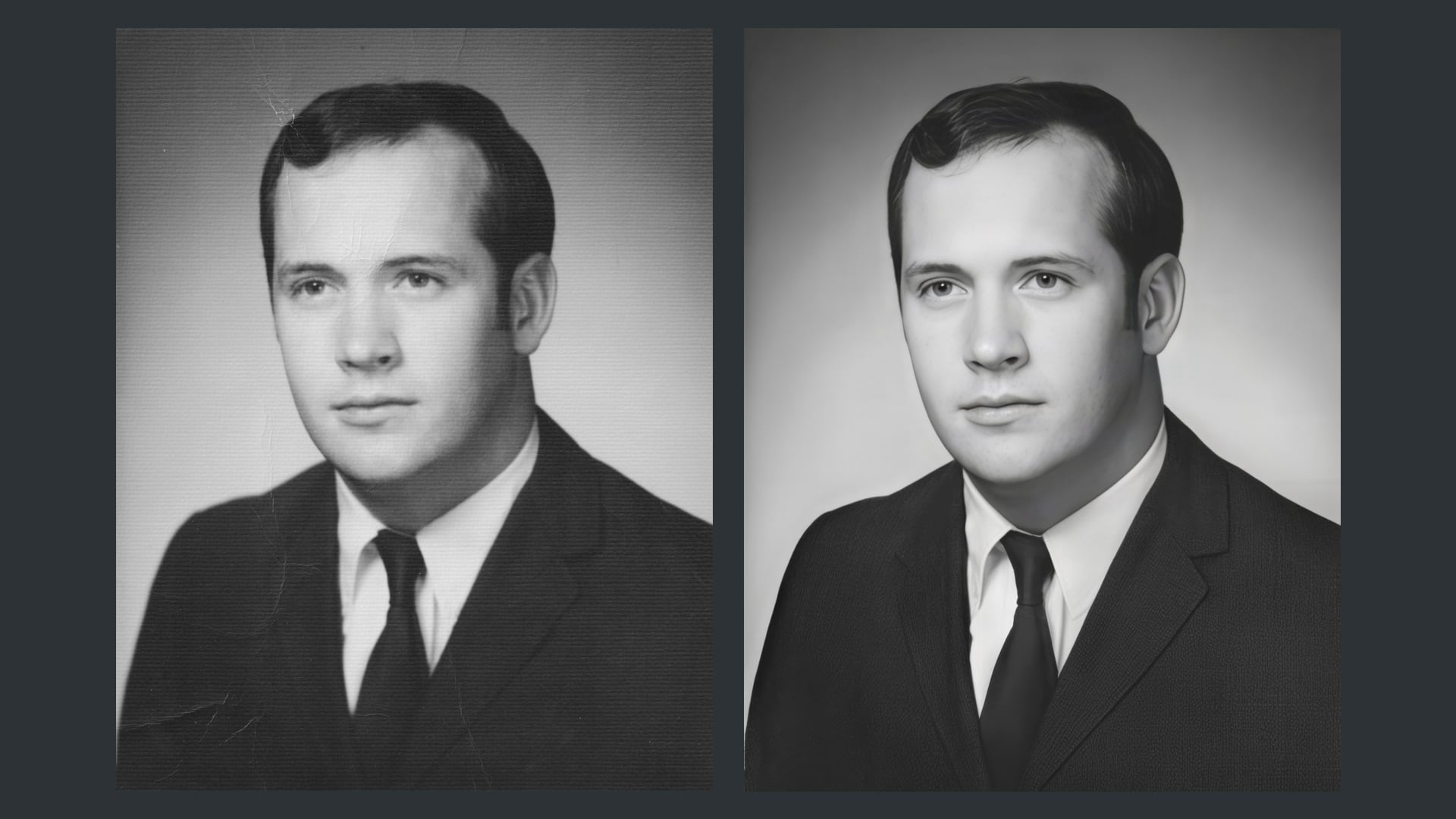
I used Affinity Photo2’s fft filter to remove the pattern from the paper. It’s the first time I 've used it.
Textured
Affinity Photo 2: Resized to 600px wide and applied fft filter
Topaz-Dust-Face
Topaz-Focus-Face
Gigapixel 8.1.0 Redefine-Creativity 2, Texture 2 “Portait of a man wearing a white shirt, dark tie and a dark, sharp suit” 2x-Faceai v2-
Topaz Upscale-1.6x-Face-Denoise
Topaz Denoise-lighting
The result I think looks natural and is faithful to the original minus the texture plus added detail.
Best regards Robert.
Thanks for the follow-up. That did a nice job! Or, rather, you did using the tools.
When you list Topaz Denoise (above). Is that Denoise AI or the Denoising feature in Topaz Photo?
Now I’ll have to look at my installation of Affinity Phot 2 to see where the FFT filter is!
I used Topaz Photo and Gigapixel AI only. I don’t have Denoise AI.
Fft is under Filters, Noise, in Affinity.
I watched the fft video that AND-E posted at the top of this thread a couple of times first. It helped. I also spent a couple of hours practising with the fft on different pictures to try and work out what it was doing. The fft worked differently on different pictures. I believe its because it’s picking up things that the human eye can’t easily spot.
Best regards.
Their eyes aren’t quite the same anymore.
Those workflows are a bit too much IMHO. That’s where most of the progress has to be made.
It’s not ideal to go from first pass in this software, second pass on this website, third pass with this AI, fourth pass again in another software.
Hopefully we’ll come to a point where we’ll be able to do it all in Topaz Photo.
That’s where I personally have high hopes for “Pro” models.
It seems to me too. Topaz-Photo often has more or less problems with eyes (not only human ones), especially with the iris, I would say. We (humans) pay a lot of attention to the eyes in our (and animal) faces, so it might be a bit annoying. Otherwise, the photo editing result is nice – purely subjectively (I don’t know exactly why) it seems to me that the person looks a little younger in the enhanced photo.
Yes. I see that. I’m not sure, but it may be that with more contrasty shadows the jawline appears slimmer and less spread (as is true of younger versions of people - more tone, less gravity).
I’ve decided I’m going to run every pic of me thru that same process from now on… ;-]
It is the plastic appearance of the eyes that gives the impression that the person looks younger.
Good idea! But it would probably also be a good idea to stop in time so that it doesn’t get too repetitive… 
Yes, thats it.