I just got a subscription today for Topaz Video, and am trying to deinterlace some old footage.
Can anyone give me some tips on improving my current workflow.
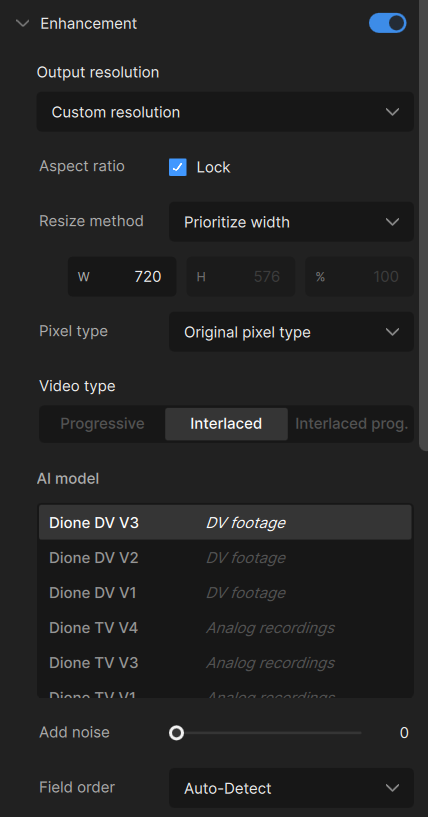
Source footage is 720x480 DV 29.97fps Interlaced Bottom field first, DV .avi
I’m converting it into:
720x540 square pixel, progressive 59.94fps.
Using Dione DV, Focus fix=off, Grain=off
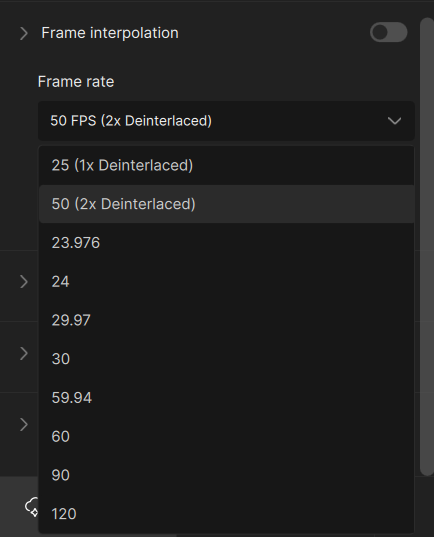
Frame interpolation (see image below).
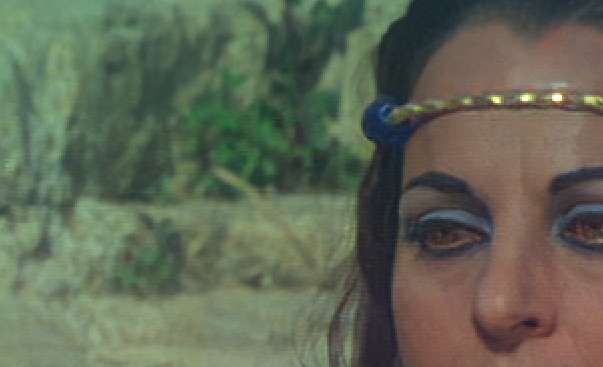
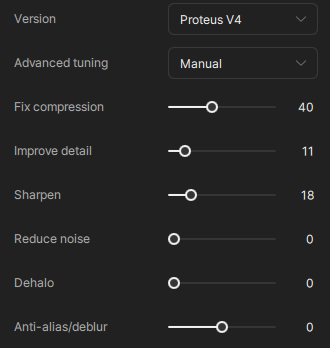
Chronos seems a touch better than Apollo, I tried a few different settings. Sensitivity I have not tried yet. I do see momentary horizontal lines every now and then, and am worried that a 4x upscale might enhance these unwanted lines.
Any comment?
I zoomed this right in, every so often it will give me horizontal lines (this is after Chronos processing):
Why are you using frame interpolation? Is the original footage not 59.94 discrete (different) fields per second?
If you have combing artifacts, then it sounds like it is 59.94 fields per second, so you don’t need to use frame interpolation (just turn off frame interpolation by pressing the blue toggle, but make sure frame rate is left on 59.94 fps, so your footage gets bob deinterlaced).
The original frame rate is 29.97fps 720x480.
I read that doubling the frame rate is appropriate for the best outcome, so that’s why I turned on frame interpolation to 59.94 (720x540 square pixel). I tried keeping the frame rate the same for the output and it wasn’t as good as doubling it.
What you read was probably referring to bob deinterlacing, not frame interpolation. Bob deinterlacing doubles the framerate by separating the fields into whole frames (so 29.97fps becomes 59.94fps) without the use of frame interpolation.
This should give better results, because you won’t have to contend with combing artifacts, and it will process much faster.
I actually tried to avoid switching on the frame interpolation section, but there was nowhere else where I could change the frame rate to 59.94. Nowhere in the enhancements section, or in the codec settings.
Do you know where I can change the frame rate without turning on frame interpolation?
If you’ve set the video to be processed as interlaced in the enhancement section, you can change the framerate to “2x Deinterlaced” in the frame interpolation section without turning on frame interpolation (notice the toggle stays grey).
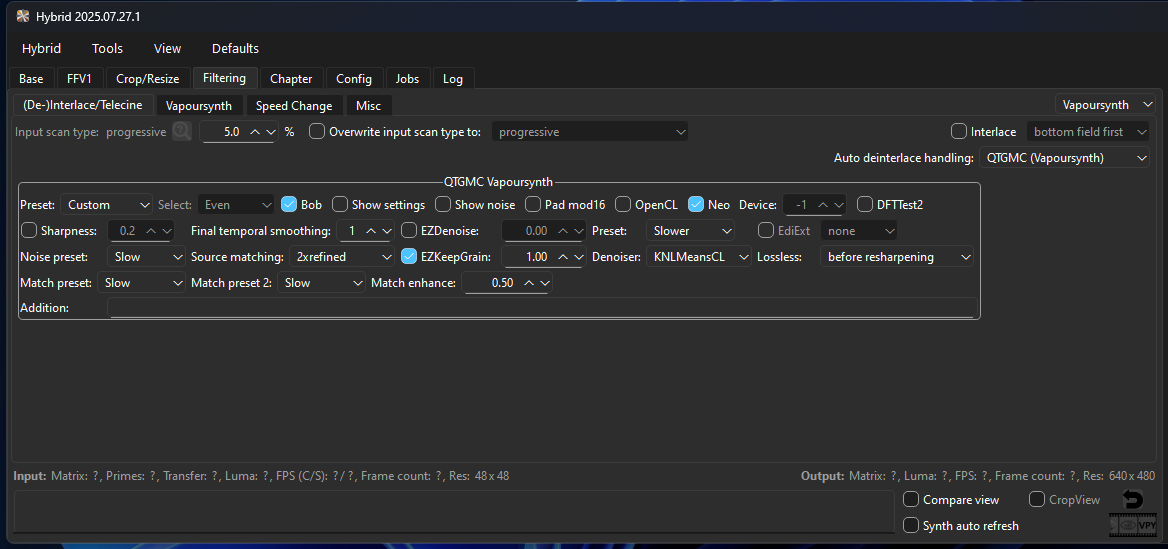
yup, do not frame interpolation, first step is always deinterlacing! I recommend Hybrid QTGMC with this settings, set “final temporal smoothing” to 0 (not as in my screenshot). When deinterlaced result produces to much halo effects, then you can enable final temp. smoothing by set it to 1.
Try first with the “Bob” flag (not as in my screenshot) then check deinterlaced result some frames, for example drag file into Virtualdub and check how the new doubled frames look like, if they look worser than the others and if there is no movement in it, then dont’ set the “Bob” flag means then do not doubling framerate when deinterlacing.
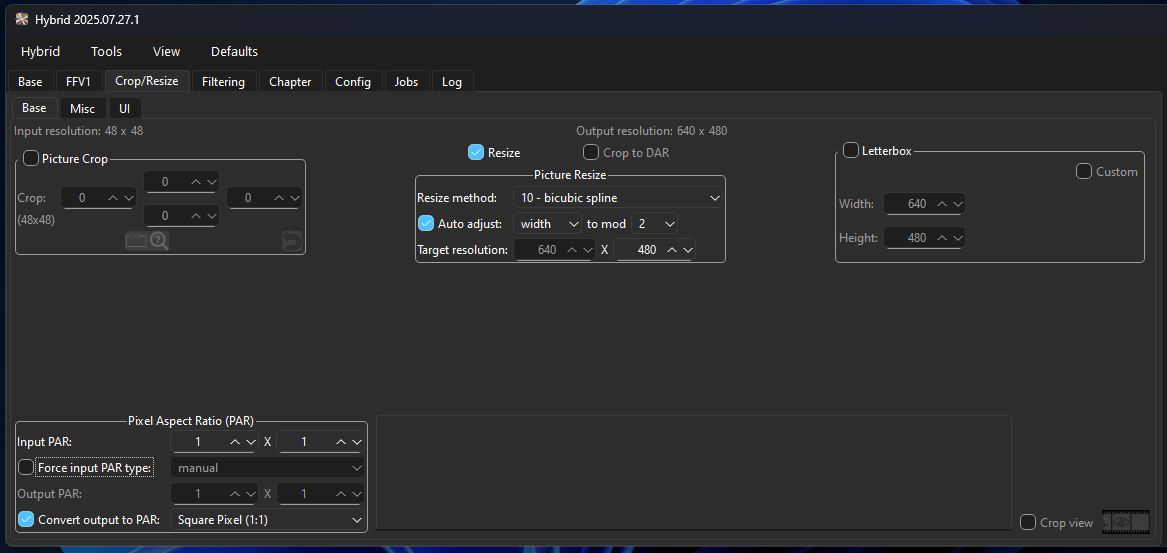
Safest: crop 8 px left + 8 px right (to 704×480) → resize to 640×480. This honors ITU geometry and trims typical DV edge crud.
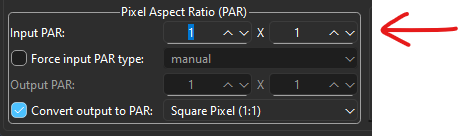
If you skip the crop and want exact 640×480 from 720 width, you can alternatively set Input PAR = 8/9 (common MPEG-2 SAR). Difference is ~2% width—pick one approach and stay consistent across the project.
It could be something like the subtitle file got removed and it was the thing that had that length. Is the length still shortened if you mix all the audio and subtitle tracks back in?
that shouldn’t be QTGMC does not change duration, maybe source is soft telecined? (I hate such stuff). I recommend do a remux with MKVToolnix first and check again what MediaInfo the header looks like about lenght and framerate.
You can also import both, the deinterlaced and orig into a video editor and compare if something is missing and if its frame accurate, do not Bob then just for a compare
They wrote that, but lowering source (SAR) pixels to 640x480 I don’t like because it’s a loss. When it’s made for 4:3 and if you crop as ITU says, then it’s better crop to 704x480 and resize this to 704x528. If 704x528 is a problem because this is not a common format, you can afterwards upscale 704x528 to 720x540
But check if there is active content, there are left/right black bars or not. There is no guarante when they mastered the DVD they payed attention to ITU specs, means crop 8px away could also be wrong.
Anyway if you have to crop away useful active content left/right, then I wouldn’t do it, when you crop no content just black bars, then you can crop, if you like.
I’m curious. When you upscale the vertical resolution from 480 → 528, what upscaling algorithm to you use?
I tend to do err on removing some horizontal signal (I.e. doing the 704->640 resize) than weakening the vertical signal, because… ML upscalers perform better on strong signals than weak. If they detect weak signals they’re unable to extract as much information compared to stronger ones. And at SD resolution, the actual signal loss going from 704->640 isn’t that bad, especially if one uses a lanczos/spline resizer as those are pretty good at choosing signal instead of noise for retention.
Personally I do the 640x480 resize then upscale with ML. The 4:3 ratio makes the target resolutions more “natural” also, which is another small boon. 1.5x: 960x720, 2x: 1280x960, 2.25x: 1440x1080.
If you have the ITU spec at hand, does it say anything about why they propose stretching the vertical dimension?
Often I use Spline Value 2 or 4, the result is sharper than using Lanczos and some models specially Starlight is better having a little bit harder footage. Yes stretch does weaken but heavy reconstruction models compensates. I can’t say for sure this method is the best, I just can observe and and my experience here is do never lower source resolution because it’s always a loss
Yes but I don’t have 2.25x Starlight. I do 2x SLM then again 2xSLM on I go the final resolution into hybrid with scale and doing other things like dehalo and add grain.
I refered to “IanTopaz” post he wrote he has 480p, 704x528 or 720x540 is also 4:3. With 540p you hit exactly 2160p when doing 4x or dual (x2 x2) upscale. PAL is 720 x 576, I do here 768x576 when it’s made for 4:3
EDIT:
I just made a mistake. Neither downscaling to 640 horizontally nor stretching to 540 vertically is ideal here, there is something better. User “IanTopaz” wrote that he has 720x480 DV Source → do not scale this when its made for 4:3 play
Upscale 720x480 directly with Topaz, for example 3x gives you 2160x1440, and then compress upscaled one from 2160x1440 to 1920x1440 This step is not a loss, but rather a gain when you have to get to 4:3, you deliver your upscale model the full native pixels.


 This step is not a loss, but rather a gain when you have to get to 4:3, you deliver your upscale model the full native pixels.