I think it would be helpful to add the exact bluescreen message for further investigation.
If you type into the search field right to the windows logo of the taskbar:
event
and start the event viewer (Ereignisanzeige) where you can find the exact bluescreen message under Windows Protocols (Windowsprotokolle) >> System
You can filter for critical errors only.
Try a two step approach:
first pass at 100% with a Dione model and second pass with Artemis model.
You have to try several models to find the best approach for your material.
Wish we had a checkbox of problems we see in the footage to compensate for. Kind of human assisted AI model.
I have already done this manipulation. But it doesn’t really offer any details on why the bluescreen. But I know I have this since 2.10 of video enhance because I didn’t have a problem before.
I always have this on every bluescreen
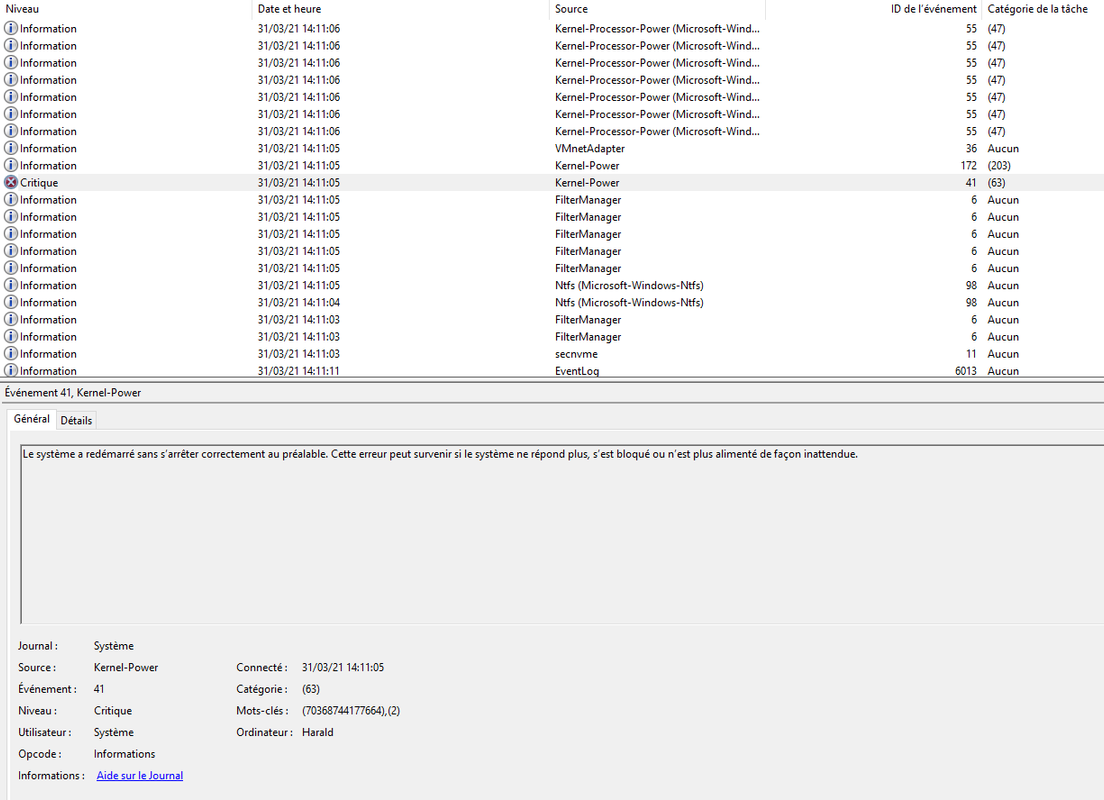
1 Like
Hi,
I read that you are in French language.
See on this page :
Redémarrage intempestives de Windows 10 (Kernel Power 41)
https://www.malekal.com/redemarrage-intempestives-de-windows-10-kernel-power-41/
Without being 100% affirmative: first, you must test the PSU if it is not powerful enough or becomes weak (maybe check with HWiNFO: https://www.hwinfo.com/) and check the options of power supply in the Windows control panel:
“Optimal or high performance” is recommended for VEAI.
Good luck because it’s not easy to diagnose.
I had read the article the other day. But the thing is that the blue screen happens either during the processing in video enhance or after when I compile the video processed a little before in video enhance. And in those cases, the blue screen comes either a little before the end of the compilation or in the middle.
I have this problem since I upgraded to 2.1.0.
I never had the problem before.
I’m having exactly the same problem; it is worse at higher resolutions - the program fails after rendering some frames, meanwhile for smaller movies it carries on during more time; but in the end it always fails. This have happened just after updating the graphics card’s BIOS.
1 Like
@taylor.bishop Can the Model Extension be back on .Also it mat be have to have a Video Analysis function to identify the type of Video model needed as a suggestion choice.
It is a tricky bluescreen.
Can you check your nvidia drivers? Sometimes this might happen with old drivers in combination with demanding software.
Faster downloads of all versions… Topaz Video AI | Facebook
That link is broken.
The downloads are quite fast for me. Definitely not locked at 150 K.
I’m experiencing the same exact issue you’re having. Even after reflashing the previous vbios back and reinstalling the drivers, the problem still persists for some reason…
I really thought the new vbios broke my gpu for a second until I found your post.
I have found after reverting back the graphics card’s BIOS that the problem persists, so I have installed a prior version of the Nvidia driver and then VEAI has worked again. Specifically, I have now the 461.92 studio version of the drivers instead of the 465.89 desktop version, which appears to be the culprit.
After that I installed again the latest BIOS of the graphics card, to make sure, and the problem hasn’t reproduced yet, so I’m pretty confident that the blame is on the Nvidia driver latest version.
1 Like
My drivers are always up to date. I check regularly. And for my NVIDIA driver there is no higher for the moment. I am at 461.92 of the studio version. Last update on 17/03/2021.
Edit:
I am on Windows 10 Pro v1909. But since version 1.8.0 of video enhance, it recommends me at least the 2004 of windows 10. But being on a pro version, I don’t have the upgrade yet. Moreover I saw on forums that the 2004 version was buggy. And I’m waiting for the 20H2 which has not arrived yet. Moreover, since the version 1.8.0 of video enhance , I saw a decrease in performance . I lost 0.05 fps of speed. which is quite huge. But the bluescreens (5 in 3 days) is since version 2.1.0
Hi,
I had version W10 H2 on a first PC on November 04, 2020 with the Microsoft MediaCreationTool20H2 tool:
https://go.microsoft.com/fwlink/?LinkId=691209
On a 2nd PC (less urgent) it came through Windows Update.
Hope this help.
There is a golden rule on updates and upgrades of operating systems, it is to never force the update. If I don’t have it yet, it’s probably because there might be bugs that could cause trouble if I force the update. Generally the upgrade arrives much later on a Windows pro than on a Windows home.
On my laptop, the upgrade came pretty quickly because I have a Windows 10 Home. But I still waited several months before doing it to be sure that the version is stable. So I will still wait on my Windows 10 Pro Tower for the upgrade to arrive. But it’s sad that devs don’t check stability or performance on a machine that still has Windows 10 v1909. I’m sure not everyone is still on a 2004 or 20H2 version of Windows 10.
Otherwise I am very familiar with Microsoft’s upgrade utilities. I use them to make an iso of the latest version after my machine had been upgraded to make a bootable key. It’s always useful
I am currently using VEAI 2.1 on Lenovo Workstation laptops with Win 10 Pro v1909 and Quadro GPUs. No bluescreens so far.
You could try the free software Heavyload to test your system’s CPU and GPU for any anomalies:
Just to make sure.
Now in pension but having been a Video and IT engineer since 1980:
The golden rule with Win 10 is to update when it becomes necessary to do so even if it means forcing it rather than waiting for it to fall from the sky.
Hope this help.
I cant seem to start a new topic for this, so please feel free to put this information where it belongs.
Owners of Bitdefender will need to add an exception for Topaz video enhance AI. Goto ‘Protection Features’ and click ‘Manage’ underneath ‘Ransomware Remediation’.
I was experiencing crashes on certain files at the same frame each time. I thought my avi file was corrupt but it seems Bitdefender thought Topaz was ransomware changing a file. If you experience repeated crashes of certain jobs, try the above solution and try to run the job again. Worked for me.
