RX460 had 4 GB VRAM and can encode with VEAI, but needed power and memory frequency to lowest for stable working. I wrote from this problem in older topics. Other parameters have good: i7-3770, 750W power, 32 GB RAM, many HDD. Graphics card was good for other video editing and photo editing, but under VEAI get black screen if no use underclocking. That’s all, and under nVidia have not problem. I think this is a driver problem, VEAI can run on lowest card too, just slower.
when we get the new version ? we are almost at end of month, i really like to see the new improvements 
1 Like
i was just corious
so i still wonder about that nervoes flickering.
As is said i know artemis just normalizing this.
No problem.
Your clips all suffer from 4 main issues (which I said on April 6th):
-Flickering
-Oversharpening
-Aliasing
And now I add
-blocking (very strong)
And I suspect it’s badly deinterlaced …
The external agent I’m talking about: It’s applying a temporal deflicker 5 to the source by pushing almost to 100%, there I used Davinci Resolve Studio + Deflicker OFX (but any temporal Deflicker must be able to do it) => Export in Cineform 640x480 .MOV. This flickering can be seen a lot on the MVI_0519 and MVI_5719 clips in the sky.
Topaz VEAI: import of .MOV
Then, we can clearly see the halo + blocking => Artemis Dehalo in SD (source format).
For aliasing and deblocking, Artemis AAA9 in HD format.
In HD it is watchable as is. (sample posted via Wetransfert)
Pass the clips in 4K, there is still a very big problem with blocking.

Try with the THEIA model by pushing the deblocking to 100% and by testing different settings for the denoise.
So I’m going back to my Super 8. Good luck.
I have seen many other people mention how much better Gaia-CG was in VEAI 1.6.1.
Also, in my opinion, Artemis v9 was a big improvement over previous versions and is still the best for certain noisy video sources.
Hi, the coulurs are changed vs original clip. How did you creat 16:9 format, of course cutting some parts of the footage? Which software did you use? I use DaVinci Resolve and thing in many time I could prepare 16:9 files out of 4:3, since sometimes I could just remove some less important parts. I shall do the test as you did and jcp29 did but I create the same output resolution. Thank you.
When can we expect a version for the M1 mac?
Good job, Topaz Labs. Keep up the good work.
1 Like
Thank you.
So I should follow the steps in that order:
- Davinci Resolve Studio + Deflicker OFX and export Format QuickTime, Codec GoPro Cineform, and YUV 10 bit? What about DNxHR or just mp4?
- Artemis Dehalo 100% denoise/deblock
- Upscaling to HD by AAA9, I shall use 2x method to 960p.
4… What to do to reach more, I mean 1080p or even more?
On which step do you recommend THEIA (detail?)
PS The orginal clips are ALL progressive (30p), I do not have to deinterlace them.
Thank you
Ok, I shall try. Usually I used to play with native format.
1 Like
Hi,
If you have big HDDs with empty space, the best codec is DNxHR.
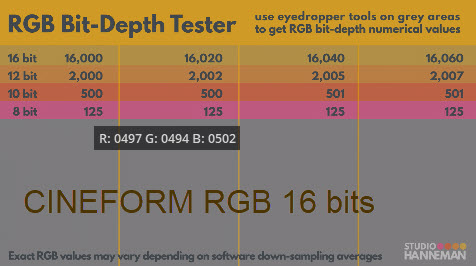
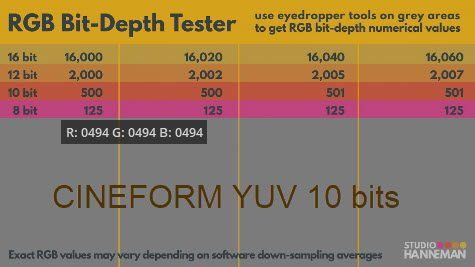
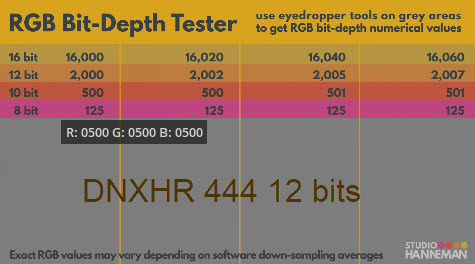
I had done the test from a test chart:
And the best is DNxHR 444 12bit for color compliance (10-bit color picker test)
EDIT :
This is a result made from 3 clips generated by Davinci Resolve (Cineform YUV / RGB and DNxHR 444 12b).
When I re-imported them into Davinci Resolve, the 3 clips had 500/500/500.
After these 3 clips were encoded by VEAI and exported in ProRes HQ.
Then check again in Davinci Resolve.
END EDIT
For HD: I did it in step 2. There are still black bands on the left and right but the 4: 3 aspect ratio is respected.
You have an AAA9 HD clip but as I showed you have a big blocking problem. In HD it cannot be seen but if you switch to UHD, it is possible.
When to use THEIA? to upscale from HD to UHD and deblocking (not tested).
Hope this help.
If you haven’t found this error yet, here’s what you need to do for stable repetition. You need to select one model and change the name by clicking on the file name at the bottom, save the new name. Use a small snippet or a very small video file for the test to save time. Start encoding to the end of the file or fragment, or forcefully stop. The encoded file works - everything is fine. Then choose a different model, include the same video in the assignment, and select another small snippet in the same video. The name of the output file at the bottom remains from the previous change (do not change anything) and start encoding. At the end, another fragment is overwritten in the same name and this is an error, because it had to suggest and change to another by adding a number or a symbol, as is done by default if the name is not changed. Also, please, correct it in the program so that the output name with the parameters remains in the line the same as by default, if you need to save the file in a different location. In order not to accidentally overwrite a file with the same name, then before saving, you need to do a programmatic check of the directory in this folder to compare the file names, and if it already exists, then suggest changing it or doing it automatically with the addition of a symbol. It seems that this is also the reason for the errors with the list of tasks.
Hi,
Thank you. I will play with the settings.
So then you recommend to use Artemis Dehalo at 100%? But it changes the clip colour and appearence , washes out everything.
Upscaling from 640p to 1080p by AAA9 does not change a lot.
Is the the right procedure?
PS I wanted to upload here the prints screens but there is an inscription I cannot do it…
But the trick allows to have v6 version which is really better thank v5 version? I have never used 1.6.1 one so I would not have any comparison. If I do not like v6, I can just go back to v5 doing the revers steps?
Hence, which steps do you recommend to use? Could you upscale according to your preferences to obtain both 1080p and 4K 2160p?
all i can say is use a softer model
like thea3
with sharpen 100, deblock 30, reduce noise 30
play around with the settings
i like it soft, thats why i hate grain
and there i no final or golden way to upscale any and every footage.
You need to test every model on every footage.
sometimes you have to start with sharpening and then softer
or vise versa.
Hi,
It’s not Dehalo which modifies the colors a little bit and lowers the brightness a little bit, it’s AAA-9.
Original => deflicker => Dehalo: same YRGB.
If you have Davinci Resolve 17, check with the vectorscopes. It is very telling.
Edit :
Test with clip MVI_5719
END EDIT
I have footage from Canon G9 and mainly have recorded in 640x480p i 30fps. There is also 1024x720p in 15 which I have used from time to time. Pity I have not used the latter option since it is more detailed, cleaner and now there are some possibilities to use AI to make footage more fluid. But I have not known that 10-12 years ago… So all my files “to remaster” come from this Canon, so it is important for me to figure out good workflow to achieve satosfactory results.
On which step do you recommend to use Thea3, as the first one to clean and then for instance to upscale by GAIA HQ? Now I have found very good test clip, short, quite steady so I shall prepare w few variants and share. I shall upscale by 2x and 4x and show you. Now I play with different AI models as suggested by different users here, as we all see different people prefer different AI models and approaches for 480p footage.
When you suggest Theia 3, you set sizing to 100% and play with Theia settings, not 100% denoise/deblock setiings and Theia settings?
