ok will do 
Hi, are any of you noticing grid looking blocks with the Theia model? (This doesn’t happen on Gaia model) It’s obvious when you zoomed in to the processed lossless PNGs. It’s very disappointing to see these grid artifacts when days have spent processing a video. I hope a newer version of Theia model can address this issue.
Here are some images of the grid looking blocks I’m talking about:



Between our experiences, the Bleach grid pattern can occur in Theia model and Gaia CG.
Gaia CG tiff: pattern can be removed with post-process de-noise, demonstrating it is additive.
Patterns follow the orientation of bare skinned body, demonstrating it is related to app.
My PC is under powered, which could also play a part.
https://i.postimg.cc/WbGg3dk7/AcidRain.png
Expand to 300% in browser to see pattern
1 Like

I’m noticing the same spotty patterns on my end as well using Gaia CG v1.5.3 on a GTX 1070, so I’d wager it has nothing to do with your PC.
It might be just a minor issue perhaps since you have to zoom in to really notice it, but I do hope it gets the attention of the devs nonetheless.
X2 upscale of 300x400 gives 600x800, which would be zoom by over 200% on any modern pc screen.
I’m running the processing on two RTX2080Ti GPUs, the grids artifacts are still there. It has nothing to do with the hardware, this is most likely due to the trainning of the Theia model 1.0.1.
@developers
@matt.lathrop
Are there any other versions of Theia model that we can test/try?
Upscaling and enhancing a low resolution video, do you prefer Gaia CG or Gaia HQ? Watching online Gaia CG seems to give better results than Gaia HQ, with a more sharpened clean image. What do you think?
Thank you!
I use Gaia CG all the time… with the help of someone here, Gaia HQ did a good result on 2 pictures (for an unknow reason lol) as on every videos i upscale since i own VEAI , the best result is given with CG (for my materials of course)
Thank you very much, I was collecting some information because I’d like to start upscaling Star Trek: Voyager and watching online Gaia CG seems to be the best.
I prefer Gaia hq, you need to assure that the scaling motor interpret textures, and not noise. If there is noise it will upscale it, if the image is already upscaled, and it’s blurred, it will upcale the blur. So you may need to downscale first, and or apply effective denoisers until you see clean texture and not visible noise.
Man… this grid pattern thing is really annoying on the Theia 1.0.1 model!!
There’s no good way to post process it without destroying the details.
@developers
@matt.lathrop
Can you guys fix this on the Theia model please?? Thanks!!!
example:

and the settings:
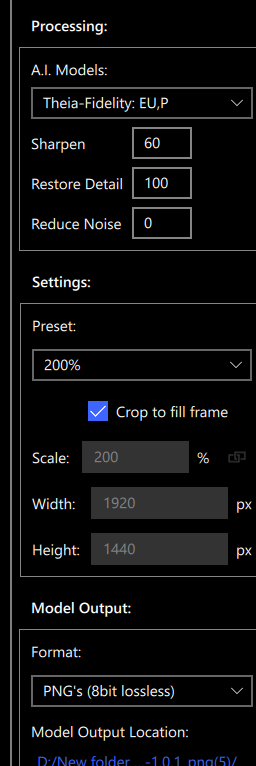
Thank you very much! Could you recommend me a software to denoise the image?
I suggest hybrid selur.
Great, I will give him a look. Thank you very much!
I’ve got another question: is it bad to export the video in MP4 H.263?
the problem about the H263 has been fixed now. H264 is available.
the new 16.0 Beta allow to modify the bitrate of it, for now it’s at 50 mb/s, but when the 16 will be released, it will be possible to change this bitrate to something less “high”. the H263 is “ok”, for stuff not important, but important stuff, yes, it’s bad. better is to use last version of AI and use the H264 output and re encode it at a lower bitrate if needed.
Thank you very much! I was worried about the huge output file size using H264, but lowering the bitrate it should also lower the size of the file, right?
Will lowering bitrate result in worse output quality? Thank you for your answers!
yes lowering file size but will lower quality too, but depending of which final size you’ll output, you can lower it and see no or very few change in term of quality. Bluray use a bitrate around 25 mb/s (sometimes more), so if you use a 25 mb/s bitrate you’ll have a 50% file , compared to the actual size. you can lower the bitrate until you see that in term of quality it please you. i can’t talk about 4K, it’s not my world unfortunatly, can only speak about Full HD. i know lot of people will disagree, but for the stuff i do, i don’t need something more than 15 mb/s, so i usually output with a bitrate going between 10 mb/s and 15mb/s.
Thank you for your answer, so I will try with h.264 trying to adjust the bitrate.
Again, thank you very much for your help.
Maybe it’s a bad idea, but would it be good to export the video from Video Enchance Ai with h.263 and then transcode it with Handbrake to h.265? Sorry if it’s a stupid question and thank you.
I’d personally rather go with VEAI h.264 re-encoded to h.264 CRF/h.265 instead.
Avoid h.263 at all costs imho.
