Video AI Pro: “No licenses are currently available”

Dear Topaz Labs Support,

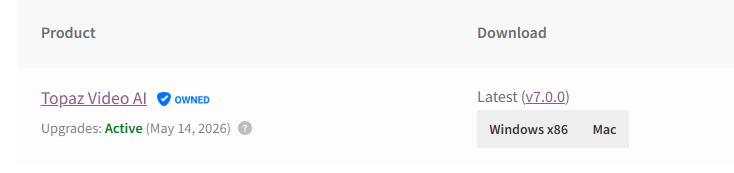
I’m experiencing a license activation issue with Topaz Video AI Pro v7.0.0, despite having an active license (valid until May 14, 2026, see attached screenshot).

Issue:

When launching the software, I receive the following message:
“No licenses are currently available.”

Actions Taken:

  1. Verified connectivity to the licensing server
  • I can access https://api.topazlabs.com/
  • The response is: {"message":"Not Found"}
  • This suggests the server is reachable
  1. Checked license folder
  • I followed your instructions to delete license-related files
  • However, the directory C:\Users\<my username>\AppData\Roaming\Topaz Labs LLC\Topaz Video AI\Licensing does not exist on my machine
  1. Relaunched and logged in again
  • The issue still persists

I am currently using a corporate network, which may involve stricter firewall or proxy settings. Please advise if specific ports or domains need to be whitelisted, or suggest any further steps I can try.

Thank you for your support.

Best regards,

How did you exactly confirm that your connection is working? (Did you also check if you got a valid license? Online)

Checking if you have internet by googling is not deterministic when it comes to licensing checks.

Can your machine reach: https://api.topazlabs.com/

If yes → Good.
If no → Thats the issue (Most likely lol)

Try following IF you can access that url.

  • Quit Topaz Video AI

  • Delete license-related files in:
    C:\Users\<yourname>\AppData\Roaming\Topaz Labs LLC\Topaz Video AI\Licensing

  • Relaunch the app and log in again—it will try to fetch a fresh license.

Depending if you are on a corpo network or at home other things might be the problem too:

Smart move to try a mobile hotspot to exclude most Firewall related issues,

Cheers

Dear Topaz Labs Support,

I’m experiencing a license activation issue with Topaz Video AI Pro v7.0.0, despite having an active license (valid until May 14, 2026, see attached screenshot).

Issue:

When launching the software, I receive the following message:
“No licenses are currently available.”

Actions Taken:

  1. Verified connectivity to the licensing server
  • I can access https://api.topazlabs.com/
  • The response is: {"message":"Not Found"}
  • This suggests the server is reachable
  1. Checked license folder
  • I followed your instructions to delete license-related files
  • However, the directory C:\Users\<my username>\AppData\Roaming\Topaz Labs LLC\Topaz Video AI\Licensing does not exist on my machine
  1. Relaunched and logged in again
  • The issue still persists

I am currently using a corporate network, which may involve stricter firewall or proxy settings. Please advise if specific ports or domains need to be whitelisted, or suggest any further steps I can try.

Thank you for your support.

Best regards,

Hi,

I‘m very sorry for not double checking that path and answering out of memory. The location for the new versions is „C:\ProgramData\Topaz Labs LLC\Topaz Video AI\models\auth.tpz“

Again: Did you try to connect outside of a corporate network? So many different things could cause errors that it‘s way simpler to verify if you get the same error pattern with a „clean“ network.

I‘m very sorry again for providing a non existent path. I must have mixed something up in my head.

Cheers

Thanks for the clarification.

I checked the directory:
C:\ProgramData\Topaz Labs LLC\Topaz Video AI\models\auth.tpz
Unfortunately, I could not find the auth.tpz file in that location either.

Also, I’m currently on a corporate network, but I plan to test the activation again later today on my home network, which should provide a cleaner environment for troubleshooting.

I’ll let you know the results once I’ve tried that.

Best regards,

Hey :waving_hand:t2:

Thanks for the fast reply, and i really appreciate your text formatting!

The problem is the missing key file. Luckily we can „pinpoint“ what causes this.

1. Clean Reinstall

  • Uninstall Topaz Video AI
  • Delete: (i cant verify it, since im not at PC but they SHOULD be here)
    • C:\Program Files\Topaz Labs LLC\Topaz Video AI\
    • C:\ProgramData\Topaz Labs LLC\Topaz Video AI\

2. Reinstall with Admin Rights

  • Right-click the installer → Run as administrator

3. Launch App with Admin Rights

  • Right-click the app icon → Run as administrator

4. Log In and Check

  • After logging in, go to:
    C:\ProgramData\Topaz Labs LLC\Topaz Video AI\models\
  • See if auth.tpz appears

If it does NOT we can assess with near 100% certainty that its a network related “issue” (aka some process/rule that blocks/breaks the authentication process.)

Since we’ve ruled out all local permission and installation issues, the problem is now definitely network-related—the app can’t reach Topaz’s licensing servers in a way that allows it to complete activation and generate the auth.tpz file.

Here’s the tricky part:
I work with enterprise networks (firewall management, domain architecture, security testing, etc.), and honestly, there are dozens of different configurations that could silently break this kind of authentication. Without visibility into how your corporate environment handles outbound traffic, it’s nearly impossible to say exactly what’s blocking it—but I can point you in the right direction.


What to ask your IT team to verify:

:white_check_mark: Can you confirm there’s no firewall or proxy blocking HTTPS (port 443) to these endpoints?
These are the critical (according to avilable documentation) services Topaz uses for license activation:

  • api.topazlabs.com
  • licensing.topazlabs.com
  • cdn.topazlabs.com

Are these domains subject to SSL inspection, packet rewriting, or certificate substitution (MITM TLS proxies)?
If yes, ask IT to whitelist (exempt) them from inspection—Topaz’s licensing relies on strict TLS trust.

Is the network using a proxy that requires authentication (NTLM, Kerberos, or login portal)?

Topaz’s license client LIKELY does not support proxy-authenticated flows, which can cause silent handshake failures.

Can they check the DNS resolution path for the domains above?
Make sure the returned IPs are correct and not being filtered or sinkholed by security software or DNS policies.

Is outbound traffic on port 443 limited to browser traffic or approved user agents only?
Some enterprise networks block non-browser HTTPS connections, which breaks background authentication flows.

Additional domains the app may contact (but less likely to block login):

These are used for downloading models, telemetry, and update checks. While not critical to license activation, they may still affect functionality or background processes:

AGAIN: Warning! i can NOT verify that those are all. I spent quite abit of time with their documentation and here is what i found:

  • downloads.topazlabs.com
  • veai-models.topazlabs.com
  • models.topazlabs.com
  • et.topazlabs.com

hope this helps,
Cheers
I’m happy to report that the issue has been resolved!

I performed a fresh uninstall of Topaz Video AI, and during reinstallation, I selected a different drive (not the C: drive) as the installation location. After that, the license activated successfully.

Thank you again for your quick and helpful responses throughout the process. I really appreciate the support from the Topaz team.

Best regards,

Lol, i don‘t work for them nor do i personally own VIDEO AI Pro but im glad i could help!

I just spent way too much time reading their documentation.

PS: pretty sure they would not let their employees run around with „NetworkSchizo“ as their username haha

Fell free to mark the post as solved,

Cheers

1 Like