Topaz Video AI  v7.1.1
System Information
OS: Windows v11.24
CPU: AMD Ryzen 9 7950X3D 16-Core Processor            95.153 GB
GPU: NVIDIA GeForce RTX 4090  23.576 GB
GPU: AMD Radeon(TM) Graphics  0.4568 GB
Processing Settings
device: 0 vram: 1 instances: 1
Input Resolution: 1920x1080
Benchmark Results
Artemis		1X: 	28.60 fps 	2X: 	15.02 fps 	4X: 	04.09 fps
Iris		1X: 	27.29 fps 	2X: 	17.09 fps 	4X: 	04.70 fps
Proteus		1X: 	29.65 fps 	2X: 	16.75 fps 	4X: 	04.92 fps
Gaia		1X: 	15.79 fps 	2X: 	09.55 fps 	4X: 	04.58 fps
Nyx		1X: 	12.28 fps 	2X: 	08.76 fps
Nyx Fast		1X: 	22.10 fps
Rhea		4X: 	04.33 fps
RXL		4X: 	04.28 fps
Hyperion HDR		1X: 	31.90 fps
4X Slowmo		Apollo: 	32.44 fps 	APFast: 	65.75 fps 	Chronos: 	15.75 fps 	CHFast: 	33.53 fps
16X Slowmo		Aion: 	31.96 fps
So i used chat gpt to calculate what a laptop with an I9 processor and a
5070
5070 TI
5080
5090
so you can determine if a desktop vs a laptop is really worth it, and what speeds you might get
I actually tested a laptop 5070 mobile at best buy and for 4k Benchmark on artemis it was 2.81fps 4k
for the 5090 mobile it was 7.45 fps for a 4k benchmark in artemis
based on the calculations
to encode an average 2 hour ish movie or so in HDR with a decent filter
3050ti laptop - 24 hours (actual test done)
5070 laptop -8.5 hours
5070 ti laptop- 5.7 hours
5080 laptop - 4.12 hours
5090 laptop - 3.22 hours
so it seems the best bang for your dollar would be in my option 5070ti.
and if you had extra cash, the 5080… if you encode more frequently.
So there you go folks.. now you can decide if you want a big desktop or a laptop…
topaz is not just for desktop users… its still useful for the rest of us “regulars”
i just purchased a lenovo i9 5080 laptop and will be posting benchmarks soon.. at 2100 dollars i couldn’t pass that up since i need a new system anyways
1 Like
MSI Titan 18 HX AI A2XWJG-609FR
Intel Core Ultra 9 285HX
64GB DDR5
SSD 6TB, RAID 0 Areca, 3 × SSD 2TB, 18 GBps
Nvidia RTX5090 24GB, Nvidia Studio 581.29
18’ UHD+
MiniLED 120Hz
Windows 11 Professional 24H2
MSI power management: high performances / MSI Engine AI
Input Resolution: 768x576
Artemis 1X: 105.83 fps 2X: 62.10 fps 4X: 17.06 fps
Iris 1X: 84.53 fps 2X: 78.73 fps 4X: 20.40 fps
Proteus 1X: 111.78 fps 2X: 80.55 fps 4X: 19.36 fps
Gaia 1X: 44.98 fps 2X: 32.03 fps 4X: 18.05 fps
Nyx 1X: 23.45 fps 2X: 14.52 fps
Nyx Fast 1X: 51.64 fps
Rhea 4X: 15.49 fps
RXL 4X: 15.59 fps
Hyperion HDR 1X: 65.75 fps
4X Slowmo Apollo: 131.61 fps APFast: 184.59 fps Chronos: 93.82 fps CHFast: 121.01 fps
16X Slowmo Aion: 88.75 fps
Input Resolution: 1280x720
Artemis 1X: 62.48 fps 2X: 37.54 fps 4X: 08.81 fps
Iris 1X: 56.70 fps 2X: 33.54 fps 4X: 09.18 fps
Proteus 1X: 52.66 fps 2X: 37.32 fps 4X: 09.60 fps
Gaia 1X: 20.00 fps 2X: 13.96 fps 4X: 09.12 fps
Nyx 1X: 14.84 fps 2X: 14.04 fps
Nyx Fast 1X: 44.06 fps
Rhea 4X: 07.31 fps
RXL 4X: 07.17 fps
Hyperion HDR 1X: 38.98 fps
4X Slowmo Apollo: 69.35 fps APFast: 143.07 fps Chronos: 44.20 fps CHFast: 62.19 fps
16X Slowmo Aion: 52.91 fps
Input Resolution: 1920x1080
Artemis 1X: 29.32 fps 2X: 14.30 fps 4X: 04.04 fps
Iris 1X: 27.08 fps 2X: 15.65 fps 4X: 04.33 fps
Proteus 1X: 28.66 fps 2X: 17.61 fps 4X: 04.31 fps
Gaia 1X: 08.60 fps 2X: 06.13 fps 4X: 04.10 fps
Nyx 1X: 08.58 fps 2X: 07.13 fps
Nyx Fast 1X: 19.97 fps
Rhea 4X: 03.41 fps
RXL 4X: 03.30 fps
Hyperion HDR 1X: 19.93 fps
4X Slowmo Apollo: 31.74 fps APFast: 46.04 fps Chronos: 21.25 fps CHFast: 30.89 fps
16X Slowmo Aion: 24.07 fps
Input Resolution: 3840x2160
Artemis 1X: 06.17 fps 2X: 03.49 fps 4X: 00.86 fps
Iris 1X: 05.79 fps 2X: 03.40 fps 4X: 01.01 fps
Proteus 1X: 06.03 fps 2X: 04.05 fps 4X: 01.08 fps
Gaia 1X: 01.82 fps 2X: 01.30 fps 4X: 00.92 fps
Nyx 1X: 01.42 fps 2X: 02.04 fps
Nyx Fast 1X: 03.26 fps
Rhea 4X: 00.72 fps
RXL 4X: 00.69 fps
Hyperion HDR 1X: 11.89 fps
4X Slowmo Apollo: 10.49 fps APFast: 19.78 fps Chronos: 04.63 fps CHFast: 07.93 fps
16X Slowmo Aion: 14.09 fps
Hi ravippe,
I read your posts and you did a good buy with your i9 RTX 5080 laptop for the price!
About Artemis and 4K, on my Titan Raider, I got:
Artemis 1X: 06.17 fps
So almost 2.1 times speedier but at 3.5 times the price!
So you have a great laptop for the money!
« for the 5090 mobile it was 7.45 fps »
I would love but it is not what I got!
See my benchmarks.
Vincent.
I know I was off because I had to guesstimate it
My Artemis at 4K is around 4.8 to 5fps
..performance mode on my Lenovo 7i pro i9 processor 5080 with a gen 4 SSD and 32 GB ram . Gonna upgrade the SSD to gen 5 when prices go lower
When I reduce the power to balanced mode it drops to like 3.8-4.2 or somethin..
But in general it only takes at most 4-6 hours to upscale a 2 hour movie with the additional HDR color feature … so I’m happy with that
Not bad for 2100 bucks I’ll post the full benchmark soon here for you when I’m home . I hope you love your msi 5090…
Hi Ravippe,
I fell in love with my MSI Titan laptop!
But it is a costly love!
I understand the power impact on performances.
I have same issue than you.
When I use the MSI Engine AI power management, everything is balanced to be responsive but performances per application are slightly falling.
That is a normal behaviour.
But even when I force High Performances mode, I am still not exceeding 50 % of my computer, the GPU temperature is around 57 degrees celsius so very cool, and the i9 Ultra 285 HX is around 65 degrees celsius, so very cool too.
The system is design to keep everything cool, but fans come loud when I launch inference, up to 3 at same time. Otherwise the fans are down almost all the time.
I actually do a FHD video quality enhancement @ 62 fps, noise reduction, etc., details increasing, unblurring, etc. and also doubling the frame rate, encoding WAV to AAC 320 VBR @ 167 times the reading speed, encoding a video FHD in HEVC @ 380 fps from an H264 FHD, while I am extracting an ISO to MP4 in HEVC @ 238 fps, while watching a FHD video on Internet, LibreOffice opened, and several other applications, and I can not exceed 50 % of my computing power, memory usage is ridiculous, around 24 Go of RAM and everything stays responsive.
But I can not use the full power I think so. That is the life.
I should use a tour computer, not a laptop to avoid thermal contingencies managed by MSI.
I was looking for the MSI MEG Vision X AI tour, but even more expensive with a screen…
Vincent.
Cool , I’m loving mine also.. I’m decoding a movie now to 4k HDR 2 hours …
I under estimated.. 14 hours total time using iris mq filter .. the HDR enabled also
It’s stuck at about 3.3 fps 4k iris HDR prores mov output. And when I kick the performance mode it jumps to 4 fps
Then I’m gonna run it on handbreak app to make a mkv file .. keeping the audio… 10 bit hdr profile , and compression reasonable .
2 hour video I’m upscaling 
Have it in balanced mode so under powered.. but seems reasonable.
Without the HDR probably half that I’m guessing 8 hours prob.
I love restoring old content or things they don’t want to re release. Give it new life and colors and make my childhood come back to life again with the things I loved .
Hi ravippe,
I do the same than you ! 
I am using AI tools to remaster my video collection so I can enjoy for instance old TV shows in much better picture quality.
Editors most of the time do not care remastering their catalog.
About power balanced, my MSI AI Engine is setting automatically this balance to prevent any excessive rise of temperature.
MSI AI Engine keeps everything cool!
A RTX 5090 Mobile at 57 degrees celsius while rendering an inference is just very good.
Okay it does not use the full power but this approach prevents crash and wear out of the hardware.
If I am in the hurry, there is always the High Perfomances mode than I can trigger.
I do recommend to you using the Nvidia Studio drivers if you are not a hard gamer.
These drivers are very stable and the rendering speed is excellent anyway.
Have a nice day.
Vincent.
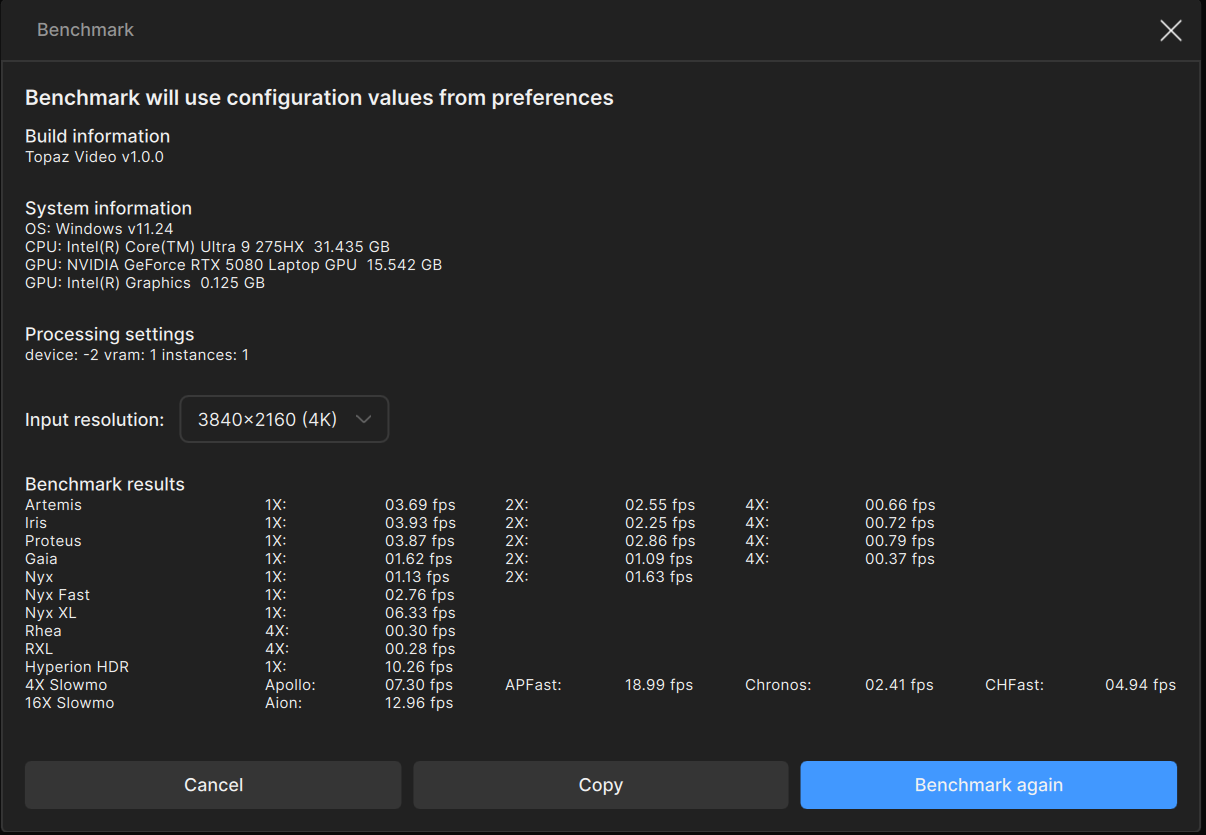
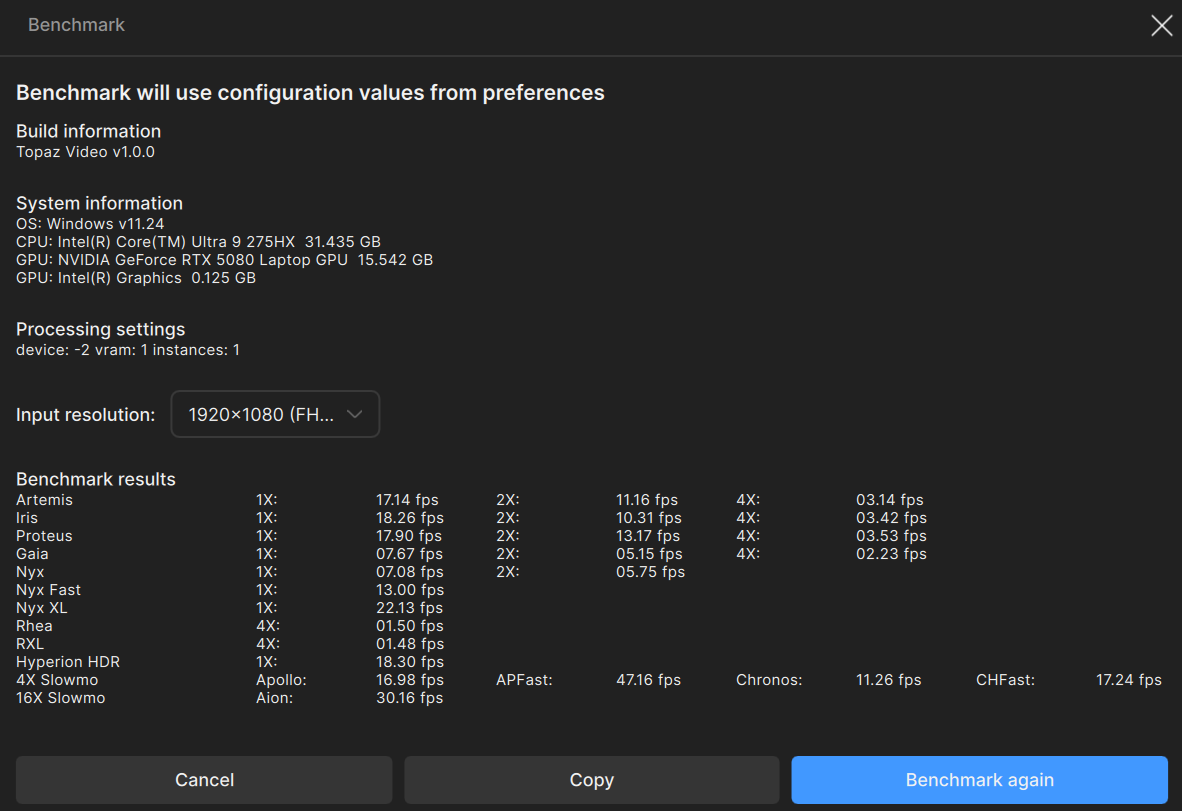
Top pic 4k
Bottom pic 1080 (standard test everyone posts)
Here is the Lenovo 7i pro laptop
That ingot for 2150 bucks last Sunday cause they screwed up on the price
I9 processor 275hx
Rtx 5080
32 GB ram 6400 MT
2tb gen 4 SSD .. I know I’m gonna get gen 5 when they get cheaper and bigger
On performance mode . Fans not too loud
Studio drivers installed .
results change a bit when retested but this is accurate enough
Hi ravippe,
For instance a MSI computer Core Ultra 7 + 32Go + RTX 5080 (MEG Vision X AI 2NVV7-004EU) is about 19.2 % faster than my Titan laptop Core Ultra 9 + 64 Go + RTX 5090 (MSI Titan 18 HX AI A2XWJG-609FR).
It is the power and thermal contingencies of a laptop that makes the difference between a computer watercooled with a super powerfull electrical supply and a laptop that needs to keep everything in a power and thermal limitations.
I am making reference to this MEG Vision X AI 2NVV7-004EU because it is close to your laptop configuration.
Kind regards.
Vincent.
Topaz Video AI Beta  v7.2.0.1.b
System Information
OS: Windows v11.24
CPU: 12th Gen Intel(R) Core(TM) i7-12700K  63.702 GB
GPU: NVIDIA GeForce RTX 4080 SUPER  15.671 GB
GPU: Intel(R) UHD Graphics 770  0.125 GB
Processing Settings
device: -2 vram: 1 instances: 1
Input Resolution: 1920x1080
Benchmark Results
Artemis		1X: 	31.29 fps 	2X: 	16.30 fps 	4X: 	04.48 fps
Iris		1X: 	35.52 fps 	2X: 	18.22 fps 	4X: 	04.87 fps
Proteus		1X: 	33.55 fps 	2X: 	18.06 fps 	4X: 	05.04 fps
Gaia		1X: 	11.51 fps 	2X: 	07.73 fps 	4X: 	04.65 fps
Nyx		1X: 	16.95 fps 	2X: 	14.17 fps
Nyx Fast		1X: 	32.11 fps
Rhea		4X: 	04.44 fps
RXL		4X: 	04.46 fps
Hyperion HDR		1X: 	21.88 fps
4X Slowmo		Apollo: 	31.86 fps 	APFast: 	82.01 fps 	Chronos: 	23.22 fps 	CHFast: 	30.25 fps
16X Slowmo		Aion: 	ERR fps
These are the benchmark results when using a 12700k CPU.
Topaz Video AI Beta  v7.2.0.1.b
System Information
OS: Windows v11.24
CPU: Intel(R) Core(TM) Ultra 7 265K  63.299 GB
GPU: NVIDIA GeForce RTX 4080 SUPER  15.671 GB
GPU: Intel(R) Graphics  0.125 GB
Processing Settings
device: -2 vram: 1 instances: 1
Input Resolution: 1920x1080
Benchmark Results
Artemis		1X: 	31.38 fps 	2X: 	14.27 fps 	4X: 	03.69 fps
Iris		1X: 	34.62 fps 	2X: 	15.18 fps 	4X: 	04.02 fps
Proteus		1X: 	33.05 fps 	2X: 	15.12 fps 	4X: 	03.96 fps
Gaia		1X: 	11.49 fps 	2X: 	07.82 fps 	4X: 	03.89 fps
Nyx		1X: 	16.87 fps 	2X: 	14.11 fps
Nyx Fast		1X: 	31.41 fps
Rhea		4X: 	03.84 fps
RXL		4X: 	03.84 fps
Hyperion HDR		1X: 	17.06 fps
4X Slowmo		Apollo: 	31.25 fps 	APFast: 	76.78 fps 	Chronos: 	23.43 fps 	CHFast: 	27.36 fps
16X Slowmo		Aion: 	35.49 fps
Benchmark results when using a 265k CPU.
I thought upgrading my CPU would speed things up, but this wasn’t what I expected. Is this happening to anyone else?
Faster RAM might get you a tiny bit more speed. Is this with the same RAM that was with the 12700k?
Topaz Video AI  v7.1.3
System Information
OS: Windows v11.24
CPU: AMD Ryzen 9 9900X 12-Core Processor              31.602 GB
GPU: AMD Radeon RX 9070 XT  15.922 GB
Processing Settings
device: 0 vram: 1 instances: 1
Input Resolution: 1920x1080
Benchmark Results
Artemis		1X: 	30.72 fps 	2X: 	13.73 fps 	4X: 	03.79 fps
Iris		1X: 	32.75 fps 	2X: 	17.22 fps 	4X: 	04.67 fps
Proteus		1X: 	31.60 fps 	2X: 	17.31 fps 	4X: 	04.74 fps
Gaia		1X: 	17.00 fps 	2X: 	10.46 fps 	4X: 	04.77 fps
Nyx		1X: 	12.69 fps 	2X: 	10.39 fps
Nyx Fast		1X: 	24.61 fps
Rhea		4X: 	03.60 fps
RXL		4X: 	03.41 fps
Hyperion HDR		1X: 	29.67 fps
4X Slowmo		Apollo: 	33.29 fps 	APFast: 	73.14 fps 	Chronos: 	20.04 fps 	CHFast: 	30.92 fps
16X Slowmo		Aion: 	50.19 fps
I haven’t bothered to install the new Topaz on this computer yet.
Interestingly though, this 9070 XT seems to be faster than the RTX 5080. I mainly do DVD to FHD upscaling with Proteus manual. I did a video with the 5080 right before installing the 9070, then did it again.
5080: Enhancement pass took: 0:09:53.20
9070: Enhancement pass took: 0:09:39.76
Maybe I’m bottle-necked somewhere else or this card is just a little faster, but this is good news for me. I had spent a lot more money for a card that was giving me the same or slightly worse speeds.
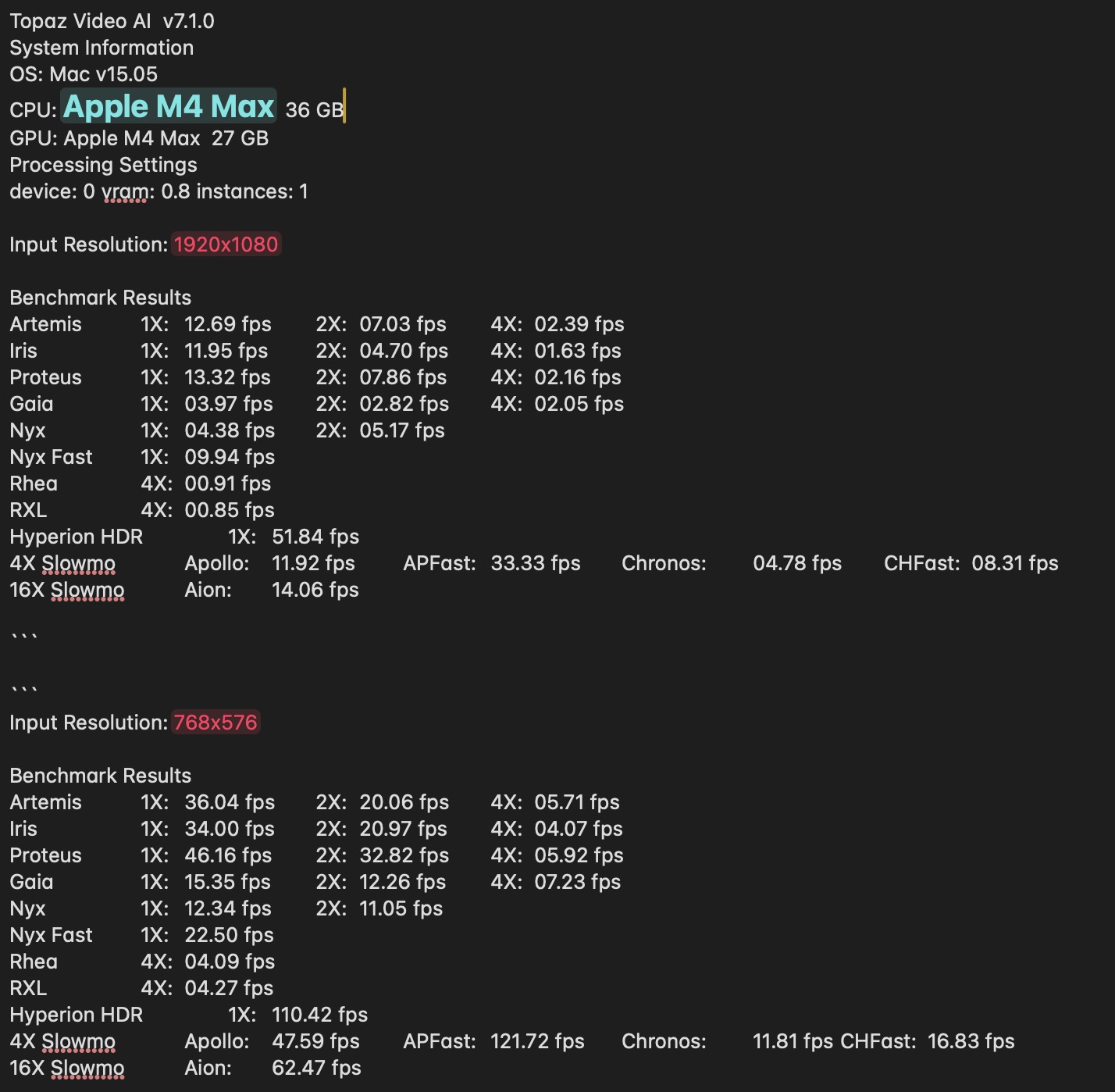
Mac Studio 16 CPU and 40 GPU. Mac OS 15.60
```
Topaz Video AI v7.1.5
System Information
OS: Mac v15.06
CPU: Apple M4 Max 64 GB
GPU: Apple M4 Max 48 GB
Processing Settings
device: 0 vram: 1 instances: 1
Input Resolution: 1920x1080
Benchmark Results
Artemis 1X: 14.40 fps 2X: 08.21 fps 4X: 02.76 fps
Iris 1X: 09.46 fps 2X: 05.27 fps 4X: 02.20 fps
Proteus 1X: 12.91 fps 2X: 09.24 fps 4X: 02.90 fps
Gaia 1X: 04.20 fps 2X: 02.98 fps 4X: 02.34 fps
Nyx 1X: 05.77 fps 2X: 04.85 fps
Nyx Fast 1X: 13.23 fps
Rhea 4X: 01.17 fps
RXL 4X: 01.22 fps
Hyperion HDR 1X: 77.34 fps
4X Slowmo Apollo: 16.22 fps APFast: 42.17 fps Chronos: 05.58 fps CHFast: 09.10 fps
16X Slowmo Aion: 17.39 fps
```
Mac Studio 16 CPU 40 GPU. 15.60 OS
```
Topaz Video AI v7.1.5
System Information
OS: Mac v15.06
CPU: Apple M4 Max 64 GB
GPU: Apple M4 Max 48 GB
Processing Settings
device: 0 vram: 1 instances: 1
Input Resolution: 1280x720
Benchmark Results
Artemis 1X: 24.86 fps 2X: 15.14 fps 4X: 05.35 fps
Iris 1X: 22.07 fps 2X: 12.60 fps 4X: 03.75 fps
Proteus 1X: 30.12 fps 2X: 20.31 fps 4X: 05.26 fps
Gaia 1X: 09.14 fps 2X: 06.93 fps 4X: 05.12 fps
Nyx 1X: 09.68 fps 2X: 09.67 fps
Nyx Fast 1X: 30.99 fps
Rhea 4X: 02.57 fps
RXL 4X: 02.68 fps
Hyperion HDR 1X: 120.62 fps
4X Slowmo Apollo: 31.55 fps APFast: 83.26 fps Chronos: 10.07 fps CHFast: 15.44 fps
16X Slowmo Aion: 39.41 fps
```
How many fps do you get with an Starlight 2x upscale of a SD source?
0.3fps
1 Like
