Users can run benchmarking (Process > Benchmark, or, Ctrl/Cmd + B) to compare results across different machines.
Topaz Video AI  v7.1.0
System Information
OS: Windows v11.24
CPU: AMD Ryzen 7 5800X3D 8-Core Processor             31.916 GB
GPU: NVIDIA GeForce RTX 3080  9.8174 GB
Processing Settings
device: 0 vram: 1 instances: 1
Input Resolution: 1920x1080
Benchmark Results
Artemis		1X: 	20.00 fps 	2X: 	09.97 fps 	4X: 	02.79 fps
Iris		1X: 	19.62 fps 	2X: 	10.37 fps 	4X: 	03.50 fps
Proteus		1X: 	19.61 fps 	2X: 	13.03 fps 	4X: 	03.54 fps
Gaia		1X: 	07.06 fps 	2X: 	04.90 fps 	4X: 	03.26 fps
Nyx		    1X: 	05.48 fps 	2X: 	04.03 fps
Nyx Fast	1X: 	16.16 fps
Rhea		4X: 	02.52 fps
RXL		4X: 	02.45 fps
Hyperion HDR		1X: 	33.50 fps
4X Slowmo		Apollo: 	22.35 fps 	APFast: 	50.17 fps 	Chronos: 	15.55 fps 	CHFast: 	24.25 fps
16X Slowmo		Aion: 	ERR fps
Topaz Video AI  v7.1.0
System Information
OS: Windows v10.22
CPU: AMD Ryzen Threadripper 3970X 32-Core Processor   127.87 GB
GPU: NVIDIA GeForce RTX 3090  23.756 GB
Processing Settings
device: -2 vram: 0.9 instances: 0
Input Resolution: 1920x1080
Benchmark Results
Artemis		1X: 	24.62 fps 	2X: 	12.26 fps 	4X: 	03.55 fps
Iris		1X: 	23.10 fps 	2X: 	12.95 fps 	4X: 	03.67 fps
Proteus		1X: 	23.80 fps 	2X: 	13.80 fps 	4X: 	04.05 fps
Gaia		1X: 	08.86 fps 	2X: 	06.17 fps 	4X: 	03.26 fps
Nyx		1X: 	08.18 fps 	2X: 	05.77 fps
Nyx Fast		1X: 	20.47 fps
Rhea		4X: 	03.13 fps
RXL		4X: 	03.02 fps
Hyperion HDR		1X: 	20.54 fps
4X Slowmo		Apollo: 	33.19 fps 	APFast: 	58.49 fps 	Chronos: 	19.96 fps 	CHFast: 	28.86 fps
16X Slowmo		Aion: 	24.51 fps
Topaz Video AI  v7.1.0
System Information
OS: Windows v11.24
CPU: Intel(R) Xeon(R) W-2265 CPU @ 3.50GHz  127.69 GB
GPU: NVIDIA GeForce RTX 5070 Ti  15.534 GB
Processing Settings
device: 0 vram: 1 instances: 1
Input Resolution: 1920x1080
Benchmark Results
Artemis		1X: 	28.51 fps 	2X: 	12.56 fps 	4X: 	03.35 fps
Iris		1X: 	25.35 fps 	2X: 	14.08 fps 	4X: 	03.79 fps
Proteus		1X: 	28.09 fps 	2X: 	14.65 fps 	4X: 	03.80 fps
Gaia		1X: 	09.21 fps 	2X: 	06.75 fps 	4X: 	03.66 fps
Nyx		1X: 	09.48 fps 	2X: 	07.40 fps
Nyx Fast		1X: 	20.16 fps
Rhea		4X: 	03.46 fps
RXL		4X: 	03.28 fps
Hyperion HDR		1X: 	17.48 fps
4X Slowmo		Apollo: 	27.25 fps 	APFast: 	47.46 fps 	Chronos: 	23.80 fps 	CHFast: 	30.47 fps
16X Slowmo		Aion: 	28.70 fps
1 Like
Topaz Video AI  v7.1.0
System Information
OS: Windows v11.24
CPU: Intel(R) Xeon(R) W-2265 CPU @ 3.50GHz  127.69 GB
GPU: NVIDIA GeForce RTX 5070 Ti  15.534 GB
Processing Settings
device: 0 vram: 1 instances: 1
Input Resolution: 3840x2160
Benchmark Results
Artemis		1X: 	06.12 fps 	2X: 	02.82 fps 	4X: 	00.84 fps
Iris		1X: 	05.32 fps 	2X: 	03.23 fps 	4X: 	00.95 fps
Proteus		1X: 	05.95 fps 	2X: 	03.51 fps 	4X: 	00.91 fps
Gaia		1X: 	01.95 fps 	2X: 	01.44 fps 	4X: 	00.89 fps
Nyx		1X: 	01.57 fps 	2X: 	02.34 fps
Nyx Fast		1X: 	03.32 fps
Rhea		4X: 	00.75 fps
RXL		4X: 	00.70 fps
Hyperion HDR		1X: 	10.98 fps
4X Slowmo		Apollo: 	12.13 fps 	APFast: 	19.37 fps 	Chronos: 	05.11 fps 	CHFast: 	08.43 fps
16X Slowmo		Aion: 	12.68 fps
1 Like
Topaz Video AI  v7.1.0
System Information
OS: Windows v11.24
CPU: Intel(R) Xeon(R) W-2150B CPU @ 3.00GHz  63.691 GB
GPU: AMD Radeon RX 6600  7.9566 GB
Processing Settings
device: 0 vram: 1 instances: 1
Input Resolution: 1920x1080
Benchmark Results
Artemis		1X: 	05.16 fps 	2X: 	03.32 fps 	4X: 	01.22 fps
Iris		1X: 	06.02 fps 	2X: 	03.58 fps 	4X: 	01.10 fps
Proteus		1X: 	05.82 fps 	2X: 	03.98 fps 	4X: 	01.62 fps
Gaia		1X: 	02.46 fps 	2X: 	01.69 fps 	4X: 	01.15 fps
Nyx		1X: 	02.20 fps 	2X: 	01.85 fps
Nyx Fast		1X: 	04.44 fps
Rhea		4X: 	00.41 fps
RXL		4X: 	00.37 fps
Hyperion HDR		1X: 	10.98 fps
4X Slowmo		Apollo: 	06.47 fps 	APFast: 	17.79 fps 	Chronos: 	03.80 fps 	CHFast: 	06.26 fps
16X Slowmo		Aion: 	11.96 fps
Topaz Video AI  v7.1.0
System Information
OS: Windows v11.24
CPU: Intel(R) Core(TM) i9-14900KF  63.725 GB
GPU: NVIDIA GeForce RTX 4090  23.576 GB
Processing Settings
device: 0 vram: 1 instances: 1
Input Resolution: 1920x1080
Benchmark Results
Artemis		1X: 	35.32 fps 	2X: 	19.54 fps 	4X: 	04.62 fps
Iris		1X: 	33.81 fps 	2X: 	20.23 fps 	4X: 	05.33 fps
Proteus		1X: 	36.55 fps 	2X: 	20.26 fps 	4X: 	05.70 fps
Gaia		1X: 	14.54 fps 	2X: 	10.38 fps 	4X: 	05.29 fps
Nyx		1X: 	12.23 fps 	2X: 	08.63 fps
Nyx Fast		1X: 	28.10 fps
Rhea		4X: 	04.77 fps
RXL		4X: 	04.57 fps
Hyperion HDR		1X: 	27.90 fps
4X Slowmo		Apollo: 	41.84 fps 	APFast: 	59.56 fps 	Chronos: 	27.90 fps 	CHFast: 	40.96 fps
16X Slowmo		Aion: 	34.58 fps
2 Likes
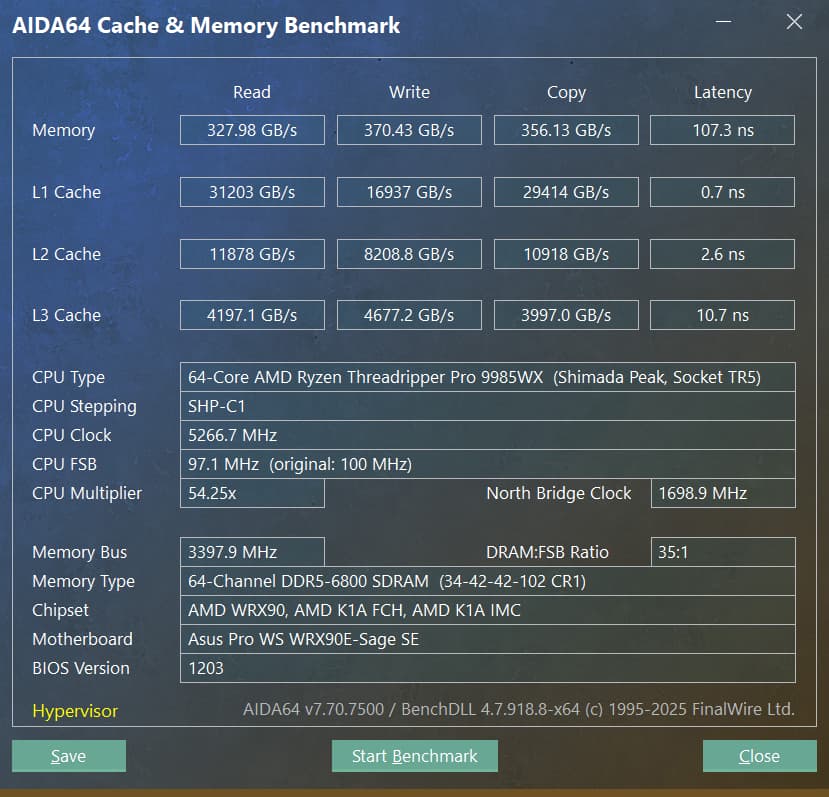
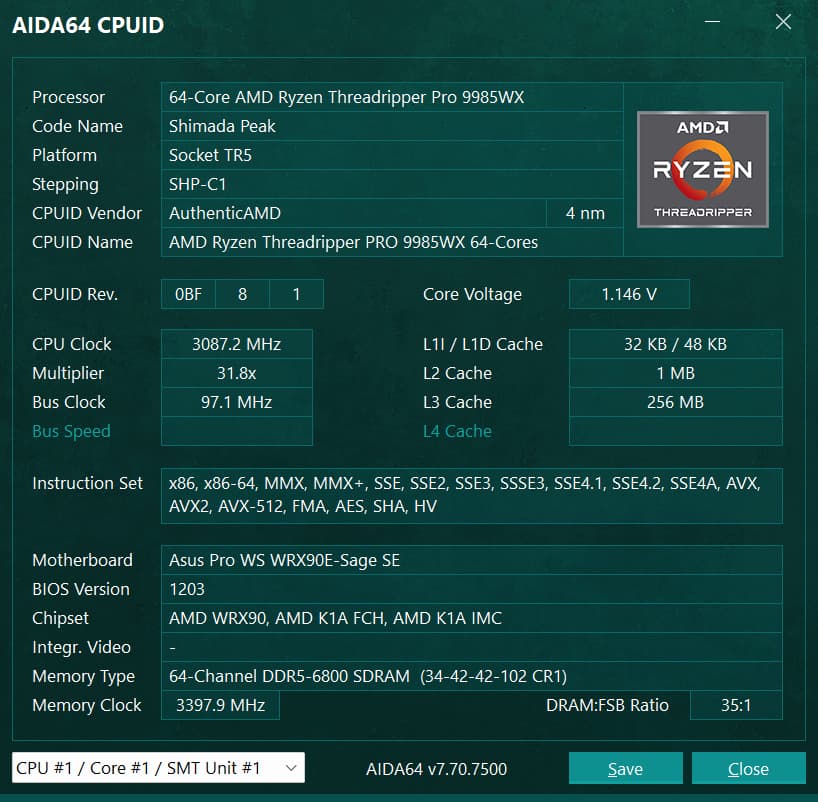
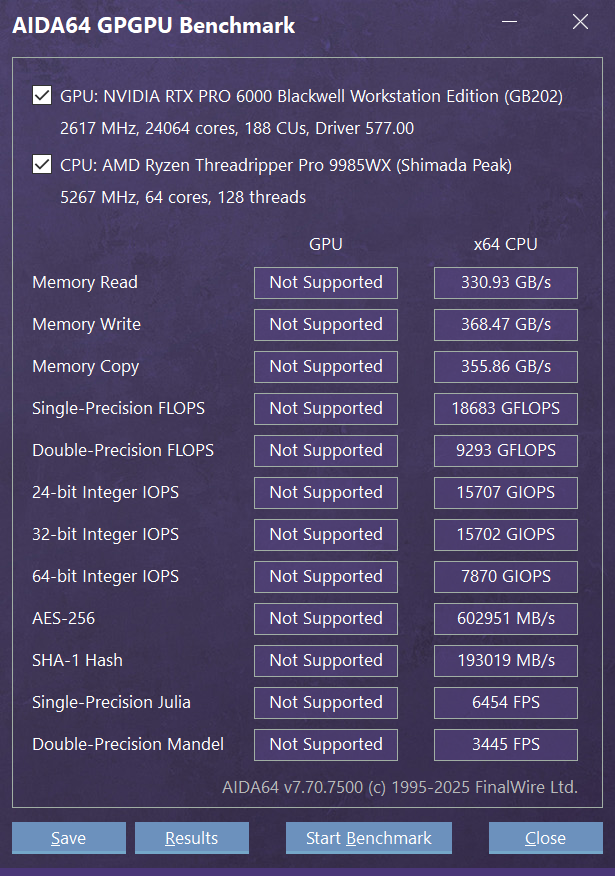
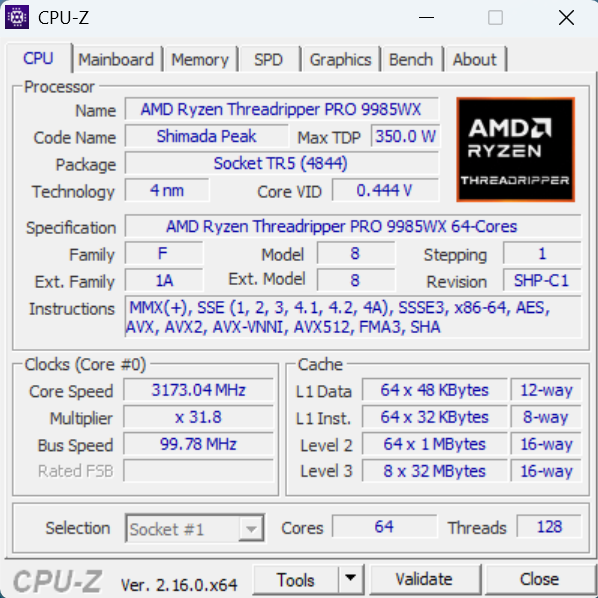
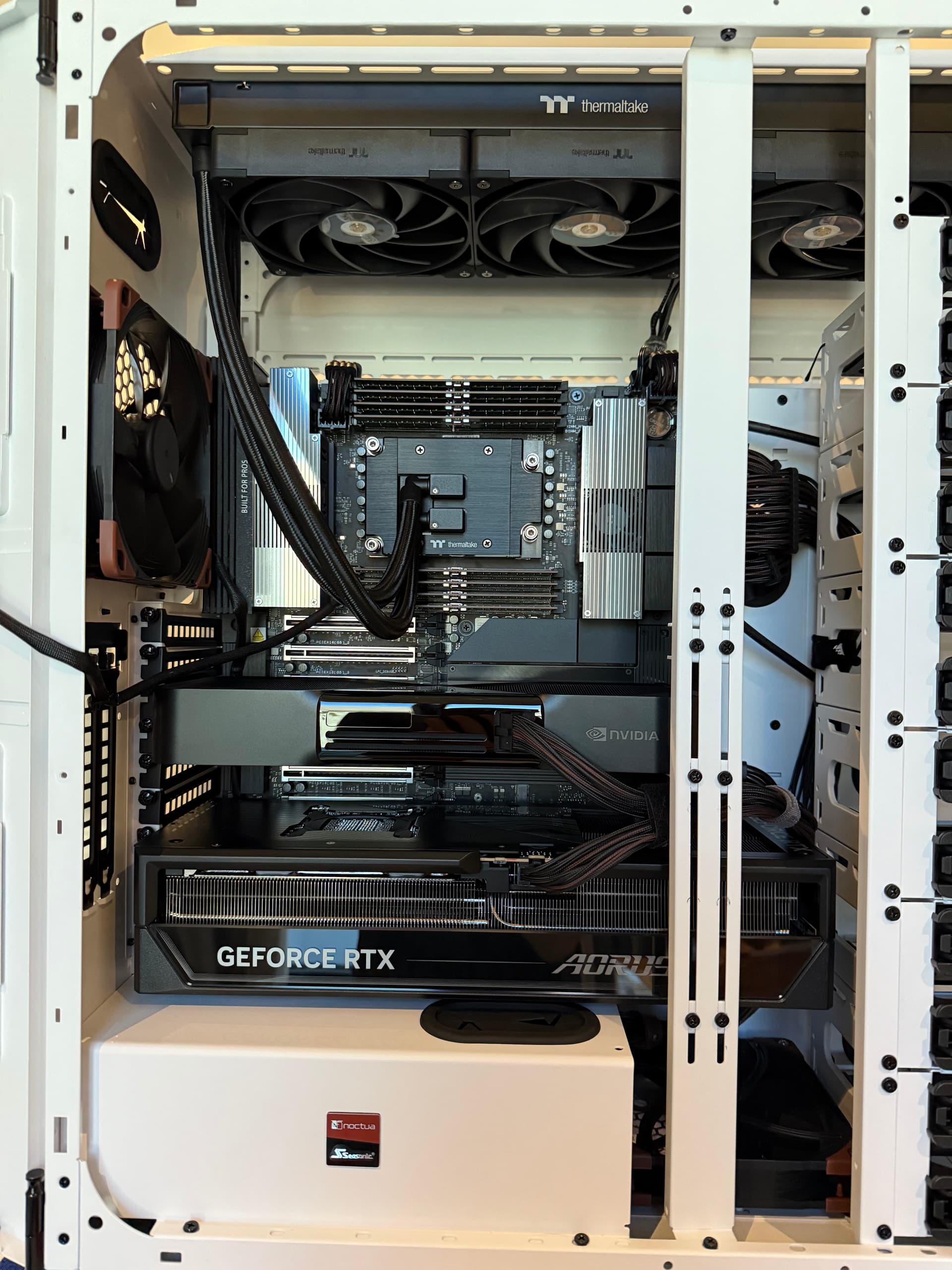
New AMD Shimada Peak 9985WX-based machine with 384GB Octal Channel DDR5-7000 for AI/ML development work and some content creation (double Blackwell GPUs). Just got it all together and organized/working well. Still tuning…
Device0 Run - nVidia RTX Pro 6000 96GB Workstation Edition
Topaz Video AI  v7.1.0
System Information
OS: Windows v11.24
CPU: AMD Ryzen Threadripper PRO 9985WX 64-Cores       383.36 GB
GPU: NVIDIA RTX PRO 6000 Blackwell Workstation Edition  94.007 GB
GPU: NVIDIA GeForce RTX 5090  31.349 GB
Processing Settings
device: 0 vram: 1 instances: 1
Input Resolution: 1920x1080
Benchmark Results
Artemis		1X: 	69.40 fps 	2X: 	24.54 fps 	4X: 	07.15 fps
Iris		1X: 	68.03 fps 	2X: 	25.17 fps 	4X: 	07.42 fps
Proteus		1X: 	66.70 fps 	2X: 	26.06 fps 	4X: 	07.38 fps
Gaia		1X: 	20.92 fps 	2X: 	15.27 fps 	4X: 	07.22 fps
Nyx		1X: 	21.18 fps 	2X: 	15.68 fps
Nyx Fast		1X: 	46.52 fps
Rhea		4X: 	07.05 fps
RXL		4X: 	07.06 fps
Hyperion HDR		1X: 	40.74 fps
4X Slowmo		Apollo: 	60.06 fps 	APFast: 	91.33 fps 	Chronos: 	51.03 fps 	CHFast: 	58.58 fps
16X Slowmo		Aion: 	38.38 fps
Asus Pro WRX90E-SAGE SE Mainboard (BIOS v1203, 07/18/2025, AMD CPU uCode 0xB008112, ShimadaPeakPI-SP6_1.0.0.1a_PatchA)
AMD Ryzen Threadripper Pro 9985WX
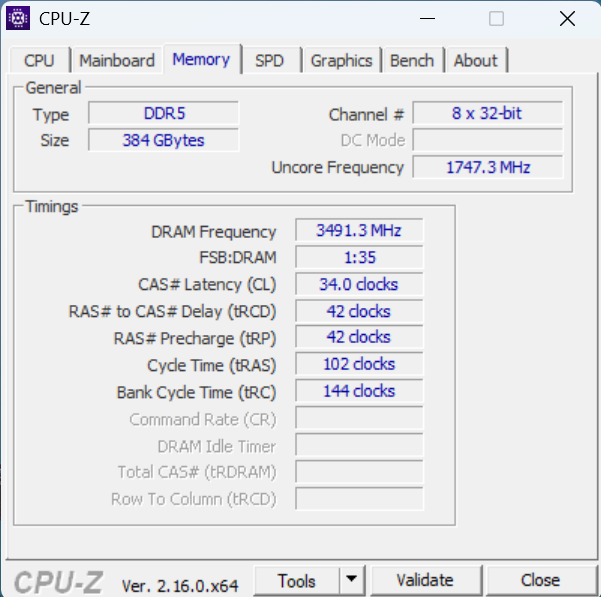
48GB x8 Octal Channel (384GB) DDR5-7000 34/42/42/102/144
nVidia RTX Pro 6000 96GB Blackwell Workstation Edition
nVidia RTX 5090 (Gigabyte AORUS Master OC)
nVidia Game Ready Driver v577.00 (07/22/2025)
Device1 Run - nVidia RTX5090 32GB Gigabyte AORUS Master
Topaz Video AI  v7.1.0
System Information
OS: Windows v11.24
CPU: AMD Ryzen Threadripper PRO 9985WX 64-Cores       383.36 GB
GPU: NVIDIA RTX PRO 6000 Blackwell Workstation Edition  94.007 GB
GPU: NVIDIA GeForce RTX 5090  31.349 GB
Processing Settings
device: 1 vram: 1 instances: 1
Input Resolution: 1920x1080
Benchmark Results
Artemis		1X: 	63.62 fps 	2X: 	24.85 fps 	4X: 	07.09 fps
Iris		1X: 	67.31 fps 	2X: 	24.69 fps 	4X: 	07.42 fps
Proteus		1X: 	66.86 fps 	2X: 	25.64 fps 	4X: 	07.37 fps
Gaia		1X: 	20.52 fps 	2X: 	15.31 fps 	4X: 	07.42 fps
Nyx		1X: 	19.48 fps 	2X: 	15.65 fps
Nyx Fast		1X: 	43.80 fps
Rhea		4X: 	07.09 fps
RXL		4X: 	07.10 fps
Hyperion HDR		1X: 	41.04 fps
4X Slowmo		Apollo: 	58.49 fps 	APFast: 	91.63 fps 	Chronos: 	48.43 fps 	CHFast: 	56.95 fps
16X Slowmo		Aion: 	36.37 fps
Asus Pro WRX90E-SAGE SE Mainboard (BIOS v1203, 07/18/2025, AMD CPU uCode 0xB008112, ShimadaPeakPI-SP6_1.0.0.1a_PatchA)
AMD Ryzen Threadripper Pro 9985WX
48GB x8 Octal Channel (384GB) DDR5-7000 34/42/42/102/144
nVidia RTX Pro 6000 96GB Blackwell Workstation Edition
nVidia RTX 5090 (Gigabyte AORUS Master OC)
nVidia Game Ready Driver v577.00 (07/22/2025)
5 Likes
Silent BIOS:
Topaz Video AI  v7.1.0
System Information
OS: Windows v11.24
CPU: Intel(R) Xeon(R) W-2150B CPU @ 3.00GHz  63.691 GB
GPU: NVIDIA GeForce RTX 3060  11.831 GB
Processing Settings
device: 0 vram: 1 instances: 1
Input Resolution: 1920x1080
Benchmark Results
Artemis		1X: 	09.44 fps 	2X: 	06.58 fps 	4X: 	02.26 fps
Iris		1X: 	09.91 fps 	2X: 	05.40 fps 	4X: 	01.73 fps
Proteus		1X: 	09.25 fps 	2X: 	06.44 fps 	4X: 	02.29 fps
Gaia		1X: 	03.36 fps 	2X: 	02.31 fps 	4X: 	01.65 fps
Nyx		1X: 	02.62 fps 	2X: 	02.17 fps
Nyx Fast		1X: 	07.49 fps
Rhea		4X: 	01.27 fps
RXL		4X: 	01.27 fps
Hyperion HDR		1X: 	12.27 fps
4X Slowmo		Apollo: 	13.60 fps 	APFast: 	30.27 fps 	Chronos: 	07.84 fps 	CHFast: 	11.66 fps
16X Slowmo		Aion: 	15.64 fps
1 Like
Great, i always wondered how octa channel RAM would perform.
4X results are expectedly very positively influenced (up to 20% faster than my 9950x3d 5090 system with tuned 6200 RAM)
2X results are very similar to mine. Not sure why they are not higher, especially since 1X are also about 10%-15% faster than mine.
Hyperion HDR might be impacted by high latency since i get 10% faster results with 60ns vs 100ns latency. Or maybe because of CPU.
1 Like
I would love to know how this does in real world examples. Device 1 and 2 like you did before. Thanks!
1 Like
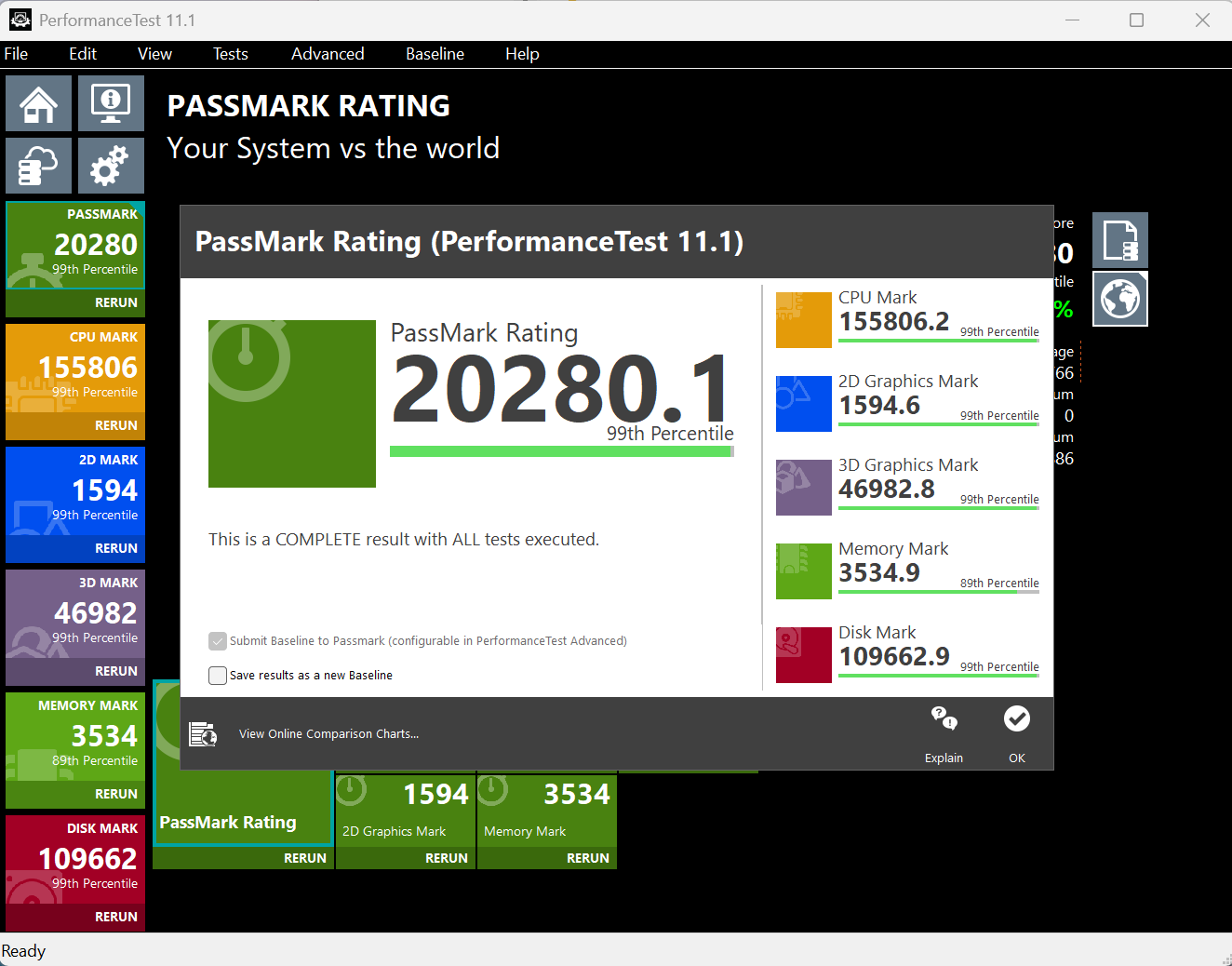
It’s weird, I get about 65ns latency with other utilities like PassMark, but I believe it is only looking at singular memory modules instead of the group set. I think there are some issues with AIDA and supporting this CPU still.

It is weird, maybe a software induced bottleneck they have yet to discover in that mode. I do wish they would auto-detect higher VRAM GPUs like the Pro 6000 and utilize all of the VRAM.
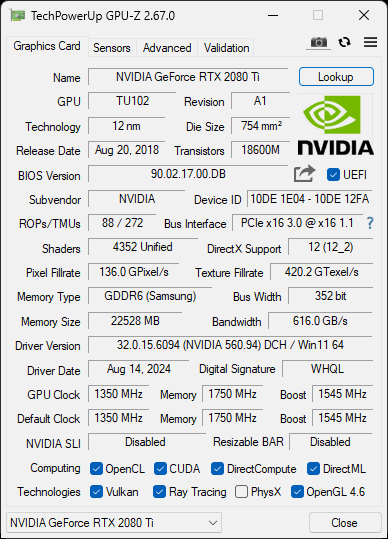
For fun and giggles: RTX 2080TI 22GB (Yes, 22GB ram, that’s not a typo: it’s a modded card with its 1GB memory chips swaped for 2GB ones)
Topaz Video AI  v7.1.0
System Information
OS: Windows v11.24
CPU: Intel(R) Core(TM) i7-6700K CPU @ 4.00GHz  31.938 GB
GPU: NVIDIA GeForce RTX 2080 Ti  21.709 GB
Processing Settings
device: 0 vram: 1 instances: 1
Input Resolution: 1920x1080
Benchmark Results
Artemis		1X: 	16.82 fps 	2X: 	08.27 fps 	4X: 	02.64 fps
Iris		1X: 	16.09 fps 	2X: 	08.94 fps 	4X: 	02.70 fps
Proteus		1X: 	16.30 fps 	2X: 	09.52 fps 	4X: 	02.83 fps
Gaia		1X: 	05.37 fps 	2X: 	03.67 fps 	4X: 	02.56 fps
Nyx		1X: 	03.85 fps 	2X: 	03.06 fps
Nyx Fast		1X: 	06.48 fps
Rhea		4X: 	02.04 fps
RXL		4X: 	01.89 fps
Hyperion HDR		1X: 	16.57 fps
4X Slowmo		Apollo: 	21.29 fps 	APFast: 	37.26 fps 	Chronos: 	12.32 fps 	CHFast: 	18.52 fps
16X Slowmo		Aion: 	18.26 fps
2 Likes
Can anyone be kind enough to run a topaz ai video benchmark
on a
Laptop with a 5070TI and 5080 mobile gpu.. any other specs i dont care about…
I got one for a 5070 mobile, and a 5090 mobile, but those are the two sweet spots and PRICE spots i think for most serious users.
Desktop on the fence, i like portability. i dont mind waiting for the trade off.
The Octachannel seems not to be worth it.
By they way, Nvidia has updated the Whitepaper for RTX Blackwell and does mention that Blackwell has a Processor for Scheduling.
So, from my expierience Blackwell should be able to better handle parallel exports compared to Lovelance, especialy the 5090, because its more of a Compute Card instead of a Gaming Card.
Does anyone know how the new Ryzen AI Max 300 Series does with TVAI?
I see the framework desktop and just curious. Probably going to just build my own and get dedicated graphics.
Also curious about the fw13 and 16 performance w tvai
1 Like
Topaz Video AI  v7.1.0
System Information
OS: Windows v10.22
CPU: AMD Ryzen 9 5950X 16-Core Processor              63.908 GB
GPU: NVIDIA GeForce RTX 5070 Ti  15.534 GB
Processing Settings
device: -2 vram: 1 instances: 1
Input Resolution: 1920x1080
Benchmark Results
Artemis		1X: 	27.52 fps 	2X: 	11.86 fps 	4X: 	03.04 fps
Iris		1X: 	27.60 fps 	2X: 	12.97 fps 	4X: 	03.50 fps
Proteus		1X: 	28.13 fps 	2X: 	13.73 fps 	4X: 	03.60 fps
Gaia		1X: 	08.76 fps 	2X: 	06.43 fps 	4X: 	03.28 fps
Nyx		1X: 	08.05 fps 	2X: 	06.60 fps
Nyx Fast		1X: 	19.89 fps
Rhea		4X: 	03.09 fps
RXL		4X: 	03.11 fps
Hyperion HDR		1X: 	25.33 fps
4X Slowmo		Apollo: 	32.11 fps 	APFast: 	57.00 fps 	Chronos: 	22.85 fps 	CHFast: 	30.22 fps
16X Slowmo		Aion: 	33.70 fps
1 Like
Great system.
But are the costs really proportional to the benefits of Topaz Video-Ai?
No, but I didn’t build this machine for Topaz. I built it for AI/ML development and inferencing/training. It is critical for speed and power in those use-cases. I am a Topaz user so I dumped those on there as well to give it a quick shot. Also, there is a lot of performance tuning to be done (so Topaz will also get faster) as that was just a small amount of setup before running. I am away from it right now but will get back to it soon after travels.
