Topaz Video AI  v7.1.1
System Information
OS: Windows v11.24
CPU: AMD Ryzen 7 7800X3D 8-Core Processor             31.604 GB
GPU: AMD Radeon RX 9070 XT  15.922 GB
Processing Settings
device: 0 vram: 1 instances: 1
Input Resolution: 1920x1080
Benchmark Results
Artemis		1X: 	27.56 fps 	2X: 	13.49 fps 	4X: 	03.53 fps
Iris		1X: 	31.58 fps 	2X: 	16.13 fps 	4X: 	04.41 fps
Proteus		1X: 	30.26 fps 	2X: 	15.79 fps 	4X: 	04.61 fps
Gaia		1X: 	16.54 fps 	2X: 	10.49 fps 	4X: 	04.34 fps
Nyx		1X: 	14.27 fps 	2X: 	11.13 fps
Nyx Fast		1X: 	27.68 fps
Rhea		4X: 	03.90 fps
RXL		4X: 	03.59 fps
Hyperion HDR		1X: 	26.86 fps
4X Slowmo		Apollo: 	33.54 fps 	APFast: 	72.61 fps 	Chronos: 	20.40 fps 	CHFast: 	29.89 fps
16X Slowmo		Aion: 	51.46 fps
Topaz Video AI  v7.1.0
System Information
OS: Mac v15
CPU: Apple M3 Pro  18 GB
GPU: Apple M3 Pro  12 GB
Processing Settings
device: 0 vram: 1 instances: 1
Input Resolution: 1920x1080
Benchmark Results
Artemis		1X: 	07.59 fps 	2X: 	04.84 fps 	4X: 	00.95 fps
Iris		1X: 	06.59 fps 	2X: 	03.36 fps 	4X: 	00.80 fps
Proteus		1X: 	08.17 fps 	2X: 	05.67 fps 	4X: 	01.47 fps
Gaia		1X: 	02.67 fps 	2X: 	01.93 fps 	4X: 	01.36 fps
Nyx		1X: 	02.36 fps 	2X: 	02.44 fps
Nyx Fast		1X: 	05.35 fps
Rhea		4X: 	00.40 fps
RXL		4X: 	00.43 fps
Hyperion HDR		1X: 	29.50 fps
4X Slowmo		Apollo: 	09.20 fps 	APFast: 	34.99 fps 	Chronos: 	02.65 fps 	CHFast: 	04.32 fps
16X Slowmo		Aion: 	  ...    fps
Compared to the Threadripper system above, the performance is almost halved. Is it because it is PCIe 4.0?
It’s mostly dual channel DDR4 bandwidth vs octa channel DDR5. (5950X has less raw grunt per core too)
1 Like
Thank you. It cleared up my doubts.
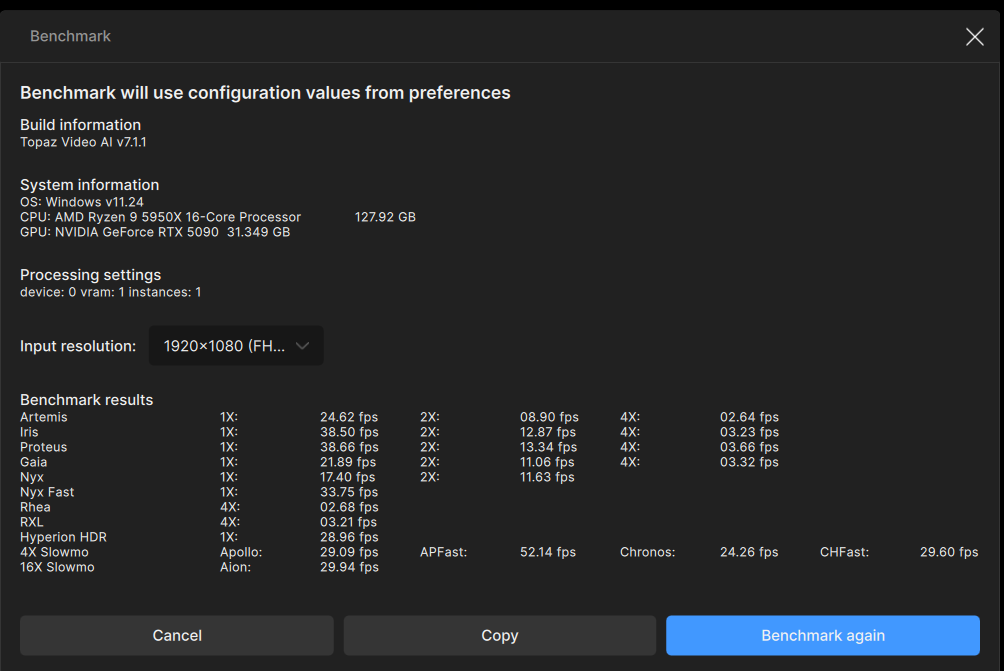
Topaz Video AI  v7.1.1
System Information
OS: Windows v11.24
CPU: AMD Ryzen 9 5950X 16-Core Processor              127.92 GB
GPU: NVIDIA GeForce RTX 5090  31.349 GB
Processing Settings
device: 0 vram: 1 instances: 1
Input Resolution: 1920x1080
Benchmark Results
Artemis		1X: 	29.15 fps 	2X: 	09.38 fps 	4X: 	02.63 fps
Iris		1X: 	37.23 fps 	2X: 	12.54 fps 	4X: 	03.50 fps
Proteus		1X: 	41.98 fps 	2X: 	13.06 fps 	4X: 	03.67 fps
Gaia		1X: 	22.84 fps 	2X: 	10.66 fps 	4X: 	03.19 fps
Nyx		1X: 	17.95 fps 	2X: 	11.95 fps
Nyx Fast		1X: 	33.54 fps
Rhea		4X: 	03.07 fps
RXL		4X: 	03.09 fps
Hyperion HDR		1X: 	31.21 fps
4X Slowmo		Apollo: 	27.19 fps 	APFast: 	50.91 fps 	Chronos: 	23.69 fps 	CHFast: 	29.12 fps
16X Slowmo		Aion: 	29.57 fps
The Threadripper system I saw above had different GPUs. I was mistaken.
However, looking at the performance results of others above, comparing it to a system with the same 5950X and RTX 5070Ti, there doesn’t seem to be much of a difference. Is the RTX 5090 not worth the money for Topaz Video AI? Maybe I should reinstall Windows…
Your 5090 can’t “stretch its legs” with other hardware holding it back. Your 5090 is most getting bored waiting on the rest of your system.
THE 5090 capable of better performance with other supporting hardware. (Although that doesn’t necessarily maje it worth the high cost)
Decided to benchmark my system…about what you’d expect but cool:
Topaz Video AI  v7.1.1
System Information
OS: Windows v11.24
CPU: AMD Ryzen 9 5900X 12-Core Processor              31.927 GB
GPU: NVIDIA GeForce RTX 4070 Ti SUPER  15.687 GB
Processing Settings
device: 0 vram: 1 instances: 1
Input Resolution: 1920x1080
Benchmark Results
Artemis		1X: 	19.46 fps 	2X: 	08.58 fps 	4X: 	02.19 fps
Iris		1X: 	20.27 fps 	2X: 	10.76 fps 	4X: 	02.73 fps
Proteus		1X: 	19.89 fps 	2X: 	10.77 fps 	4X: 	03.14 fps
Gaia		1X: 	09.16 fps 	2X: 	06.67 fps 	4X: 	02.90 fps
Nyx		1X: 	07.90 fps 	2X: 	06.17 fps
Nyx Fast		1X: 	14.97 fps
Rhea		4X: 	02.38 fps
RXL		4X: 	  ...    fps
Hyperion HDR		1X: 	   -     fps
4X Slowmo		Apollo: 	   -     fps 	APFast: 	   -     fps 	Chronos: 	   -     fps 	CHFast: 	   -     fps
16X Slowmo		Aion: 	   -     fps
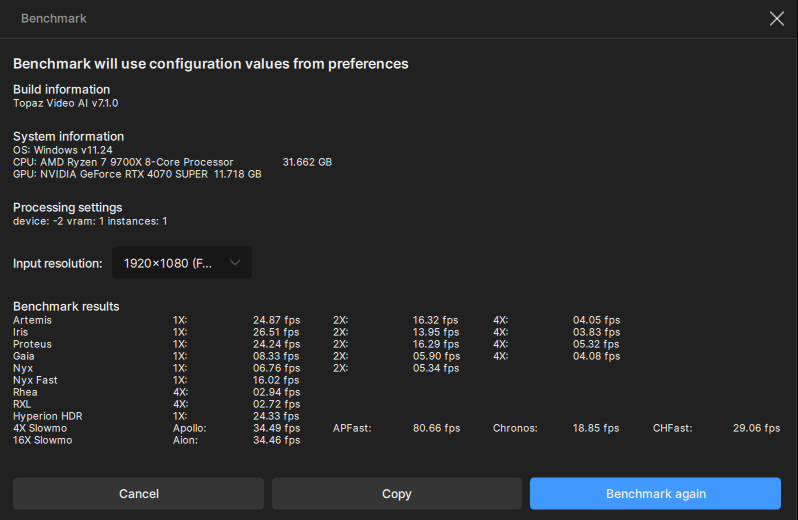
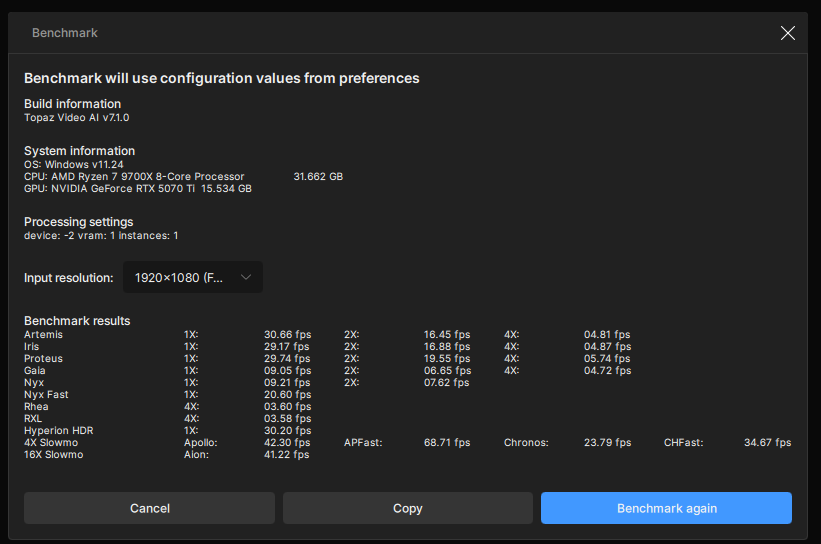
Oh… I was wondering how much the upgrade would increase, and you gave me a perfect example. Thank you!
1 Like
In a real-world task, I haven’t noticed a difference with models running on the processor (Proteus, Artemis, Iris). However, Rhea and Starlight-Mini seemed slightly faster to me – they fully load the graphics card.
Topaz Video AI  v7.1.0
System Information
OS: Windows v11.24
CPU: Intel(R) Core(TM) i7-14700K  63.781 GB
GPU: NVIDIA GeForce RTX 5090  31.349 GB
GPU: Intel(R) UHD Graphics 770  0.125 GB
Processing Settings
device: 0 vram: 1 instances: 1
Input Resolution: 1920x1080
Benchmark Results
Artemis		1X: 	51.05 fps 	2X: 	18.20 fps 	4X: 	05.04 fps
Iris		1X: 	45.05 fps 	2X: 	22.56 fps 	4X: 	06.25 fps
Proteus		1X: 	51.39 fps 	2X: 	22.79 fps 	4X: 	06.20 fps
Gaia		1X: 	17.85 fps 	2X: 	13.07 fps 	4X: 	05.74 fps
Nyx		1X: 	17.23 fps 	2X: 	12.95 fps
Nyx Fast		1X: 	39.89 fps
Rhea		4X: 	05.56 fps
RXL		4X: 	05.69 fps
Hyperion HDR		1X: 	33.46 fps
4X Slowmo		Apollo: 	50.07 fps 	APFast: 	71.33 fps 	Chronos: 	44.37 fps 	CHFast: 	53.27 fps
16X Slowmo		Aion: 	40.86 fps
Topaz Video AI  v7.1.0
System Information
OS: Windows v11.24
CPU: Intel(R) Core(TM) i7-9700K CPU @ 3.60GHz  31.843 GB
GPU: NVIDIA GeForce RTX 4090  23.576 GB
GPU: Intel(R) UHD Graphics 630  0.125 GB
Processing Settings
device: 0 vram: 1 instances: 1
Input Resolution: 1920x1080
Benchmark Results
Artemis		1X: 	27.92 fps 	2X: 	11.43 fps 	4X: 	03.03 fps
Iris		1X: 	34.54 fps 	2X: 	11.68 fps 	4X: 	03.27 fps
Proteus		1X: 	31.49 fps 	2X: 	12.16 fps 	4X: 	03.38 fps
Gaia		1X: 	13.44 fps 	2X: 	09.59 fps 	4X: 	03.05 fps
Nyx		1X: 	09.86 fps 	2X: 	08.77 fps
Nyx Fast		1X: 	25.64 fps
Rhea		4X: 	03.04 fps
RXL		4X: 	02.98 fps
Hyperion HDR		1X: 	01.35 fps
4X Slowmo		Apollo: 	30.07 fps 	APFast: 	51.04 fps 	Chronos: 	25.96 fps 	CHFast: 	31.16 fps
16X Slowmo		Aion: 	ERR fps
Topaz Video AI  v7.1.3
System Information
OS: Windows v10.22
CPU: AMD Ryzen Threadripper 3970X 32-Core Processor   127.87 GB
GPU: NVIDIA GeForce RTX 3090  23.756 GB
Processing Settings
device: 0 vram: 0.9 instances: 1
Input Resolution: 1920x1080
Benchmark Results
Artemis		1X: 	24.21 fps 	2X: 	11.56 fps 	4X: 	03.54 fps
Iris		1X: 	22.74 fps 	2X: 	13.16 fps 	4X: 	03.88 fps
Proteus		1X: 	23.06 fps 	2X: 	14.37 fps 	4X: 	03.81 fps
Gaia		1X: 	08.82 fps 	2X: 	06.14 fps 	4X: 	03.30 fps
Nyx		1X: 	07.94 fps 	2X: 	06.08 fps
Nyx Fast		1X: 	20.33 fps
Rhea		4X: 	03.08 fps
RXL		4X: 	02.94 fps
Hyperion HDR		1X: 	22.63 fps
4X Slowmo		Apollo: 	33.33 fps 	APFast: 	61.48 fps 	Chronos: 	19.64 fps 	CHFast: 	29.54 fps
16X Slowmo		Aion: 	27.06 fps
Topaz Video AI  v7.1.3
System Information
OS: Windows v11.24
CPU: AMD Ryzen 9 9900X 12-Core Processor              31.602 GB
GPU: NVIDIA GeForce RTX 5080  15.517 GB
Processing Settings
device: 0 vram: 1 instances: 1
Input Resolution: 1920x1080
Benchmark Results
Artemis		1X: 	38.36 fps 	2X: 	17.31 fps 	4X: 	04.68 fps
Iris		1X: 	33.09 fps 	2X: 	18.54 fps 	4X: 	05.43 fps
Proteus		1X: 	34.17 fps 	2X: 	19.42 fps 	4X: 	05.26 fps
Gaia		1X: 	10.58 fps 	2X: 	07.75 fps 	4X: 	04.97 fps
Nyx		1X: 	11.01 fps 	2X: 	08.77 fps
Nyx Fast		1X: 	22.90 fps
Rhea		4X: 	04.18 fps
RXL		4X: 	04.03 fps
Hyperion HDR		1X: 	32.11 fps
4X Slowmo		Apollo: 	44.03 fps
 	APFast: 	69.97 fps
 	Chronos: 	26.85 fps
	CHFast: 	38.13 fps
16X Slowmo		Aion: 	ERR fps
I tried three more times to get Aion to pass, but it never happened. I don’t use it so I’m not worried.
Also of note, doing a real FHD movie on NYX auto gave a consistent 13fps. Significantly higher than the 11fps reported here.
1 Like
Looks like I am going back to 7.0.2. 7.1.3 is 10% - 15% slower in most models vs 7.0.2 on the 9070 XT. Any ideas why?
Topaz Video AI  v7.1.3
System Information
OS: Windows v11.24
CPU: AMD Ryzen 9 9950X3D 16-Core Processor            47.084 GB
GPU: AMD Radeon RX 9070 XT  15.922 GB
Processing Settings
device: 0 vram: 0.98 instances: 1
Input Resolution: 1920x1080
Benchmark Results
Artemis		1X: 	29.16 fps 	2X: 	17.38 fps 	4X: 	03.74 fps
Iris		1X: 	30.53 fps 	2X: 	19.80 fps 	4X: 	05.52 fps
Proteus		1X: 	30.16 fps 	2X: 	21.18 fps 	4X: 	05.41 fps
Gaia		1X: 	17.62 fps 	2X: 	10.72 fps 	4X: 	05.62 fps
Nyx		1X: 	12.99 fps 	2X: 	10.60 fps
Nyx Fast		1X: 	26.25 fps
Rhea		4X: 	03.78 fps
RXL		4X: 	03.66 fps
Hyperion HDR		1X: 	28.00 fps
4X Slowmo		Apollo: 	29.96 fps 	APFast: 	79.24 fps 	Chronos: 	20.28 fps 	CHFast: 	31.12 fps
16X Slowmo		Aion: 	56.69 fps
1 Like
Topaz Video AI  v7.1.3
System Information
OS: Windows v11.23
CPU: AMD Ryzen 9 5900X 12-Core Processor              31.922 GB
GPU: NVIDIA GeForce RTX 3080 Ti  11.816 GB
Processing Settings
device: 0 vram: 1 instances: 1
Input Resolution: 1920x1080
Benchmark Results
Artemis		1X: 	23.40 fps 	2X: 	10.50 fps 	4X: 	02.96 fps
Iris		1X: 	22.52 fps 	2X: 	11.96 fps 	4X: 	03.86 fps
Proteus		1X: 	22.75 fps 	2X: 	14.04 fps 	4X: 	03.83 fps
Gaia		1X: 	08.69 fps 	2X: 	05.99 fps 	4X: 	03.56 fps
Nyx		    1X: 	06.46 fps 	2X: 	04.95 fps
Nyx Fast	1X: 	18.99 fps
Rhea		4X: 	03.18 fps
RXL	    	4X: 	03.01 fps
Hyperion HDR		1X: 	25.76 fps
4X Slowmo		Apollo: 	31.67 fps 	APFast: 	47.33 fps 	Chronos: 	19.39 fps 	CHFast: 	28.63 fps
16X Slowmo		Aion: 	40.06 fps
since april 2025 ive been asking for a benchmark for a 5070 ti MOBILE laptop, and or 5080 MOBILE laptop.. ANY make any model.
I have a 5070Mobile and a 5090M benchmark.. but these two are lacking
Most of the world uses laptops. We dont do this professionally. And there is a HUGE lack of these benchmarks here.
I currently use a 3050TI i9 lenovo Z13 laptop with average speeds. Its good for me.
But if i cant see these benchmarks i would potentially spend 600 more on a 5080M vs a 5070M ti
for a MARGINAL performance gain, which i cant tell if it is or not.
Thank you
From whom? Staff or members?
Since they stopped putting Blu-ray drives in laptops, I haven’t been tempted to buy another one. My 2011 laptop still runs, so I keep using it.
The real issue is that TVAI is just not a good thing to run on most laptops, even if they have a high numbered GPU. I think most long-time users have come to that conclusion.
I am building a workstation specifically for use with Starlight Mini, based on the NVIDIA RTX Pro 6000 Blackwell. Could you tell me how fast it can render with 1× Pro 6000 on Mini?
The source videos will be very low resolution, upscaled to 4K.
Probably will use mini to restore details in medium res and then upscale with faster model if it takes too long straight to 4K in mini.
I’ve already tested it on my RTX 3070 laptop (8 GB VRAM). The results were what I was looking for, but it took 43 minutes to render a 1-second video. (straight to 4K)
I’m hoping to reduce that time so I can finish my project within a few months of 24/7 rendering.
1 Like
